

NewEdge Express Connect (NEEC) enables the extension of private network infrastructure to the SASE boundary via direct ethernet connectivity. By establishing direct transport from on-premises networks to NewEdge Data Centers (DCs), your organizations can support high-throughput requirements while maintaining a dedicated path to NewEdge DCs. This connectivity model bypasses traditional transit providers and the public Internet, reducing latency and ensuring predictable networking.
NEEC offers efficient network architecture through a high-throughput steering mechanism without the need for GRE or IPsec tunnels, simplifying the handoff between the customer edge and NewEdge DCs.
Use Cases
-
High-Throughput Requirements: Ideal for environments where traffic volume exceeds the processing capabilities of traditional tunnel-based steering methods (such as GRE or IPsec).
-
Centralized Traffic Egress: Supports organizations with centralized egress points where large volumes of user traffic are concentrated at data center or MAN/WAN break-out.
-
Machine and Unauthenticated Traffic: Offers a seamless method for steering server, IoT, or unauthenticated traffic via a default route, eliminating the need for complex tunnel configurations.
Benefits
-
High-Performance Connectivity: Delivers dedicated Layer 1/2 connectivity directly to NewEdge. By bypassing the public Internet, NEEC eliminates the unpredictable latency and congestion typically associated with traditional transit providers and ISPs.
-
Highly Resilient Architecture: NEEC supports high availability through connections to multiple NewEdge DCs. By utilizing dual networking devices within each NewEdge DC, customers can establish multiple layers of redundancy to ensure continuous uptime.
-
Dynamic Routing with BGP: Netskope implements Border Gateway Protocol (BGP) to manage routing between customer data centers and NewEdge. This includes support for Bidirectional Forwarding Detection (BFD) for rapid reachability and fault detection, ensuring quick failover.
-
Centralized Visibility: The Netskope Admin UI and APIs provide real-time monitoring of circuit health and BGP peering status, giving network teams visibility into the connection.
-
Granular Policy Control: Netskope’s Real-Time Protection and SSL policies include NewEdge Express Connect as a Source Criteria Access Method filter. This allows administrators to apply specific security profiles based on traffic originating from a NEEC link.
-
Efficient Multi-Tenancy: A single NEEC physical deployment can support multiple tenants. Individual tenants are logically isolated and identified by their unique 802.1Q VLAN tags, simplifying management for complex or distributed organizations.
-
Enhanced Security: Le chiffrement MACsec, défini par IEEE 802.1AE, définit la confidentialité et l’intégrité des données sans connexion via le chiffrement. Il assure une sécurité point à point sur les liaisons ethernet et est capable d’identifier et de prévenir un certain nombre de menaces de sécurité, telles que MiTM, l’écoute passive et la lecture. Netskope prend en charge MACsec sur certains DC NewEdge.
Prerequisites & Planning
Successful deployment of NEEC requires coordination between your organization’s network team and Netskope. The following requirements must be met:
-
Connectivity and Cross-Connects: Customers are responsible for the procurement and establishment of physical cross-connects to the designated NewEdge DCs.
-
Routing Protocol Support: Customer-managed networking devices must support BGP to facilitate dynamic routing, BFD-based fault detection, and automated failover.
-
Technical Configuration Information: Provisioning is dependent on the exchange of specific network parameters, including Point-to-Point IP addresses, BGP ASNs, and 802.1Q VLAN IDs.
-
Design Consultation: To initiate the feasibility and design phase, you should contact a Netskope Sales Representative. The representative will engage the Netskope Platform Engineering team to validate the proposed architecture and ensure it aligns with technical standards.
-
Traffic Activation Timeline: Generally customers complete traffic activation on NEEC within 8 weeks (or less) once an order is received. Actual timelines will be contingent upon the completion of customer-side requirements.
Architecture du réseau NewEdge Express Connect
The following section outlines common network topologies utilized by organizations deploying NewEdge Express Connect (NEEC). Because every network environment has unique requirements, each design is evaluated individually by the Netskope Platform Engineering team to ensure optimal resiliency and performance.
Example 1: Redundant Data Center Connectivity
In this scenario, an organization connects multiple geographically dispersed customer data centers to multiple NewEdge DCs. Organizations typically utilize a Data Center Interconnect (DCI) to link their internal sites and establish a dedicated NEEC connection from each site to a corresponding NewEdge DC.
This topology provides multiple layers of redundancy across disparate networking hardware and physical facilities. By leveraging BGP for path selection, the architecture ensures that traffic can failover seamlessly between sites.

Example 2: Single Data Center to Dual NewEdge DCs
In this configuration, an organization connects a single primary data center to multiple geographically distinct NewEdge DCs. This design is optimized for organizations with consolidated infrastructure that require high-availability access to the Netskope security cloud.
This topology ensures path diversity and hardware-level redundancy. By establishing independent connections to separate NewEdge DCs, the organization maintains continuous service availability across disparate networking hardware and physical locations. BGP is utilized to manage primary and secondary path preferences, ensuring a consistent and resilient connection to NewEdge DCs.

Network Configurations
Layer 1
For each NewEdge DC, Netskope provides a dedicated pair of Ethernet ports across separate networking devices to ensure hardware-level redundancy. This dual-port architecture allows your organizations to establish a resilient connectivity to NewEdge DCs.
Physical Handoff & Transport
-
Standard Interface: Connectivity typically consists of direct fiber handoffs utilizing standard wavelengths and optical specifications.
-
Local Connectivity: For organizations co-located within the same facility as a NewEdge DC, connectivity is established via physical cross-connects.
-
Remote Connectivity: When an organization’s infrastructure is located outside of the NewEdge facility, a third-party carrier or network service provider is utilized to provide the necessary transport to NewEdge DCs.
Layer 2 & Layer 3
Media Access Control Security (MACsec)
MACsec provides hardware-based encryption for traffic at Layer 2, ensuring point-to-point data confidentiality and integrity between your organization’s edge and the NewEdge DC.
Support for MACsec varies across NewEdge DCs. If your organizations requires MACsec, consult with a Netskope Sales Representative during the design phase to verify regional compatibility and technical requirements.
VLAN Configuration & Assignment
Each Netskope tenant is logically identified on the circuit via an 802.1Q (dot1q) VLAN. This tagging mechanism enables native, high-throughput traffic steering without the need for additional encapsulation.
The specific VLAN ID is determined through a collaborative agreement between your organization and the Netskope Platform Engineering team. You can request a preferred VLAN from the following reserved ranges, subject to availability within the local NewEdge DC:
-
200 à 249
-
1500 à 1549
-
2500 à 2549
IP Addressing
For each NewEdge Express Connect (NEEC) circuit, the assigned VLAN is bound to a dedicated Per-Tenant VRF (Virtual Routing and Forwarding) on the Netskope DC.
Point-to-Point (P2P) Addressing
L’adressage IP pour l’interface de peering est localement significatif, utilisé exclusivement pour la connexion directe entre la périphérie client et le DCer NewEdge. Pour éviter tout chevauchement avec vos réseaux internes ou l’infrastructure Netskope, les adresses sont sélectionnées dans la plage 169.254.0.0/16. Les adresses IP spécifiques utilisées pour la liaison P2P sont convenues mutuellement avec vous et Netskope Platform Engineering lors de la phase de conception.
Border Gateway Protocol Configuration & Routing
For each tenant-assigned VLAN, external Border Gateway Protocol (eBGP) sessions are established between the NewEdge DC devices and the customer-managed networking hardware. These sessions facilitate dynamic routing and ensure high availability across the connection.
Netskope Advertised Routes
Netskope announces the following routes to your organization over each VLAN subnet:
-
Default Route: 0.0.0.0/0.
-
Reserved Health Check IP: A specific ICMP-reachable IP per NewEdge DC is provided during the onboarding process.
-
Explicit Proxy IP Addresses: The following IP addresses are announced over NEEC for use over ports 80, 8080, and 8081:
-
163.116.204.253/32
-
163.116.204.254/32
-
-
Specific IPv4 Routes: Any specific Netskope-owned IP ranges or prefixes required for your organization’s unique service profile.
Your Configuration Requirements
The following diagram provides a conceptual view of the NEEC architecture, illustrating the integration of physical transport, logical steering, and BGP routing layers.

Operational Considerations
Traffic Distribution & Capacity
All NewEdge Express Connect circuits are provisioned as active/active. To ensure architectural resiliency, the maximum supported bandwidth for a pair of circuits is equal to the capacity of a single circuit. For example, a configuration consisting of two 10 Gbps ports supports a total aggregate throughput of 10 Gbps upstream and 10 Gbps downstream to maintain full capacity during maintenance or path redirection.
Inbound Traffic (Organization to NewEdge)
You might direct traffic to any designated NewEdge DC, provided the endpoint IP remains associated with that specific DC. Netskope doesn’t dictate inbound traffic distribution; your organization determines how to balance or steer traffic based on your internal infrastructure and steering requirements. Any custom routing behaviors must be reviewed and agreed upon by Netskope Platform Engineering.
Outbound Traffic (NewEdge to Organization)
The NewEdge DC is configured for symmetric return, ensuring that traffic is returned to your originating IP on the same physical and logical link upon which it was received (unless overridden by a specific configuration such as BGP AS-Path prepending or MED).
Failover & Health Monitoring
Netskope monitors each DC for service availability and utilizes healthcheck-based failover mechanisms. To facilitate local failover decisions, Netskope provides ICMP-reachable healthcheck VIPs.
Your managed networking devices can utilize these VIPs for IPSLA probes. Based on the results of these probes, your equipment can dynamically make appropriate routing and failover decisions to ensure continuous connectivity.
Interaction with Other Access Methods
-
Netskope Client: When the Netskope Client detects a NEEC path, it automatically disables its data tunnel (TLS/DTLS). However, the Client remains active to transmit user identity to the Netskope Cloud and to facilitate end-user notifications on the endpoint. This behavior aligns with the Netskope Client’s operation over IPsec or GRE tunnels.
-
IPsec and GRE Tunnels: Netskope does not support the establishment of IPsec or GRE tunnels over an Express Connect circuit, as NEEC is designed to provide direct, unencapsulated connectivity.
-
Cloud Explicit Proxy: Cloud Explicit Proxy over Express Connect operates identically to Explicit Proxy over traditional tunnels, utilizing the private interconnect for traffic transport to Netskope DCs.
Limitations & Considerations
Following are the technical limitations and caveats for NewEdge Express Connect:
-
Restricted Environments: NEEC is currently unavailable in FedRAMP, PBMM, and China DCs.
-
Throughput and Resiliency: To maintain architectural resiliency, the maximum supported bandwidth for a pair of circuits is equal to the capacity of a single circuit (e.g., a dual 10 Gbps port configuration supports a total aggregate throughput of 10 Gbps).
-
Route Limits: Netskope limits the number of BGP routes received per tenant/VLAN to 5.
-
Endpoint-to-DC Persistence: Required for accurate user attribution and context-based security, aligning with other Netskope steering methods.
-
NAT Restrictions: Netskope does not support Network Address Translation (NAT) performed on traffic prior to its transmission over the NEEC circuits.
-
Egress and Localization: NewEdge Localization Zones are not supported. Only Shared and Dedicated Egress IPs (DEIPs) are available for traffic egress.
-
Unsupported Features: The following features aren’t compatible with the NEEC access method:
-
Cloud Tap
-
Application-level Bandwidth Control/QoS. This refers to application-specific shaping and is distinct from physical port-level policing or shaping. To learn more, see Bandwidth Control.
-
Configuring NewEdge Express Connect
After completing the provisioning process, the Netskope Admin UI provides a centralized interface for the configuration and monitoring of NEEC. You can manage the components below within the console.
Site & Circuit Status
The Admin UI maintains the operational inventory of the NEEC infrastructure:
-
Site List: Provides a summary of all defined Sites, which represent the organization’s egress points where a NEEC instance originates (the “A” side).
-
Circuit Assignment: Displays the specific circuits associated with each designated Site.
Traffic Configuration
You can manage technical parameters for traffic arriving via the interconnect:
-
X-Forwarded-For (XFF) Headers: In conjunction with general authentication configurations, enables user identification via the XFF header. When enabled, XFF header values can be used for Source IP policies and attribution.
-
Trusted XFF Source IPs: Defines the specific source IP addresses or subnets from which XFF headers are accepted.
Policy Configurations
NEEC is integrated into the Netskope policy engine, allowing administrators to utilize Express Connect as a filter in the Source Criteria for both Real-Time Protection and SSL policies.
NewEdge Express Connect Management
The NewEdge Express Connect page serves as the primary dashboard for monitoring the health and configuration of the interconnect infrastructure.
Sur la page NewEdge Express Connect (Settings > Security Cloud Platform > NewEdge Express Connect), vous pouvez :
-
Refresh the NEEC sites.
-
View a list of the NEEC sites. For each site, you can see the following information:
-
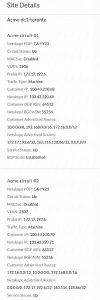
Site Name: Le nom du site représentant le centre de données ou le point de sortie de votre organisation. Vous pouvez cliquer sur le nom pour afficher le Site Details.
-
Circuit Name: The name of the individual circuit originating from the site.
-
Netskope POP: The specific Netskope NewEdge DC where the circuit terminates.
-
MACsec: Displays if Media Access Control Security (MACsec) encryption is enabled or disabled for the point-to-point link.
-
Circuit Status: Displays the physical state of the port on the NewEdge device.
-
Haut de la page
-
En bas
-
Pending
-
-
VLAN: The specific 802.1Q VLAN ID assigned to the circuit for traffic identification.
-
Service Status: The collective operational health of the Netskope security services (e.g., Secure Web Gateway and Cloud Firewall) receiving traffic via the Express Connect path.
-
BGP State: Displays the current operational status of the Border Gateway Protocol (BGP) peering session.
-
-
Cliquez
 pour modifier les paramètres d'en-tête X-Forwarded-For (XFF) pour le site et les adresses IP de confiance contenues dans l'en-tête HTTP XFF du trafic entrant.


Using NewEdge Express Connect in SSL Decryption Policies
Pour utiliser NewEdge Express Connect comme méthode d'accès à votre politique de décryptage SSL :
-
Allez à Policies > SSL Decryption.
-
Cliquez sur Add Policy.
-
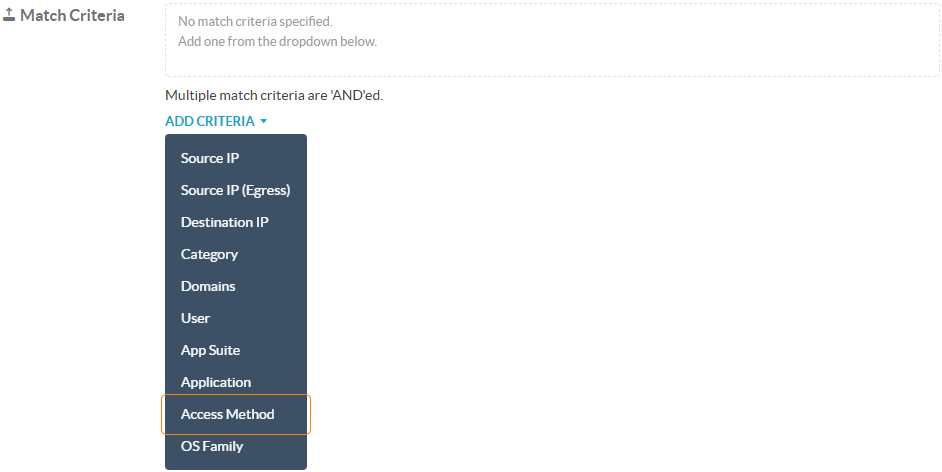
Sur la page New SSL Decryption Policy , pour Match Criteria, cliquez sur Add Criteria puis sur Access Method.
-
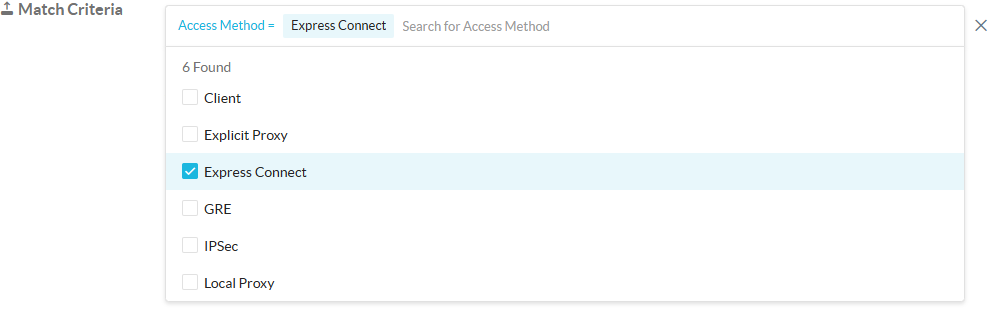
Mettez Access Method à Express Connect.
-
Configurez les autres champs en conséquence. Pour en savoir plus : Ajouter une politique de décryptage SSL.


Using NewEdge Express Connect in Real-Time Protection Policies
Pour utiliser NewEdge Express Connect comme méthode d'accès à votre politique de protection en temps réel :
-
Allez à Policies > Real-time Protection.
-
Cliquez sur New Policy, puis choisissez le type de politique que vous souhaitez créer.
-
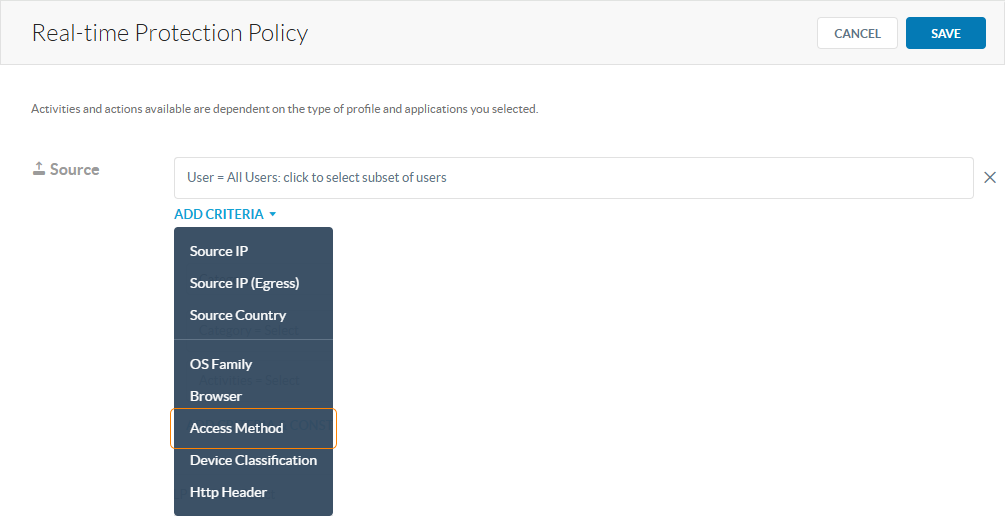
Sur la page Real-time Protection Policy , pour Source, cliquez sur Add Criteria puis sur Access Method.
-
Mettez Access Method à Express Connect.

-
Configurez les autres champs en conséquence. Pour en savoir plus : Politiques de protection en temps réel.


Monitoring NewEdge Express Connect Events in Skope IT
Pour voir les alertes NewEdge Express Connect dans Skope IT :
-
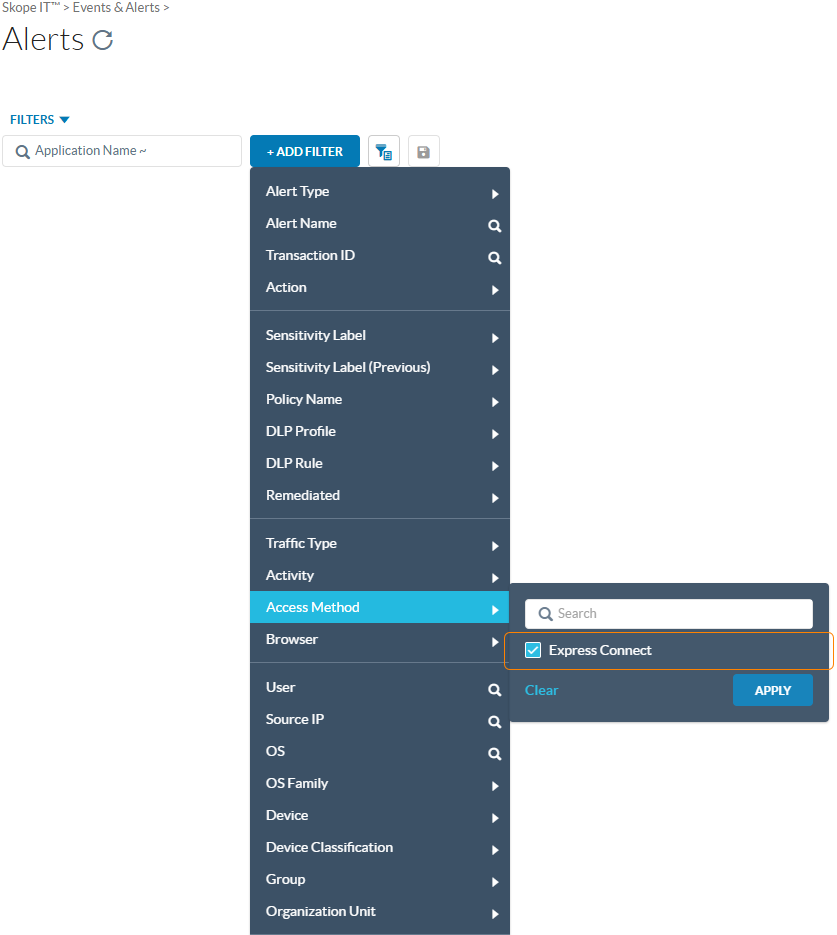
Allez à Skope IT > Alerts.
-
Cliquez sur +Add Filter, allez sur Access Method et sélectionnez ensuite Express Connect pour voir tous les événements associés.
-
Cliquez
 View Details pour voir plus d'informations sur l'événement.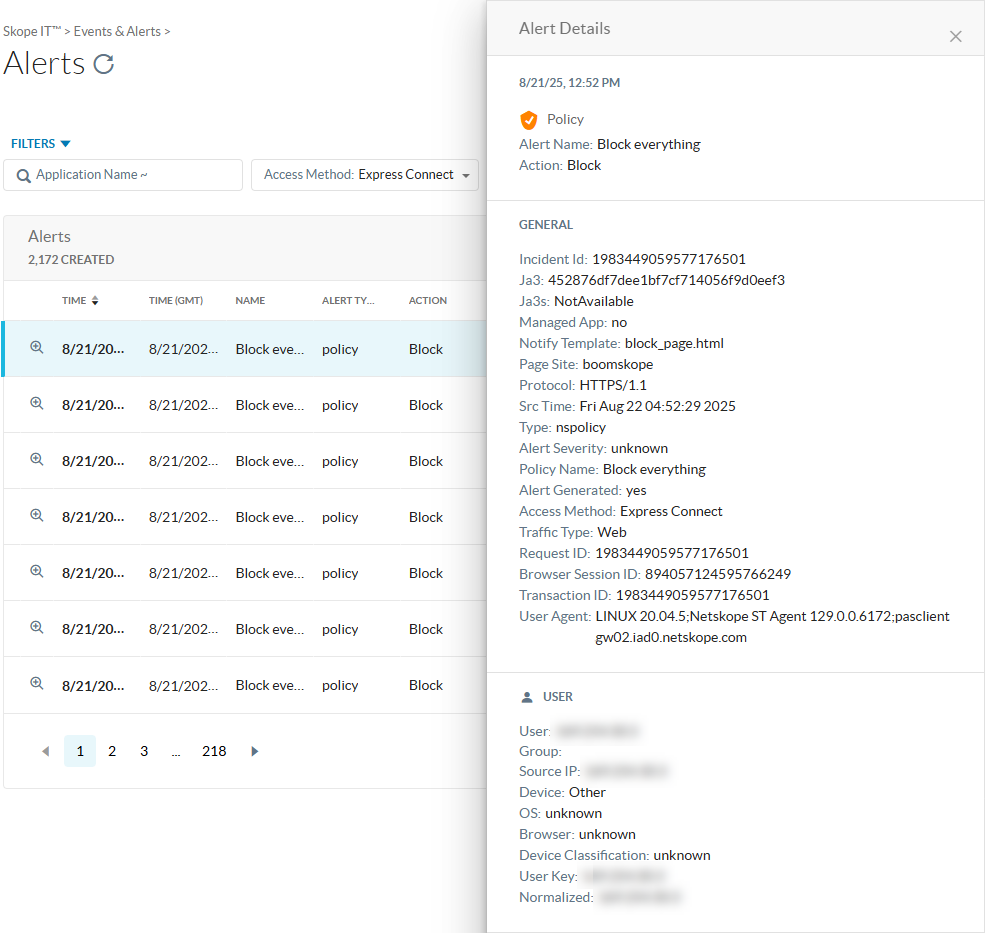


Viewing NewEdge Express Connect Transaction Events
You can use the following log fields to view transaction events for NewEdge Express Connect:
-
x-cs-access-method: Express Connect -
x-s-dp-name: Netskope POP/DC -
x-cs-tunnel-id: VLAN
NewEdge Express Connect APIs
You can use the following steering APIs for the programmatic configuration and monitoring of NewEdge Express Connect:
-
Status Monitoring: APIs to retrieve real-time operational metrics, including circuit health and BGP peering states.
-
XFF Configuration: APIs to manage X-Forwarded-For (XFF) settings, allowing for the automated enablement of user identification and the definition of trusted source IP ranges.
-
Site Management: Programmatic access to view and update Site metadata and associated circuit parameters.
