

Next Generation API Data Protection for Anthropic Claude Enterprise enables security teams to monitor and scan data within an organization’s Claude Enterprise environment. The integration uses the Claude compliance API to access organizational data, including conversations, files, projects, users, groups, and activity logs.
To configure Anthropic Claude Enterprise for the Next Generation API Data Protection, follow the instructions below.
Conditions préalables
Before configuring Anthropic Claude Enterprise for Next Generation API Data Protection, review the prerequisites.
-
This integration requires the Claude compliance API which is available exclusively to Anthropic Claude Enterprise customers. Free, Pro, and Team plans do not have access to the compliance API.
-
A primary owner account is required to regenerate a compliance access key.
-
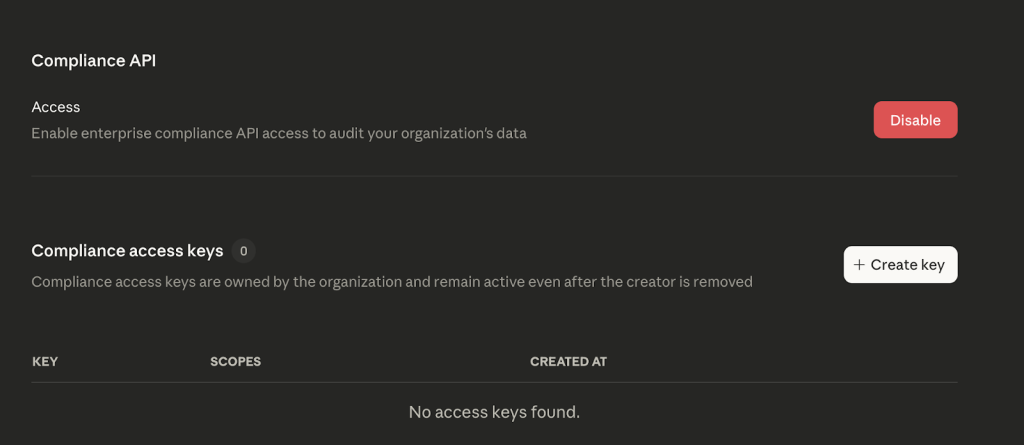
Assurez-vous que l'API de conformité est activée au sein de votre organisation. Pour en savoir plus : Accédez à l’API de conformité.
Generate a Compliance Access Key
This section describes the steps to create a compliance access key. Creating a compliance access key will allow Next Generation API Data Protection to start pulling activity logs, chat data, and file content programmatically.
– The key does not expire automatically and remains valid until the primary owner manually disables or deletes it.
– The compliance access key is different from admin key created in Claude console. Admin key provides access only to the activity feed. All other compliance API endpoints require a compliance access key. Ensure that you generate a compliance access key, not an admin key.
-
Log in to Claude Enterprise as the primary owner of the organization.
-
Naviguez jusqu'à Organization and access > Data and privacy > Compliance access keys.
-
Cliquez sur + Create key.
-
Enter a name for the key (e.g., Netskope CASB API Integration).
-
Select le scopes requis :
Champ d'application Description Required for… read:compliance_activitiesRead organization and user activity data. Activity monitoring, audit events. read:compliance_user_dataRead user chats, files, projects, and org users. Inventory, DLP scanning. delete:compliance_user_dataDelete user chats, files, and projects. (not in use currently)
Delete remediation action.
Note: This will be delivered in a future release.read:compliance_org_dataRead organization metadata, roles, groups. Inventory (orgs, groups, roles). Scopes are immutable once assigned. If the scopes need to be modified, a new key must be created with all required scopes. -
Click Create and copy the key immediately.
The API key is only visible once, so be sure to copy it securely. The API key will be required when you set up the Anthropic Claude Enterprise instance on the Netskope tenant.

Configure Netskope to Access your Anthropic Claude Enterprise Account
To authorize Netskope to access your Anthropic Claude Enterprise account, follow the steps below:
-
Connectez-vous à l’interface utilisateur du locataire Netskope et allez dans Settings > Configure App Access > Next Gen > CASB API.
-
Sous Apps, sélectionnez Anthropic Claude Enterprise et cliquez sur Setup CASB API Instance.
La fenêtre Setup Instance s'ouvre.
-
Under Compliance Access Key, enter the API key that was previously created.
Le format de la clé API est
sk-ant-api01-....If the compliance key needs to be rotated, generate a new key in Claude Enterprise with all the required scopes. In the Netskope tenant, edit the Anthropic Claude Enterprise instance, enter the newly generated key and save the instance. The instance will re-grant and re-validate with the new key. -
Sous Instance Name, entrez le nom de l'instance de l'application SaaS. Cette étape est facultative et si elle est laissée vide, Netskope déterminera le nom de l'instance de l'application après l'octroi.
-
Cliquez sur Grant Access.
Rafraîchissez votre navigateur et vous devriez voir une icône verte à côté du nom de l'instance.
Ensuite, vous pouvez consulter la page Protection Inventory de données d’API Next Generation pour obtenir des informations approfondies sur différentes entités de votre instance Anthropic Calude.ai. Pour plus d’informations sur la page Inventory, voir Inventaire de Protection des données API de nouvelle génération.
Après une subvention réussie, Next Generation API données Protection crée automatiquement une politique par défaut nommée Anthropic Claude Enterprise – Default Policy. Cette politique comprend trois profils DLP (Prévention des pertes de données) : PCI (Industrie des cartes de paiement), PHI (Informations de santé protégées) et PII (Informations personnelles identifiables). Vous pouvez modifier cette politique ou en créer une New selon vos besoins. Pour cela, consultez l’assistant de politique de protection des données de l’API de nouvelle génération.