

Overview
Netskope One DSPMは、自己管理型のSQL Serverデータストアのスキャンをサポートしています。 以下の手順に従って、自己管理型のSQL Serverデータベースをセットアップし、Netskope One DSPMへの接続を設定してください。
Netskope One DSPMサービスアカウントを作成する
These configuration commands are required only if you connect using SQL Server Authentication (Username / Password). If you authenticate using Active Directory or Kerberos, database administrators must provision the domain account or Kerberos service principal with equivalent read access (db_datareader) and metadata permissions according to your organization’s directory service procedures.
Netskope One DSPM専用のサービスアカウントを設定することから始めます。 。
- データベース管理者として、SQLデータベースにログインしてください。
- 以下のコマンドを記載されている順序で実行して、Netskope One DSPM専用のSQLユーザーを作成します。
| Command | 結果 | 注記 |
|---|---|---|
CREATE LOGIN 'dasera_user' WITH PASSWORD ='dasera_password'; | Creates the DB user with which will be dedicated to Netskope One DSPM’s use as a service account. | Substitute dasera_user and dasera_password with your own preferred values. You will need this information later when configuring Netskope One DSPM. Note: We recommend to use dasera as the username and a password of your choice. You will need this information later when configuring Netskope One DSPM. |
USE "database name";CREATE USER dasera FOR LOGIN 'dasera_user';ALTER ROLE db_datareader ADD MEMBER dasera; | Grants read-only access to the Netskope One DSPM specific DB user in each SQL database to you want to scan. | Substitute database name with each SQL DB you wish to scan with Netskope One DSPM Application. The CREATE USER command enables the previously-created LOGIN to access the database. The built-in db_datareader role grants read-only access to all schemas and tables (including system tables) on the active database. |
接続情報を取得する
Netskope One DSPMは、サービスアカウントの設定に加えて、SQLデータベースと通信するために必要な追加情報も必要とします。後で使用するために、以下の手順に従って接続値を特定してください。 Netskope One DSPM内。
| 対応するNetskope One DSPM値 | Details |
|---|---|
| Endpoint | Either the fully-qualified domain name or the listener IP address for your SQL Server instance, used to create the service account above. If necessary, the latter can be found by: – Querying the local_net_address Connection Property.– Running ipconfig.exe from the instance’s CLI and parsing its output |
| Port | Either the default (1433) or the TCP/IP port value override defined within SQL Server Configuration Manager. |
データストアを接続する
ステップ 1: クレデンシャルを提供する
接続を設定するには、以下の手順に従ってください。
-
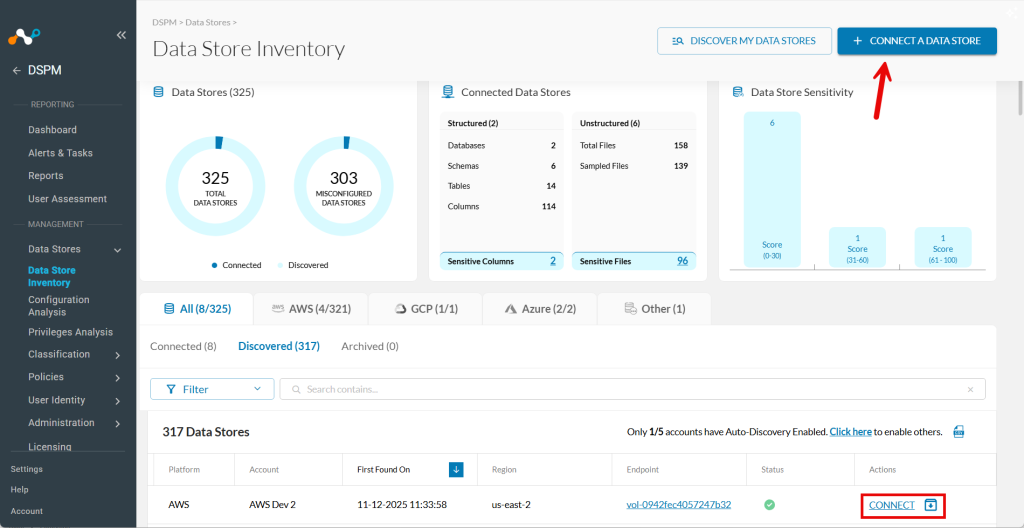
Data Stores > Data Store Inventoryへ移動してください。
-
右上のCONNECT A DATA STOREクリックしてください。
ヒント:または、データストアが自動検出によって既に見つかった場合は、 Discoveredタブに移動し、[アクション] 列のConnectをクリックします。
-
In the Connect a Data Store window, click the data store icon you wish to connect.
-
「クレデンシャルの提供」セクションで、次のフィールドに入力します。
| Field | Value |
|---|---|
| Data Store Identifier | Friendly name to describe this Data Store. Your value is displayed in other Netskope One DSPM screens such as Policy Management and Classification Management. |
| Data Store Endpoint | Enter the corresponding value from the prior section above. |
| Authentication Type | Select the authentication method configured on your SQL Server instance: – Username / Password: Standard SQL Server database authentication. – Active Directory Password: Active Directory domain user authentication. – Active Directory Principal: Active Directory principal authentication using a Principal ID and Principal Secret. – Kerberos (Username / Password): Kerberos authentication using a Kerberos Principal and Password. – Kerberos (Keytab): Kerberos authentication using a Kerberos Principal and an uploaded .keytab file. |
| Username | Enter the database username (for Username / Password) or domain account username (for Active Directory Password). |
| Password | Enter the corresponding password for the user account specified above. (Applicable when using Username / Password, Active Directory Password, or Kerberos (Username / Password)). |
| Principal ID | Enter the application or principal ID. (Applicable when using Active Directory Principal). |
| Principal Secret | Enter the principal client secret. (Applicable when using Active Directory Principal). |
| Kerberos Principal | Enter the Kerberos principal name. (Applicable when using Kerberos (Username / Password) or Kerberos (Keytab)). |
| Keytab File | If using Windows Authentication (Kerberos) with a keytab file, upload the valid Kerberos .keytab file generated for your domain account or Service Principal Name (SPN). |
| Scan Frequency | Controls how often your Data Store is reviewed for changes. Netskope One DSPM’s recommended frequency is defaulted, which you can override (if desired). |
ステップ2:インフラストラクチャのスキャン
- Nextをクリックしてください。
- 「機能のSelect 」タブが表示されたら、以下のフィールドに入力してください。
- Assign a Data Owner (オプション):このデータストアの責任者であるユーザーを1人以上Select 。
- Which databases should Netskope DSPM scan?監視する具体的なデータストアやスキーマ Select 、該当する場合は。
- Features有効にしたい機能Select 。
| Capability | Microsoft SQL Server に対応しています。 |
|---|---|
| Discovery | はい(常時オン) |
| Configuration Analysis | はい |
| Privilege Analysis | はい |
| Stale Data Analysis | はい |
| Classification | はい |
| Data De-Identification (DID) | はい |
| Data In Use Monitoring | No (custom query logs only) |
| Automation | はい(常時オン) |
ステップ3:確認して保存する
- Saveをクリックしてください。
- Reviewタブが表示されたら、システムは設定を検証します。問題が発生した場合は、画面の指示に従って解決してください。
- 接続を確定するには、 Saveをクリックしてください。