

リリースノート
1.0.0 (Requires minimum Cloud Exchange version 6.1.0)
Added
- 初回リリース。
- エンティティ:ユーザー、ワークロード
- アクション:Scan Data 今、Add/Remove Custom Tag
このドキュメントでは、Orca Security v1.0.0プラグインをNetskope Cloud ExchangeプラットフォームのRisk Exchangeモジュールで構成する方法について説明します。このプラグインは、Orca Securityの「Inventory > Inventory Overview」ページから、次の「アセットカテゴリまたはタイプ」(AWS EC2インスタンス、Azure Compute VMインスタンス、Azure Container Instance、GCP Compute VMインスタンス、OCI Compute VMインスタンス、GCPユーザー、AWS IAMユーザー、OCIユーザー、Azureユーザー、Azureサービスプリンシパル、GCP IAMサービスアカウント、K8sサービスアカウント)のワークロードとユーザーを取得するために使用されます。このプラグインは、オンデマンドのOrcaスキャンをトリガーする「Scan Data Now」アクションと、ワークロードおよびユーザーのカスタムタグを追加または削除する「Add/Remove Custom Tag」アクションをサポートしています。
Netskope Normalized Score = round((10 – Risk Score) * 100)。Risk Scoreが存在し、かつ[0.0, 10.0]の範囲内である場合にのみ計算されます。
前提条件
この統合を完了するには、以下が必要です。
- Netskopeテナント(または、例えば本番環境と開発/テスト環境など、複数のテナント)。
- Netskope Cloud Exchangeテナントには、テナントプラグインとリスクエクスチェンジプラグインが既に設定済みです。
- Orca Security インスタンス。
- 以下のホストへの接続性:
- https://app.orcasecurity.io (グローバル)
- https://app.in.orcasecurity.io (インド)
- https://app.eu.orcasecurity.io (Europe)
- https://app.au.orcasecurity.io(オーストラリア)
- https://app.sa.orcasecurity.io (South America)
- https://app.id.orcasecurity.io (インドネシア)
- https://app.gov.orcasecurity.io(政府機関向け)
Orca Security プラグインのサポート
このプラグインは、Orca Securityの Inventory > Inventory Overview ページから、以下の Asset Category or Type(AWS EC2 Instance、Azure Compute VM Instance、Azure Container Instance、GCP Compute VM Instance、OCI Compute VM Instance、GCP User、AWS IAM User、OCI User、Azure User、Azure Service Principal、GCP IAM Service Account、K8s Service Account)のワークロードとユーザーを取得するために使用されます。このプラグインは、オンデマンドのOrcaスキャンをトリガーする Scan Data Now アクションと、ワークロードおよびユーザーのカスタムタグを追加または削除する Add/Remove Custom Tag アクションをサポートしています。
Netskope Normalized Score = round((10 – Risk Score) * 100)。Risk Scoreが存在し、かつ[0.0, 10.0]の範囲内である場合にのみ計算されます。
| 取得したデータの種類 | Actions |
|---|---|
| ワークロード、ユーザー | 今すぐデータをスキャン カスタムタグの追加/削除 アクションなし |
マッピング
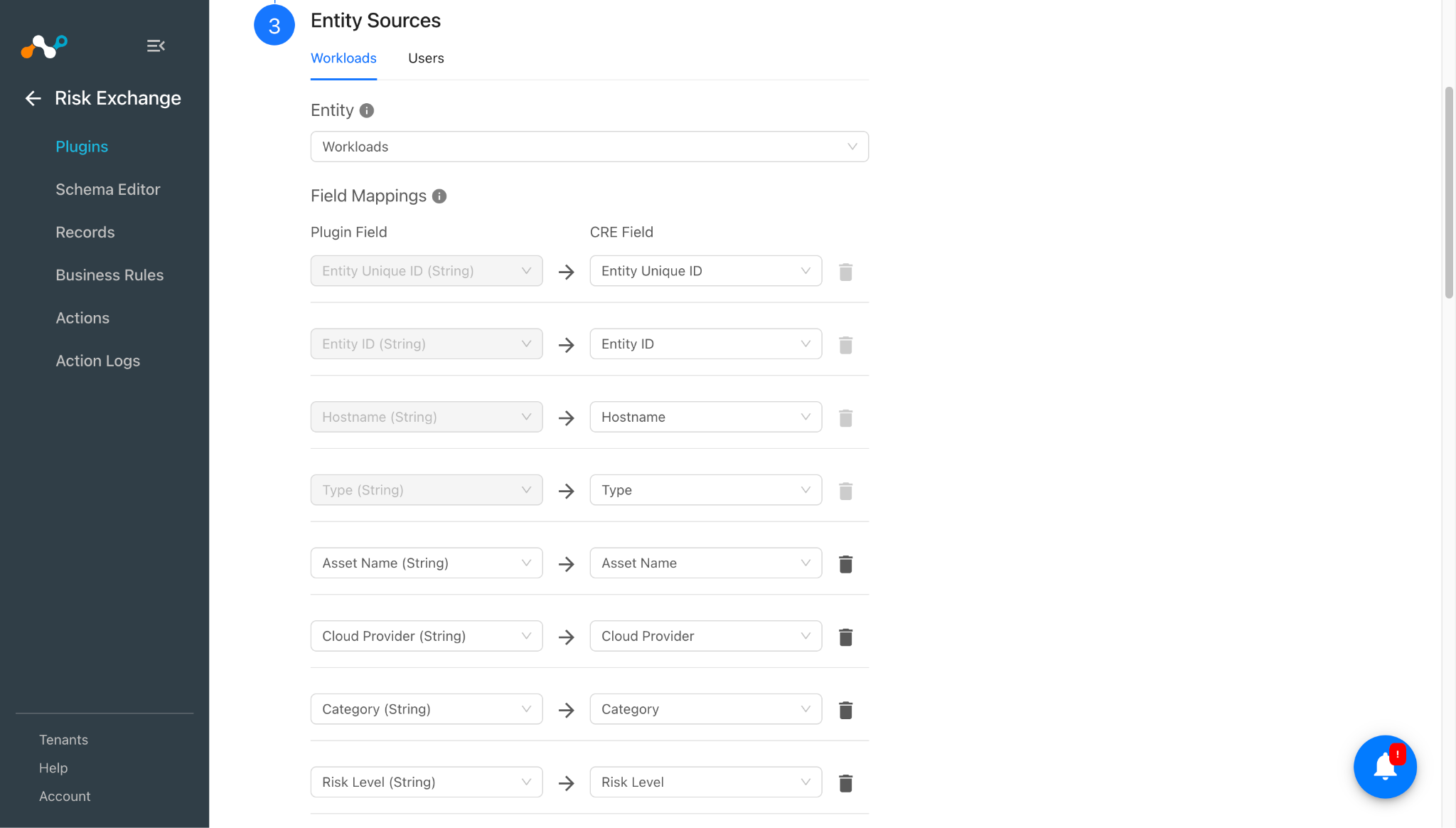
マッピングは、取得したレコードをそれぞれの詳細とともに表示するために使われます。プラグインの設定中にマッピングされたフィールドは、データが取得されると Records ページに表示されます。ここでは、プラグインの設定時に使うべき推奨されるマッピングを示します。
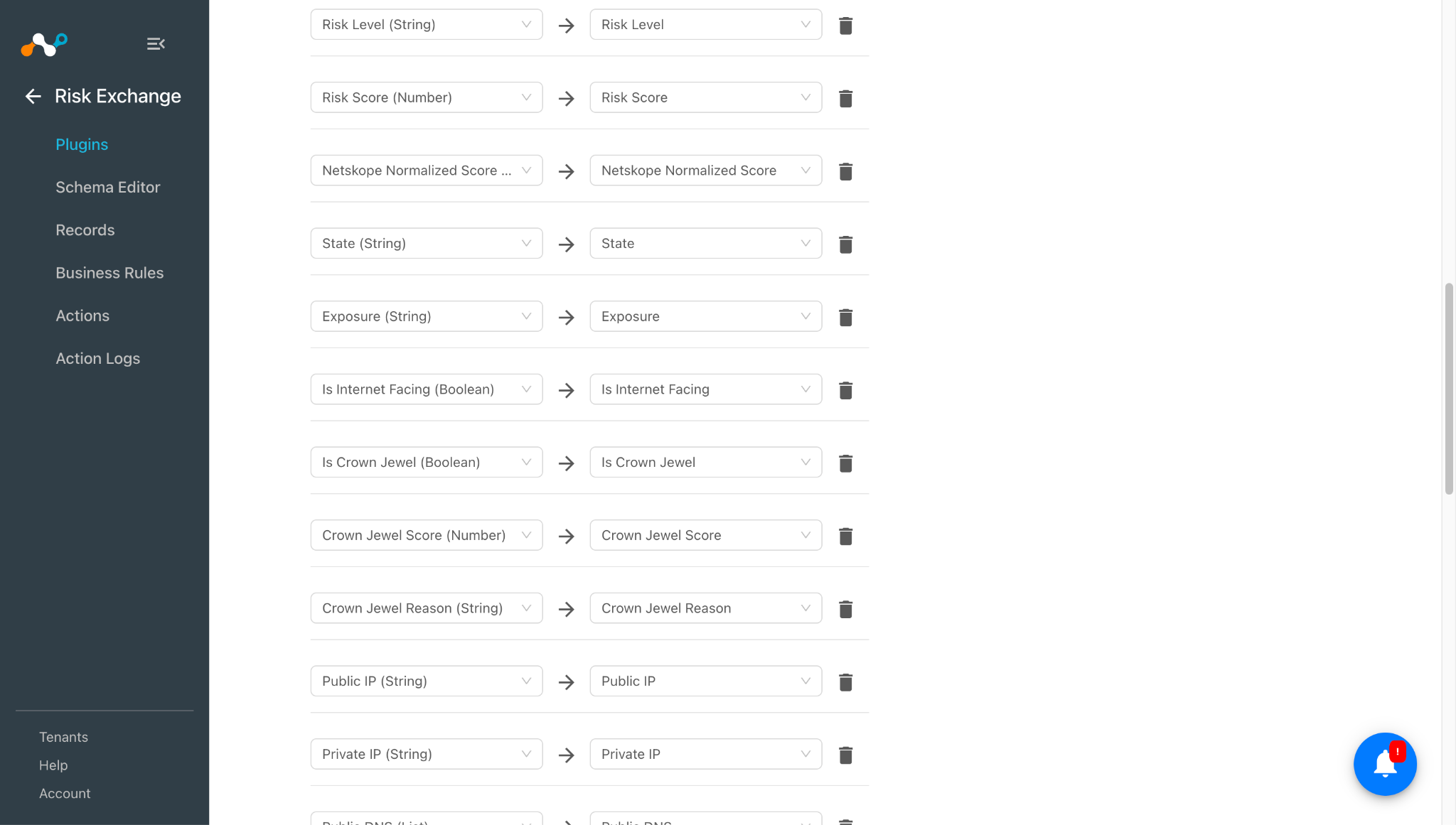
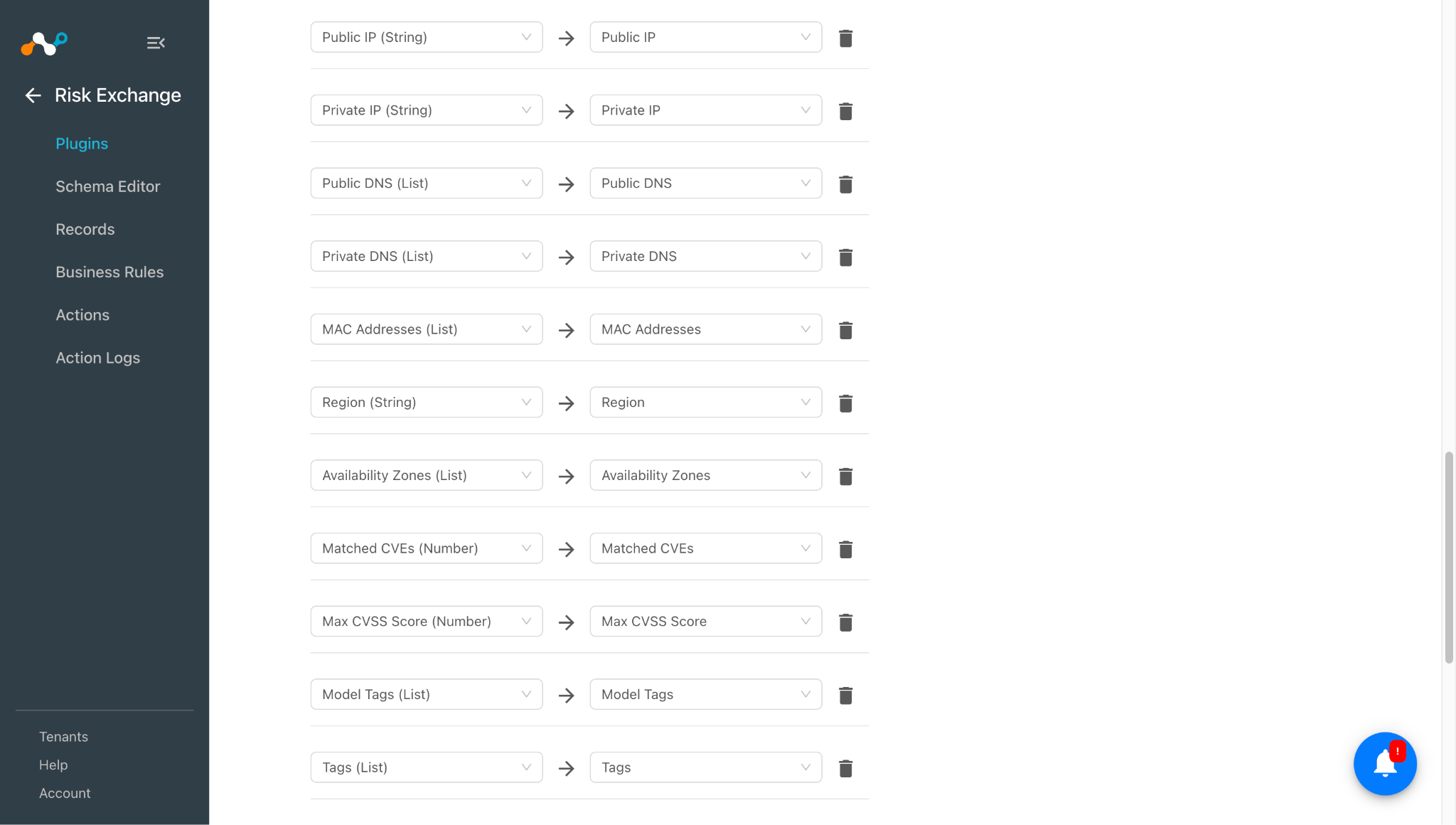
ワークロードのプルマッピング
| プラグインフィールドラベル | 想定されるデータ型 | 推奨フィールドラベル | 総合戦略 | 例 |
|---|---|---|---|---|
| Entity Unique ID | String | Orcaエンティティ一意識別子 | Unique | a1b2c3d4-e5f6-7890-abcd-ef1234567890 |
| Entity ID | String | Orca Entity ID | Overwrite | orca-id-98765 |
| Hostname | String | Orcaホスト名 | Overwrite | web-server-01 |
| 資産名 | String | Orcaアセット名 | Overwrite | web-server-01 |
| タイプ | String | Orca アセットタイプ | Overwrite | AwsEc2Instance |
| クラウドプロバイダー | String | Orca Cloud Provider | Overwrite | AWS |
| カテゴリ | String | Orca アセットカテゴリ | Overwrite | Compute |
| リスクレベル | String | Orcaリスクレベル | Overwrite | 高い |
| リスクスコア | Number | Orca リスクスコア | Overwrite | 6.5 |
| 州 | String | Orca State | Overwrite | Running |
| 暴露 | String | Orca の露出 | Overwrite | public_facing |
| インターネット接続の有無 | Boolean | Orcaはインターネットに面しています | Overwrite | true |
| クラウン・ジュエル | Boolean | Orca は最大の目玉です | Overwrite | false |
| クラウンジュエルスコア | Number | Orca クラウンジュエル スコア | Overwrite | 8 |
| 最重要の理由 | String | Orca クラウンジュエルの理由 | Overwrite | PIIを含む |
| パブリックIP | String | OrcaパブリックIPアドレス | Overwrite | 54.23.1.10 |
| プライベートIP | String | Orca プライベートIPアドレス | Overwrite | 10.0.0.5 |
| パブリックDNS | List | OrcaパブリックDNS名 | Overwrite | [“ec2-54-23-1-10.compute.amazonaws.com”] |
| プライベートDNS | List | Orca Private DNS名 | Overwrite | [“ip-10-0-0-5.ec2.internal”] |
| MACアドレス | List | Orca MACアドレス | Overwrite | [“02:1a:2b:3c:4d:5e”] |
| Region | String | Orca Region | Overwrite | us-east-1 |
| 利用可能エリア | List | Orca アベイラビリティーゾーン | Overwrite | [“us-east-1a”] |
| 一致した CVE | List | Orcaで一致したCVE | Overwrite | [「CVE-2024-1234」] |
| Max CVSS Score | Number | Orca Max CVSS スコア | Overwrite | 9.8 |
| Tags | List | Orca Tags | Overwrite | [“env: production”] |
| Model Tags | List | Orcaモデルタグ | Overwrite | [“owner: platform-team”] |
| Netskope正規化スコア | Number | Orca Netskope正規化スコア | Overwrite | 350 |
| アラート数 | Number | アラート数 | Overwrite | 3 |
| ログイン試行回数 | Number | Orcaログイン試行回数 | Overwrite | 0 |
| 脆弱性数 | Number | Orca の脆弱性数 | Overwrite | 12 |
| 港 | List | Orcaのオープンポート | Overwrite | [443, 8080] |
| ポートサービス | List | Orca ポートサービス | Overwrite | ["https"] |
| ポートプロトコル | List | Orcaポートプロトコル | Overwrite | [“tcp”] |
| Custom Tags | List | Orca Custom Tags | Overwrite | [“team: security”] |
ユーザー向けプルマッピング
| プラグインフィールドラベル | 想定されるデータ型 | 推奨フィールドラベル | 総合戦略 | 例 |
|---|---|---|---|---|
| Entity Unique ID | String | Orca ユニークID | 一意性(Netskope Risk Exchangeプラグインでレコードをマージする場合は、この上書き設定を保持してください) | b2c3d4e5-f6a7-8901-bcde-f23456789012 |
| Entity ID | String | Orca Identity ID | Overwrite | orca-user-id-54321 |
| 電子メール | String | 電子メール | 上書き(Netskope Risk Exchangeプラグインでレコードをマージする場合は、この値を一意に保ってください) | jane.doe@example.com |
| Display Name | String | Orca Display Name | Overwrite | Jane Doe |
| タイプ | String | Orca IDタイプ | Overwrite | AwsUser |
| クラウドプロバイダー | String | Orca Cloud Provider | Overwrite | AWS |
| カテゴリ | String | Orca IDカテゴリ | Overwrite | Identity |
| リスクレベル | String | Orcaリスクレベル | Overwrite | 中くらい |
| リスクスコア | Number | Orca リスクスコア | Overwrite | 4.2 |
| 州 | String | Orca State | Overwrite | アクティブ |
| Tags | List | Orca Tags | Overwrite | [“dept: finance”] |
| Model Tags | List | Orcaモデルタグ | Overwrite | [“managed-by: iam-team”] |
| Netskope正規化スコア | Number | Orca Netskope正規化スコア | Overwrite | 580 |
| Custom Tags | List | Orca Custom Tags | Overwrite | [“reviewed: true”] |
権限
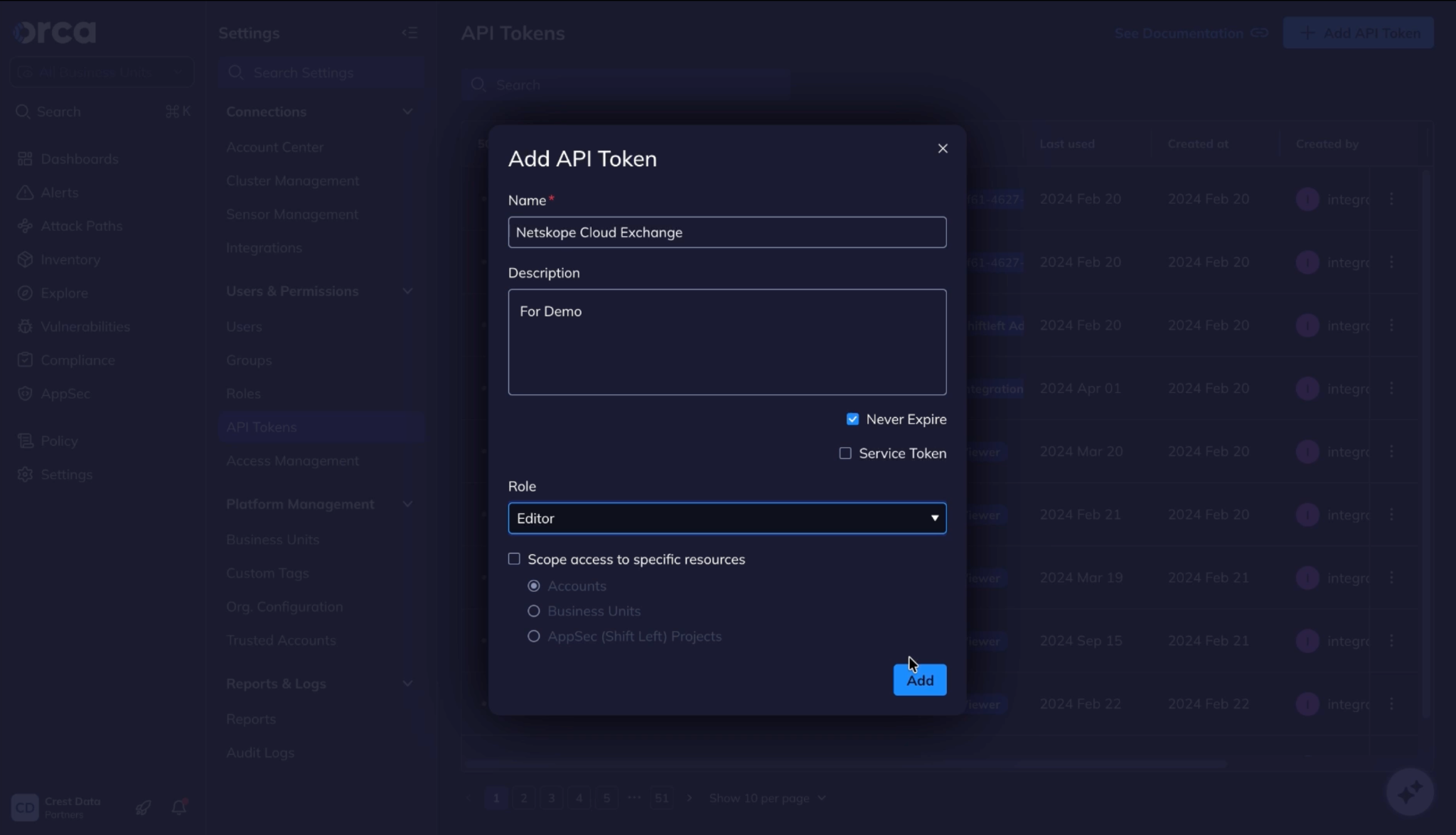
APIトークンには「Editor」ロールが付与されている必要があります。

APIの詳細
使うAPI一覧
| APIエンドポイント | 方法 | 使うケース |
|---|---|---|
| /api/serving-layer/query | 役職 | ワークロードおよびユーザーレコードの取得、オープンポートデータの取得、接続性チェック |
| /api/servingレイヤー/linked_entities_count | 役職 | ワークロードのアラート、ログイン試行、脆弱性の件数を取得します。 |
| /api/manual_tags/{asset_id} | 得る | ワークロードまたはユーザーのカスタムタグの取得 |
| /api/manual_tags/{asset_id} | 役職 | ワークロードまたはユーザーへのカスタムタグの追加 |
| /api/manual_tags/{asset_id} | DELETE | ワークロードまたはユーザーからカスタムタグを削除する |
| /api/scan/asset/{asset_unique_id} | 役職 | ワークロードまたはユーザーのオンデマンドスキャンをトリガーします |
クエリ資産
Endpoint: POST /api/serving-layer/query
Request Headers
| 鍵 | Value |
|---|---|
| Authorization | Token {api_token} |
| Content-Type | アプリケーション/json |
Request Body
{
  "query": {
    "type": "object_set",
    "models": [
      "AwsEc2Instance",
      "AzureComputeVm",
      "AzureContainerInstance",
      "GcpVmInstance",
      "OciComputeVmInstance"
    ]
  },
  "get_results_and_count": true,
  "start_at_index": 0,
  "limit": 100
}
Sample Response
{
"status": "success",
"data": [
{
"id": "e739eb76-324e-d680-bb39-94ba3aec1bf7",
"type": "OciComputeVmInstance",
"data": {
"AgentConfiguration": {
"value": {
"areAllPluginsDisabled": false,
"isManagementDisabled": false,
"isMonitoringDisabled": false,
"pluginsConfig": [
{
"desiredState": "DISABLED",
"name": "Vulnerability Scanning"
},
{
"desiredState": "DISABLED",
"name": "Oracle Java Management Service"
},
{
"desiredState": "DISABLED",
"name": "Oracle Autonomous Linux"
},
{
"desiredState": "DISABLED",
"name": "OS Management Service Agent"
},
{
"desiredState": "DISABLED",
"name": "OS Management Hub Agent"
},
{
"desiredState": "DISABLED",
"name": "Management Agent"
},
{
"desiredState": "ENABLED",
"name": "Custom Logs Monitoring"
},
{
"desiredState": "DISABLED",
"name": "Compute RDMA GPU Monitoring"
},
{
"desiredState": "ENABLED",
"name": "Compute Instance Run Command"
},
{
"desiredState": "ENABLED",
"name": "Compute Instance Monitoring"
},
{
"desiredState": "DISABLED",
"name": "Compute HPC RDMA Auto-Configuration"
},
{
"desiredState": "DISABLED",
"name": "Compute HPC RDMA Authentication"
},
{
"desiredState": "ENABLED",
"name": "Cloud Guard Workload Protection"
},
{
"desiredState": "DISABLED",
"name": "Block Volume Management"
},
{
"desiredState": "DISABLED",
"name": "Bastion"
}
]
}
},
"AutoUpdatesStatus": {
"value": "on"
},
"AvailabilityConfiguration": {
"value": {
"isLiveMigrationPreferred": null,
"recoveryAction": "RESTORE_INSTANCE"
}
},
"AvailabilityDomain": {
"value": "Lhkx:US-ASHBURN-AD-2"
},
"AvailabilityZones": {
"value": [
"Lhkx:US-ASHBURN-AD-2"
]
},
"CVECount": {
"value": {
"In-2017": 1,
"In-2024": 450,
"In-2025": 1848,
"In-2026": 1794,
"LastYear": 1848,
"TwoYearsAgo": 450
}
},
"Category": {
"value": "VM"
},
"ConsoleUrlLink": {
"value": "https://cloud.oracle.com/compute/instances/ocid1.instance.oc1.iad.anuwcljschxdvzyc5s6pkckvj52t4q4u4s4lrtg7hd6md3zuogovb7lsohmq?region=us-ashburn-1"
},
"CpuFamily": {
"value": "AMD"
},
"CreationTime": {
"value": "2024-09-19T22:40:35+00:00"
},
"DetectedCrownJewelReason": {
"value": "Sensitive Data"
},
"DetectedCrownJewelScore": {
"value": 75
},
"DisksInfo": {
"value": [
"{'size_bytes': 50010783744, 'size': '46.58 GB', 'used_bytes': 6843484160, 'used': '6.37 GB', 'volume_id': 'ocid1.bootvolume.oc1.iad.abuwcljspo2bszfbfhmxpif22vr7lumcdffcxnp4xhpwjl6juyv3foy7duiq'}"
]
},
"DistributionInfoSite": {
"value": "https://ubuntu.com/"
},
"DistributionMajorVersion": {
"value": "24"
},
"DistributionName": {
"value": "Ubuntu"
},
"DistributionVersion": {
"value": "24.04"
},
"DistroCategory": {
"value": "debian"
},
"EnableSecureBoot": {
"value": false
},
"EsmStatus": {
"value": "disabled"
},
"Exposure": {
"value": "public_facing"
},
"FaultDomain": {
"value": "FAULT-DOMAIN-2"
},
"FirstSeen": {
"value": "2026-02-04T12:48:17+00:00"
},
"HasMalwareWithHighConfidence": {
"value": false
},
"HasSensitiveKeys": {
"value": false
},
"Hostname": {
"value": "shw-helper-ubuntu"
},
"ImageId": {
"value": "ocid1.image.oc1.iad.aaaaaaaa5by4latw3wcb7ekg4xyj2v6k2bnuebtrw5iiqmy6igxqzox45byq"
},
"IngressPorts": {
"value": [
"0-65535"
]
},
"InstanceId": {
"value": "ocid1.instance.oc1.iad.anuwcljschxdvzyc5s6pkckvj52t4q4u4s4lrtg7hd6md3zuogovb7lsohmq"
},
"InstanceShape": {
"value": "VM.Standard.E5.Flex"
},
"InstanceType": {
"value": "VM.Standard.E5.Flex"
},
"IsCrownJewel": {
"value": true
},
"IsIMDSV2Required": {
"value": false
},
"IsInternetFacing": {
"value": true
},
"KernelVersion": {
"value": "6.8.0-1022-oracle"
},
"LastSeen": {
"value": "2026-08-19T03:06:26+00:00"
},
"LastUpdateTime": {
"value": "2026-01-07T06:12:16+00:00"
},
"LaunchMode": {
"value": "PARAVIRTUALIZED"
},
"LaunchOptions": {
"value": {
"bootVolumeType": "PARAVIRTUALIZED",
"firmware": "UEFI_64",
"isConsistentVolumeNamingEnabled": true,
"isEncryptionInTransitEnabled": null,
"isPvEncryptionInTransitEnabled": false,
"networkType": "PARAVIRTUALIZED",
"remoteDataVolumeType": "PARAVIRTUALIZED"
}
},
"MacAddresses": {
"value": []
},
"MatchedCVEs": {
"value": 4093
},
"MaxCVSSScore": {
"value": 10.0
},
"ModelTags": {
"value": {
"Category": "Compute"
}
},
"Name": {
"value": "shw-helper-ubuntu-24"
},
"NewCategory": {
"value": "Compute Services"
},
"NewSubCategory": {
"value": "Virtual Instances"
},
"NumberOfContainers": {
"value": 1
},
"Observations": {
"value": [
"public_facing",
"sensitive_data"
]
},
"OciState": {
"value": "STOPPED"
},
"OrcaScore": {
"value": 10.0
},
"OrcaTags": {
"value": {}
},
"OsEndOfSupport": {
"value": "2029-04-30T00:00:00+00:00"
},
"OsSupportInfoSite": {
"value": "https://wiki.ubuntu.com/Releases"
},
"PiiTypes": {
"value": []
},
"PrivateDnss": {
"value": []
},
"PrivateIps": {
"value": [
"10.88.0.168"
]
},
"PublicDnss": {
"value": []
},
"PublicIps": {
"value": [
"150.136.78.78"
]
},
"Region": {
"value": "us-ashburn"
},
"Regions": {
"value": [
"us-ashburn"
]
},
"RegionsNames": {
"value": []
},
"RelatedCompliances": {
"value": [
"HITRUST Level 1 v11.0.0",
"ISO 27001 2022",
"US MARS-E Volume 1 2.2.0",
"NZISM (New Zealand Information Security Manual)",
"EU NIS (Network and Information Security) v2",
"US ARC-AMPE Volume 2",
"CIS Ubuntu Linux 24.04 Benchmark",
"Indian DPDPA (Digital Personal Data Protection Act)",
"NIST 800-171 (Rev 2)",
"US CMMC (Cybersecurity Maturity Model Certification) Level 2",
"HITRUST Level 2 v11.0.0",
"US GLBA (Gramm-Leach-Bliley Act) Standards For Safeguarding Customer Information",
"India SEBI CSCRF (Cybersecurity and Cyber Resilience Framework) 1.0.1 (Aug 2024)",
"Indonesian PDPL (Personal Data Protection Law)",
"NIST 800-172",
"CIS Oracle Cloud Infrastructure Foundations Benchmark 2.0.0",
"AU Essential 8 Maturity Level 1 November 2022",
"CIS Controls v8.1.2",
"UK NCSC CAF (National Cyber Security Centre Cyber Assessment Framework) 4.0.0",
"CSA CCM Lite v4.0.13",
"MITRE ATT&CK v13",
"test",
"Orca Identity & Access Best Practices",
"Privacy Shield",
"Hong Kong PDPO (Personal Data Privacy Ordinance)",
"HITRUST Level 3 v9.6.0",
"ISO 27018 2019",
"CIS Oracle Cloud Infrastructure Foundations Benchmark 3.0.0",
"MPA (Motion Picture Association) 5.3.0",
"Multi-Level Protection Scheme 2.0 (Level 3)",
"NIST 800-53 (Rev 5.1.1)",
"CIS Docker Benchmark 1.3.1",
"US FERPA (Family Educational Rights and Privacy Act)",
"US CJIS (Criminal Justice Information Services) 5.8.0",
"Spain National Security Scheme",
"FedRAMP",
"ISO 27701",
"CMORG Cloud Control Framework",
"US COPPA (Children’s Online Privacy Protection)",
"OWASP NHI Top Ten",
"CSA CCM v4.0.5",
"Singapore PDPA (Personal Data Protection Act)",
"Canada PIPEDA (Personal Information Protection and Electronic Documents Act)",
"AU Essential 8 Maturity Level 3 November 2022",
"AU Essential 8 Maturity Level 2 November 2022",
"NYDFS (New York Department of Financial Services)",
"SOC 2",
"Japan FISC Security Guidelines on Computer Systems for Financial Institutions 11th Edition",
"RBI (Reserve Bank of India)",
"Telecommunications Security Code of Practice",
"MPA (Motion Picture Association) 5.0.0",
"South Korea ISMS-P (Personal information & Information Security Management System)",
"PCI DSS 3.2.1",
"EU DORA (Digital Operational Resilience Act)",
"HITRUST Level 3 v11.0.0",
"ISM (Australian Government Information Security Manual) September 2022",
"DSPM (Data Security Posture Management) Best Practices",
"HIPAA",
"MASTRM (Monetary Authority of Singapore Technology Risk Management)",
"China PIPL (Personal Information Protection Law)",
"CPRA (California Privacy Rights Act)",
"ISM (Australian Government Information Security Manual) March 2024",
"US FFIEC (Federal Financial Institutions Examination Council)",
"ISO 27002 2022",
"LGPD (Brazilian General Data Protection)",
"ISM (Australian Government Information Security Manual) March 2026",
"CIS Controls v8",
"APRA CPS 234 Information Security",
"PCI DSS 4.0.0",
"NIST 800-190",
"Indian DPDPA (Digital Personal Data Protection Act) 2025",
"Orca Best Practices 2.0.0",
"AU Essential 8 Maturity Level 2 November 2023",
"SOX 404",
"Japan FISC Security Guidelines on Computer Systems for Financial Institutions 13th Edition",
"NERC CIP (Critical Infrastructure Protection)",
"UK Cyber Essentials",
"GDPR",
"Swift CSCF (Customer Security Controls Framework)",
"AU Essential 8 Maturity Level 1 November 2023",
"PCI DSS 4.0.1",
"NIST 800-53 (Rev 5)",
"ISO 27017",
"CCPA",
"US CJIS (Criminal Justice Information Services) 6.0.0",
"NIST 800-53 (Rev 4)",
"CIS Oracle Cloud Infrastructure Foundations Benchmark 1.2.0",
"India SEBI CSCRF (Cybersecurity and Cyber Resilience Framework)",
"AU Essential 8 Maturity Level 3 November 2023",
"NIST CSF 2.0.0",
"MITRE ATT&CK v12",
"ISO 27001 2013",
"Germany TISAX VDA",
"Orca for Post Quantum Cryptography",
"NIST 800-171 (Rev 3)",
"UK NCSC CAF (National Cyber Security Centre Cyber Assessment Framework) 3.1.0"
]
},
"RiskLevel": {
"value": "critical"
},
"Score": {
"value": 3
},
"SourceType": {
"value": "image"
},
"State": {
"value": "stopped"
},
"StopDate": {
"value": "2026-02-04T12:48:13+00:00"
},
"SubCategory": {
"value": "VM"
},
"Tags": {
"value": {
"Lifetime": "Long Term",
"Oracle-Tags-CreatedBy": "oktasso_qualys_oraclecengg1/saher@qualys.com",
"Oracle-Tags-CreatedOn": "'2024-09-19T22:40:34.067Z'",
"Owner": "Shweta Aher"
}
},
"TotalDisksBytes": {
"value": 50010783744
},
"TotalVulnerabilitiesFound": {
"value": 6419
},
"Type": {
"value": "OciComputeVmInstance"
},
"UiUniqueField": {
"value": "ocid1.instance.oc1.iad.anuwcljschxdvzyc5s6pkckvj52t4q4u4s4lrtg7hd6md3zuogovb7lsohmq"
},
"UpdatedTime": {
"value": "2026-01-07T06:12:16+00:00"
},
"Zones": {
"value": [
"Lhkx:US-ASHBURN-AD-2"
]
},
"AssetUniqueId": {
"value": "vm_xn7itwhk7keokamq_ocid1.instance.oc1.iad.anuwcljschxdvzyc5s6pkckvj52t4q4u4s4lrtg7hd6md3zuogovb7lsohmq"
},
"bu_tags": {
"value": ",-32325982428363234,"
},
"cluster_unique_id": {
"value": "vm_xn7itwhk7keokamq_ocid1.instance.oc1.iad.anuwcljschxdvzyc5s6pkckvj52t4q4u4s4lrtg7hd6md3zuogovb7lsohmq"
},
"full_scan_time": {
"value": "2026-08-19T01:38:59+00:00"
},
"GroupUniqueId": {
"value": "vm_xn7itwhk7keokamq_ocid1.instance.oc1.iad.anuwcljschxdvzyc5s6pkckvj52t4q4u4s4lrtg7hd6md3zuogovb7lsohmq"
}
},
"name": "shw-helper-ubuntu-24",
"group_unique_id": "vm_xn7itwhk7keokamq_ocid1.instance.oc1.iad.anuwcljschxdvzyc5s6pkckvj52t4q4u4s4lrtg7hd6md3zuogovb7lsohmq",
"cluster_unique_id": "vm_xn7itwhk7keokamq_ocid1.instance.oc1.iad.anuwcljschxdvzyc5s6pkckvj52t4q4u4s4lrtg7hd6md3zuogovb7lsohmq",
"asset_unique_id": "vm_xn7itwhk7keokamq_ocid1.instance.oc1.iad.anuwcljschxdvzyc5s6pkckvj52t4q4u4s4lrtg7hd6md3zuogovb7lsohmq",
"last_seen": "2026-08-19T03:50:49+00:00"
}
],
"total_items": 1142
}
ユーザークエリ
Endpoint: POST /api/serving-layer/query
Request Headers
| 鍵 | Value |
|---|---|
| Authorization | Token {api_token} |
| Content-Type | アプリケーション/json |
Request Body
{
  "query": {
    "type": "object_set",
    "models": [
      "GcpUser",
      "AwsUser",
      "OciUser",
      "AzureUser",
      "AzureServicePrincipal",
      "GcpIamServiceAccount",
      "K8sServiceAccount"
    ]
  },
  "get_results_and_count": true,
  "start_at_index": 0,
  "limit": 100
}
Sample Response
{
    "status": "success",
    "data": [
        {
            "id": "e739eb76-3b38-9580-8805-1c9b10b4b088",
            "type": "AzureServicePrincipal",
            "data": {
                "AppId": {
                    "value": "076af1ed-de03-4981-9ed2-066f89d2aafe"
                },
                "AppOwnerOrganizationId": {
                    "value": "ff4e2413-65ab-4dc2-9e5b-1ea02d3d94eb"
                },
                "AzureId": {
                    "value": "ef893edf-6aab-494b-b037-935e7a237cb5"
                },
                "Category": {
                    "value": "Users and Access"
                },
                "CreationTime": {
                    "value": "2024-02-27T05:44:00+00:00"
                },
                "Exposure": {
                    "value": "N/A"
                },
                "FirstSeen": {
                    "value": "2026-01-20T05:05:57+00:00"
                },
                "IdentityId": {
                    "value": "ef893edf-6aab-494b-b037-935e7a237cb5"
                },
                "IsCrownJewel": {
                    "value": false
                },
                "IsEnabled": {
                    "value": true
                },
                "IsInternal": {
                    "value": true
                },
                "IsTrusted": {
                    "value": true
                },
                "LastSeen": {
                    "value": "2026-08-19T22:32:09+00:00"
                },
                "Name": {
                    "value": "aro-app-1709012625479"
                },
                "NewCategory": {
                    "value": "Identity and Access"
                },
                "NewSubCategory": {
                    "value": "Cloud Non-Human Identities (NHI)"
                },
                "Observations": {
                    "value": []
                },
                "OrcaScore": {
                    "value": 1.0
                },
                "PrincipalId": {
                    "value": "ef893edf-6aab-494b-b037-935e7a237cb5"
                },
                "RelatedCompliances": {
                    "value": [
                        "APRA CPS 234 Information Security",
                        "AU Essential 8 Maturity Level 1 November 2023",
                        "AU Essential 8 Maturity Level 2 November 2023",
                        "AU Essential 8 Maturity Level 3 November 2022",
                        "AU Essential 8 Maturity Level 3 November 2023",
                        "Azure Well-Architected",
                        "CCPA",
                        "CIS Azure Kubernetes Service (AKS) Benchmark 1.7.0",
                        "CIS Controls v8",
                        "CIS Controls v8.1.2",
                        "CIS Microsoft Azure Foundations Benchmark 5.0.0",
                        "CIS Microsoft Azure Foundations Benchmark 6.0.0",
                        "CMORG Cloud Control Framework",
                        "CPRA (California Privacy Rights Act)",
                        "CSA CCM Lite v4.0.13",
                        "CSA CCM v4.0.5",
                        "Canada PIPEDA (Personal Information Protection and Electronic Documents Act)",
                        "China PIPL (Personal Information Protection Law)",
                        "DSPM (Data Security Posture Management) Best Practices",
                        "EU DORA (Digital Operational Resilience Act)",
                        "EU NIS (Network and Information Security) v2",
                        "FedRAMP",
                        "GDPR",
                        "Germany TISAX VDA",
                        "HIPAA",
                        "HITRUST Level 1 v11.0.0",
                        "HITRUST Level 2 v11.0.0",
                        "HITRUST Level 3 v11.0.0",
                        "HITRUST Level 3 v9.6.0",
                        "Hong Kong PDPO (Personal Data Privacy Ordinance)",
                        "ISM (Australian Government Information Security Manual) March 2024",
                        "ISM (Australian Government Information Security Manual) March 2026",
                        "ISM (Australian Government Information Security Manual) September 2022",
                        "ISO 27001 2013",
                        "ISO 27001 2022",
                        "ISO 27002 2022",
                        "ISO 27017",
                        "ISO 27018 2019",
                        "India SEBI CSCRF (Cybersecurity and Cyber Resilience Framework)",
                        "India SEBI CSCRF (Cybersecurity and Cyber Resilience Framework) 1.0.1 (Aug 2024)",
                        "Indian DPDPA (Digital Personal Data Protection Act)",
                        "Indian DPDPA (Digital Personal Data Protection Act) 2025",
                        "Indonesian PDPL (Personal Data Protection Law)",
                        "Japan FISC Security Guidelines on Computer Systems for Financial Institutions 11th Edition",
                        "Japan FISC Security Guidelines on Computer Systems for Financial Institutions 13th Edition",
                        "LGPD (Brazilian General Data Protection)",
                        "MASTRM (Monetary Authority of Singapore Technology Risk Management)",
                        "MCSB (Microsoft Cloud Security Benchmark)",
                        "MITRE ATT&CK v12",
                        "MITRE ATT&CK v13",
                        "MPA (Motion Picture Association) 5.3.0",
                        "Multi-Level Protection Scheme 2.0 (Level 3)",
                        "NERC CIP (Critical Infrastructure Protection)",
                        "NIST 800-171 (Rev 2)",
                        "NIST 800-171 (Rev 3)",
                        "NIST 800-172",
                        "NIST 800-53 (Rev 4)",
                        "NIST 800-53 (Rev 5)",
                        "NIST 800-53 (Rev 5.1.1)",
                        "NIST CSF",
                        "NIST CSF 2.0.0",
                        "NYDFS (New York Department of Financial Services)",
                        "NZISM (New Zealand Information Security Manual)",
                        "OWASP NHI Top Ten",
                        "Orca Best Practices",
                        "Orca Best Practices 2.0.0",
                        "Orca Identity & Access Best Practices",
                        "Orca for Post Quantum Cryptography",
                        "PCI DSS 3.2.1",
                        "PCI DSS 4.0.0",
                        "PCI DSS 4.0.1",
                        "Privacy Shield",
                        "RBI (Reserve Bank of India)",
                        "SOC 2",
                        "SOX 404",
                        "Singapore PDPA (Personal Data Protection Act)",
                        "South Korea ISMS-P (Personal information & Information Security Management System)",
                        "Spain National Security Scheme",
                        "Swift CSCF (Customer Security Controls Framework)",
                        "Telecommunications Security Code of Practice",
                        "UK Cyber Essentials",
                        "UK NCSC CAF (National Cyber Security Centre Cyber Assessment Framework) 3.1.0",
                        "UK NCSC CAF (National Cyber Security Centre Cyber Assessment Framework) 4.0.0",
                        "US ARC-AMPE Volume 2",
                        "US CJIS (Criminal Justice Information Services) 5.8.0",
                        "US CJIS (Criminal Justice Information Services) 6.0.0",
                        "US CMMC (Cybersecurity Maturity Model Certification) Level 2",
                        "US COPPA (Children’s Online Privacy Protection)",
                        "US FERPA (Family Educational Rights and Privacy Act)",
                        "US FFIEC (Federal Financial Institutions Examination Council)",
                        "US GLBA (Gramm-Leach-Bliley Act) Standards For Safeguarding Customer Information",
                        "US MARS-E Volume 1 2.2.0",
                        "test"
                    ]
                },
                "RiskLevel": {
                    "value": "informational"
                },
                "Score": {
                    "value": 4
                },
                "ServicePrincipalNames": {
                    "value": [
                        "076af1ed-de03-4981-9ed2-066f89d2aafe"
                    ]
                },
                "ServicePrincipalType": {
                    "value": "Application"
                },
                "SubCategory": {
                    "value": "ManagedIdentities"
                },
                "Type": {
                    "value": "AzureServicePrincipal"
                },
                "UiUniqueField": {
                    "value": "ef893edf-6aab-494b-b037-935e7a237cb5"
                },
                "Zones": {
                    "value": []
                },
                "AssetUniqueId": {
                    "value": "AzureServicePrincipal_ff4e2413-65ab-4dc2-9e5b-1ea02d3d94eb_e739eb76-2a3a-17ce-84bc-a1f8765d0902"
                },
                "bu_tags": {
                    "value": ",-32325982428363234,-1894962669124995387,2112785123256613438,-4124477540523243805,-7644646143476473755,-7911719698443582879,-3252461980860312900,"
                },
                "cluster_unique_id": {
                    "value": "AzureServicePrincipal_ff4e2413-65ab-4dc2-9e5b-1ea02d3d94eb_e739eb76-2a3a-17ce-84bc-a1f8765d0902"
                },
                "full_scan_time": {
                    "value": "2026-08-19T22:32:03+00:00"
                },
                "GroupUniqueId": {
                    "value": "AzureServicePrincipal_ff4e2413-65ab-4dc2-9e5b-1ea02d3d94eb_e739eb76-2a3a-17ce-84bc-a1f8765d0902"
                }
            },
            "name": "aro-app-1709012625479",
            "group_unique_id": "AzureServicePrincipal_ff4e2413-65ab-4dc2-9e5b-1ea02d3d94eb_e739eb76-2a3a-17ce-84bc-a1f8765d0902",
            "cluster_unique_id": "AzureServicePrincipal_ff4e2413-65ab-4dc2-9e5b-1ea02d3d94eb_e739eb76-2a3a-17ce-84bc-a1f8765d0902",
            "asset_unique_id": "AzureServicePrincipal_ff4e2413-65ab-4dc2-9e5b-1ea02d3d94eb_e739eb76-2a3a-17ce-84bc-a1f8765d0902",
            "last_seen": "2026-08-19T22:34:47+00:00"
        }
],
    "total_items": 6643
}
リンクされたエンティティ数の取得
Endpoint: POST /api/serving-layer/linked_entities_count
Request Headers
| 鍵 | Value |
|---|---|
| Authorization | Token {api_token} |
| Content-Type | アプリケーション/json |
Request Body
{
  "model": "OciComputeVmInstance",
  "base_id": "{{asset_id}}"
}
Sample Response
{
    "status": "success",
    "data": {
        "asset_id": "e739eb76-324e-d680-bb39-94ba3aec1bf7",
        "links": [
            {
                "related_model": "AttackPathInventories",
                "relation_key": "AttackPathInventories",
                "reversed_relation_key": "Inventory",
                "count": 2
            },
            {
                "related_model": "Application",
                "relation_key": "Applications",
                "reversed_relation_key": "Compute",
                "count": 5
            },
            {
                "related_model": "Container",
                "relation_key": "Containers",
                "reversed_relation_key": "Vm",
                "count": 1
            },
            {
                "related_model": "Subnet",
                "relation_key": "SubnetList",
                "reversed_relation_key": "ComputeObjects",
                "count": 1
            },
            {
                "related_model": "InventoryCustomTags",
                "relation_key": "CustomTags",
                "reversed_relation_key": "inventory",
                "count": 1
            },
            {
                "related_model": "OciIdentityCompartment",
                "relation_key": "Compartment",
                "reversed_relation_key": "VmInstances",
                "count": 1
            },
            {
                "related_model": "OciVnic",
                "relation_key": "OciVnics",
                "reversed_relation_key": "Vm",
                "count": 1
            },
            {
                "related_model": "Alert",
                "relation_key": "InventoryAlerts",
                "reversed_relation_key": "Inventory",
                "count": 263
            },
            {
                "related_model": "Alert",
                "relation_key": "Alerts",
                "reversed_relation_key": "Inventories",
                "count": 263
            },
            {
                "related_model": "AssetScanStatus",
                "relation_key": "AssetScanStatus",
                "reversed_relation_key": "Inventory",
                "count": 1
            },
            {
                "related_model": "AssetSshKeyPair",
                "relation_key": "AssetSshKeyPairs",
                "reversed_relation_key": "Content",
                "count": 4
            },
            {
                "related_model": "ConfigurationFile",
                "relation_key": "ConfigurationFiles",
                "reversed_relation_key": "Content",
                "count": 4
            },
            {
                "related_model": "InstalledPackage",
                "relation_key": "InstalledPackages",
                "reversed_relation_key": "Content",
                "count": 992
            },
            {
                "related_model": "LocalPort",
                "relation_key": "LocalPorts",
                "reversed_relation_key": "Compute",
                "count": 4
            },
            {
                "related_model": "LoginAttempt",
                "relation_key": "LoginAttempts",
                "reversed_relation_key": "Compute",
                "count": 38
            },
            {
                "related_model": "OrcaScanStatus",
                "relation_key": "OrcaLastScanStatus",
                "reversed_relation_key": "Inventory",
                "count": 1
            },
            {
                "related_model": "PIIDirectory",
                "relation_key": "PIIDirectories",
                "reversed_relation_key": "Content",
                "count": 7
            },
            {
                "related_model": "Role",
                "relation_key": "Roles",
                "reversed_relation_key": "Compute",
                "count": 1
            },
            {
                "related_model": "RunningService",
                "relation_key": "RunningServices",
                "reversed_relation_key": "Compute",
                "count": 42
            },
            {
                "related_model": "ScanEngineData",
                "relation_key": "ScanEngineData",
                "reversed_relation_key": "Content",
                "count": 1
            },
            {
                "related_model": "SensitiveData",
                "relation_key": "SensitiveData",
                "reversed_relation_key": "Inventory",
                "count": 16
            },
            {
                "related_model": "SensitiveFile",
                "relation_key": "SensitiveFiles",
                "reversed_relation_key": "Content",
                "count": 12
            },
            {
                "related_model": "ShellHistoryFile",
                "relation_key": "ShellHistoryFiles",
                "reversed_relation_key": "Content",
                "count": 2
            },
            {
                "related_model": "ShellHistorySuspiciousCommand",
                "relation_key": "ShellHistorySuspiciousCommands",
                "reversed_relation_key": "Content",
                "count": 1
            },
            {
                "related_model": "SshAuthorizedKey",
                "relation_key": "SshAuthorizedKeys",
                "reversed_relation_key": "Content",
                "count": 2
            },
            {
                "related_model": "SshAuthorizedKeyFile",
                "relation_key": "SshAuthorizedKeyFiles",
                "reversed_relation_key": "Content",
                "count": 3
            },
            {
                "related_model": "SSHConfigurationFile",
                "relation_key": "SSHConfigurationFiles",
                "reversed_relation_key": "Content",
                "count": 1
            },
            {
                "related_model": "SshKey",
                "relation_key": "SshKeys",
                "reversed_relation_key": "Content",
                "count": 6
            },
            {
                "related_model": "VulnerabilityV2",
                "relation_key": "VulnerabilityV2s",
                "reversed_relation_key": "Inventory",
                "count": 7105
            },
            {
                "related_model": "CloudAccount",
                "relation_key": "CloudAccount",
                "reversed_relation_key": "vm",
                "count": 1
            },
            {
                "related_model": "CloudAccount",
                "relation_key": "CloudAccount",
                "reversed_relation_key": "compute",
                "count": 1
            },
            {
                "related_model": "CloudAccount",
                "relation_key": "CloudAccount",
                "reversed_relation_key": "content",
                "count": 1
            },
            {
                "related_model": "CloudAccount",
                "relation_key": "CloudAccount",
                "reversed_relation_key": "inventory",
                "count": 1
            },
            {
                "related_model": "CloudAccount",
                "relation_key": "CloudAccount",
                "reversed_relation_key": "ocicomputevminstance",
                "count": 1
            }
        ],
        "from_cache": false
    }
}
Fetch Custom Tags
Endpoint: GET /api/manual_tags/{asset_id}
Request Headers
| 鍵 | Value |
|---|---|
| Authorization | Token {api_token} |
Sample Response
{
  "status": "success",
  "data": {
    "netskope-ce": "managed",
    "cost-center": "CC-4471",
    "owner": "platform-team"
  }
}
Add Custom Tag
Endpoint: POST /api/manual_tags/{asset_id}
Request Headers
| 鍵 | Value |
|---|---|
| Authorization | Token {api_token} |
| Content-Type | アプリケーション/json |
Request Body
{
  "tag_key": "netskope-ce",
  "tag_value": "quarantine"
}
Sample Response
{
  "status": "success",
  "data": {
    "asset_id": "b1f4c3d2-8a6e-4f19-9c07-2d5e7a1b8f43",
    "tag_key": "netskope-ce",
    "tag_value": "quarantine"
  }
}
カスタムタグの削除
Endpoint: DELETE /api/manual_tags/{asset_id}
Request Headers
| 鍵 | Value |
|---|---|
| Authorization | Token {api_token} |
| Content-Type | アプリケーション/json |
Sample Request
{
  "tag_key": "netskope-ce"
}
Sample Request
{
  "status": "success",
  "data": {
    "asset_id": "b1f4c3d2-8a6e-4f19-9c07-2d5e7a1b8f43",
    "tag_key": "netskope-ce"
  }
}
今すぐデータをスキャン
Endpoint: POST /api/scan/asset/{asset_unique_id}
Request Headers
| 鍵 | Value |
|---|---|
| Authorization | Token {api_token} |
| Content-Type | アプリケーション/json |
Sample Response
{
    "scan_unique_id": "req_73521d3c-d567-4f71-aeb8-ee19e12811ee",
    "asset_unique_id": "vm_xn7itwhk7keokamq_ocid1.instance.oc1.iad.anuwcljschxdvzyc5s6pkckvj52t4q4u4s4lrtg7hd6md3zuogovb7lsohmq"
}
パフォーマンスマトリックス
以下は、50万件のワークロードとユーザーを抽出することにより、前述の仕様を持つ大規模CEスタックで実施されたパフォーマンスマトリックスです。
| デスクリプション | 仕様 |
|---|---|
| スタックの詳細 | サイズ:大 RAM:32 GB CPU:16コア |
| Orca Securityからフェッチおよび更新されたワークロード | 約 95 分 |
| Orca Securityから取得および更新されたユーザー | 約 95 分 |
ユーザーエージェント
netskope-ce-6.1.0-cre-orca-security-v1.0.0
ワークフロー
- Orca Security API トークンを取得します。
- Orca Securityプラグインを構成します。
- Risk Exchange ビジネスルールを構成します。
- Risk Exchange のアクションの構成
- Validation
動画を見る
再生ボタンをクリックして動画をご覧ください。
Orca Security API トークンの取得
-
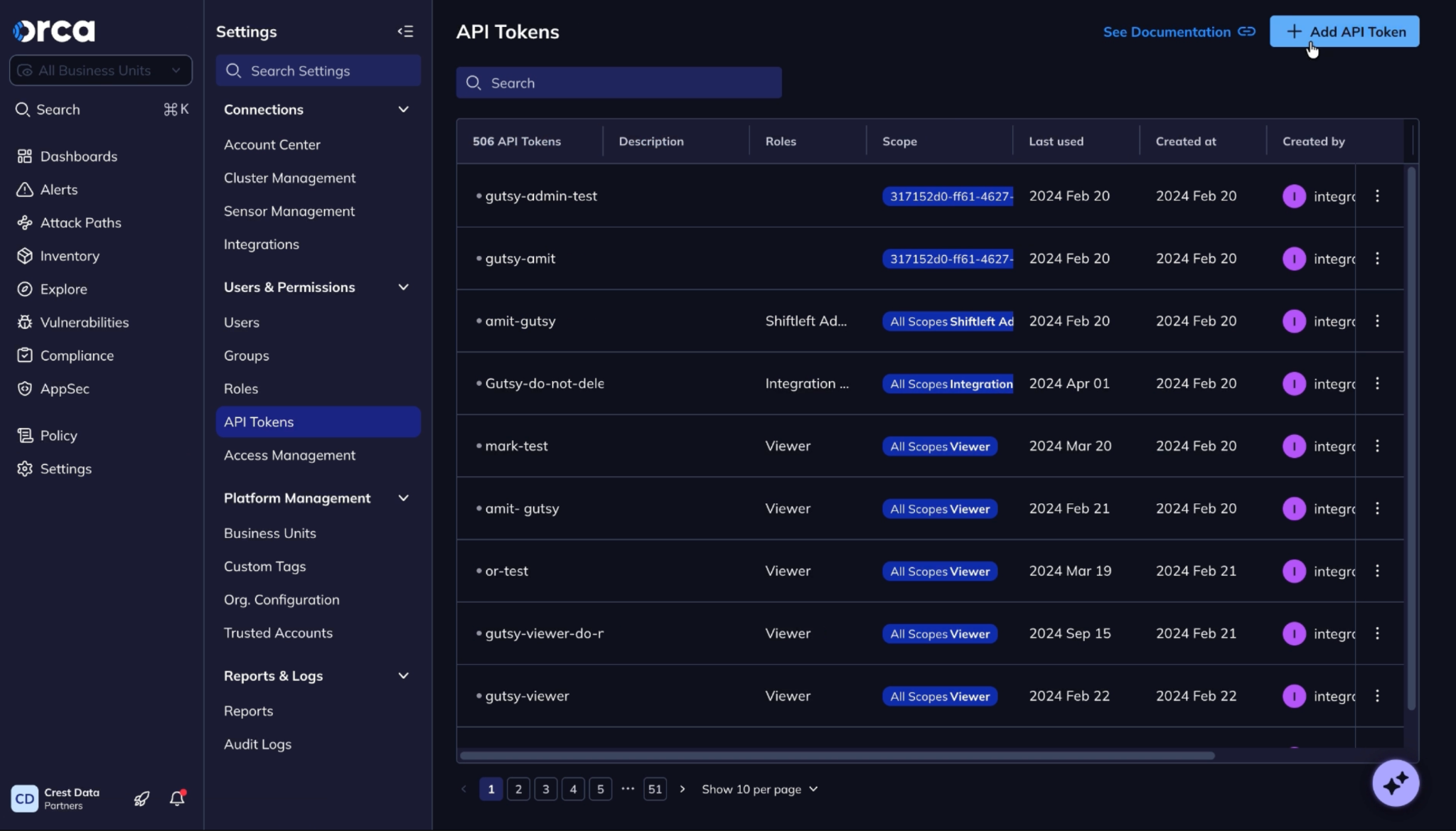
Orca Securityインスタンスにログインします。Settings > API Tokenに移動し、Add API Tokenをクリックします。

-
必要に応じて名前、デスクリプション、有効期限を入力し、Addをクリックします。

-
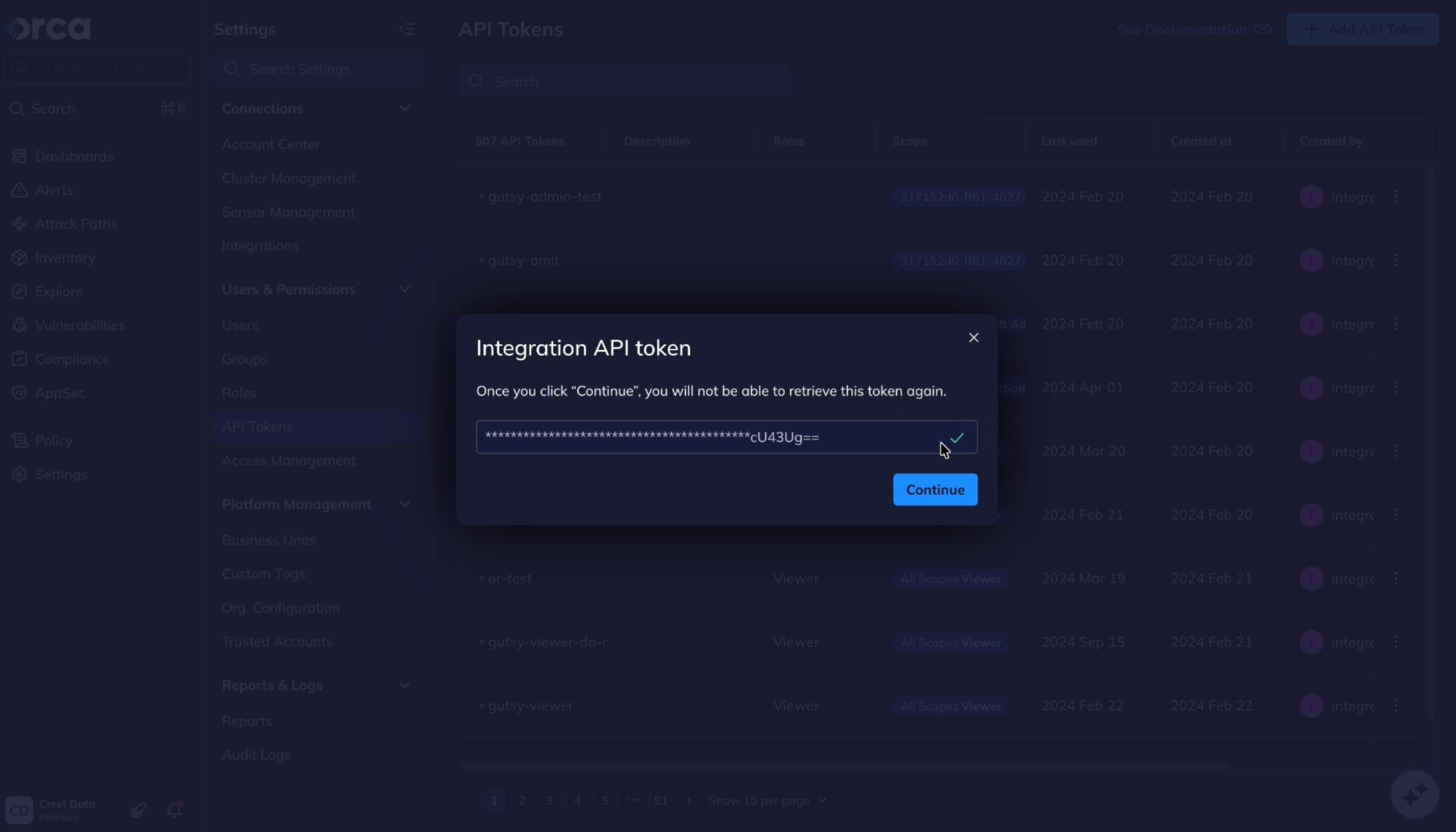
生成されたトークンをコピーします。

Orca Security プラグインを構成する
-
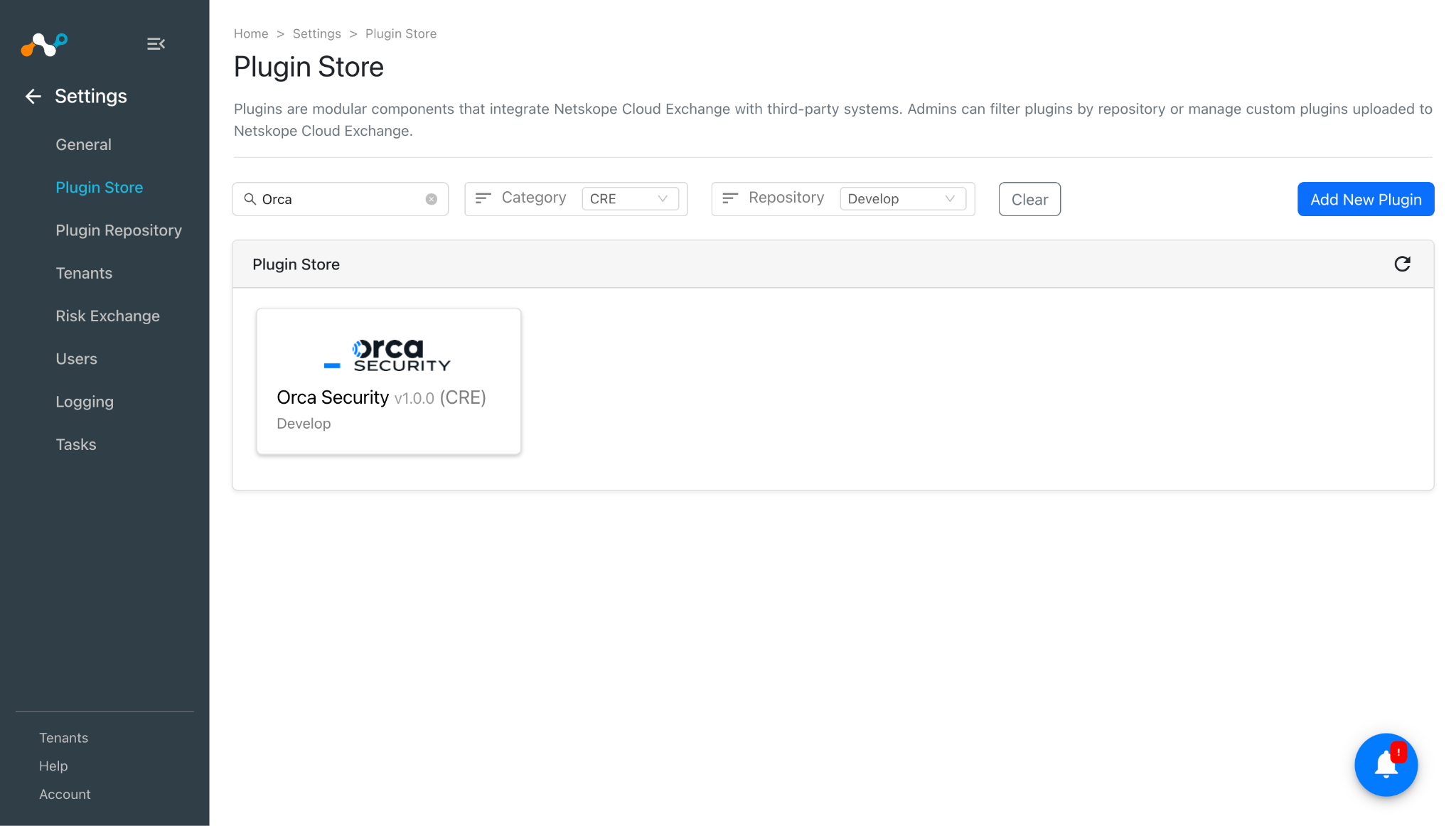
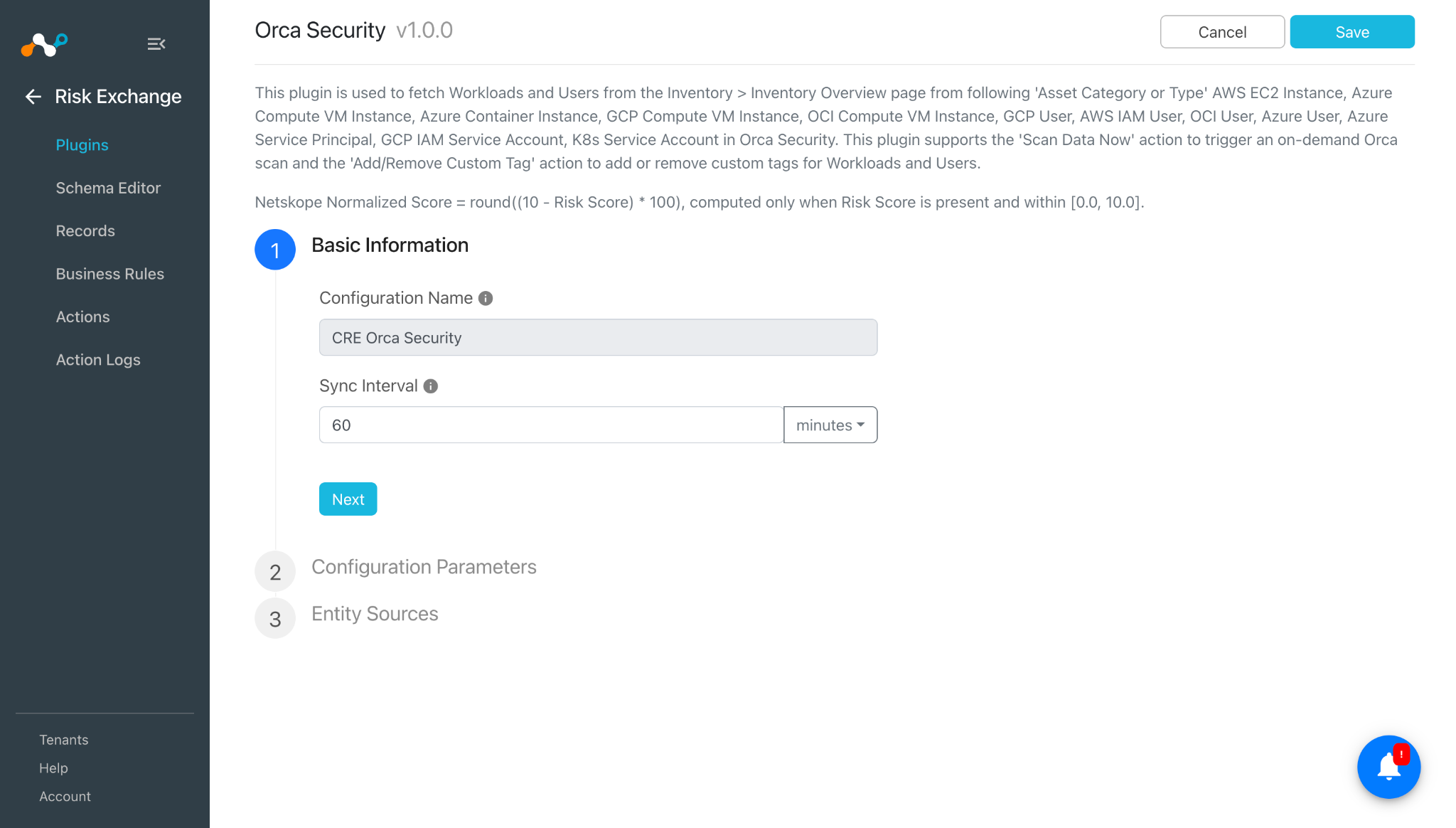
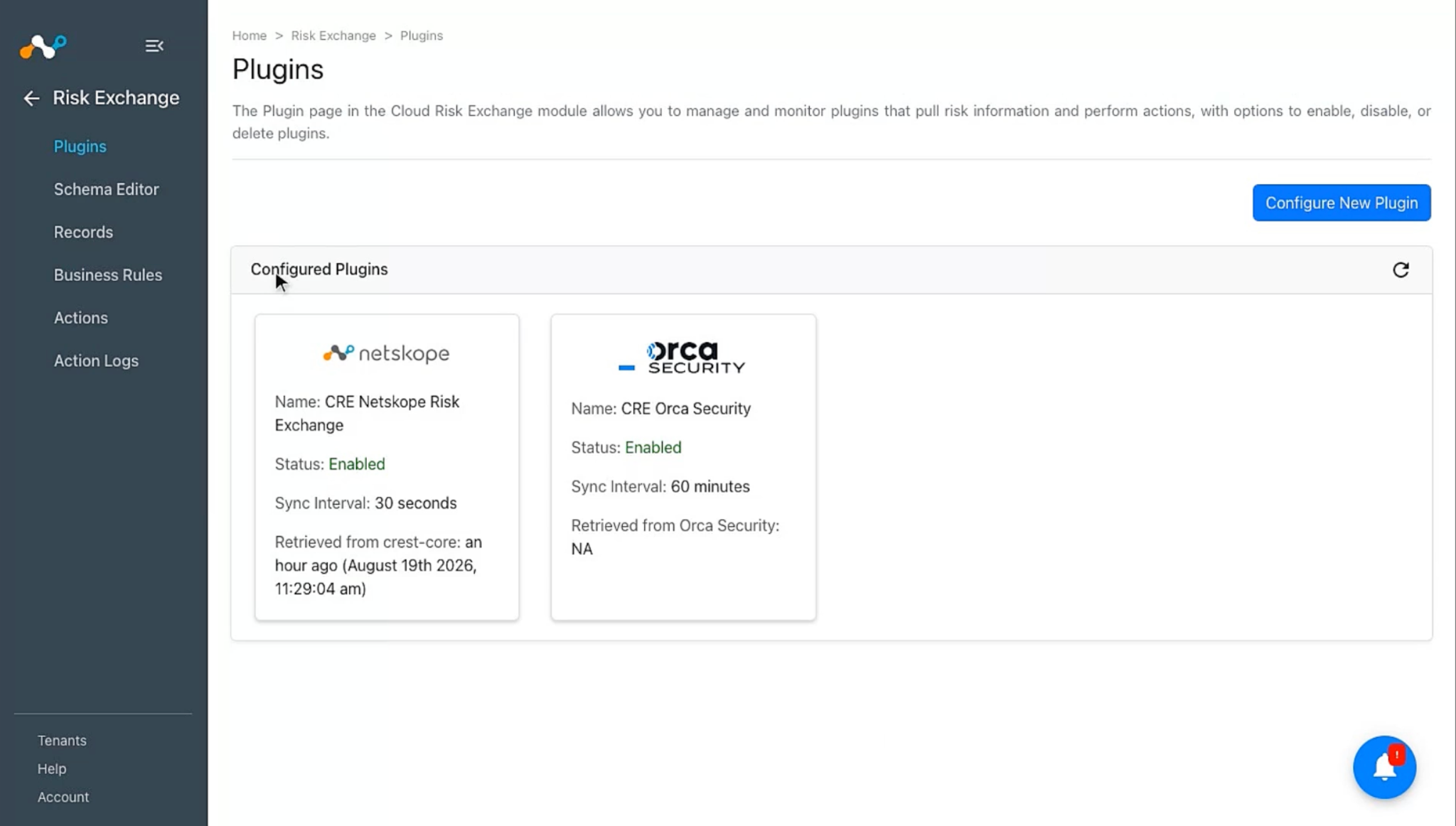
Cloud Exchange で、 Settings > Plugin Storeに移動します。Orca Security v1.0.0プラグインを検索して選択してください。

-
プラグイン構成名を入力し、必要に応じて同期間隔を変更します。

-
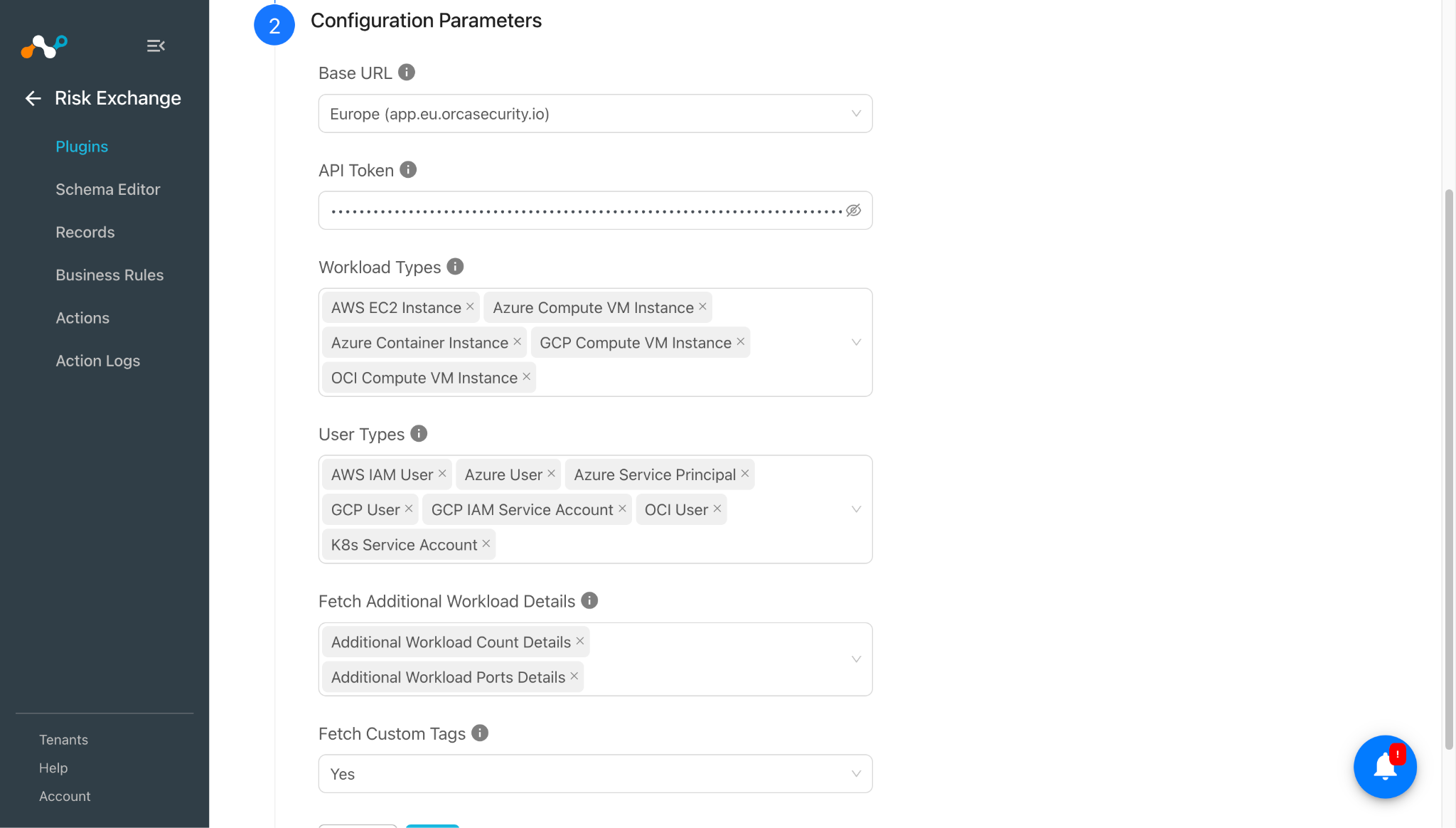
Nextをクリックして、設定パラメータを入力してください。
- Base URL: Select Orca Securityテナントのリージョン。異なるベースURLを使用するテナントでカスタムベースURLフィールドを表示するには、Selectを選択します。
- Custom Base URL:Base URLがCustomに設定されている場合にのみ表示されます。表示される場合は必須です。Orca Securityテナントの完全なカスタムベースURLです。URLスキームとネットワークロケーションを含める必要があります。
- API Token: 先ほど取得したOrcaプラットフォームでの認証用APIトークン。
- Workload Types: Select Workload Typesをプルして、ワークロードエンティティレコードをプルします。すべてのワークロードエンティティレコードをプルするには、空のままにします。
- User Types: Select Usersエンティティレコードをプルするユーザータイプを選択します。すべてのUsersエンティティレコードをプルするには、空のままにします。
- Fetch Additional Workload Details: アップデートサイクル中に取得する追加のワークロード詳細を選択します。Additional Workload Count Details が選択されている場合、アラート数、ログイン試行回数、脆弱性数を取得するために、ワークロードごとに
/serving-layer/linked_entities_countへの追加の API 呼び出しが 1 回実行されます。Additional Workload Ports Details が選択されている場合、公開ワークロードのポート、ポートサービス、ポートプロトコルを取得するために、/serving-layer/queryへの追加の API 呼び出しが実行されます。 - Fetch Custom Tags: Yesに設定すると、ワークロードとユーザーの両方でカスタムタグを取得するために、アセットごとに1回、
/manual_tags/{asset_id}への追加のAPI呼び出しが行われます。

-
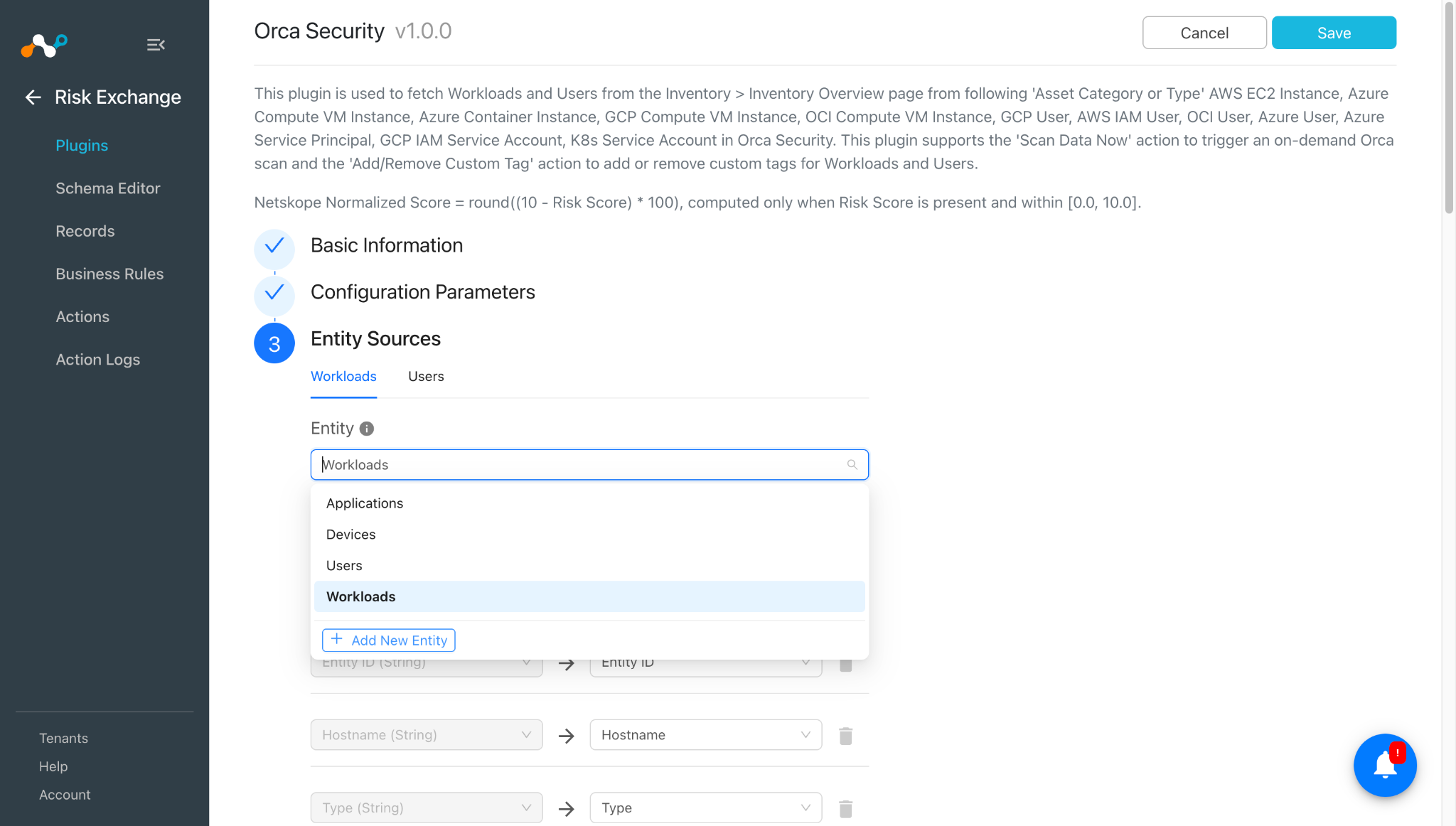
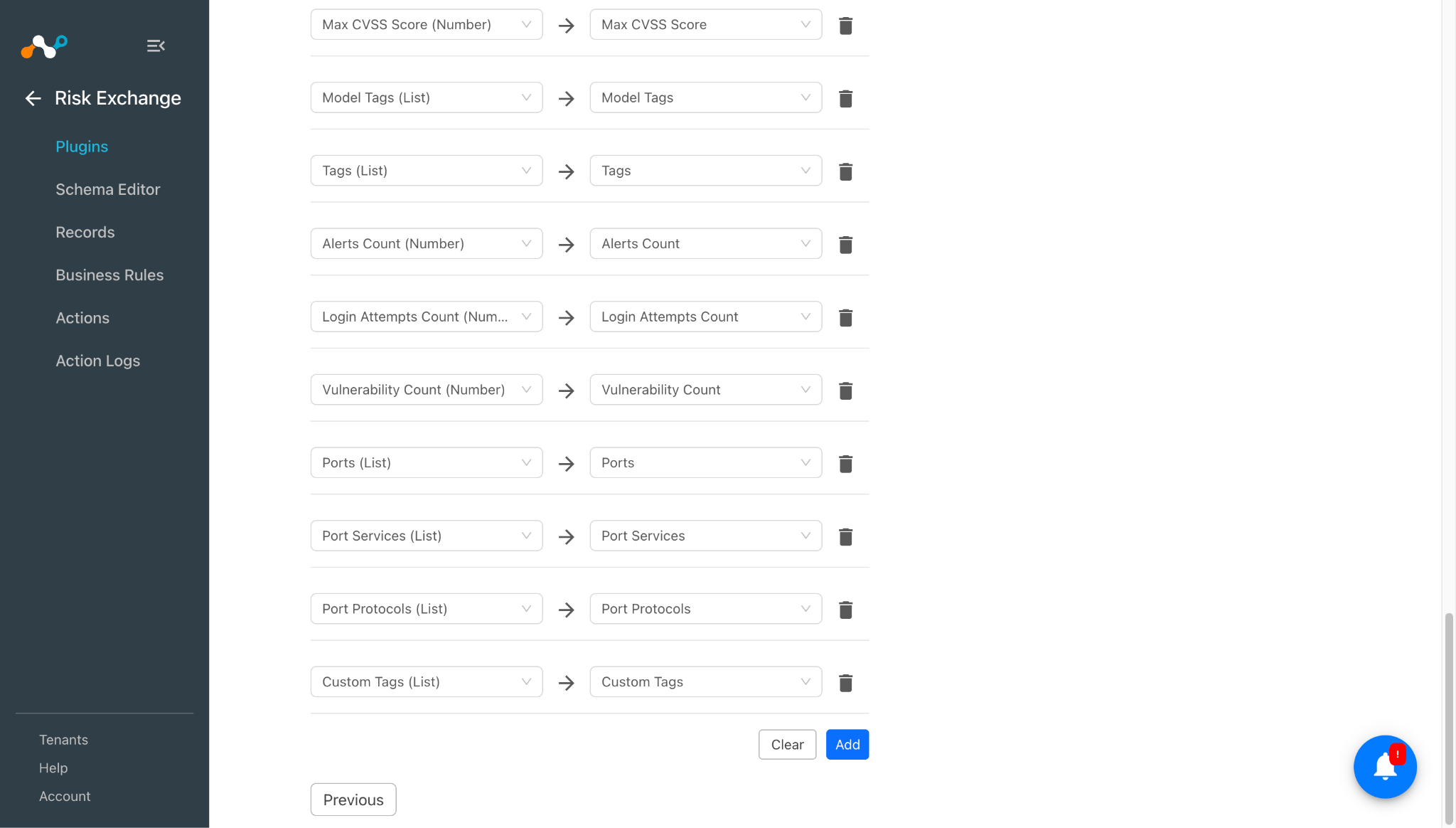
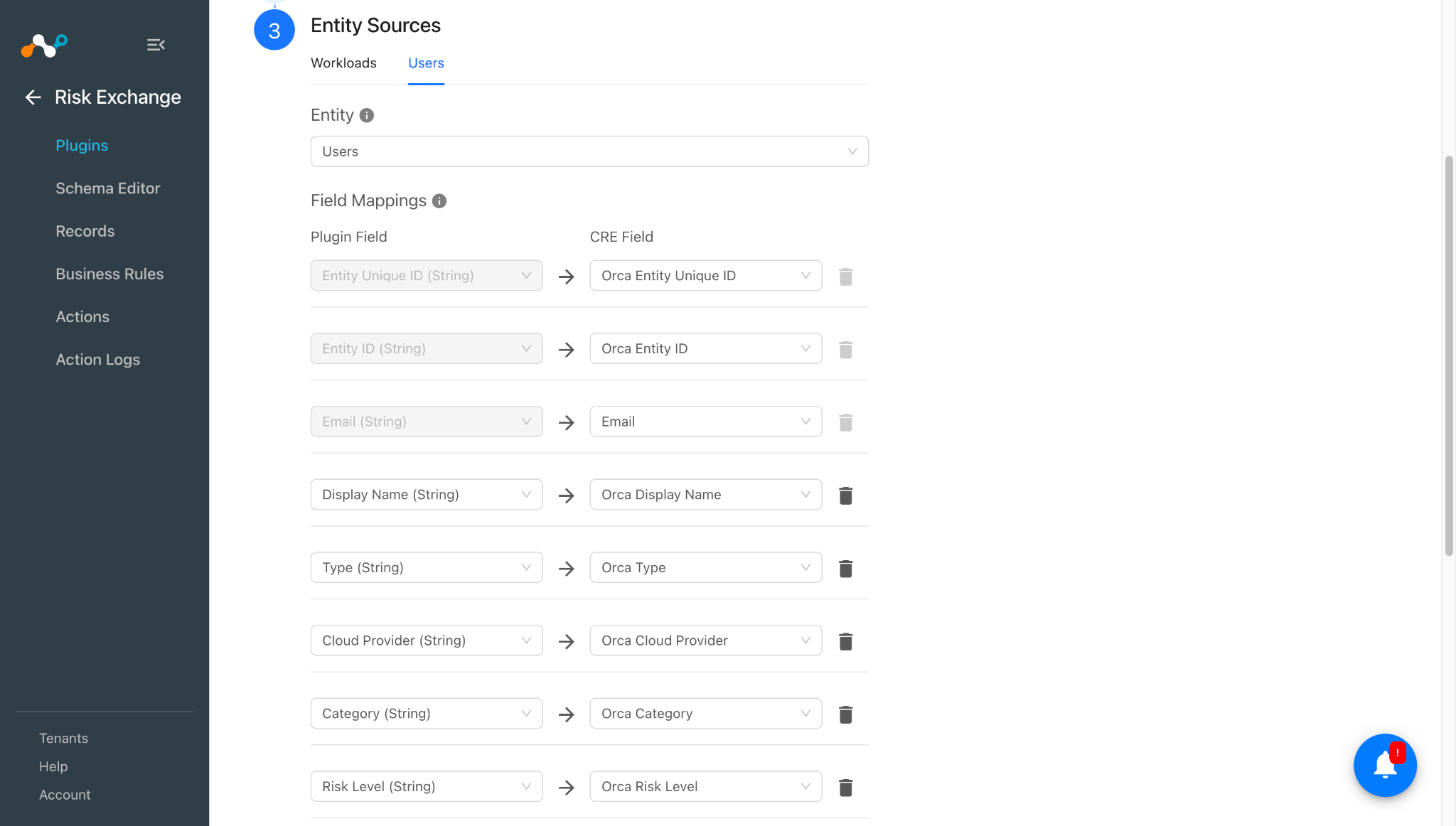
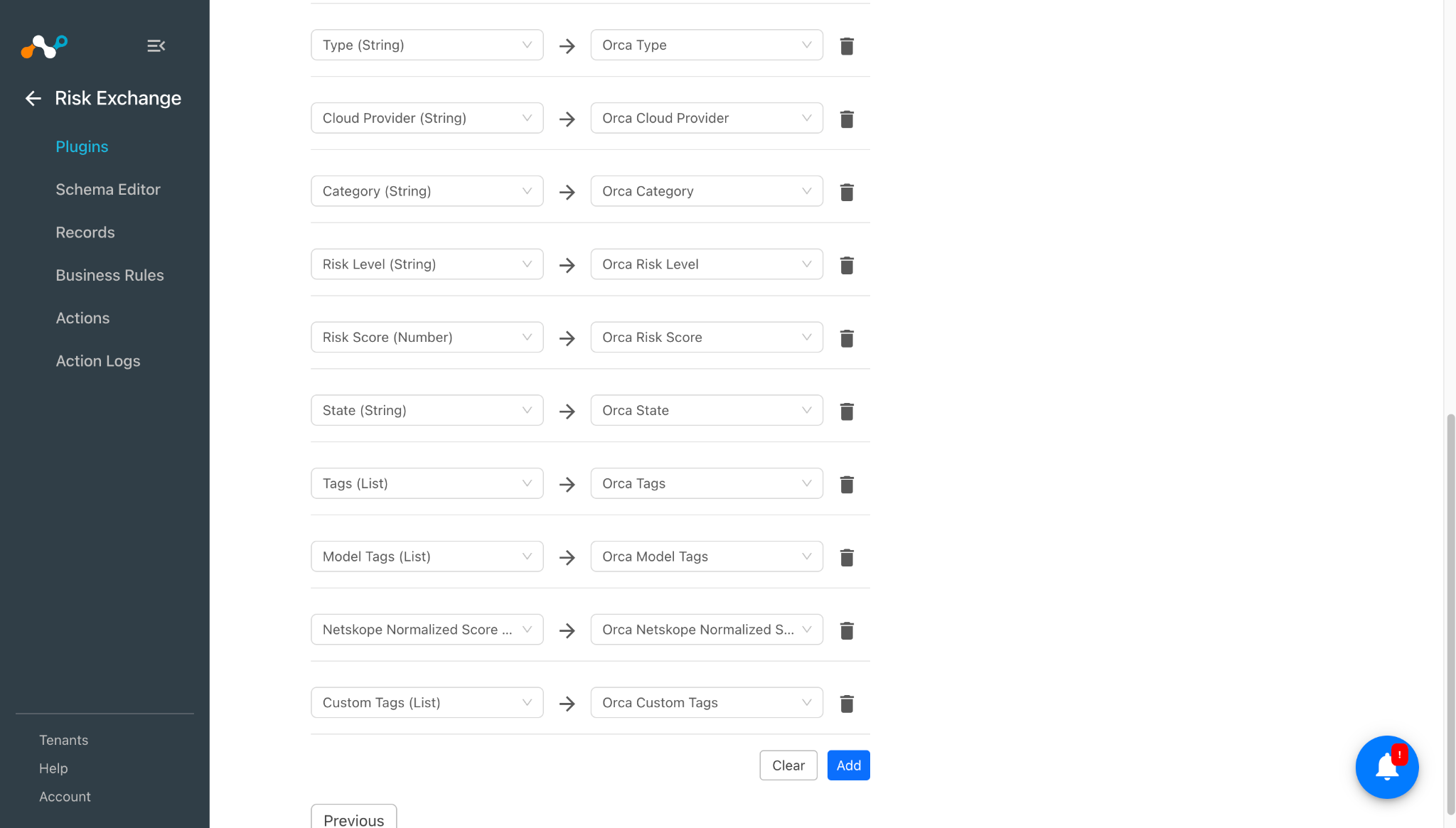
Next をクリックし、Entity ドロップダウンから必要なEntityを選択します。ニーズに合わせてフィールドマッピングを提供します。Add New Entity をクリックして、新しいEntityを作成できます。

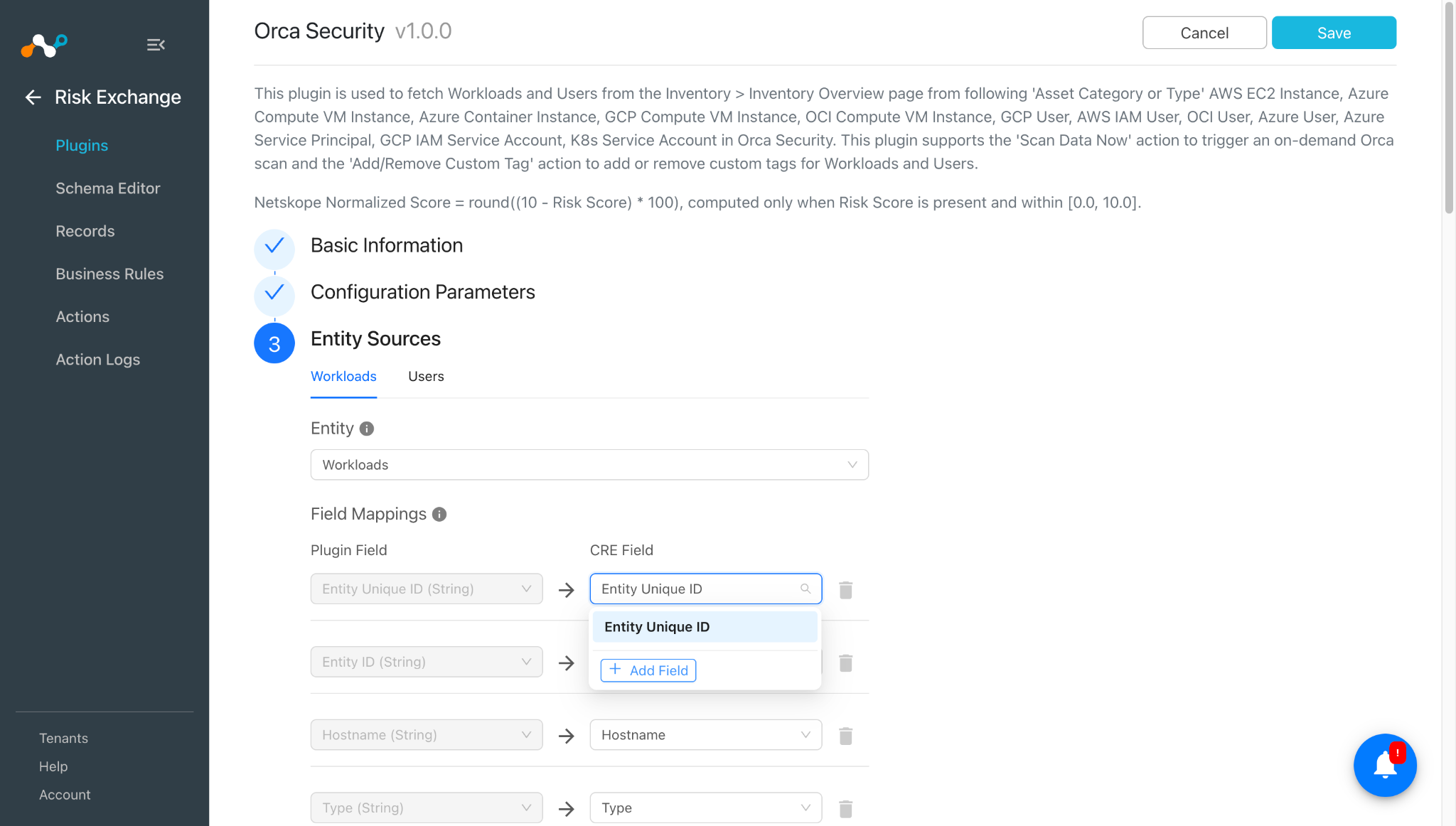
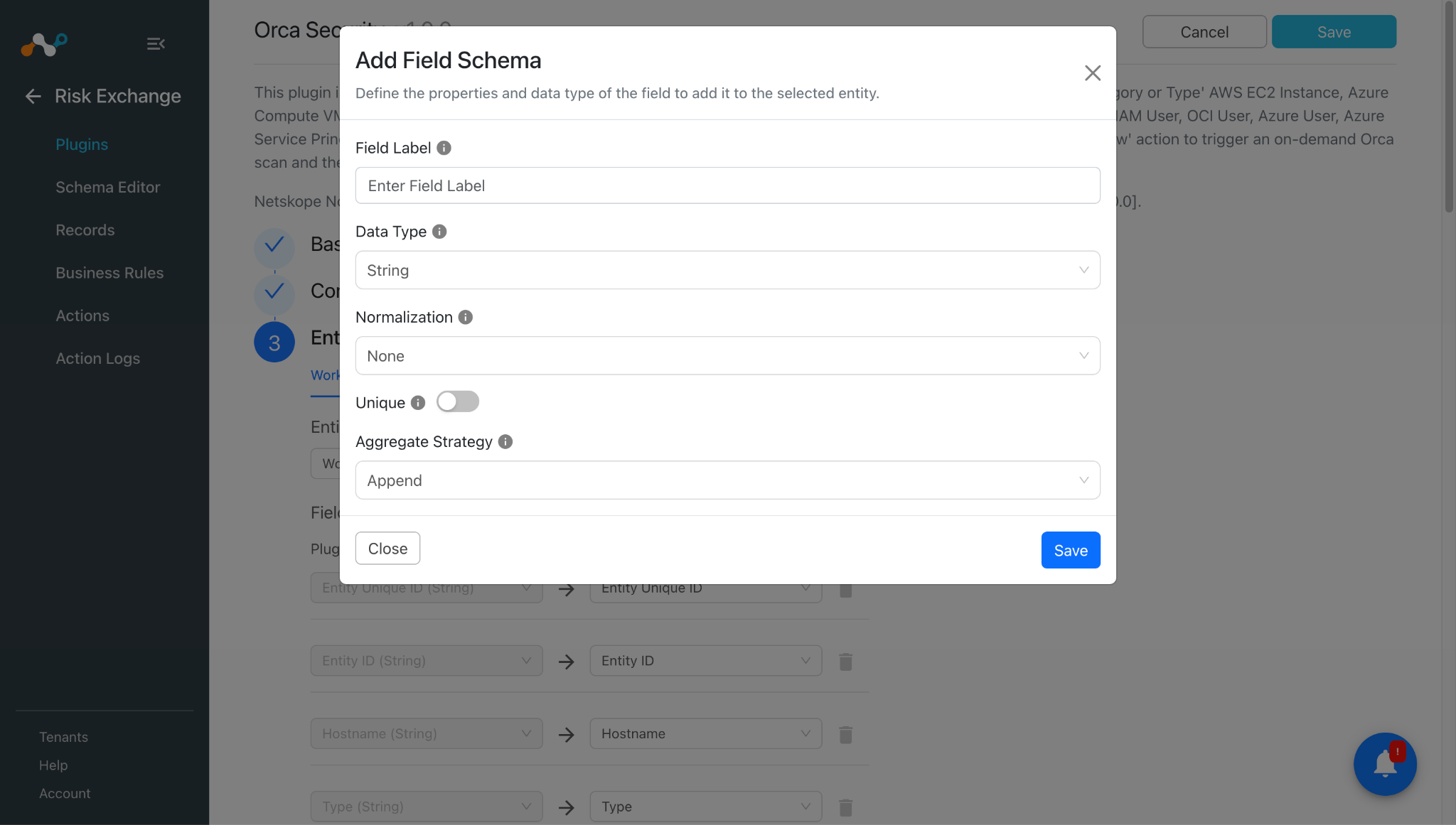
新しいフィールドを作成するには、 Add fieldをクリックしてください。

必要に応じてフィールドラベル、データ型、正規化、集計戦略を指定し、Saveをクリックします。

作成したフィールドをマッピングします。


同様に、Users Entity にマップされたフィールドは次のとおりです。

 プラグインを設定する前に、「マッピング」セクションを参照してください。
 -
Saveをクリックしてください。

Orca SecurityプラグインのRisk Exchangeビジネスルールの追加
-
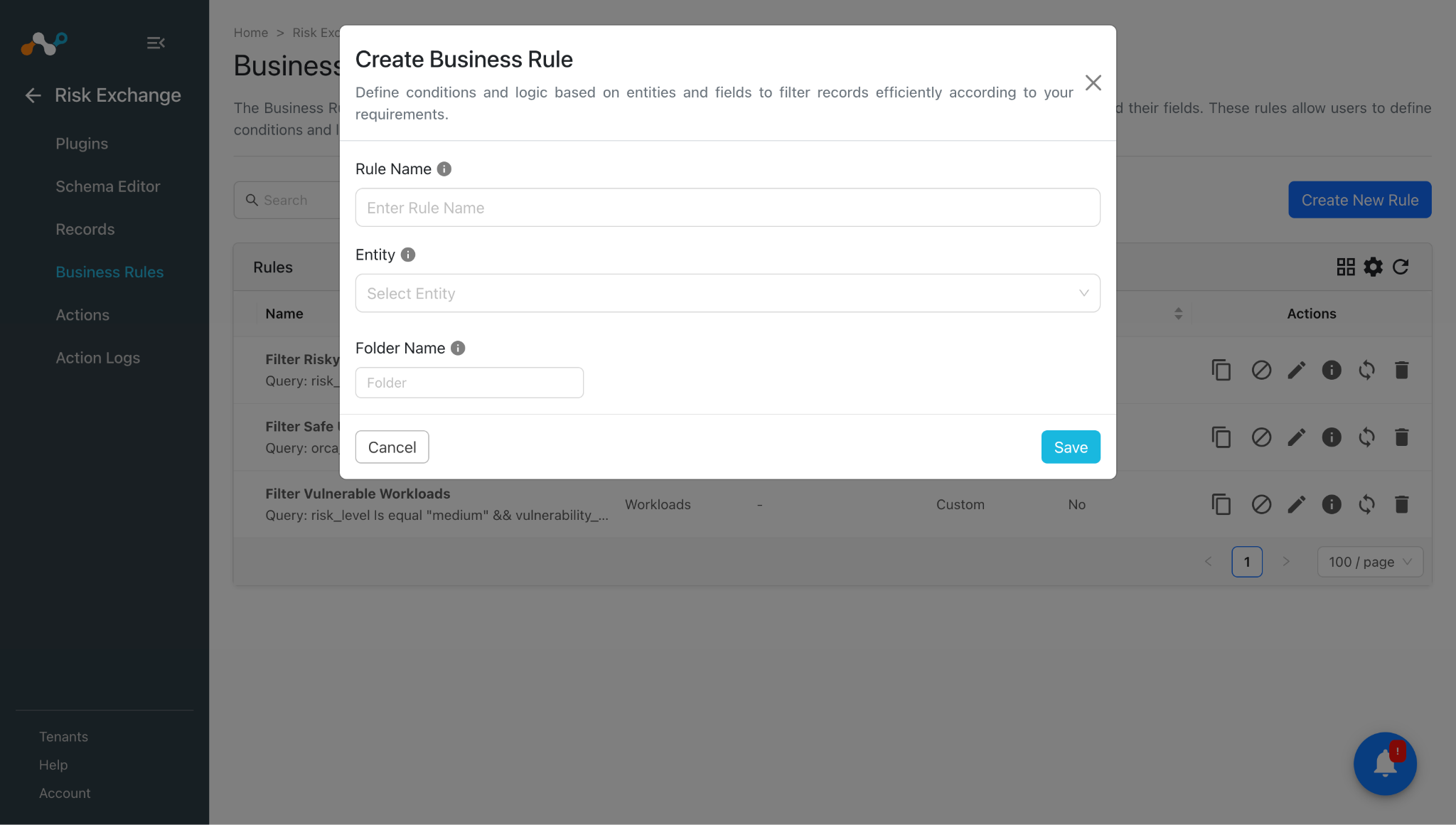
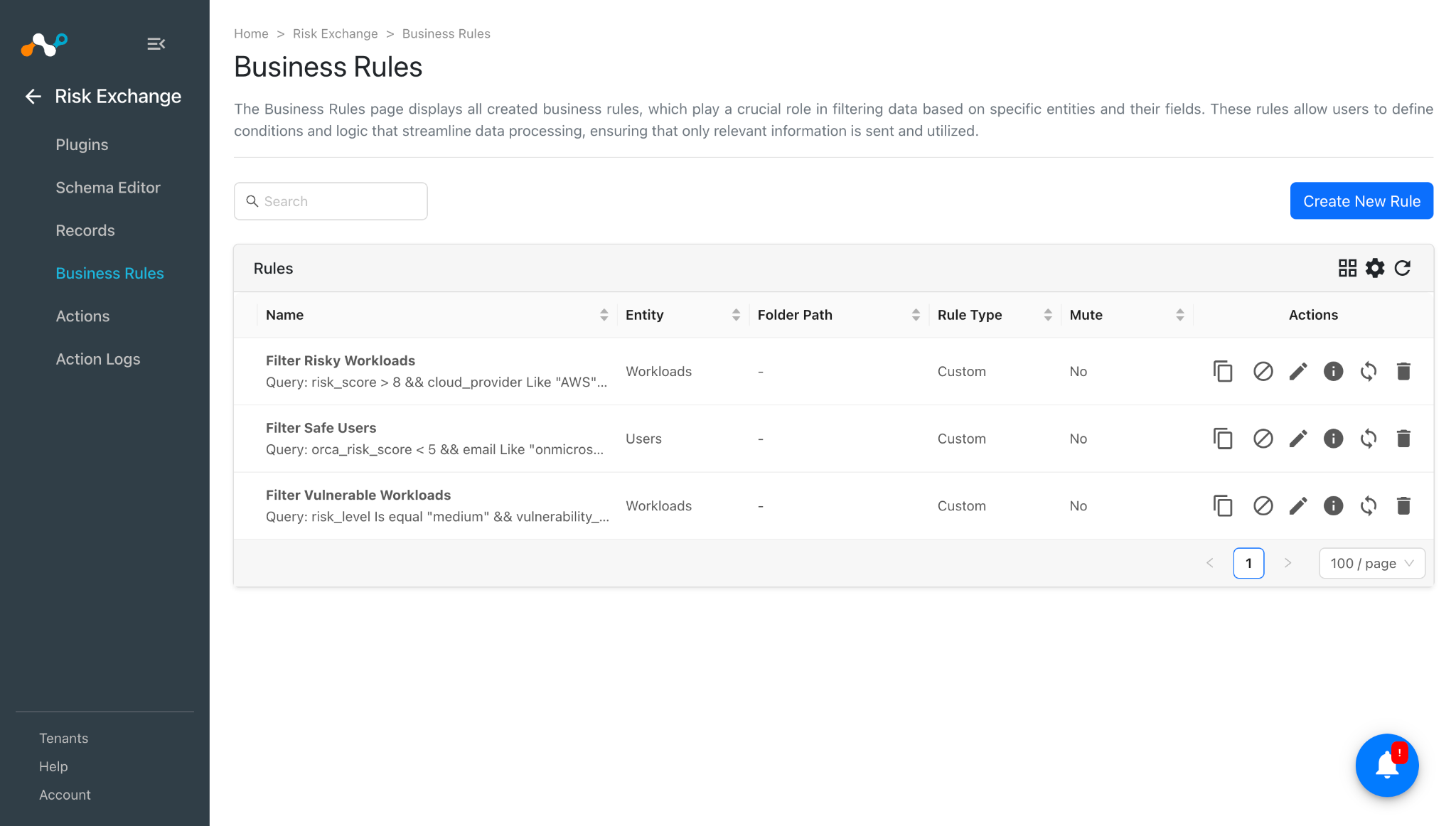
Risk Exchange > Business Rulesに移動してCreate New Ruleをクリックしてください。
-
ルール名を入力してください。Select Orca Security プラグイン用に構成されたフィールドのエンティティを選択し、要件に基づいてクエリを構成します。この例では、プラグインから取得したデータをフィルタリングします。

-
Saveをクリックしてください。

Orca Securityプラグイン用のRisk Exchangeアクションの追加
Orca Securityプラグインは、次のアクションタイプをサポートしています:
- Add/Remove Custom Tag:このアクションを使用して、Orca Securityインスタンスから取得した、サポートされているワークロードやユーザーに対するタグの追加や削除を行うことができます。
- Scan Data Now:このアクションを使用して、Orca Security インスタンスから取得した、サポートされている Workloads および Users に対する Scan Data Now アクションをトリガーできます。
- No Actionこのアクションに対しては、何も措置は講じられません。Ticket Orchestrator で UBA アラートを生成するには、 このアクションを実行し、 [アラートの生成]トグルを有効にします。
Add/Remove Custom Tag
- Risk Exchange > Actionsに移動してAdd Action Configurationをクリックしてください。
- ドロップダウンから必要なビジネスルール、構成、およびアクションを選択し、次のアクションパラメータを入力します:
- Tag Action: アセットにタグを追加するか削除するか。ドロップダウンの [タグのアクション (Tag Action)] で [Static] を Select します。
- Tag Key: 追加または削除するカスタムタグのキー。ドロップダウンからタグの値として Static を Select します。このフィールドでは複数の値は許可されないことに注意してください。
- Tag Value: カスタムタグの価値。タグのアクションが Add の場合にのみ必須となります。Select 静的フィールドのみ。このフィールドでは複数の値は許可されないことに注意してください。
- Entity ID: タグ付け/タグ付け解除する資産のOrca
id。Entity ID ソースフィールドを Select して、マッチした各ビジネスルールレコードから自動的に解決するか、どのレコードがマッチしたかに関係なく単一の特定の資産にタグ付け/タグ付け解除するための1つの固定された静的値を入力します。このフィールドでは複数の値は許可されないことに注意してください。
- 取得したレコードに対して操作を実行する前に承認が必要な場合は、 「承認が必要」トグルを有効にしてください。
- Saveをクリックしてください。


今すぐデータをスキャン
- Risk Exchange > Actionsに移動してAdd Action Configurationをクリックしてください。
- それぞれのドロップダウンから必要なビジネスルール、構成、アクションを選択し、次のアクションパラメータを入力します。
Asset Unique ID: スキャンするアセットの Orca の「asset_unique_id」。一致した各ビジネスルールレコードから自動的に解決するために「ソース」フィールドに Entity Unique ID を Select するか、一致したレコードに関係なく単一の特定のアセットをスキャンするための固定値を1つ入力します。このフィールドでは複数の値は許可されないことに注意してください。 - 取得したレコードに対して操作を実行する前に承認が必要な場合は、 「承認が必要」トグルを有効にしてください。
- Saveをクリックしてください。

No Action
- Risk Exchange > Actionsに移動してAdd Action Configurationをクリックしてください。
- それぞれのドロップダウンリストから、必要なビジネスルール、設定、およびアクションSelect 。
- 取得したレコードに対して操作を実行する前に承認が必要な場合は、 「承認が必要」トグルを有効にしてください。
- Saveをクリックしてください。

Orca Securityプラグインを検証する
Cloud Exchangeで検証する
Risk Exchangeに移動し、 Records をクリックします。Select the Entity that was selected while configuring the field mapping to view the pulled records.


取得したレコードに関連するログを確認するには、 Settings > Loggingに移動し、プラグイン名またはプラグイン構成名でフィルタを適用します。


アクション検証
実行された「カスタムタグの追加/削除」アクションのログ:


今実行されたスキャンデータのログ:

実行された「アクションなし」のアクションのログ:

プルされたレコードが構成されたビジネスルールのいずれかと一致すると、構成されたアクションがそのレコードに対して実行されます。これは、Cloud Risk Exchange > アクションログで確認できます。

Orca Securityで検証
Orca Securityで利用可能な資産(ユーザーおよびワークロード)を表示するには、Orca Securityインスタンスにログインしてください。

Inventory > Inventory Overviewへ移動します。ここからレコードがCloud Exchangeにプルされます。

アセットカテゴリを指定してフィルターを適用し、ユーザーを表示します。例:

資産のいずれかをクリックすると、詳細が表示されます。

同様に、以下のように Workloads に関連するカテゴリをフィルタリングできます。

いずれかの資産をクリックすると、詳細が開きます。

アクション検証
カスタムタグの追加/削除を行うには、特定の資産をフィルターで絞り込み、詳細ビューを開きます。


「Scan Data Now」については、Orca Securityインスタンスで通知を確認できます。

スキャンのステータスを確認するには、対象のアセットの詳細ビューを開きます。

Orca Security プラグインのトラブルシューティング
Orca Security プラグインを構成できません
エラーが発生してプラグインの保存に失敗する場合、以下のいずれかの理由が考えられます。
- ベースURLが正しくないか、CEインスタンスからアクセスできません。
- APIトークンが無効であるか、有効期限が切れているか、十分な権限がありません。
What to do:上記の問題を解決するには、以下の手順に従ってください。
- Base URL が正しい Orca Security インスタンス URL であることを確認します
- APIトークンの有効期限が切れておらず、必要な権限がすべて付与されていることを確認します。Orca Securityプラットフォームでの設定(Configuration on the Orca Security platform)セクションを参照してください。
Orca Securityプラグインからレコードを取得できません
資産レコードをプルできない場合、レコードが Orca Security プラットフォーム上で利用できないことが原因である可能性があります。
What to do: プラグインの設定で使用されている「Workload Types」および「User Types」の下で、レコードがOrca Securityプラットフォーム上に存在するかどうかを確認します。Orca Securityでの検証セクションを参照してください。
既知の行動
- Orca Security APIは、orcaインスタンスで見つからなかったアセット一意IDに対して200ステータスコードを返すため、アクションログにはCloud Exchangeでの「成功」が表示されます。
- Orca Security UIでは、1つのAsset Unique IDに対して複数のレコードが表示されることがあります。
