

このドキュメントではCloud Exchangeプラットフォームで Tanium v1.0.0 プラグインを構成する方法について説明します。 このプラグインは、Tanium プラットフォームの[モジュール] > [脅威への対応] > [アラート]ページからタイプ ハッシュ (MD5 および SHA256) のインジケーターをフェッチするために使用されます。 このプラグインは、Tanium プラットフォームへのインジケーターの共有をサポートしていません。 このプラグインは、Tanium プラットフォームから取得したインジケーターの撤回をサポートします。
前提条件
この設定を完了するには、以下が必要です。
- Netskopeテナント(または、例えば本番環境と開発/テスト環境など、複数のテナント)。
- Netskopeテナント上のファイルプロファイル。
- Netskope Cloud Exchangeテナントには、テナントプラグインと脅威交換プラグインが既に設定済みです。
- Tanium プラットフォームへの接続。
- Tanium Threat Response Moduleサービスのサブスクリプション。
- Taniumの管理者権限でAPIトークンを生成し、アラートを取得できます。
- 以下のホストへの接続: https://*-api.titankube.com/ 。
Taniumプラグインのサポート
このプラグインは、Tanium プラットフォームの[モジュール] > [脅威への対応] > [アラート]ページからタイプ ハッシュ (MD5 および SHA256) のインジケーターをフェッチするために使用されます。 このプラグインは、Tanium プラットフォームへのインジケーターの共有をサポートしていません。 このプラグインは、Tanium プラットフォームから取得したインジケーターの撤回をサポートします。
| 取得したインジケータータイプ | 共有指標タイプ |
|---|---|
| ハッシュ(MD5およびSHA256) | NA |
IoC撤回
IoCの取り消し(プル):インジケーターはTaniumから取得され、その後のプルサイクルでTanium上で一部のインジケーターが削除された場合、Netskope Cloud Exchangeで取り消し済みとしてマークされます。
| 引き込みタイプ | サポートされているリトラクションタイプ |
|---|---|
| IoCリトラクション(プル) | はい |
| IoCリトラクション(プッシュ) | いいえ |
マッピング
プルマッピング
| Netskope CTEフィールド | Tanium APIフィールド |
|---|---|
| タイプ | (値から型を識別する) |
| value | details.match.properties.file.md5 details.match.properties.file.sha256 details.match.properties.parent.file.md5 details.match.properties.parent.file.sha256 |
| firstSeen | details.finding.first_seen |
| lastSeen | details.finding.last_seen |
| 重大度 | 重大度 |
| コメント | Priority: <priority> Intel Name:<intelDoc.name> Intel Description: <intelDoc.description> Intel Source Name: <intelDoc.source.name> Path: <details.match.properties.{parent}.file.fullpath> |
| tags | 親プロセスハッシュ 子プロセスハッシュ マッチタイプ |
プル型タスクの重要度マッピング
| Netskopeの重要度 | タニウムの深刻度 |
|---|---|
| low | low |
| medium | medium |
| high | high |
| critical | critical |
| unknown | info |
権限
APIトークンを生成し、アラートを取得するには、ユーザーは管理者ユーザーロールを持っている必要があります。
APIの詳細
使うAPI一覧
| APIエンドポイント | 方法 | 使うケース |
|---|---|---|
| /plugin/products/threat-response/api/v1/alerts | 得る | 脅威対応アラートを取得する |
脅威対応アラートを取得する
API endpoint: <API Base URL>/plugin/products/threat-response/api/v1/alerts
Method: 得る
Headers
| 鍵 | Value |
|---|---|
| session | <API Token> |
| ユーザーエージェント | netskope-ce-5.1.2-cte-tanium-v1.0.0 |
Parameters
| 鍵 | Value |
|---|---|
| expand | intelDoc |
| limit | 1000 |
| offset | 0 |
| alertedAtFrom | <time> |
| sort | alertedAt |
Sample API Response
{
    "data": [
        {
            "id": 244,
            "eid": 1004,
            "state": "inprogress",
            "type": "detect.match",
            "guid": "00000000-0000-0000-d672-a2f862b6c592",
            "priority": "high",
            "severity": "info",
            "details": "{\"match\":{\"hash\":\"8671925402277025835\",\"type\":\"process\",\"source\":\"recorder\",\"version\":1,\"contexts\":[{\"file\":{\"uniqueEventId\":\"4611686018429125664\"},\"event\":{\"fileDelete\":{\"path\":\"D:\\\\Users\\\\kes@google.in\\\\Downloads\\\\NSClient_addon-crest.betaskope.com_6410_rQ14jxRpa5CwQd5gjVkl_7qP2WqobiUcqDK17of58ZioLqPxKk8SMcjJb3d58_.msi:Zone.Identifier\"},\"timestampMs\":\"1737540697695\"}}],\"properties\":{\"pid\":9528,\"args\":\"C:\\\\Windows\\\\Explorer.EXE\",\"file\":{\"md5\":\"d2baaaaa96839af424e3bd69a0b22c71\",\"sha1\":\"00e6d95a94e564d94b58788816be303a06047b0b\",\"sha256\":\"a438bf739441f96f2db9f9bd49aa361a298f9498ba814acea29d5ea6a2d4468c\",\"fullpath\":\"C:\\\\Windows\\\\explorer.exe\"},\"name\":\"C:\\\\Windows\\\\explorer.exe\",\"ppid\":9248,\"user\":\"google\\\\kes\",\"parent\":{\"pid\":9248,\"args\":\"C:\\\\Windows\\\\system32\\\\userinit.exe\",\"file\":{\"md5\":\"6d1d512b5f2670d3e4035939bc57e655\",\"sha1\":\"71882ca27c9028062dcb37178a1694af54cd9586\",\"sha256\":\"095d63e4c5b6430fad8e1acafce578231a0efea3c870c68ed4eeae8484aa9530\",\"fullpath\":\"C:\\\\Windows\\\\System32\\\\userinit.exe\"},\"name\":\"C:\\\\Windows\\\\System32\\\\userinit.exe\",\"ppid\":860,\"user\":\"google\\\\kes\",\"parent\":{\"pid\":860,\"args\":\"winlogon.exe\",\"file\":{\"fullpath\":\"C:\\\\Windows\\\\System32\\\\winlogon.exe\"},\"name\":\"C:\\\\Windows\\\\System32\\\\winlogon.exe\",\"ppid\":780,\"user\":\"NT AUTHORITY\\\\SYSTEM\",\"parent\":{\"pid\":780,\"args\":\"\\\\SystemRoot\\\\System32\\\\smss.exe 000000d0 0000008c \",\"file\":{\"fullpath\":\"C:\\\\Windows\\\\System32\\\\smss.exe\"},\"name\":\"C:\\\\Windows\\\\System32\\\\smss.exe\",\"ppid\":556,\"user\":\"NT AUTHORITY\\\\SYSTEM\",\"parent\":{\"pid\":556,\"args\":\"\\\\SystemRoot\\\\System32\\\\smss.exe\",\"file\":{\"fullpath\":\"C:\\\\Windows\\\\System32\\\\smss.exe\"},\"name\":\"C:\\\\Windows\\\\System32\\\\smss.exe\",\"ppid\":4,\"user\":\"NT AUTHORITY\\\\SYSTEM\",\"parent\":{\"pid\":4,\"file\":{\"fullpath\":\"System\"},\"name\":\"System\",\"user\":\"NT AUTHORITY\\\\SYSTEM\",\"start_time\":\"2025-01-21T10:29:31.000Z\",\"recorder_unique_id\":\"8569627172349557237\"},\"start_time\":\"2025-01-21T10:29:31.000Z\",\"recorder_unique_id\":\"3804061124233752300\"},\"start_time\":\"2025-01-21T10:29:35.000Z\",\"recorder_unique_id\":\"18323218992899302098\"},\"start_time\":\"2025-01-21T10:29:35.000Z\",\"recorder_unique_id\":\"8017205500022428559\"},\"start_time\":\"2025-01-21T10:33:04.000Z\",\"recorder_unique_id\":\"3695158773730177212\"},\"start_time\":\"2025-01-21T10:33:11.000Z\",\"recorder_unique_id\":\"6415688394152031122\"}},\"finding\":{\"whats\":[{\"source_name\":\"recorder\",\"intel_intra_ids\":[{\"id_v2\":\"10420185013891409313\"},{\"id_v2\":\"13232781051211547001\"}],\"artifact_activity\":{\"acting_artifact\":{\"process\":{\"pid\":9528,\"file\":{\"file\":{\"hash\":{\"md5\":\"d2baaaaa96839af424e3bd69a0b22c71\",\"sha1\":\"00e6d95a94e564d94b58788816be303a06047b0b\",\"sha256\":\"a438bf739441f96f2db9f9bd49aa361a298f9498ba814acea29d5ea6a2d4468c\"},\"path\":\"C:\\\\Windows\\\\explorer.exe\",\"signature_data\":{\"issuer\":\"Microsoft Windows Production PCA 2011\",\"status\":1,\"subject\":\"Microsoft Windows\"}},\"artifact_hash\":\"4668134681718746372\",\"instance_hash\":\"4668134681718746372\"},\"user\":{\"user\":{\"name\":\"kes\",\"domain\":\"google\",\"user_id\":\"S-1-5-21-769425621-2486857270-3423107360-1145\"}},\"parent\":{\"process\":{\"pid\":9248,\"file\":{\"file\":{\"hash\":{\"md5\":\"6d1d512b5f2670d3e4035939bc57e655\",\"sha1\":\"71882ca27c9028062dcb37178a1694af54cd9586\",\"sha256\":\"095d63e4c5b6430fad8e1acafce578231a0efea3c870c68ed4eeae8484aa9530\"},\"path\":\"C:\\\\Windows\\\\System32\\\\userinit.exe\",\"signature_data\":{\"issuer\":\"Microsoft Windows Production PCA 2011\",\"status\":1,\"subject\":\"Microsoft Windows\"}},\"artifact_hash\":\"16325832498882432364\",\"instance_hash\":\"16325832498882432364\"},\"user\":{\"user\":{\"name\":\"kes\",\"domain\":\"google\",\"user_id\":\"S-1-5-21-769425621-2486857270-3423107360-1145\"}},\"parent\":{\"process\":{\"pid\":860,\"file\":{\"file\":{\"path\":\"C:\\\\Windows\\\\System32\\\\winlogon.exe\",\"signature_data\":{\"issuer\":\"Microsoft Windows Production PCA 2011\",\"status\":1,\"subject\":\"Microsoft Windows\"}},\"artifact_hash\":\"13433015920877340112\",\"instance_hash\":\"13433015920877340112\"},\"user\":{\"user\":{\"name\":\"SYSTEM\",\"domain\":\"NT AUTHORITY\",\"user_id\":\"S-1-5-18\"}},\"parent\":{\"process\":{\"pid\":780,\"file\":{\"file\":{\"path\":\"C:\\\\Windows\\\\System32\\\\smss.exe\",\"signature_data\":{\"issuer\":\"Microsoft Windows Production PCA 2011\",\"status\":1,\"subject\":\"Microsoft Windows Publisher\"}},\"artifact_hash\":\"13095238853773225043\",\"instance_hash\":\"13095238853773225043\"},\"user\":{\"user\":{\"name\":\"SYSTEM\",\"domain\":\"NT AUTHORITY\",\"user_id\":\"S-1-5-18\"}},\"parent\":{\"process\":{\"pid\":556,\"file\":{\"file\":{\"path\":\"C:\\\\Windows\\\\System32\\\\smss.exe\",\"signature_data\":{\"issuer\":\"Microsoft Windows Production PCA 2011\",\"status\":1,\"subject\":\"Microsoft Windows Publisher\"}},\"artifact_hash\":\"13095238853773225043\",\"instance_hash\":\"13095238853773225043\"},\"user\":{\"user\":{\"name\":\"SYSTEM\",\"domain\":\"NT AUTHORITY\",\"user_id\":\"S-1-5-18\"}},\"parent\":{\"process\":{\"pid\":4,\"file\":{\"file\":{\"path\":\"System\",\"signature_data\":{\"status\":7}},\"artifact_hash\":\"10673367317368319370\",\"instance_hash\":\"10673367317368319370\"},\"user\":{\"user\":{\"name\":\"SYSTEM\",\"domain\":\"NT AUTHORITY\",\"user_id\":\"S-1-5-18\"}},\"handles\":[],\"arguments\":{},\"start_time\":\"2025-01-21T10:29:31.000Z\",\"tanium_unique_id\":\"8569627172349557237\"},\"artifact_hash\":\"133628619820746138\",\"instance_hash\":\"17432442374944931046\"},\"handles\":[],\"arguments\":\"\\\\SystemRoot\\\\System32\\\\smss.exe\",\"start_time\":\"2025-01-21T10:29:31.000Z\",\"tanium_unique_id\":\"3804061124233752300\"},\"artifact_hash\":\"6295600673353488791\",\"instance_hash\":\"10239728948408888913\"},\"handles\":[],\"arguments\":\"\\\\SystemRoot\\\\System32\\\\smss.exe 000000d0 0000008c \",\"start_time\":\"2025-01-21T10:29:35.000Z\",\"tanium_unique_id\":\"18323218992899302098\"},\"artifact_hash\":\"1682511555763885258\",\"instance_hash\":\"9882236691747135410\"},\"handles\":[],\"arguments\":\"winlogon.exe\",\"start_time\":\"2025-01-21T10:29:35.000Z\",\"tanium_unique_id\":\"8017205500022428559\"},\"artifact_hash\":\"15202984064548280121\",\"instance_hash\":\"9617131730790084616\"},\"handles\":[],\"arguments\":\"C:\\\\Windows\\\\system32\\\\userinit.exe\",\"start_time\":\"2025-01-21T10:33:04.000Z\",\"tanium_unique_id\":\"3695158773730177212\"},\"artifact_hash\":\"15310695090792779169\",\"instance_hash\":\"3453834692933203077\"},\"handles\":[],\"arguments\":\"C:\\\\Windows\\\\Explorer.EXE\",\"start_time\":\"2025-01-21T10:33:11.000Z\",\"tanium_unique_id\":\"6415688394152031122\"},\"artifact_hash\":\"8671925402277025835\",\"instance_hash\":\"8851274989043869165\",\"is_intel_target\":true},\"relevant_actions\":[{\"verb\":4,\"target\":{\"file\":{\"path\":\"D:\\\\Users\\\\kes@google.in\\\\Downloads\\\\NSClient_addon-crest.betaskope.com_6410_rQ14jxRpa5CwQd5gjVkl_7qP2WqobiUcqDK17of58ZioLqPxKk8SMcjJb3d58_.msi:Zone.Identifier\"},\"artifact_hash\":\"13157424290436624405\",\"instance_hash\":\"13157424290436624405\"},\"timestamp\":\"2025-01-22T10:11:37.000Z\",\"tanium_recorder_context\":{\"file\":{\"unique_event_id\":\"4611686018429125664\"},\"event\":{\"file_delete\":{\"path\":\"D:\\\\Users\\\\kes@google.in\\\\Downloads\\\\NSClient_addon-crest.betaskope.com_6410_rQ14jxRpa5CwQd5gjVkl_7qP2WqobiUcqDK17of58ZioLqPxKk8SMcjJb3d58_.msi:Zone.Identifier\"},\"timestamp_ms\":\"1737540697695\"}},\"tanium_recorder_event_table_id\":\"4611686018429125664\"}]}}],\"domain\":\"threatresponse\",\"hunt_id\":\"2\",\"type_id\":\"intel\",\"intel_id\":\"701:1:94c7b075-2c70-4bb2-b4a1-9453ebdbf0fc\",\"last_seen\":\"2025-01-22T10:11:39.000Z\",\"threat_id\":\"10420185013891409313,13232781051211547001\",\"finding_id\":\"-2994151614556224110\",\"first_seen\":\"2025-01-22T10:11:39.000Z\",\"source_name\":\"recorder\",\"system_info\":{\"os\":\"Microsoft Windows Server 2022 Datacenter\",\"bits\":64,\"platform\":\"Windows\",\"patch_level\":\"10.0.20348.0.0\",\"build_number\":\"20348\"},\"reporting_id\":\"reporting-id-placeholder\"},\"intel_id\":701,\"config_id\":2,\"config_rev_id\":1}",
            "intelDocId": 701,
            "groupingId": 50,
            "intelDocRevisionId": 1,
            "scanConfigId": 2,
            "scanConfigRevisionId": 1,
            "computerName": "KATHYCOMBS-PC8893.jones.info",
            "computerIpAddress": "16.181.5.2",
            "matchType": "process",
            "path": "C:\\Windows\\explorer.exe",
            "receivedAt": "2025-01-22T10:15:40.062Z",
            "suppressedAt": null,
            "alertedAt": "2025-01-22T10:11:39.000Z",
            "findingId": "-2994151614556224110",
            "ackedAt": "2025-01-22T10:28:35.026Z",
            "firstEIDResolutionAttempt": "2025-01-22T10:15:43.488Z",
            "lastEIDResolutionAttempt": "2025-01-22T10:15:43.488Z",
            "createdAt": "2025-01-22T10:15:40.223Z",
            "updatedAt": "2025-02-24T11:02:31.600Z",
            "sentToConnect": true,
            "reactions": [],
            "intelDoc": {
                "id": 701,
                "type": "tanium-signal",
                "typeVersion": "1.0",
                "md5": "0363a2dc3dad684bd1b8654052813e34",
                "blobId": "d1d19d68-d9a4-49ac-a8ae-49fc7015672a",
                "revisionId": 2,
                "intrinsicId": "Zone Identifier ADS Deletion",
                "name": "Zone Identifier ADS Deletion",
                "description": "Detects deletion of Zone Identifier ADS files that may be related to attacker actvity to cover their tracks.",
                "size": 593,
                "compiled": {
                    "expressions": [],
                    "terms": [
                        {
                            "condition": "ends with",
                            "negate": true,
                            "value": "\\windows\\explorer.exe",
                            "object": "process",
                            "property": "path"
                        },
                        {
                            "event_group": 1,
                            "condition": "ends with",
                            "negate": false,
                            "value": ":Zone.Identifier",
                            "object": "file",
                            "property": "path"
                        },
                        {
                            "event_group": 1,
                            "condition": "is",
                            "negate": false,
                            "value": "delete",
                            "object": "file",
                            "property": "operation"
                        }
                    ],
                    "operator": "and",
                    "text": "group(file.path ends with ':Zone.Identifier' AND file.operation is 'delete') AND process.path ends with NOT '\\\\windows\\\\explorer.exe'",
                    "syntax_version": 2
                },
                "isSchemaValid": true,
                "sourceId": 9,
                "customHash": null,
                "mitreAttack": {
                    "techniques": [
                        {
                            "id": "T1070",
                            "name": "Indicator Removal"
                        },
                        {
                            "id": "T1070.004",
                            "name": "Indicator Removal on Host Mitigation: File Deletion"
                        }
                    ]
                },
                "platforms": [
                    "windows"
                ],
                "createdAt": "2024-09-09T19:30:28.353Z",
                "updatedAt": "2025-08-25T18:06:12.747Z",
                "throttledFindingCount": 0,
                "allowAutoDisable": true,
                "disabled": false,
                "disabledEndpointCount": 0,
                "firstDeploymentTimestamp": "2025-02-12T23:26:41.672Z",
                "lastDeploymentTimestamp": "2025-08-25T18:06:12.714Z",
                "status": "HIGH_FIDELITY",
                "editedAt": "2025-02-12T07:36:08.637Z",
                "source": {
                    "id": 9,
                    "enabled": true,
                    "type": "tanium-signals",
                    "name": "Tanium Signals",
                    "nameSlug": "tanium-signals",
                    "description": "Tanium authored Signals stream",
                    "config": {
                        "subscriptionIntervalMins": 60,
                        "shouldRequireSignature": true,
                        "ignoreSsl": false,
                        "manifestUrl": "https://content.tanium.com/files/misc/ThreatResponse/ThreatResponse.xml"
                    },
                    "state": {
                        "lastIngestVersion": "4.16.0.0001",
                        "lastRunAt": 1756361558483
                    },
                    "createdAt": "2024-09-09T19:30:04.942Z",
                    "updatedAt": "2025-08-28T06:12:38.484Z"
                }
            }
        },
        …
    ],
    "meta": {
        "totalCount": 43,
        "filteredCount": 43
    }
}
パフォーマンスマトリックス
この測定は、Taniumから10万個のIoCを取得することにより、これらの仕様を持つ大規模なCloud Exchangeスタック上で実施されました。
| デスクリプション | 仕様 |
|---|---|
| スタックサイズ | 大容量 RAM: 32 GB コア: 16 |
| Taniumから取得した指標 | ~25k per min |
ユーザーエージェント
netskope-ce-5.1.2-cte-tanium-v1.0.0
ワークフロー
- Tanium上でAPIトークンを作成します。
- Taniumプラグインを設定します。
- ビジネスルールを追加します。
- アクションを追加します。
- Taniumプラグインを検証します。
動画を見る
再生ボタンをクリックして動画をご覧ください。
TaniumでAPIトークンを作成する
- Tanium プラットフォームにログインします。
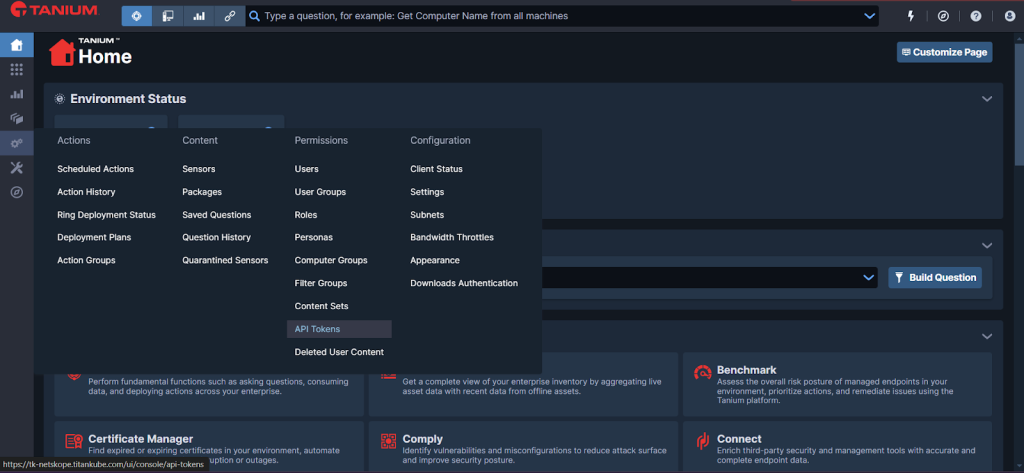
- 左側のパネルからAdministration > API Tokensへ移動してください。

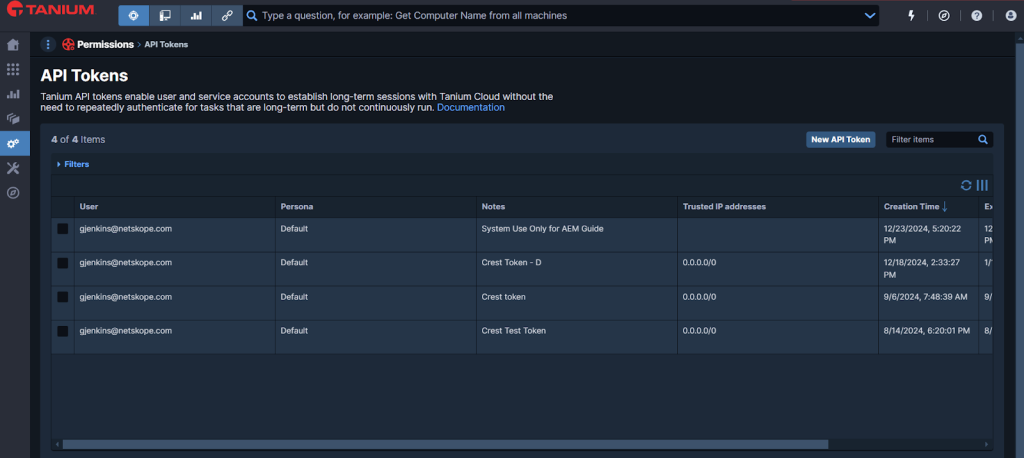
- New API Tokenをクリックしてください。

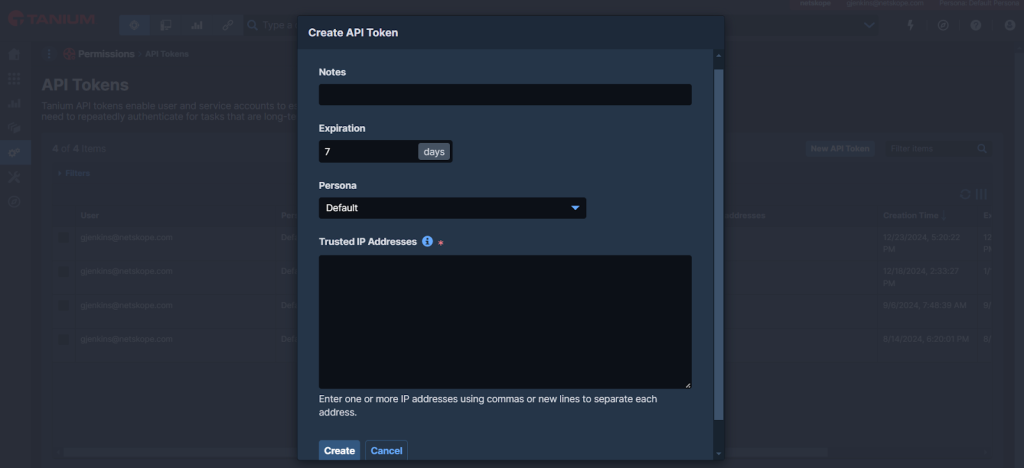
- 必要な情報を入力してください。要件に応じて有効期限を設定し、特定のマシンからのアクセスを許可するIPアドレスを指定するか、 任意のソースからのアクセスを許可する汎用IPアドレスを指定してください。

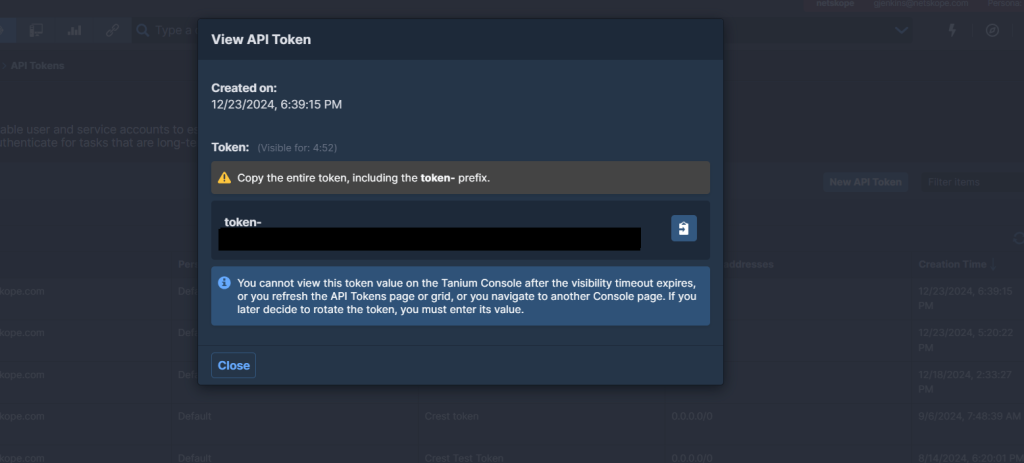
- Click Create, and then click Yes in the Confirm Your Action prompt.
- 「APIトークンの表示」タブからトークンをコピーしてください。これは Taniumプラグインを設定するためのものです。

- Closeをクリックしてください。
Taniumプラグインの設定
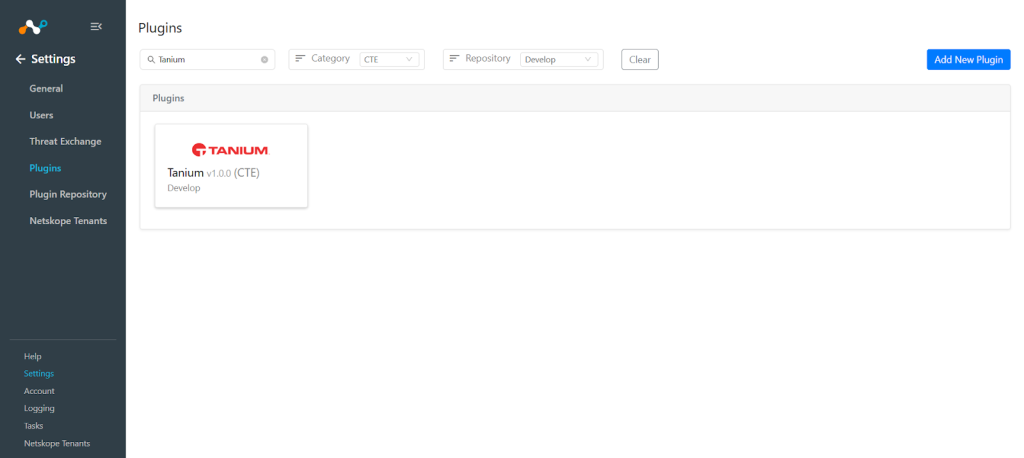
- Cloud ExchangeにログインしてSettings > Pluginsに移動してください。
- Tanium v1.0.0 (CTE)プラグインボックスを検索して選択します。

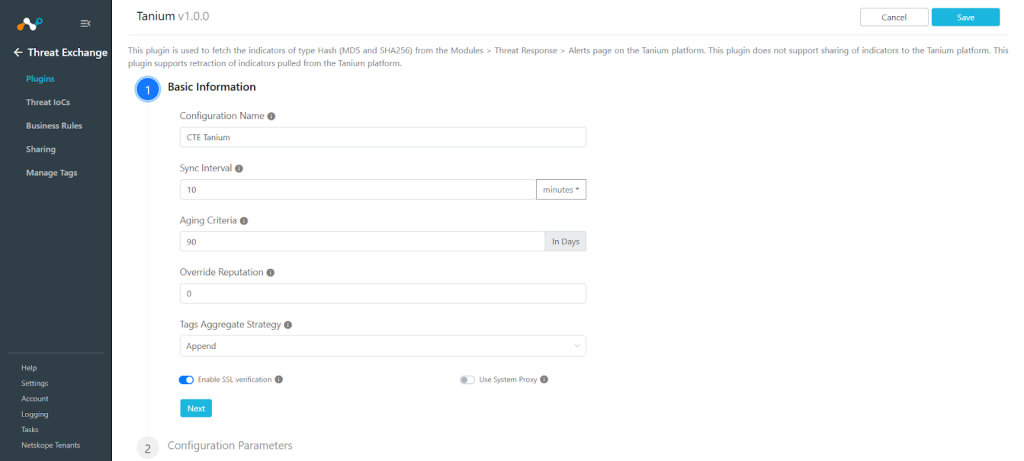
- 基本情報を入力してください:
- Configuration Name: 設定の一意の名前。
- Sync Interval: このプラグインからデータを取得し、他のソースからこのプラグインにデータを共有するための間隔。
多数のIoCを取得したい場合は、同期間隔の値を大きくする方が良いことに注意してください。 - Aging Criteria: プラグインの有効期限(日数)(デフォルト:90)。
- Override Reputationこの設定から受信したインジケーターの評判を上書きする値を設定します。
- Enable SSL ValidationSSL証明書の検証を有効にします。
- Use System Proxyプロキシが通信に必要な場合は有効にします。

- Nextをクリックして、設定パラメータを入力してください。

- API Base URL: TaniumインスタンスのAPIベースURL。例: https://<domain>-api.titankube.com
- API Token: 以前にTaniumインスタンスから生成されたAPIトークン。
- Type of Threat Data to Pull: 取得すべき脅威データの種類。使用可能な値はMD5とSHA256です。
- Enable Tagging: タグ付け機能を有効/無効にします。
- Retraction Interval: TaniumインジケーターのIoCリトラクションを実行する日数を指定してください。このパラメータはNetskope Cloud Exchange バージョン5.1.0にのみ適用されることに注意してくださいまたはそれ以降、脅威交換設定で IoC 撤回が有効になっている場合。
- Initial Range: 初回実行時にデータを取得するのにかかる日数。
- Saveをクリックしてください。
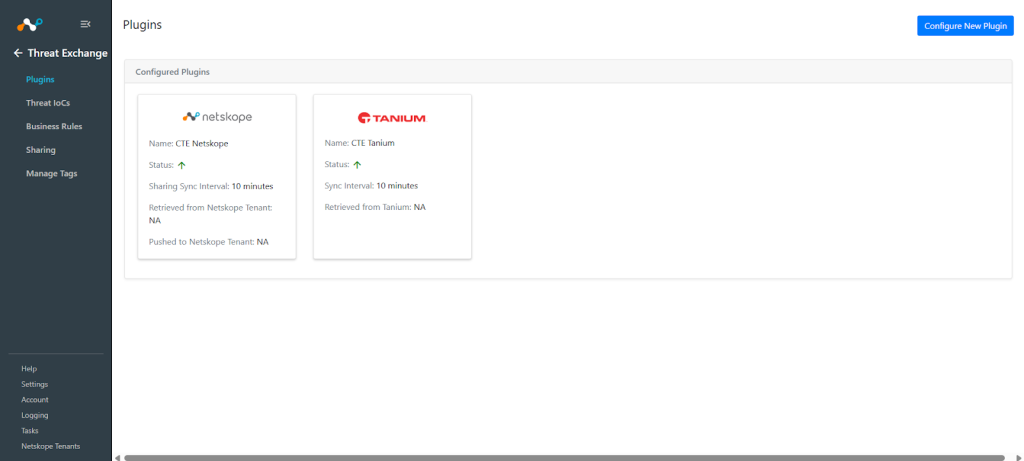

Tanium 用の脅威交換ビジネスルールを追加する
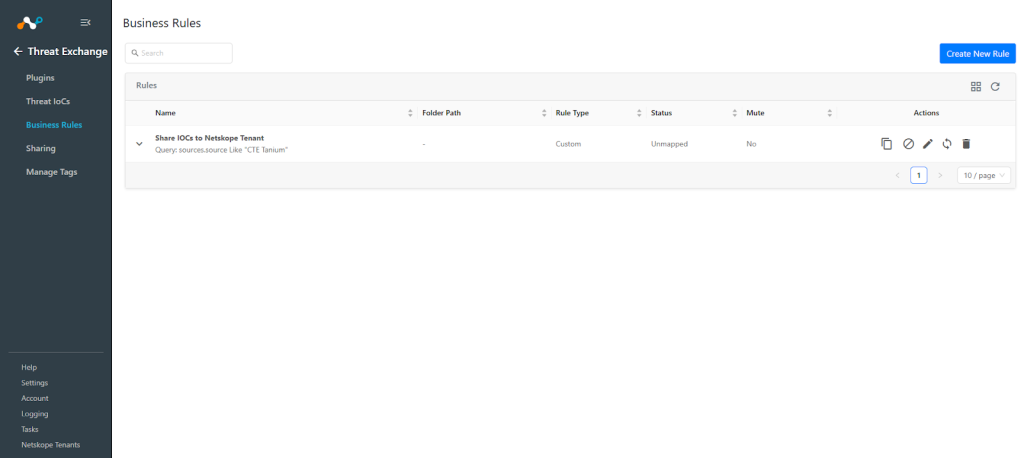
Taniumから取得した指標をCloud Exchangeに共有するには、共有したい指標をフィルタリングするビジネスルールが必要です。ビジネスルールを設定するには:
- Threat Exchange > Business Rulesに移動してCreate New Ruleをクリックしてください。
- ルールに、要件に応じたフィルターを追加してください。完了したら、 Saveをクリックしてください。

Tanium の脅威交換共有機能を追加する
TaniumからCloud ExchangeにIoCを共有するには:
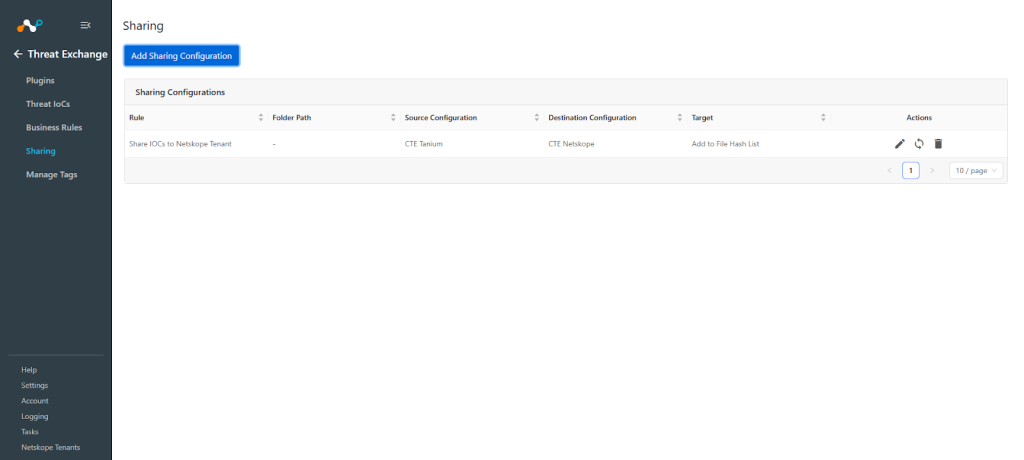
- Threat Exchange > Sharingに移動してAdd Sharing Configurationをクリックしてください。
- ソース構成(CTE Tanium)、ビジネスルール、宛先構成(CTE Netskope )、およびターゲットSelect 。
- Saveをクリックしてください。

Taniumプラグインを検証する
プルを検証する
取得したデータは 脅威IoCs ページに掲載されます。プラットフォームから取得したIOCをフィルターでフィルターできます。例えば 「<plugin configuration name>」のように。

Cloud Exchange で取得したログを確認するには、 Loggingにアクセスして、CTE Tanium プラグインのログを検索してください。
例:メッセージ「CTE Tanium」

Taniumプラットフォームで取得可能なデータを確認するには、Taniumにログインして Modules > Threat Response > Alertsへ行ってください。

取り下げられたIoCを確認するには、ログでIoC取り下げに関する項目を確認してください。例えば、メッセージ「[撤回]」のように:

プラットフォームからフィルターを使用して 、 撤回された IoC <plugin configuration name>をフィルターできます。


注記
- 撤回期間に該当するIoCは、Cloud Exchangeで「撤回済み:はい」とマークされます。
- 共有結果は、共有設定を作成した後にソースプラグインからIoCが取得された場合にのみマークされます。
プッシュ通知を検証する
ここでは、NetskopeテナントのファイルハッシュリストにIoC(侵害指標)が追加されたことが確認できます。

その後、共有されていたIoCの一部が撤回されたとマークされたため、リストから削除されました。

Taniumプラグインのトラブルシューティング
Tanium プラットフォームから IoC をプルできません
プラグインの設定後、プラットフォームからIoCが取得されない場合は、以下のいずれかの理由が考えられます。
- プラットフォーム上には、取得可能なIoC(侵害指標)がありません。
- 指定された構成パラメータ(取得する脅威データの種類など)では、IoC(侵害指標)は利用できません。
What to do: 上記の手順に従って根本原因を特定し、以下の手順に従って問題を解決してください。
No IoCs are available on the platform to pull
プラットフォーム上でIoC(侵害指標)が利用可能かどうかを確認してください。可能であれば、次の項目の解決策を確認してください。
IoCs are not available for the given time range
プラットフォーム上でIoCが取得可能であるにもかかわらず、プラグインがCloud ExchangeでIoCを取得していない場合は、プラグイン設定の初期範囲パラメータで指定されている日数を確認してください。Tanium プラットフォームで、指定された時間範囲のデータがあるかどうかを確認します。

指定された期間のデータがまだ利用可能な場合、プラグイン構成で指定されたフィルタの IoC が利用できない可能性があるため、プラグイン構成パラメータの値を確認し、Tanium プラットフォーム上で同じフィルタを適用してください。