

Release Notes
1.4.0
Added
- Added support for indicator retraction.
- Added ‘Type of Threat data to pull’ and ‘Enable Polling’ configuration parameters.
- Added support to bifurcate the URL by types (Domain, IPv4, IPv6 & URL).
- Added resolution for error logs starting from CE v6.0.0.
- Added support for storing access token in the storage.
1.3.1
Added
- Added ‘Indicators with Generated Alert’ field in Configuration parameters.
- Added ‘Generate Alert’ field in the sharing configuration.
Removed
- Removed actions ‘Alert’ and ‘Alert and Block’ from configuration and sharing configuration.
1.3.0
Added
- Added support for different regions for Base URL.
- Added support for fetching indicators on the basis of actions provided.
- Added support for Tagging on the basis of indicator action.
1.2.0
Changed
- Replaced beta API’s with stable API endpoints.
1.1.0
Added
- Added push support.
Changed
- Changed deprecated apis.
1.0.0
Added
- Initial release.
This document explains how to configure the Microsoft Defender for Endpoint v1.4.0 plugin for the Threat Exchange module of the Netskope Cloud Exchange platform. This plugin is used to pull indicators of type URL, IPv4, IPv6, Domain, MD5 and SHA256 from the System > Settings > Endpoints > Indicators page of the Microsoft Defender for Endpoint platform. This plugin supports sharing indicators of type URL, IPv4, IPv6, Domain, MD5 and SHA256 to the System > Settings > Endpoints > Indicators page in the Microsoft Defender for Endpoint platform. This plugin also supports pull and push retraction of indicators from the Microsoft Defender for Endpoint platform.
Prerequisites
To complete this configuration, you need:
- A Netskope tenant (or multiple, for example, production and development/test instances).
- A File Profile on your Netskope tenant.
- A URL List on your Netskope tenant.
- A Destination Profile on your Netskope tenant.
- A Private App on your Netskope tenant.
- A DNS Profile on your Netskope tenant.
- A Secure Web Gateway subscription for URL sharing.
- A Netskope Cloud Exchange tenant with the the Tenant plugin and Threat Exchange plugin already configured.
- A Microsoft Defender for Endpoint account.
- Your Microsoft Azure Tenant ID, Client ID, and Client Secret.
- A Microsoft Azure Application with the Ti.ReadWrite.All Permission. For more information, go to this article.
- Connectivity to these hosts:
- https://api.securitycenter.microsoft.com/api/indicators
- https://securitycenter.windows.com
- https://login.microsoftonline.com
- https://portal.azure.com
Microsoft Defender for Endpoint Plugin Support
This plugin is used to pull indicators of type URL, IPv4, IPv6, Domain, MD5 and SHA256 from the System > Settings > Endpoints > Indicators page of the Microsoft Defender for Endpoint platform. This plugin supports sharing indicators of type URL, IPv4, IPv6, Domain, MD5 and SHA256 to the System > Settings > Endpoints > Indicators page in the Microsoft Defender for Endpoint platform. This plugin also supports pull and push retraction of indicators from the Microsoft Defender for Endpoint platform.
| Fetched Indicator Types | Shared Indicator Types |
|---|---|
| URL, IPv4, IPv6, Domain, MD5 and SHA256 | URL, IPv4, IPv6, Domain, MD5 and SHA256 |
IoC Retraction
IoC Retraction (Pull): Indicators will be fetched from Microsoft Defender for Endpoint and in the subsequent pull cycles if some indicators are deleted on Microsoft Defender for Endpoint or not within the retraction interval range then they will be marked as Retraced in Cloud Exchange.
IoC Retraction (Push): Retracted indicators present on Cloud Exchange will be deleted from Microsoft Defender for Endpoint during sharing.
| Retraction Type | Supported Retraction Type |
|---|---|
| IoC Retraction (Pull) | Yes |
| IoC Retraction (Push) | Yes |
Mappings
Pull Mappings
Here are the mappings for pulled IoCs.
| Netskope CTE Field | Defender API Field | Description |
|---|---|---|
| Indicator.value | indicatorValue | |
| Indicator.type | indicatorType | Url → URL; DomainName→ Domain; FileMd5 → MD5; FileSha256 → SHA256; IpAddress→IPv4/IPv6 |
| Indicator.firstSeen | creationTimeDateTimeUtc | |
| Indicator.lastSeen | lastUpdateTime | |
| Indicator.comments | title + description | Concatenated as “<title> | <description>“ |
| Indicator.severity | severity | |
| Indicator.tags | action | creates Defender_<action> tag; one tag per indicator. |
Severity Mappings for Pull
| Netskope Severity | Defender Severity |
|---|---|
| LOW | Low |
| MEDIUM | Medium |
| HIGH | High |
| UNKNOWN | Anything else |
Push Mappings
Here are the mappings for shared IoCs.
| Netskope CTE Field | Defender API field | Description |
|---|---|---|
| Indicator.value | indicatorValue | |
| Indicator.type | indicatorType | URL → Url Domain → DomainName FQDN → DomainNameIPv4/IPv6 → IpAddressMD5 → FileMd5SHA256 → FileSha256 |
| Indicator.comments | description | Formatted as ” Netskope-CTE | <source> | <comments>” |
| Indicator.severity | severity | |
| action_dict.action (configured) | action | Mapped via action_conversion: unknown/alert/Alert → Audit; allow → Allowed; block → Block; AlertAndBlock → Block (and forces generateAlert=True). |
| action_dict.generate_alert | generateAlert | If action is Audit: forced True; otherwise uses configured Yes/No (boolean). |
| Indicator.type/value | type | “Indicator <value> of type <indicatorType>” (uses resolved type). |
Severity Mapping for push
| Netskope Severity | Defender Severity |
|---|---|
| LOW | Low |
| MEDIUM | Medium |
| HIGH | High |
| CRITICAL | High |
Permissions
Microsoft Azure Application with the Ti.ReadWrite.All Permission. For more information, go here.
API Details
List of APIs used
| Netskope CTE Field | Proofpoint API field | Type |
|---|---|---|
| threatStatus | threatStatus | String |
| interval | interval | Datetime |
| sinceSeconds | sinceSeconds | Integer |
| eventTypes | eventTypes | String |
Authentication
This plugin uses the Python library to generate authentication tokens for .
- Library: Microsoft Authentication Library for Python (msal)
- Usage: Microsoft Authentication Library for Python (msal) to get authentication token for Microsoft Defender APIs.
Create a new session with credentials
scope = ["https://api.securitycenter.microsoft.com/.default"]
authority = "https://login.microsoftonline.com/{tenantID}

app = msal.ConfidentialClientApplication(
           client_id={clientID}, authority=authority, client_credential={clientSecret}, proxies=proxy
)
auth_json = app.acquire_token_for_client(scopes=scope)
auth_token = auth_json.get("access_token", "")
Pull Indicators
API Endpoint: <Base URL>/api/indicators
Method: GET
Headers
| Key | Value |
|---|---|
| Authorization | Bearer <auth_token> |
| Content-Type | application/json |
| Accept | application/json |
| User-Agent | netskope-ce-6.1.0-cte-microsoft-defender-for-endpoint-v1.4.0 |
Parameters
| Key | Value |
|---|---|
| $filter | combining creationTimeDateTimeUtc+ge+<UTC timestamp> and optional actions: action+eq+'<Action>’ joined with or. e.g., creationTimeDateTimeUtc+ge+2025-02-05T00:00:00Z and (action+eq+’Alert’ or action+eq+’Audit’) |
Sample API Response
{
  "@odata.context": "https://api.securitycenter.microsoft.com/api/$metadata#Indicators",
  "value": [
    {
      "id": "66407",
      "indicatorValue": "a40da157d2e56d26c01d8d57947779e1b403999ed32a1ac3553b46f501542e0d",
      "indicatorType": "FileSha256",
      "action": "Audit",
      "createdBy": "d45ccecf-7406-47f6-90e5-05f0b3f76094",
      "severity": "Informational",
      "category": 1,
      "application": null,
      "educateUrl": null,
      "bypassDurationHours": null,
      "title": "Indicator a40da157d2e56d26c01d8d57947779e1b403497e999a1ac3553b46f501542e0d of type FileSha256",
      "description": "Pull Test",
      "recommendedActions": null,
      "creationTimeDateTimeUtc": "2026-01-21T09:08:36.9319034Z",
      "expirationTime": null,
      "lastUpdateTime": "2026-01-21T09:08:36.9319034Z",
      "lastUpdatedBy": null,
      "rbacGroupNames": [],
      "rbacGroupIds": [],
      "notificationId": null,
      "notificationBody": null,
      "version": null,
      "mitreTechniques": [],
      "historicalDetection": false,
      "lookBackPeriod": null,
      "generateAlert": true,
      "additionalInfo": null,
      "createdByDisplayName": "Demo app",
      "externalId": null,
      "createdBySource": "PublicApi",
      "certificateInfo": null
    },
    {
      "id": "66408",
      "indicatorValue": "521e25b2d1bb9f8059dc7b0e86d05454bd599941e2a59620521ba1510be110e6",
      "indicatorType": "FileSha256",
      "action": "Audit",
      "createdBy": "d45ccecf-7406-47f6-90e5-05f999f76094",
      "severity": "Informational",
      "category": 1,
      "application": null,
      "educateUrl": null,
      "bypassDurationHours": null,
      "title": "Indicator 521e25b2d1bb9f8059dc7b0e86d05454bd565441e9999620521ba1510be110e6 of type FileSha256",
      "description": "Pull Test",
      "recommendedActions": null,
      "creationTimeDateTimeUtc": "2026-01-21T09:08:37.7747306Z",
      "expirationTime": null,
      "lastUpdateTime": "2026-01-21T09:08:37.7747306Z",
      "lastUpdatedBy": null,
      "rbacGroupNames": [],
      "rbacGroupIds": [],
      "notificationId": null,
      "notificationBody": null,
      "version": null,
      "mitreTechniques": [],
      "historicalDetection": false,
      "lookBackPeriod": null,
      "generateAlert": true,
      "additionalInfo": null,
      "createdByDisplayName": "Demo app",
      "externalId": null,
      "createdBySource": "PublicApi",
      "certificateInfo": null
    }
]
}
Push Indicators
API endpoint: <Base URL>/api/indicators
Method: POST
Headers
| Key | Value |
|---|---|
| Authorization | Bearer <auth_token> |
| Content-Type | application/json |
| Accept | application/json |
| User-Agent | netskope-ce-6.1.0-cte-microsoft-defender-for-endpoint-v1.4.0 |
Body
{
        "indicatorValue": "malicious.example.com",
        "indicatorType": "DomainName",
        "action": "Block",
        "title": "Indicator malicious.example.com of type DomainName",
        "description": " Netskope-CTE | demo | Example domain IOC",
        "severity": "High",
        "generateAlert": true,
}
Sample API Response (Status Code: 201)
{
  "@odata.context": "https://api.securitycenter.microsoft.com/api/$metadata#Indicators/$entity",
  "id": "67908",
  "indicatorValue": "malicious.example.com",
  "indicatorType": "DomainName",
  "action": "Block",
  "createdBy": "d45ccecf-7406-47f6-90e5-05f0b3f76094",
  "severity": "High",
  "category": null,
  "application": null,
  "educateUrl": null,
  "bypassDurationHours": null,
  "title": "Indicator malicious.example.com of type DomainName",
  "description": " Netskope-CTE | demo | Example domain IOC",
  "recommendedActions": null,
  "creationTimeDateTimeUtc": "2026-02-09T07:01:36.6399107Z",
  "expirationTime": null,
  "lastUpdateTime": "2026-02-09T07:01:36.6399107Z",
  "lastUpdatedBy": null,
  "rbacGroupNames": [],
  "rbacGroupIds": [],
  "notificationId": null,
  "notificationBody": null,
  "version": null,
  "mitreTechniques": [],
  "historicalDetection": false,
  "lookBackPeriod": null,
  "generateAlert": true,
  "additionalInfo": null,
  "createdByDisplayName": "Demo app",
  "externalId": null,
  "createdBySource": "PublicApi",
  "certificateInfo": null
}
Delete Indicators
API endpoint: <Base URL>/api/indicators/{id}
Method: DELETE
Headers
| Key | Value |
|---|---|
| Authorization | Bearer <auth_token> |
| Content-Type | application/json |
| Accept | application/json |
| User-Agent | netskope-ce-6.1.0-cte-microsoft-defender-for-endpoint-v1.4.0 |
Parameters
| Key | Value |
|---|---|
| id | ID of the Indicator to delete on Defender platform |
Delete Indicators for retraction
API endpoint: <Base URL>/api/indicators/BatchDelete
Method: POST
Headers
| Key | Value |
|---|---|
| Authorization | Bearer <auth_token> |
| Content-Type | application/json |
| Accept | application/json |
| User-Agent | netskope-ce-6.1.0-cte-microsoft-defender-for-endpoint-v1.4.0 |
Body
{
    "IndicatorIds": [
        "<Indicator ID>"
    ]
}
Sample API Response
Status Code: 204 No Content
Performance Matrix
Here is the performance reading conducted by pulling and sharing 15K indicators from/to Microsoft Defender for Endpoint on a Large CE Stack with these specifications.
| Description | Specification |
|---|---|
| Stack details | Size: Large RAM: 32 GB CPU: 16 Cores |
| Indicator fetched from Microsoft Defender for Endpoint | ~15K IOCs per minute |
| Indicators shared with CrowdStrike | ~100 per minute |
User Agent
netskope-ce-6.1.0-cte-microsoft-defender-for-endpoint-v1.4.0
Workflow
- Get your Tenant ID, Application (Client) ID, and Client Secret from Microsoft Defender.
- Add API Permissions for Microsoft Defender.
- Configure the Microsoft Defender for Endpoint plugin.
- Configure a Business Rule for Microsoft Defender for Endpoint.
- Configure Sharing for Netskope and Microsoft Defender for Endpoint.
- Validate the Microsoft Defender for Endpoint Plugin.
Watch a Video
Click play to watch a video.
Get your Tenant ID, Application (Client) ID and Client Secret from Microsoft Defender
-
Go to https://entra.microsoft.com/ and log in with your credentials
-
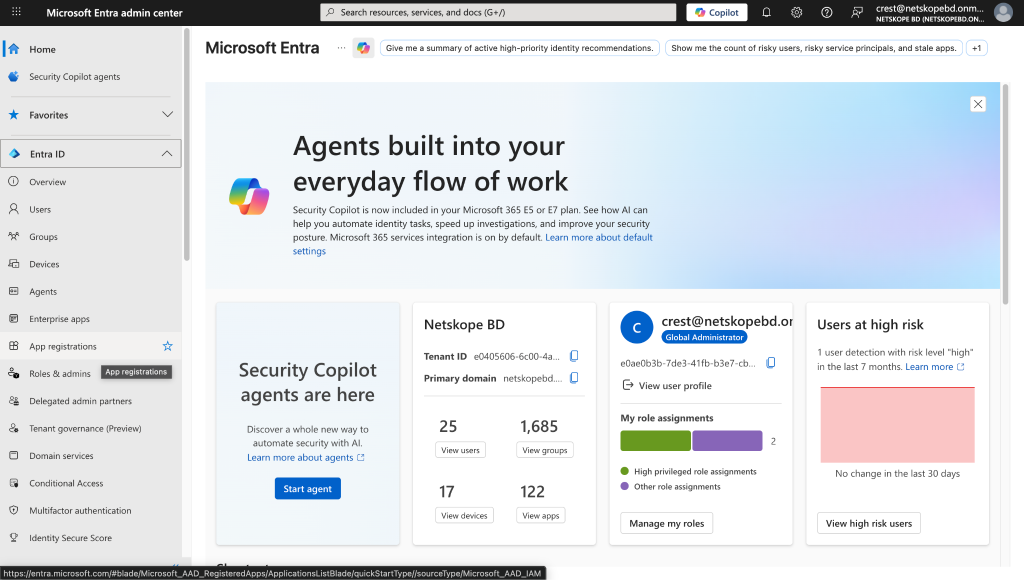
Click App registrations.
-
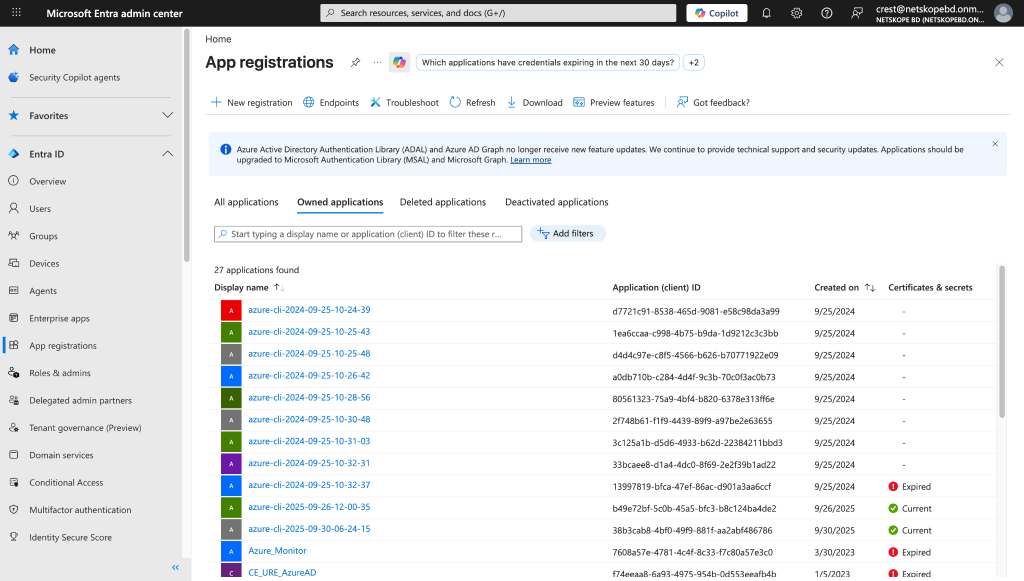
Click New Registration.
-
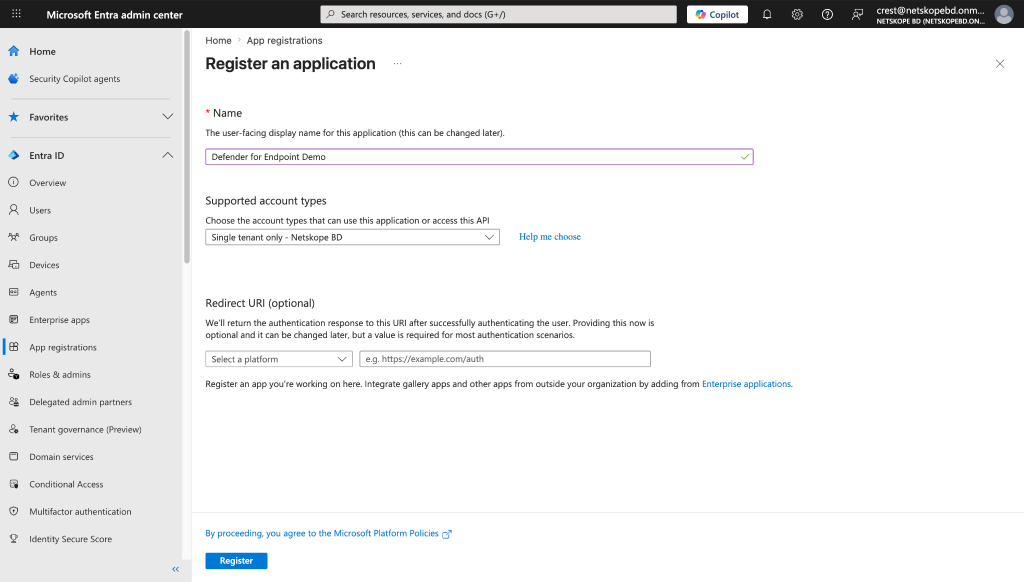
Provide the name for the application and click Register.
-
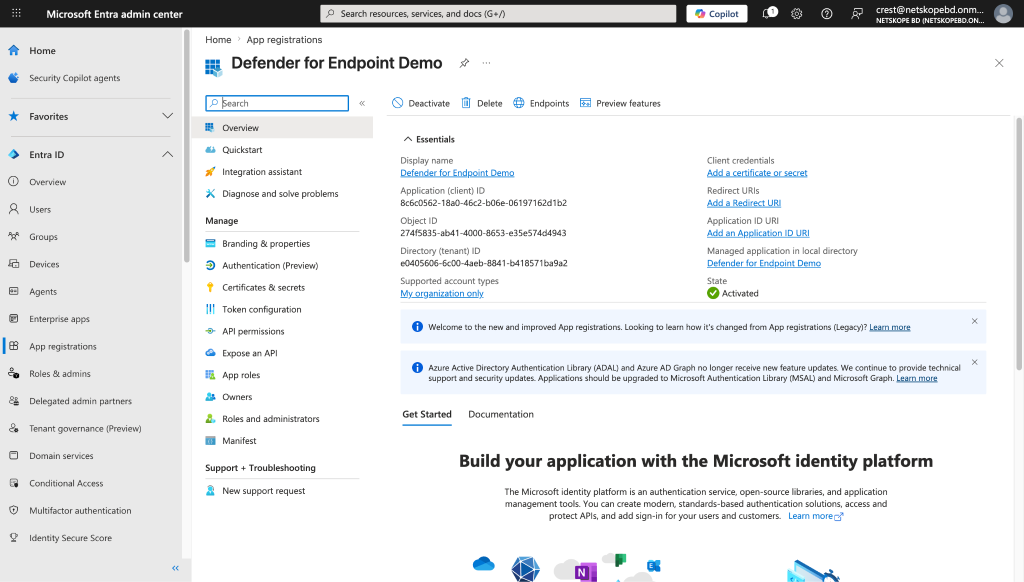
Copy the Application (Client ID), which is the Client (Application) ID in Netskope. Also copy the Directory (tenant) ID, which is tenant ID in Netskope. Click Certificates & Secrets.
-
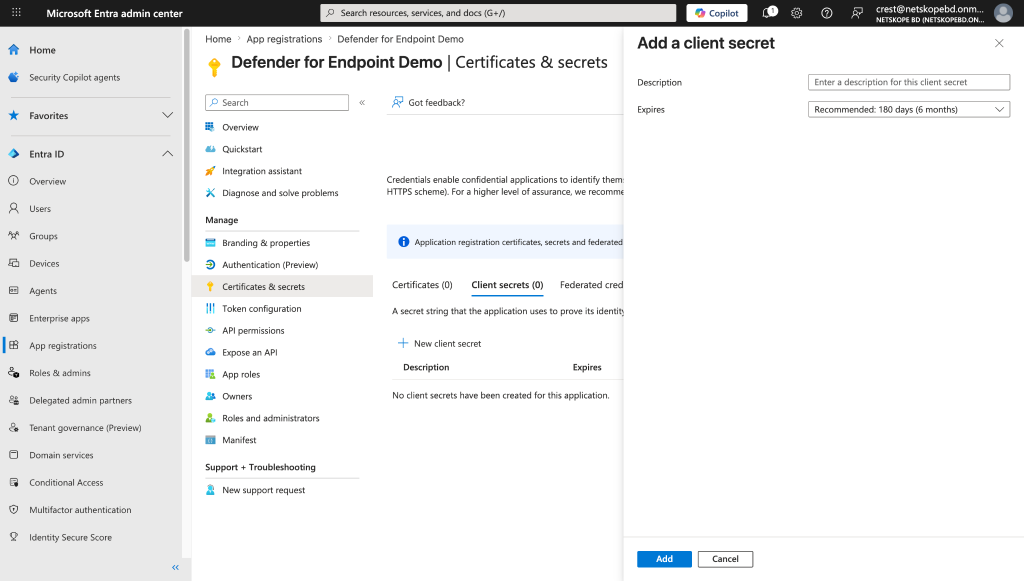
Click New client secret. Add a description and click Save.
-
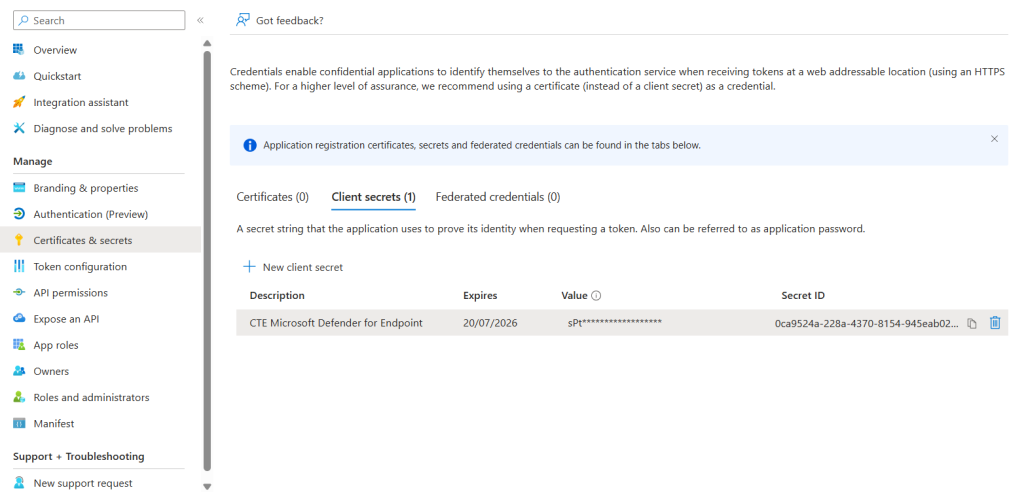
Copy the value; it is the Client Secret needed for the plugin configuration.


Add API Permissions
-
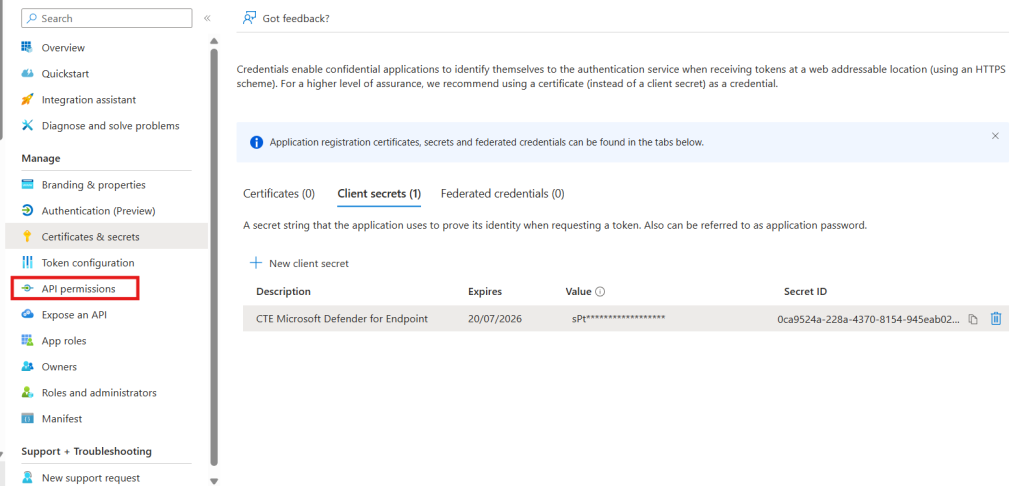
In the left panel, click API permissions.
-
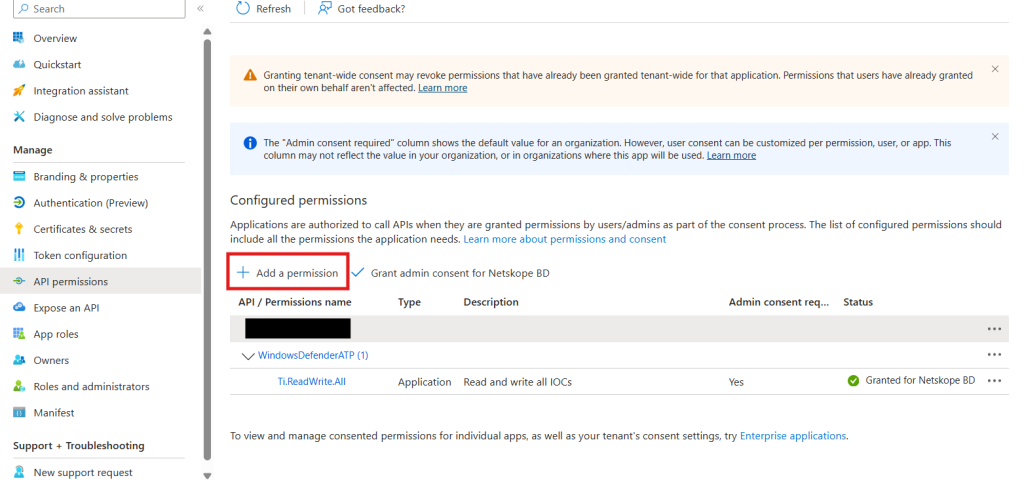
Click Add a permission.
-
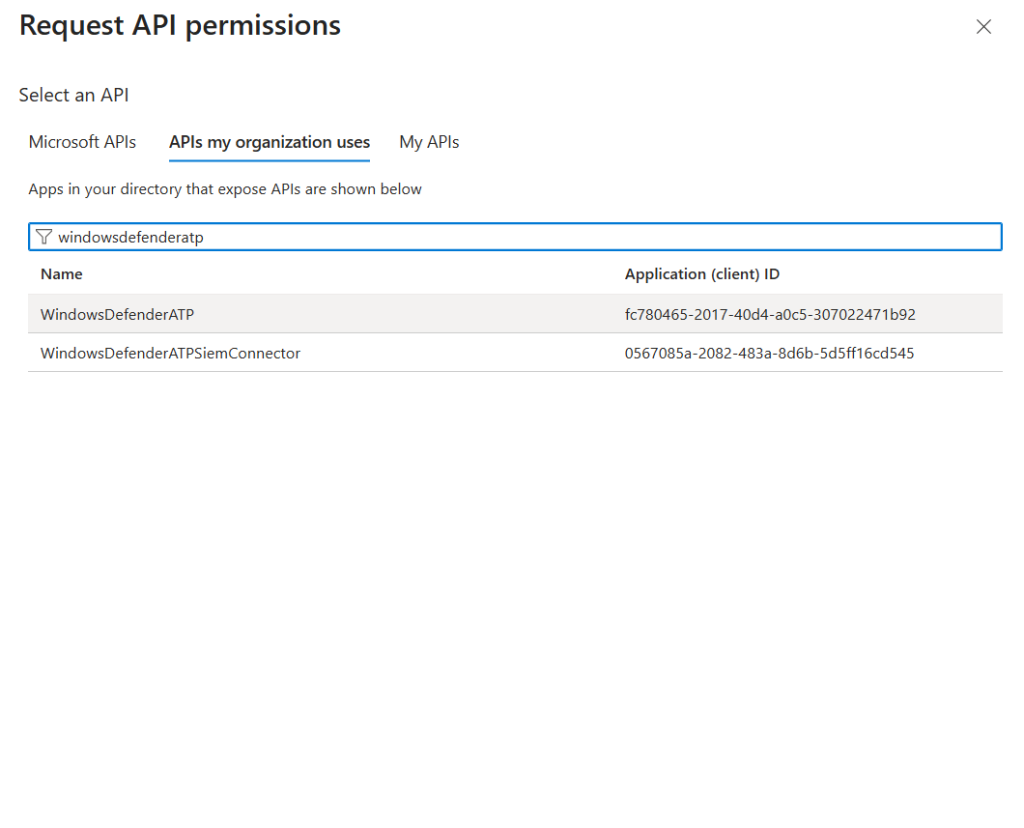
Click APIs my organization uses, and then click WindowsDefenderATP.
-
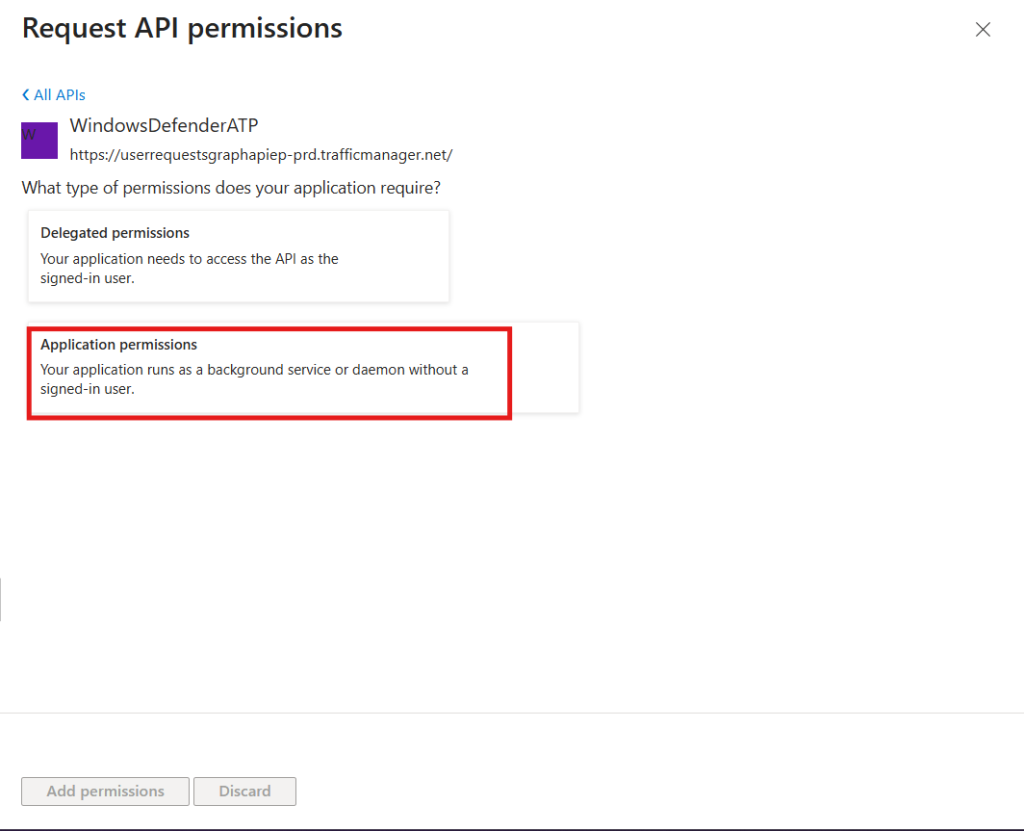
Click Application permissions.
-
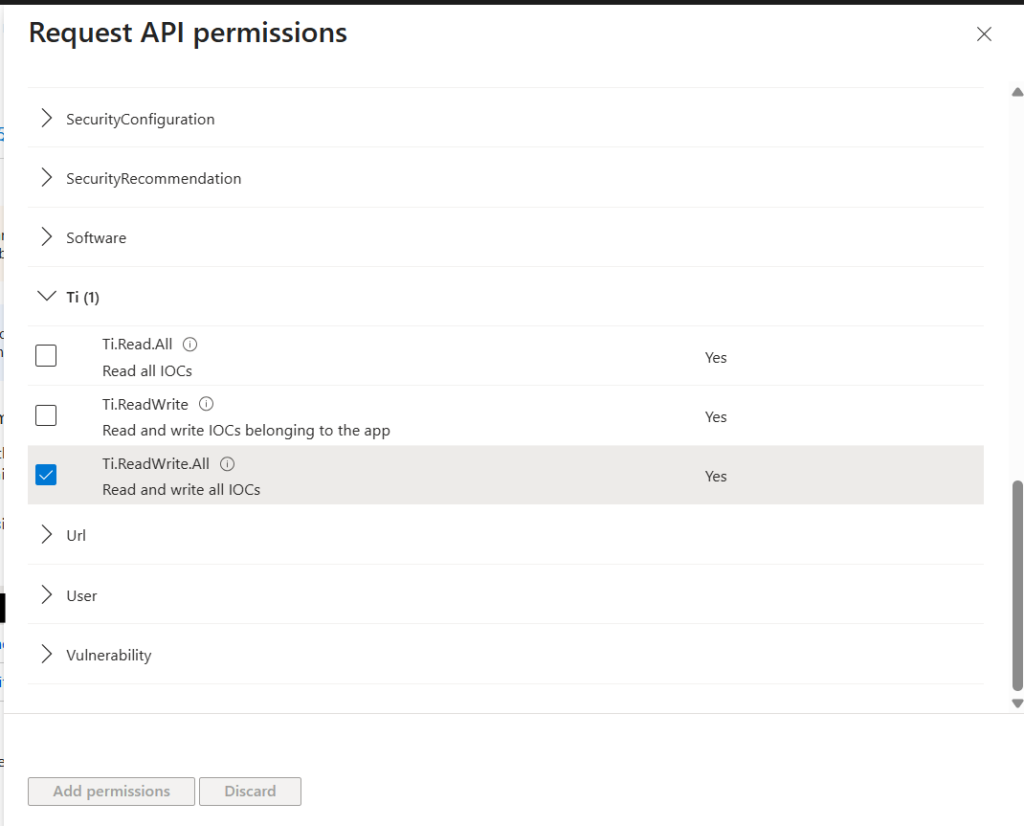
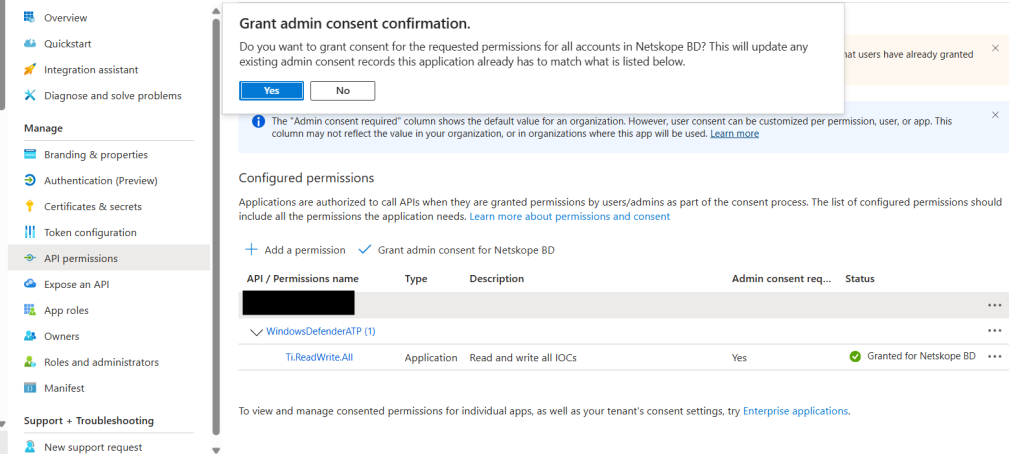
Select the Ti.ReadWrite.All permissions and click Add permission.
Click Grant admin consent for Contoso.
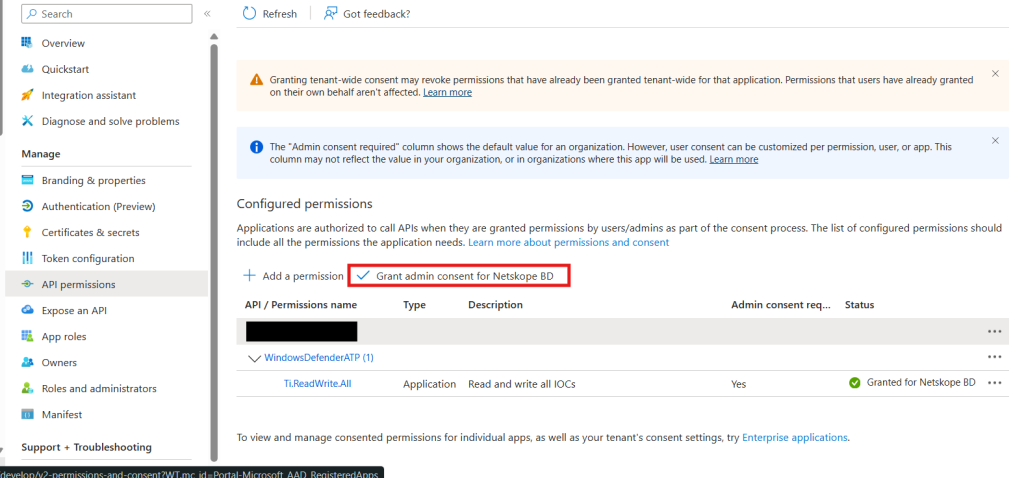
Click Yes.


Configure the Microsoft Defender for Endpoint Plugin
-
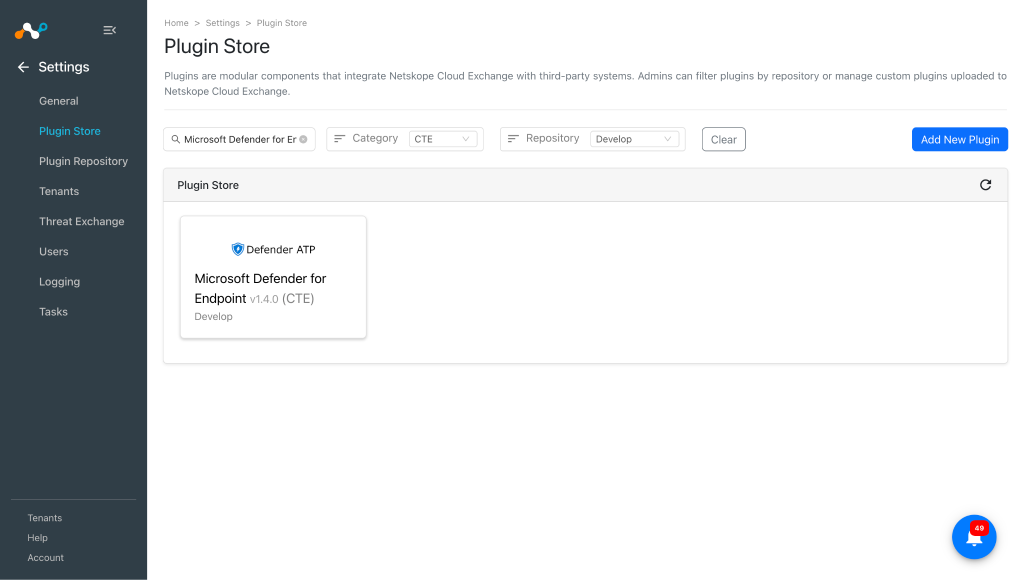
In Cloud Exchange, go to Settings > Plugin Store.
-
Search for and select the Microsoft Defender for Endpoint v1.4.0 (CTE) plugin.
-
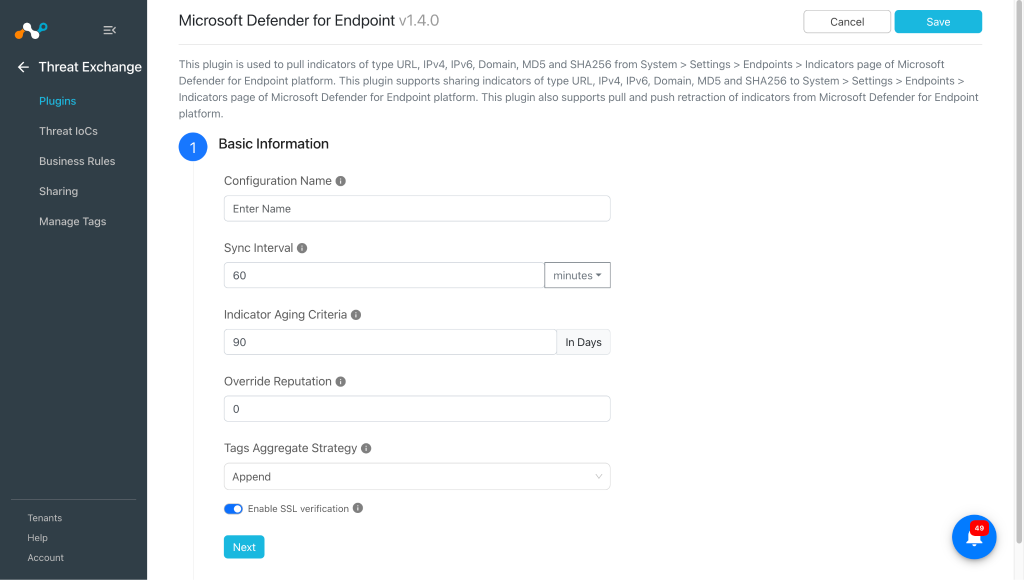
Enter the Basic Information:
- Configuration Name: Unique name for the configuration.
- Sync Interval: Leave the default.
- Aging Criteria: Expiry time of the plugin in days. (Default: 90)
- Override Reputation: Set a value to override the reputation of indicators received from this configuration.
- Tags Aggregate Strategy: Choose whether to append new tags to existing IoC(s) or overwrite them. These configuration parameters determine how tags are stored for indicators pulled for this configuration.
- Enable SSL Validation: Enable SSL Certificate validation.
-
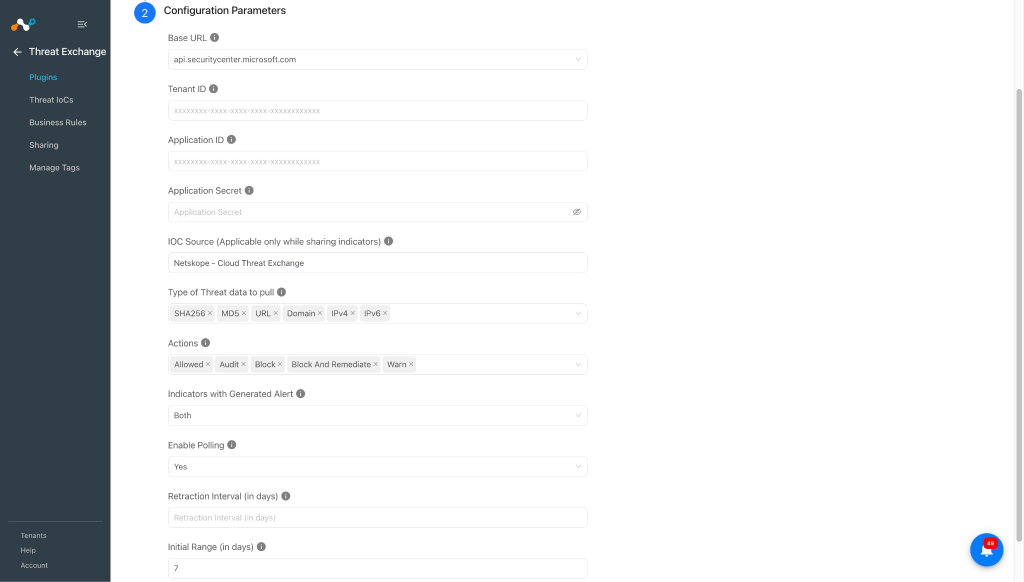
Click Next and enter the Configuration Parameters:
- Base URL: Base URL of the Microsoft Defender for Endpoint platform.
- Tenant ID: Directory (Tenant) ID of the Microsoft Entra ID application.
- Application ID: Application (Client) ID of the Microsoft Entra ID application.
- Application Secret: Client Secret of the Microsoft Entra ID application.
- IOC Source (Applicable only while sharing IoCs): The source where this indicator originated. This can be used for tracking where this indicator was defined. Limit 200 characters.
- Type of Threat data to pull: Type of Threat data to pull. If no threat type is selected, all threat type indicators will be pulled.
- Actions: Select the action(s) to filter the pulled indicators. If no action is selected, all indicators will be pulled regardless of their action.
- Indicators with Generated Alert: Select whether to pull indicators based on their Generate Alert flag. Both pulls all indicators regardless of this flag.
- Enable Polling: Enable/Disable polling data from Microsoft Defender for Endpoint. Disable if you only need to push indicators to Microsoft Defender for Endpoint.
- Retraction Interval (in days): Specify the number of days for which IoC retraction should be run for Microsoft Defender for Endpoint indicators. This parameter is applicable only if IoC(s) Retraction is enabled in Threat Exchange Settings. Value must be between 1 and 365.
- Initial Range (in days): Number of days to pull the data for the initial run.
-
Click Save.
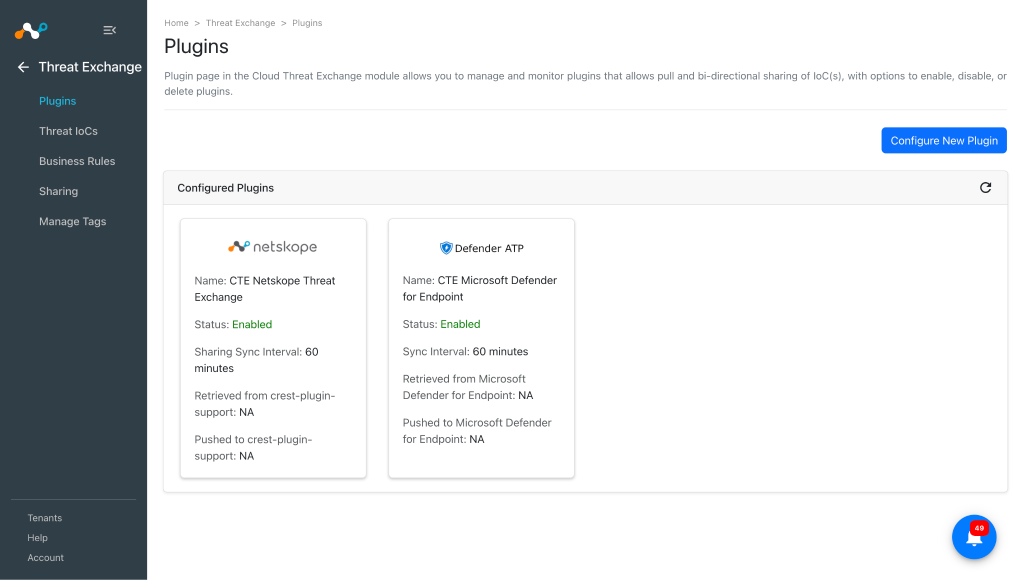


Configure a Threat Exchange Business Rule for Microsoft Defender for Endpoint
To share indicators fetched from the Microsoft Defender for Endpoint to Netskope, and vice-versa, you need to have a business rule that will filter out the indicators that you want to share. To configure a business rule:
-
In Threat Exchange, go to Business Rules and click Create New Rule.
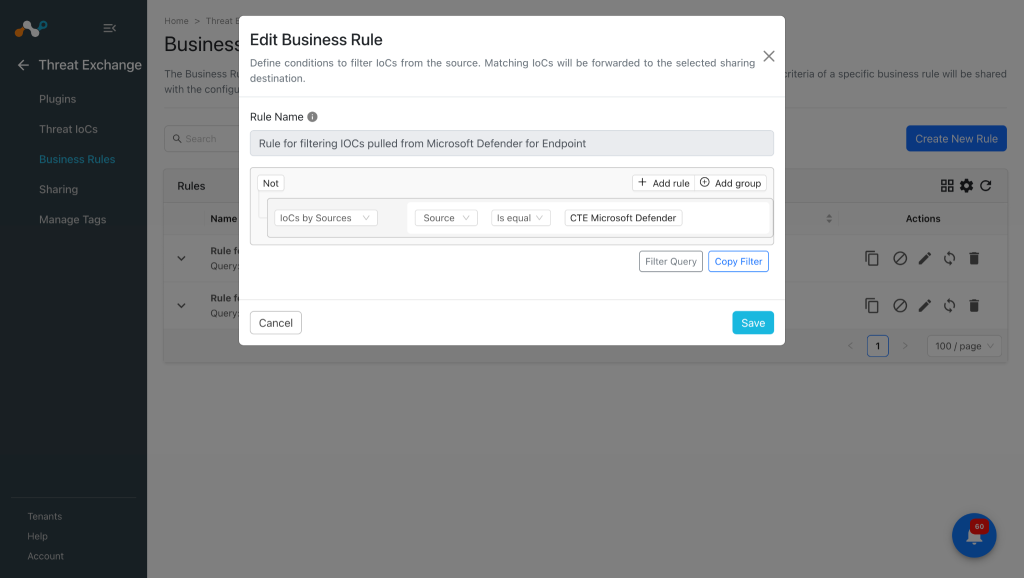
-
Add the filter according to your requirements in the rule, and then click Save.
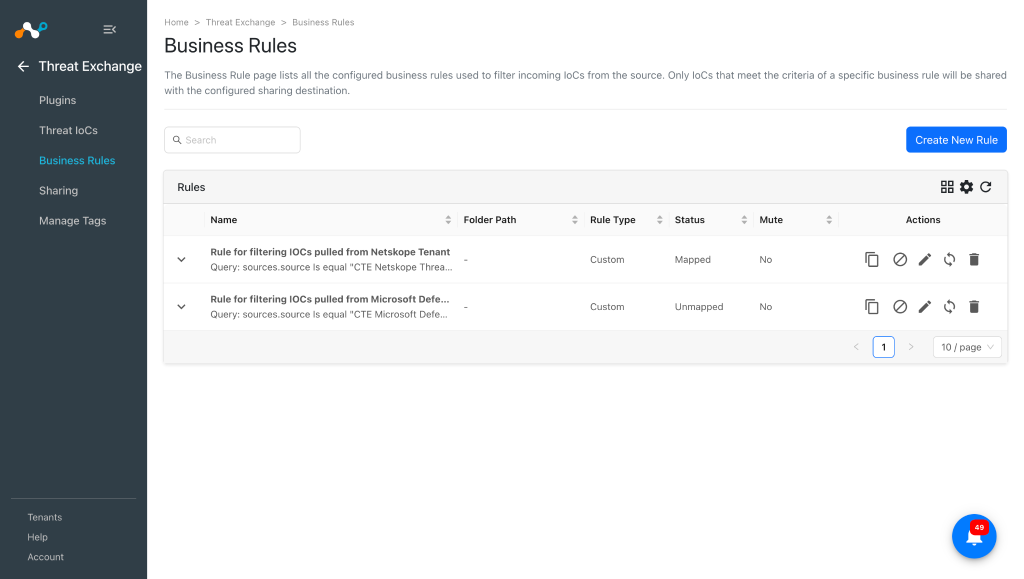 FQDN present in Cloud Exchange will be shared as URL/Domain in Microsoft Defender.


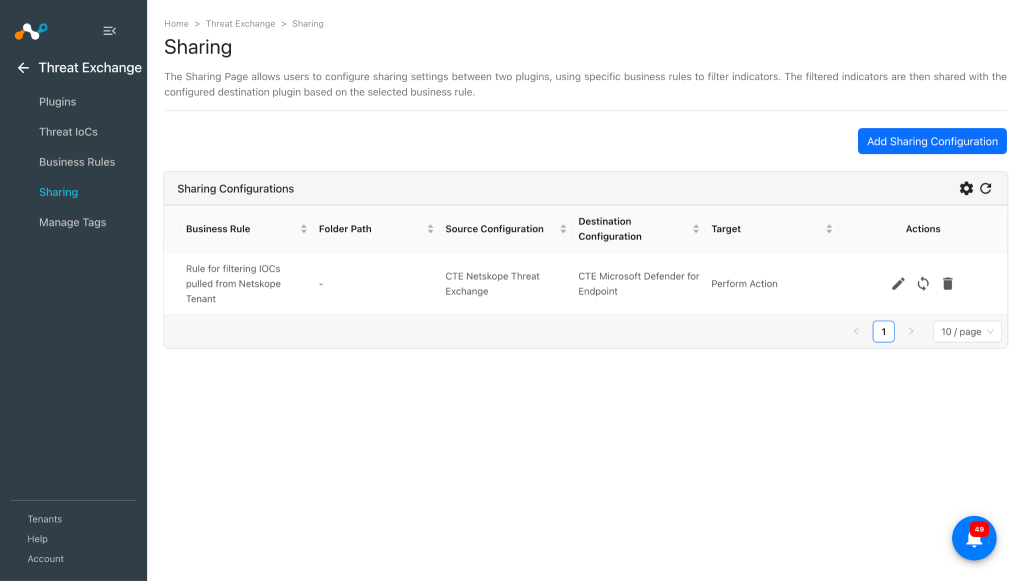
Configure Sharing for Netskope and Microsoft Defender for Endpoint
To share IoCs from the Netskope Cloud Exchange to the Microsoft Defender for Endpoint platform, and vice versa, follow these steps:
-
In Threat Exchange, go to Sharing and click Add Sharing Configuration.
-
Select the Source Configuration (Netskope CTE), the Business Rule, the Destination Configuration (Microsoft Defender for Endpoint), and Target(s). Enter these values:
- Action: The action that is taken if the indicator is discovered in the organization.
- Generate Alert: Generate alerts for the indicators. Note that for the action type Audit, the Generate Alert will be Yes by default, so even if you keep it as No with the action type Audit you will see the shared IoCs on Defender will have Generate alert as Yes.
- Allow Existing Indicators to be deleted?: Whether or not to delete the existing indicator(s) from the Microsoft Defender for Endpoint platform to insert new indicator(s). If Yes is selected, the oldest indicator will be deleted when max capacity of 15000 active indicators per tenant is exceeded.
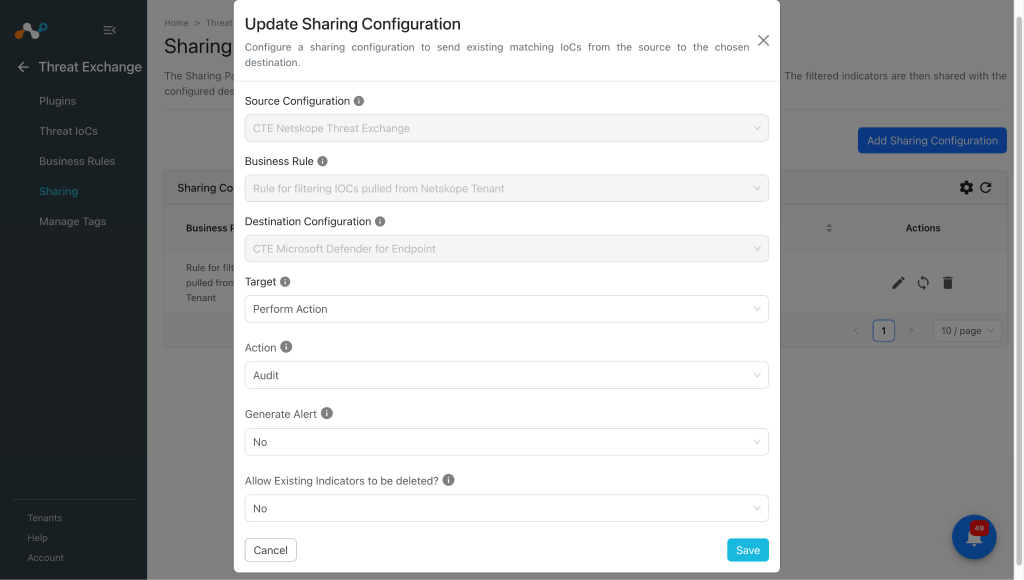
-
Click Save.
-
Follow these steps again, but vice-versa for sharing Microsoft Defender for Endpoint IoCs to Netskope. Select your Source Configuration as Microsoft Defender for Endpoint, a Business Rule, Destination Configuration (CTE Netskope Threat Exchange), and Target.
-
When finished, click Save.


Validate the Microsoft Defender for Endpoint Plugin
Validate the Pull
Pulled data will be listed in Threat Exchange at Threat IoCs. You can filter the IoCs pulled from the platform using the filter: sources.source,contains <plugin name>.


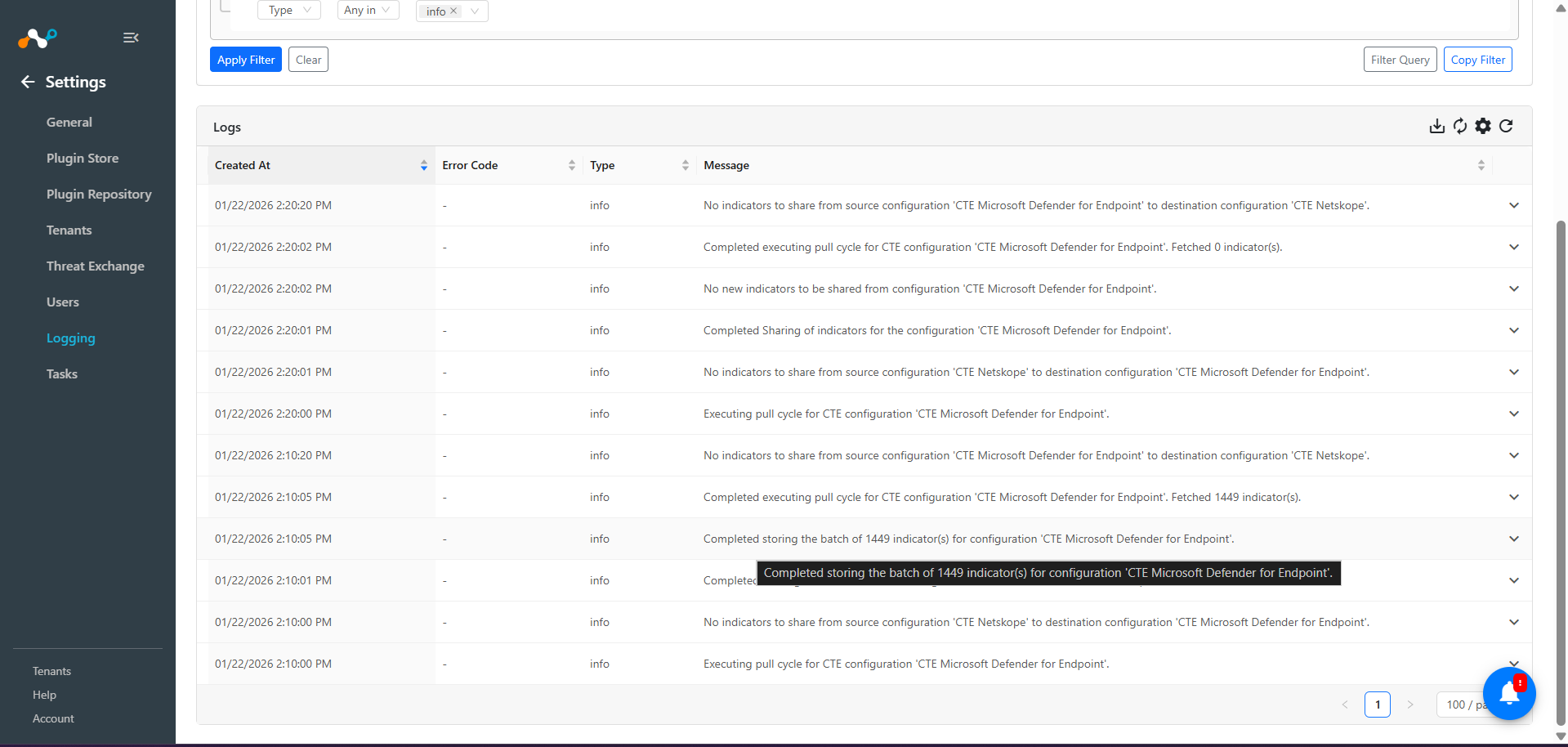
To verify pulled logs in Cloud Exchange, go to Logging and search logs for the Microsoft Defender for Endpoint plugin.
To verify the data available for pulling on Microsoft Defender for Endpoint, log in to Microsoft Defender and go to Settings > Endpoints > Indicators. You can verify URL indicators from IP Addresses and URLs/Domains page, and MD5 and SHA256 from the File Hashes page.


Validate the Push
Shared IoCs to Microsoft Defender for Endpoint can be verified at Logging in Cloud Exchange.

Note
- For sharing of IoCs, Microsoft Defender has a rate limit of 100 IoCs per minute. Refer to the documentation.
- If the IoCs are not shared within expected time and you do not see any logs in CE related to sharing after the initial log for sharing start then it may be due to the rate limit of Microsoft Defender. You can manually check via the Microsoft Defender’s API, whether the rate limit is exhausted or not for sharing IOCs.
To verify shared indicators on Microsoft Defender. Log in to Microsoft Defender and go to Settings > Endpoints > Indicators.
You can filter shared indicators by applying filter like “Created by: <app_name>”


Validate the Retraction
For verifying the Retracted IoCs from Microsoft Defender, check the logs for IoC Retraction example: message Like “CTE Microsoft Defender for Endpoint” && message Like “retraction”.

To check the retracted IoCs in Cloud Exchange, go to Threat IoCs and search for “sources.source Like “CTE CrowdStrike” && sources.retracted Is equal true”.

Here’s the Destination Profile on the Netskope tenant before push retraction for CTE Netskope Threat Exchange executes:

You can verify the deletion of IoC from Netskope tenant from the Retraction result filed under particular IoC. In the below image you can see the Retraction result is marked as CTE Netskope Threat Exchange: retracted that means it was deleted from the Netskope tenant.

Here’s the URL List on the Netskope tenant after push retraction for CTE Netskope Threat Exchange executes:

This plugin also supports push retraction, which means IoCs pulled from 3rd-party platforms that were shared to Microsoft Defender platforms, and were marked as retracted in Cloud Exchange, will also get deleted from the Microsoft Defender platform. You can verify the same through the Retraction result field.
This is an MD file present on Defender:


Here the retraction result is CTE Microsoft Defender for Endpoint: retracted this means that particular IoC was deleted from Microsoft Defender platform as it was marked as retracted yes in Cloud Exchange.
MD5 was deleted from the Defender platform:

Troubleshooting the Microsoft Defender for Endpoint Plugin
Unable to configure the plugin
This may be due to one of these reasons:
- Invalid configuration parameters.
- Insufficient permissions.
- License Error: During configuration of plugin if you receive error message “Plugin: Microsoft Defender for Endpoint, Validation error occurred. Received status code: 403, Unauthorized request – No active license found”, it may indicate that you have selected an incorrect Base URL for the credentials used.
What to do:
- Verify all Tenant ID, Application ID and Application Secret are correct and have proper permissions. Follow the Configuration on Microsoft Defender section.
- Verify proper permissions are provided.
Unable to share IOCs to Microsoft Defender for Endpoint.
This may be due to the max capacity of 15000 active indicators per tenant on Microsoft Defender for Endpoint.
What to do:
Check the total number of IoCs on your Microsoft Defender for Endpoint. If it is 15k then you can edit the sharing configuration with Allow Existing Indicators to be deleted? fieldas Yes. If Yes is selected, the oldest indicator will be deleted when max capacity of 15000 active indicators per tenant is exceeded.
Error while upgrading the plugin
While updating the plugin from version v1.3.0 to version v1.3.1 user will get an validation error while saving the plugin as follows:

What to do:
In this case the follow the steps to successfully enable the plugin:
- Select the skip option.
- Go to the configured Threat exchange plugin, click on the edit icon for the Microsoft Defender for Endpoint plugin, and remove the actions Alert and Alert And Block if selected previously.
- Select the value for Indicators with Generated Alert field as per your requirement whether you want to pull all the indicators or the one with generated alerts yes or no.
- Save the plugin.
- Click on the enable icon and select Enable.
