

Netskope Private Access (NPA) offers a comprehensive solution that combines classic Zero Trust Network Access (ZTNA) for user-to-application flows with Layer 3 (L3) access for client-to-client and server-to-client interactions. This dual approach ensures secure, seamless, least-privileged access to applications, whether hosted in the cloud or on-premises, and supports workflows requiring direct communication like file sharing, remote desktop, and specialized applications.
By replacing legacy VPNs with a modern Zero Trust framework, Netskope Private Access enhances security with granular, context-aware controls, simplifies operations, and delivers comprehensive access coverage across all scenarios.
Netskope Private Access includes three subcomponents:
-
Netskope Private Application Access (currently listed as Netskope Private Access in the UI): Supports all endpoint-initiated applications with a Zero Trust architecture, enabling secure, least-privileged access.
-
Netskope Private Optimized Access (currently listed as Netskope Endpoint SD-WAN): Supports both endpoint- and server-initiated apps, offering VPN replacement with traffic optimization for improved performance.
-
Netskope Private Unified Access: Combines the above components, offering full support for all app types with Zero Trust architecture.
This modular yet unified approach allows organizations to tailor secure access solutions while ensuring optimal scalability, security, and user experience.
Netskope Private Application Access
Netskope Private Application Access securely connects users to private applications in data centers or cloud environments using a Zero Trust architecture. It enforces least-privileged access and restricts users to only the applications they are authorized for—without exposing the broader network.
Key Features
-
Endpoint-Initiated Access: Supports all apps launched from user devices.
-
Zero Trust Enforcement: Validates identity, device posture, and application-specific permissions.
-
Granular Policy Controls: Enables precise access management at the application level.
-
Cloud-Native Architecture: Replaces traditional VPNs for faster, secure access.
- TLS 1.2 Encryption: All communication tunnels between Client and Publisher are encrypted using TLS 1.2 to ensure data confidentiality and integrity.
- Advanced Threat Protection: Using Netskope’s IPS and TSS Malware Protection capabilities.
Use Cases
-
Remote Workforce and BYOD: Secure access to private apps from any device without VPNs.
-
Third-Party Access: Granular, role-based access for contractors and partners.
-
Mergers and Acquisitions: Rapid, secure integration of newly acquired users.
-
Cloud Migrations: Maintain secure app access during migration.
-
Compliance and Auditing: Meet regulatory requirements with detailed visibility.
-
Legacy System Access: Modern VPN replacement for on-prem legacy apps
How It Works
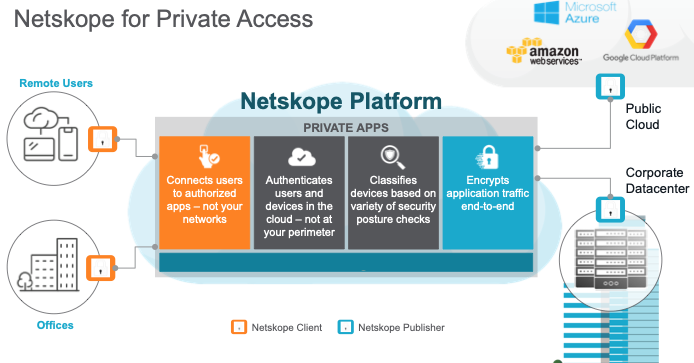
Netskope Private Application Access operates through the seamless integration of the Private Access Broker and the Publisher to enforce Zero Trust principles and provide secure access. The Private Access Broker functions as a cloud-native control plane that validates user identity, device posture, and access policies in real time before granting access to applications.
The Publisher, a lightweight connector deployed on-premises or in the cloud, establishes secure, encrypted communication between users and private applications without exposing applications to the internet. This architecture ensures that users gain access only to the specific applications they are authorized to use, with optimized routing and granular control, while eliminating the need for traditional VPNs. This combination provides a highly secure, scalable, and efficient access solution for endpoint-initiated workflows.
NPA is illustrated in this diagram:
 |
To watch a video about configuring Netskope Private Application Access, click play:
Prerequisites
In order to configure private apps with a Publisher, you need to:
- Purchase the Netskope Private Access license and contact Support to have it enabled in your tenant.
- Choose a private app to be published.
- Collect information about the app: host, port(s).
- Identify the network on which the app is running.
- Using a modern release that is inline with our support policy.
For Publisher requirements and recommendations, plus OS hardening information, go to: Deploy a Publisher.
Supported Browsers
NPA has been tested on these browsers:
- Google Chrome Version 92.0.4515.159 (Official Build) (x86_64) on Big Sur
- Google Chrome Version 92.0.4515.159 (Official Build) (x86_64) on Mojave
- Safari Version 14.1.2 (14611.3.10.1.5) on Mojave
- Brave Version 1.26.67 Chromium: 91.0.4472.114 (Official Build) (x86_64)
- Chrome Version 92.0.4515.159 (Official Build) (x86_64) on Catalina
- Firefox 91.0.1 (64-bit) (on Mac Catalina)
- Edge Version 80.0.361.69 (Official build) (64-bit)
- Microsoft Edge Version 92.0.902.78 (Official build) (64-bit) Windows 10
iOS Use with Netskope Private Access
Netskope is replacing the existing iOS App for NPA (Netskope Private Access) with a new iOS App that supports NPA/CASB/SWG/CFW. This new unified iOS Client is called Netskope Client in the app store, and is intended to offer all the Netskope security services in a single client for iOS phones and tablets (iPads).
Important
Netskope ends the existing NPA iOS Netskope Client support with the new app released in release 102.0.0. With this end of support, you need to remove the existing NPA Netskope Client from all your iOS phones and tablets (iPads), and install the new Netskope Client from the store.
To learn more: Netskope Client for iOS.
Workflow
You can grant access to multiple private apps by repeating the following steps:
- Create a publisher.
- Deploy the publisher on your network.
- Create a private app.
- Steer traffic for the private app.
- Add users.
- Create policies so users can access a private app.
- Deploy the Netskope Client on devices.
- View Private Apps and Network Events information in Skope IT.
Note
The same publisher can be used to give access to multiple apps which resides on the same network.
If you need private apps in different networks (which are not routable from one to another), you will need to repeat these steps for each:
- Create a publisher.
- Deploy a publisher.
Netskope Private Optimized Access
Netskope Private Optimized Access (currently known in the UI as Netskope Endpoint SD-WAN) provides real-time visibility and optimization for all applications while ensuring consistent policy enforcement for employees connecting from any location, whether remote or on-premises.
Capabilities of Netskope Private Optimized Access
1. Bi-directional Flows
- Provides both client-to-server and server-to-client traffic flows, enabling peer-to-peer communication, including legacy on-premises hosted VoIP solutions.
- With dynamic traffic steering and context-aware QoS, it overcomes network performance challenges, boosting productivity for remote call center employees by ensuring an optimal voice and video application experience.
2. Server-to-Client Flows
- Supports legacy applications that require server-initiated traffic, also known as inside-out connectivity, where the traffic is endpoint-initiated.
- Streamlines IT operations by supporting tools such as Microsoft Remote Assistance and TeamViewer for remote access, control, and support.
Further information on how to configure the private Optimized Access is here : https://netskope.document360.io/.
The following sections explain how to configure and use Private Access.
- Private Access AIOps Agent
- Publisher Management
- Private App Management
- Local Broker Management
- Create a Real-time Protection Policy for Private App Segments
- View Private App Segments and Network Events in Skope IT
- Deploy the Netskope Client for Netskope Private Access
- Private Access Troubleshooting
- Private Access FAQs
- Private Access Best Practices
- Private Access REST APIs
- Netskope Private Access for Microsoft Active Directory Domain Services
- Netskope Private Access for SMB and DFS Services
- Source IP Anchoring for an IdP with Netskope Private Access
- NewEdge Traffic Management Zones per NPA Tenant