

Overview
This guide will help you onboard Azure Subscriptions or Tenants to Netskope DSPM (also known as Netskope One DSPM) using Terraform. This allows DSPM to discover, scan, and classify your data store activities.
Prerequisites
Before you begin, make sure these tools are installed, and you’re signed in:
To ensure you’re using the latest versions of these tools, run the following commands in your terminal:
terraform -version
az version
Instructions for Infrastructure Connection
This workflow starts in Netskope DSPM, continues with actions in the Terminal on your local machine, and ends back in DSPM to complete the setup.
-
In the Netskope DSPM console:
-
Go to Administration > Infrastructure Connections.
-
Go to Azure tab > Click Add Infrastructure >
- Select Add Subscription to onboard a single subscription.
- Select Add Tenant to onboard an entire Azure Tenant (Root Management Group).
-
Select Capabilities tab > Adjust the toggles based on your discovery and classification needs.
The following table describes the available capabilities and the permissions they include:
Toggle Description Details Auto-Discover New Data Stores Enables the auto-discovery of newly created data stores (e.g., SQL Servers, Storage Accounts) to ensure DSPM is always aware of your assets. Configures the Auto-Discovery Role. Authorize Data Store Snapshots Access Enables snapshot-based scanning for data stores on disk volumes and the discovery of unmanaged data stores. Configures the Data Store Snapshot Role. Auto-Discover New Subscriptions Enables the auto-discovery and onboarding of newly added subscriptions within the tenant, ensuring your account list remains accurate. (Azure Tenant Onboarding) Auto-Discover New Subscriptions: This capability enables auto-discovery for new subscriptions in the tenant. When enabled, Netskope One DSPM will automatically detect and onboard new subscriptions as they are added to the tenant. -
Click Next > Fill in the following values.
- For Subscription: Enter the Subscription Name and ID.
- For Tenant: Enter the Tenant Name and ID.
Field Value Tenant Name Any value (this is used to identify your infrastructure connection within Netskope DSPM). Tenant ID Obtain from your Azure console:
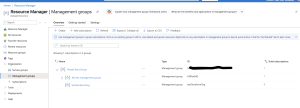
Netskope DSPM Service Account Role Will default to Netskope DSPM_Role. Note that this value needs to be unique to each onboarded Tenant -
Select Terraform > Click Download Template.
-
Don’t close this window and leave it on the Add Infrastructure modal to return to it later.
-
-
In the Terminal on your local machine:
-
Go to the ZIP file path of the Terraform template (eg.
cd C:\Users\User\Downloads) -
Run the
unzipcommand (eg.unzip file_name.zip)-
In the extracted org folder, you’ll find the necessary Terraform files.
-
-
In the org folder, run
terraform initto initialize.-
You’ll see Initializing the backend, followed by a success message.
-
-
Run
terraform applyto start the script.-
Terraform will show a warning if you’re not logged in or your Azure credentials aren’t set correctly.
-
-
Type
Yeswhen you see an output of resources created in your org folder, including the Application ID, Application Secret, and Tenant ID values.-
After completion, you’ll see the Apply complete! Resources: XX added, 0 changed, 0 destroyed message.
-
-
Don’t close this window and leave it on the output values to return to it later.
-
-
In the Netskope Console:
-
Return to the Add Infrastructure Modal > Copy and paste the output values into the Summary Info fields.
Netskope DSPM Field Corresponding Alphanumeric Value Application ID application_idApplication Secret secretTenant ID tenant_id
-
Click Save > Click I’ve already run the template.
-

Your Azure Subscription or Tenant is now connected, and Netskope DSPM can begin discovering data stores.
– Connect your discovered Data Stores. For help, check out the Connecting Azure Data Stores category and find the article for your specific Data Store type.
Reference: Azure Permissions & Roles
The Terraform template automatically configures the necessary roles based on the capabilities you selected in the UI.
All permission details documented here apply equally to:
- Manual configuration through the Azure portal
- Terraform deployments
- Troubleshooting and debugging any deployment method
1. Core Permissions. (Required)
Always deployed. Covers basic connectivity and permission validation. Implemented as the following Azure custom role: Netskope One DSPM Core Role.
{
    "properties": {
        "roleName": "Netskope One DSPM Core Role",
        "description": "",
        "assignableScopes": [
            "/subscriptions/<AZURE SUBSCRIPTION ID>"
        ],
        "permissions": [
            {
                "actions": [
                    "Microsoft.Authorization/roleAssignments/read",
                    "Microsoft.Authorization/roleDefinitions/read"
                ],
                "notActions": [],
                "dataActions": [],
                "notDataActions": []
            }
        ]
    }
}
2. Authorize & Auto-Discover Data Stores. (Optional)
Deployed when you enable Auto-Discover New Data Stores.
Actions and Purpose
| Action | Purpose |
|---|---|
| Microsoft.Resources/subscriptions/resourceGroups/read | To discover all the resource groups in a subscription and data stores within them. |
| Microsoft.Sql/servers/read | To discover and connect to SQL servers to scan databases. |
| Microsoft.DBforPostgreSQL/flexibleServers/read Microsoft.DBforPostgreSQL/flexibleServers/databases/read | To discover and connect to PostgreSQL servers to scan databases. |
| Microsoft.DBforMySQL/flexibleServers/read Microsoft.DBforMySQL/flexibleServers/databases/read | To discover and connect to MySQL servers to scan databases. |
| Microsoft.Synapse/workspaces/read | To discover and connect to Synapse workspaces. |
| Microsoft.Databricks/workspaces/read | To discover and connect to Databricks workspaces. |
| Microsoft.Storage/storageAccounts/listkeys/action Microsoft.Storage/storageAccounts/read Microsoft.Storage/storageAccounts/blobServices/containers/read Microsoft.Storage/storageAccounts/fileServices/read Microsoft.Storage/storageAccounts/fileServices/shares/read | To discover all Blob storage containers and File shares present in storage accounts and scan files. |
| Microsoft.Compute/disks/read | To discover all the managed disks for snapshot scan. |
3. Authorize Data Store Snapshot Access & Unmanaged Data Store Discovery. (Optional)
Deployed when you enable Authorize Data Store Snapshots Access.
Deployed when you enable Authorize Data Store Snapshots Access.
Actions and Purpose
| Actions | Purpose |
|---|---|
| Microsoft.Resources/subscriptions/resourceGroups/read | To discover all the resource groups in a subscription and Managed disks within them. |
| Microsoft.Resources/subscriptions/resourcegroups/write | To create a resource group for creating temporary resources required for scanning of Managed disks for detecting unmanaged data stores. |
| Microsoft.Sql/servers/read Microsoft.Sql/servers/write Microsoft.Sql/servers/delete Microsoft.Sql/servers/firewallRules/write | To connect SQL servers and create a temporary SQL server for snapshot scan. |
| Microsoft.Sql/servers/databases/read Microsoft.Sql/servers/databases/write | To discover all the databases on a server and create temporary cloned DBs to attach them to SQL server for snapshot scan. |
| Microsoft.Compute/disks/read | To discover all the Managed disks. |
| Microsoft.Compute/disks/write Microsoft.Compute/disks/delete Microsoft.Compute/disks/beginGetAccess/action | To create Managed disks for launching VM for scanning of Managed disks. |
| Microsoft.Compute/virtualMachines/read Microsoft.Compute/virtualMachines/write Microsoft.Compute/virtualMachines/delete Microsoft.Compute/virtualMachines/generalize/action Microsoft.Compute/virtualMachines/start/action Microsoft.Compute/virtualMachines/deallocate/action Microsoft.Compute/virtualMachines/powerOff/action | To create VM with sidecar image for scanning of Managed disks and terminate VM after scanning. |
| Microsoft.Compute/snapshots/read Microsoft.Compute/snapshots/write Microsoft.Compute/snapshots/delete | To create snapshots of Managed disks for scanning and delete after scanning. |
| Microsoft.Compute/galleries/images/read Microsoft.Compute/galleries/images/versions/read | To read image gallery definitions and versions used to launch the VM for scanning Managed disks. |
| Microsoft.Network/networkInterfaces/read Microsoft.Network/networkInterfaces/write Microsoft.Network/networkInterfaces/delete Microsoft.Network/networkInterfaces/join/action Microsoft.Network/publicIPAddresses/read Microsoft.Network/publicIPAddresses/write Microsoft.Network/publicIPAddresses/delete Microsoft.Network/publicIPAddresses/join/action Microsoft.Network/networkSecurityGroups/read Microsoft.Network/networkSecurityGroups/write Microsoft.Network/networkSecurityGroups/join/action Microsoft.Network/virtualNetworks/read Microsoft.Network/virtualNetworks/write Microsoft.Network/virtualNetworks/subnets/join/action | To create networking components for launching VM for scanning of Managed disks and allow Netskope One DSPM IPs to access VM for snapshot scan. |
Grant Permissions for Role Validation
Netskope DSPM requires the Application.Read.All permission to validate the roles assigned to the App/Service Principal and to perform automatic misconfiguration analysis. Terraform creates the app, but you must manually grant this permission in the Azure portal.
- Go to App registrations > Search for the Netskope DSPM app created by the Terraform script (use the Application ID from the terminal output to find it).
- Go to API permissions > Select Microsoft Graph.
- Go to Application (1) > Mark the Application.Read.All permission > Click Update permissions.
- Select Grant admin consent for Default Directory to remove the warning.
Troubleshooting Permission Issues
If you encounter errors after deployment, verify that Terraform successfully assigned the roles corresponding to your selected capabilities.
- “Cannot discover and scan data store snapshots due to missing permissions.”
- Fix: Rerun the onboarding and ensure Authorize Data Store Snapshots Access is enabled, or manually assign the Netskope One DSPM Data Store Snapshot Role.
- “Netskope encountered an error while scanning data warehouse ‘XYZ’: Missing required Azure permissions…”
- Fix: Identify the missing permission in the error log and ensure your Terraform template is up to date.
- “Insufficient privileges to complete the operation…”
- Fix: Ensure the Terraform script ran without errors regarding Azure AD Graph permissions (
Application.Read.All).
- Fix: Ensure the Terraform script ran without errors regarding Azure AD Graph permissions (