

Netskope Cloud Firewall will support non-web traffic over IPSec, GRE, or Netskope Client through SOCKS5 proxies in order support the following use-cases:
-
Provide connectivity to applications/traffic coming from an air-gapped environment through DNS resolution and connection negotiation
-
Data and Malware Protection – Provide content inspection for non-web protocols.
-
Access Control and Monitoring – Enforce access control policies and monitor internet usage by employees or network users. By routing all internet traffic through the proxy server, organizations can implement content filtering, block access to and monitor and log internet activity for compliance and security purposes.
-
Enhanced Application Control – Identify activities of various applications such as SSH traffic going to specific Git instances.
- Only TCP-based protocols are supported at the moment.
- This feature is not supported for web traffic on standard (80/443) or non-standard ports.
Configuring the SOCKS5 Proxy
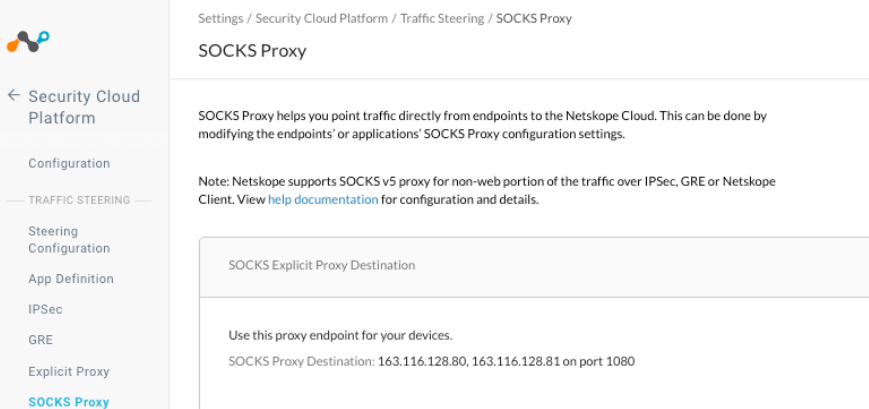
Netskope will provide a SOCKS5 proxy endpoint for your devices and applications.
-
In the Netskope Admin Dashboard, click Settings.
-
Then click Security Cloud Platform -> SOCKS Proxy.
-
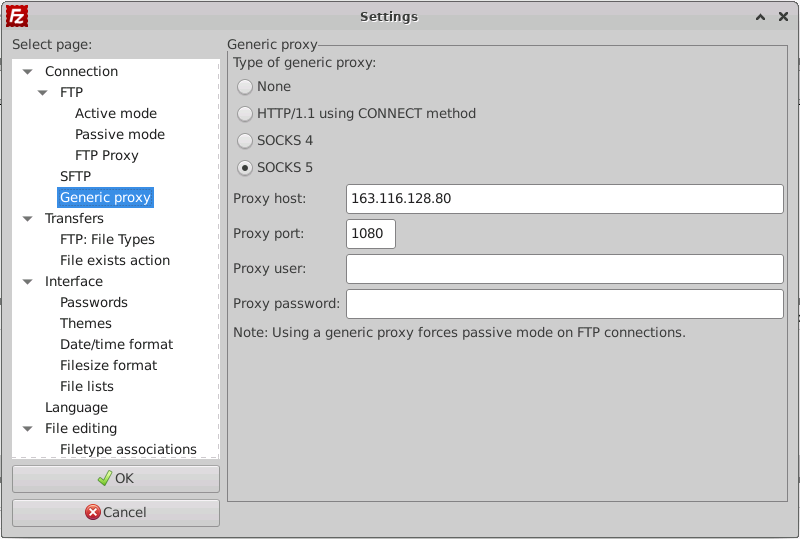
Copy the SOCKS Proxy Destination IP Address and Port Number for usage within your applications (i.e. Filezilla).
DNS Resolution & Domain-Based Policies
A SOCKS client can resolve destination hostnames in one of two ways, and this choice determines whether Netskope Cloud Firewall can apply domain-based policies to the traffic:
-
Remote DNS resolution (recommended): The client sends the destination FQDN inside the SOCKS CONNECT request (SOCKS5 address type DOMAINNAME). Netskope performs the DNS resolution and enforces domain-based firewall policies.
-
Local DNS resolution: The client resolves the FQDN itself and sends only the resolved IP address in the SOCKS CONNECT request. Cloud Firewall never sees the FQDN, so only IP-based policies can match; domain-based policies do not apply.
Events
Events / Alerts will have -SOCKS as suffix in Access Method and Proxy Type will indicate it as SOCKS5

Limitations
Netskope Client cannot know or share the usage of the SOCKS5 proxy in the device. Even though the Netskope Client is in Web+SteerDNS traffic mode, the Global Service Load Balancer continues to remove the SOCKS5 proxy error POP, and the Netskope Gateway also disconnects older Tunnels and rejects newer Tunnels. GSLB removes CTAP errored POPs only if traffic mode is CFW. NSGW disconnects older Tunnels and rejects newer Tunnels by NSClient on CTAP errored POPS irrespective of traffic mode.