Release Notes
1.0.0 (Required minimum CE version for this is 6.0.0)
Added
- Initial release.
- Pull: Yes (URL, Domain, FQDN, IPv4, SHA256 and MD5)
- Push: Yes (URL, Domain, FQDN and IPv4)
- Pull Retraction: Yes (Based On time and verdict type)
- Push Retraction: Yes (Based On tag)
This document explains how to configure the VMRay v1.0.0 plugin with the Threat Exchange module of the Netskope Cloud Exchange platform. This plugin is used to pull IoC(s) of type Domain (FQDN, Domain), IPv4, URL, and File Hash (MD5, SHA256) from Malicious and Suspicious Sample IoCs of submissions in VMRay platform. This plugin supports sharing IoC(s) of type URL, Domain, FQDN, and IPv4 to VMRay via the Upload File or URL submission page. This plugin supports pull and push retraction of indicators from VMRay.
Prerequisites
To complete this configuration, you need:
- A Netskope tenant (or multiple, for example, production and development/test instances).
- A Netskope Cloud Exchange tenant with the Tenant plugin and Threat Exchange plugin already configured.
- A File Profile on your Netskope tenant.
- A URL List on your Netskope tenant.
- A Destination Profile on your Netskope tenant.
- A Private App on your Netskope tenant.
- A DNS Profile on your Netskope Tenant.
- A VMRay instance with an account.
- Connectivity to the following host: https://<region>.cloud.vmray.com
VMRay Plugin Support
This plugin is used to pull IoC(s) of type Domain (FQDN, Domain), IPv4, URL, and File Hash (MD5, SHA256) from Malicious and Suspicious Sample IoCs of submissions in VMRay platform. This plugin supports sharing IoC(s) of type URL, Domain, FQDN, and IPv4 to VMRay via the Upload File or URL submission page. This plugin supports pull and push retraction of indicators from VMRay.
| Fetched Indicator Types | Shared Indicator Types |
|---|---|
| Domain, FQDN, IPv4, URL, MD5, SHA256 | URL, Domain, FQDN, IPv4 |
IoC Retraction
The VMRay plugin supports pull and push retraction of indicators.
| Type | Description |
|---|---|
| IoC Retraction (Pull) | Yes |
| IoC Retraction (Push) | Yes |
Mappings
Severity Mappings
| Netskope Severity | VMRay numeric_severity |
|---|---|
| unknown | 0 |
| low | 1 |
| low | 2 |
| medium | 3 |
| high | 4 |
| critical | 5 |
Pull Indicators Mappings
| Netskope Fields | VMRay Observable Fields |
|---|---|
| Value (domain) | domain |
| Value (url) | url |
| Value (ip) | ip_address |
| Value (md5) | md5_hash |
| Value (sha256) | sha256_hash |
| Severity | numeric_severity |
| Tags | submission_tags, verdict, protocols |
| Comments | severity |
| Extended Information | submission_webif_url |
Push Indicators Mappings
| VMRay Observable Field | Netskope Indicator Field |
|---|---|
| sample_url | indicator.value |
| tags | indicator.tags |
| submission_metadata.ce_severity | indicator.severity |
| submission_metadata.ce_reputation | indicator.reputation |
| submission_metadata.ioc_comment | indicator.comments |
Permissions
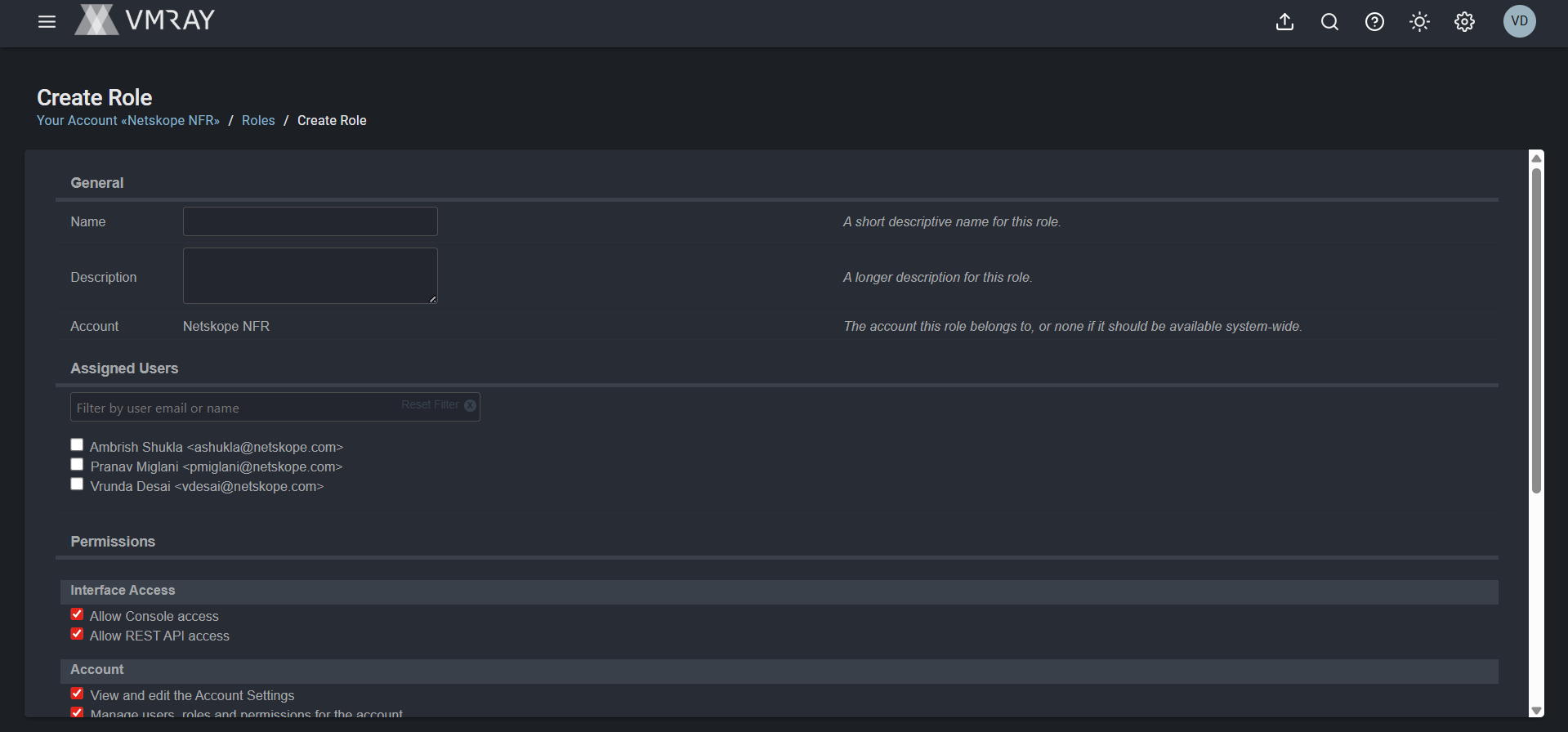
You need a VMRay user role created with these permissions:
- Allow Console Access
- Allow REST API access
- View own submissions, analyses, and samples
- View shared submissions, analyses, and samples
- Submit samples, manage own jobs, reanalyze old analytics, and regenerate analysis reports
- Delete all submissions in this account including associated analyses.
API Details
List of APIs Used
| API Endpoint | Method | Use Case |
|---|---|---|
| /rest/submission/finish_time/{start}~{end} | GET | Fetch submissions by finish time window |
| /rest/sample/{sample_id}/iocs | GET | Fetch IoCs for a given sample |
| /rest/sample/submit | POST | Submit an indicator to VMRay |
| /rest/submission/search | GET | Search submissions for push retraction |
| /rest/submission/{submission_id} | DELETE | Delete a submission for push retraction |
Fetch Submissions by Finish Time
Endpoint: GET /rest/submission/finish_time/{start}~{end}
Request Headers:
| Key | Value |
|---|---|
| Authorization | api_key {api_token} |
| Content-Type | application/json |
Query Parameters:
| Parameter | Description |
|---|---|
| submission_verdict | Filter by verdict: malicious or suspicious |
| _limit | Number of results per page |
| _order | Sort order (asc) |
| _min_id | Cursor for pagination |
Sample Response:
{
    "continuation_id": 9084709,
    "data": [
        {
            "submission_analysis_cache_ids": [
                16989547
            ],
            "submission_analyzer_mode_ai_based_phishing_detection": "normal",
            "submission_analyzer_mode_analysis_caching": "smart",
            "submission_analyzer_mode_analyzer_mode": "static_dynamic",
            "submission_analyzer_mode_archive_action": "sample",
            "submission_analyzer_mode_detonate_links_in_documents": "smart",
            "submission_analyzer_mode_detonate_links_in_emails": "smart",
            "submission_analyzer_mode_disk_image_action": "compound_sample",
            "submission_analyzer_mode_enable_reputation": true,
            "submission_analyzer_mode_enable_whois": false,
            "submission_analyzer_mode_id": 2245384,
            "submission_analyzer_mode_known_benign": false,
            "submission_analyzer_mode_known_malicious": false,
            "submission_analyzer_mode_max_dynamic_analyses_per_sample": "default",
            "submission_analyzer_mode_max_recursive_samples": "10",
            "submission_analyzer_mode_ml_based_phishing_detection": "normal",
            "submission_analyzer_mode_triage": "custom",
            "submission_analyzer_mode_triage_error_handling": null,
            "submission_api_key_id": 2168,
            "submission_billing_type": "analyzer",
            "submission_comment": "Netskope CE",
            "submission_consumed_quota": 0,
            "submission_created": "2026-06-11T09:25:10",
            "submission_deletion_date": "2026-12-08T09:25:10",
            "submission_dll_call_mode": null,
            "submission_dll_calls": null,
            "submission_document_password": null,
            "submission_enable_custom_av": false,
            "submission_enable_local_av": false,
            "submission_filename": "sample.url",
            "submission_finish_time": "2026-06-11T09:25:11",
            "submission_finished": true,
            "submission_has_errors": false,
            "submission_has_recursive_errors": false,
            "submission_id": 14513326,
            "submission_interface_name": "CloudExchange",
            "submission_ip_id": 1242821,
            "submission_ip_ip": "14.96.106.184",
            "submission_job_cache_ids": [],
            "submission_known_configuration": false,
            "submission_number_cached_analyses": 2,
            "submission_number_created_jobs": 0,
            "submission_original_filename": null,
            "submission_original_url": "test-domain.com",
            "submission_parent_submission_id": null,
            "submission_prescript_force_admin": false,
            "submission_prescript_id": null,
            "submission_priority": 7,
            "submission_quota_type": "report",
            "submission_recursive": false,
            "submission_reputation_job_cache_id": null,
            "submission_reputation_lookup_cache_id": 5414252,
            "submission_reputation_mode": "auxiliary",
            "submission_retention_period": 180,
            "submission_sample_id": 14106863,
            "submission_sample_md5": "376df3380181be9ec57644b1de15f751",
            "submission_sample_sha1": "3b286b862ca8a4753b0bf0cd4337e80dd807028c",
            "submission_sample_sha256": "31ace2defcf47c077fcd906556427144a695bd3d3621adfa21ec437e3a5cce22",
            "submission_sample_ssdeep": "3:N1KKATZI:CKqI",
            "submission_sample_verdict": "malicious",
            "submission_sample_verdict_reason_code": null,
            "submission_sample_verdict_reason_description": null,
            "submission_score": 83,
            "submission_severity": "malicious",
            "submission_shareable": false,
            "submission_status": "success",
            "submission_submission_metadata": "{\"ce_severity\": \"SeverityType.UNKNOWN\", \"ce_reputation\": \"5\", \"ioc_comment\": \"Application: Nuance\"}",
            "submission_submitter_email": null,
            "submission_system_time": null,
            "submission_tags": [
                "Unsanctioned",
                "Netskope-CE-Microsoft-Defender-for-Cloud-Apps"
            ],
            "submission_triage_error_handling": null,
            "submission_triage_stage": null,
            "submission_triaged": null,
            "submission_type": "api",
            "submission_used_cache": true,
            "submission_user_account_id": 767,
            "submission_user_account_name": "Netskope NFR",
            "submission_user_account_subscription_mode": null,
            "submission_user_account_type": "integration_partner",
            "submission_user_email": "vdesai@netskope.com",
            "submission_user_id": 7752,
            "submission_verdict": "malicious",
            "submission_verdict_reason_code": null,
            "submission_verdict_reason_description": null,
            "submission_webif_url": "https://us.cloud.vmray.com/samples/14106863",
            "submission_whois_mode": "disabled"
        },
    ],
}
Fetch Sample IOCs
Endpoint: GET /rest/sample/{sample_id}/iocs
Request Headers:
| Key | Value |
|---|---|
| Authorization | api_key {api_token} |
| Content-Type | application/json |
Query Parameters:
| Parameter | Description |
|---|---|
| all_artifacts | Set to true to retrieve all artifacts |
| ioc_verdict | Filter by verdict: malicious or suspicious |
Sample Response:
{
  "data": {
    "sample_child_relations": [


    ],
    "sample_child_relations_truncated": false,
    "sample_child_sample_ids": [

    ],
    "sample_classifications": [

    ],
    "sample_clusters": [

    ],
    "sample_container_type": null,
    "sample_created": "2026-05-20T14:05:23",
    "sample_display_url": "http://www.vnic.co/khach-hang.html",
    "sample_emailhash": null,
    "sample_filename": "sample.url",
    "sample_filesize": 34,
    "sample_highest_vti_score": 20,
    "sample_highest_vti_severity": "not_suspicious",
    "sample_id": 13812243,
    "sample_imphash": null,
    "sample_is_multipart": false,
    "sample_last_md_score": null,
    "sample_last_reputation_severity": "unknown",
    "sample_last_vt_score": null,
    "sample_md5hash": "d11ae5bb4de4608ba67a6524cf9312a7",
    "sample_parent_relations": [

    ],
    "sample_parent_relations_truncated": false,
    "sample_parent_sample_ids": [

    ],
    "sample_password_protected": false,
    "sample_pe_signature": null,
    "sample_priority": 7,
    "sample_score": 0,
    "sample_severity": "not_suspicious",
    "sample_sha1hash": "ee2216546a31be8ab2ebb7da990ffe0c4a919862",
    "sample_sha256hash": "8cc6bc85842af39dfeb13539d80a8c38376215e8ae1ea81f5b477b30d55d1045",
    "sample_ssdeephash": "3:N1KJS4H5nEiLk0:Cc4ZEo/",
    "sample_threat_names": [

    ],
    "sample_type": "URL",
    "sample_url": "http://www.vnic.co/khach-hang.html",
    "sample_verdict": "clean",
    "sample_verdict_reason_code": null,
    "sample_verdict_reason_description": null,
    "sample_vti_score": 20,
    "sample_webif_url": "https://us.cloud.vmray.com/samples/13812243"
  },
  "result": "ok"
}
Submit Indicator to VMRay
Endpoint: POST /rest/sample/submit
Request Headers:
| Key | Value |
|---|---|
| Authorization | api_key {api_token} |
| Content-Type | application/json |
Query Parameters:
| Parameter | Description |
|---|---|
| sample_url | The indicator value to submit |
Request Body:
{
  "tags": "Netskope-CE-{plugin_name},{tag1},{tag2}",
  "submission_metadata": "{\"ce_severity\": \"HIGH\", \"ce_reputation\": \"\", \"ioc_comment\": \"\"}",
  "enable_reputation": "true",
  "live_interaction": "false",
  "comment": ""
}
Sample Response:
{
  "data": {
    "errors": [

    ],
    "jobs": [
      {
        "job_account_id": 767,
        "job_analyzer_id": 7,
        "job_analyzer_name": "vmray_web",
        "job_bill_id": 13908651,
        "job_bill_type": "analyzer",
        "job_configuration_description": "Chrome",
        "job_configuration_id": 254,
        "job_configuration_name": "web_root",
        "job_created": "2026-06-15T09:27:14",
        "job_document_password": null,
        "job_enable_custom_av": false,
        "job_enable_local_av": false,
        "job_id": 17321711,
        "job_jobrule_id": 112,
        "job_jobrule_sampletype": "URL",
        "job_parent_analysis_id": null,
        "job_prescript_force_admin": false,
        "job_prescript_id": null,
        "job_priority": 9,
        "job_quota_type": "report",
        "job_reputation_job_id": null,
        "job_sample_id": 13824015,
        "job_sample_md5": "e9e73f6ae078cfd5a24bddc40043e4b3",
        "job_sample_sha1": "960aebe953a46e9fba63203feb38566001d3648a",
        "job_sample_sha256": "9e4cf379b7ccedcf1bf521fee850d9c9de96153a691c05e50a7a9d8333495515",
        "job_sample_ssdeep": "3:N8SP3uwVQokyMAwMIIPBhMJNMPHxXgxQeOE6fKP3u2NerLIK:2SmwVQjMDPBWORktOE6fKm24fIK",
        "job_snapshot_id": 1,
        "job_snapshot_name": "def",
        "job_static_config_id": null,
        "job_status": "queued",
        "job_statuschanged": "2026-06-15T09:27:14",
        "job_submission_id": 14547658,
        "job_submission_ids": [
          14547658
        ],
        "job_system_time": null,
        "job_tracking_state": "//waiting",
        "job_type": "full_analysis",
        "job_user_email": "vdesai@netskope.com",
        "job_user_id": 7752,
        "job_vm_description": "VMRay Web Analyzer",
        "job_vm_id": 42,
        "job_vm_name": "win-web",
        "job_vmhost_id": null,
        "job_vminstance_num": null,
        "job_vnc_url_html": null,
        "job_vnc_url_wss": null
      }
    ],
    "md_jobs": [

    ],
    "reputation_jobs": [
      {
        "reputation_job_account_id": 767,
        "reputation_job_bill_id": null,
        "reputation_job_created": "2026-06-15T09:27:14",
        "reputation_job_id": 6861365,
        "reputation_job_priority": 9,
        "reputation_job_sample_id": 13824015,
        "reputation_job_sample_md5": "e9e73f6ae078cfd5a24bddc40043e4b3",
        "reputation_job_sample_sha1": "960aebe953a46e9fba63203feb38566001d3648a",
        "reputation_job_sample_sha256": "9e4cf379b7ccedcf1bf521fee850d9c9de96153a691c05e50a7a9d8333495515",
        "reputation_job_sample_ssdeep": "3:N8SP3uwVQokyMAwMIIPBhMJNMPHxXgxQeOE6fKP3u2NerLIK:2SmwVQjMDPBWORktOE6fKm24fIK",
        "reputation_job_status": "queued",
        "reputation_job_statuschanged": "2026-06-15T09:27:14",
        "reputation_job_submission_id": 14547658,
        "reputation_job_submission_ids": [
          14547658
        ],
        "reputation_job_user_email": "vdesai@netskope.com",
        "reputation_job_user_id": 7752
      }
    ],
    "samples": [
      {
        "sample_child_sample_ids": [

        ],
        "sample_container_type": null,
        "sample_created": "2026-05-21T05:22:01",
        "sample_display_url": "https://docs.google.com/spreadsheet/viewform?formkey=dGg2Z1lCUHlSdjllTVNRUW50TFIzSkE6MQ,https://docs.google.com, https://api.google.com",
        "sample_emailhash": null,
        "sample_filename": "9e4cf379b7ccedcf1bf521fee850d9c9de96153a691c05e50a7a9d8333495515url",
        "sample_filesize": 135,
        "sample_id": 13824015,
        "sample_imphash": null,
        "sample_is_multipart": false,
        "sample_md5hash": "e9e73f6ae078cfd5a24bddc40043e4b3",
        "sample_parent_sample_ids": [

        ],
        "sample_password_protected": false,
        "sample_pe_signature": null,
        "sample_priority": 7,
        "sample_sha1hash": "960aebe953a46e9fba63203feb38566001d3648a",
        "sample_sha256hash": "9e4cf379b7ccedcf1bf521fee850d9c9de96153a691c05e50a7a9d8333495515",
        "sample_ssdeephash": "3:N8SP3uwVQokyMAwMIIPBhMJNMPHxXgxQeOE6fKP3u2NerLIK:2SmwVQjMDPBWORktOE6fKm24fIK",
        "sample_type": "URL",
        "sample_url": "https://docs.google.com/spreadsheet/viewform?formkey=dGg2Z1lCUHlSdjllTVNRUW50TFIzSkE6MQ,https://docs.google.com, https://api.google.com",
        "sample_webif_url": "https://us.cloud.vmray.com/samples/13824015",
        "submission_filename": "https://docs.google.com/spreadsheet/viewform?formkey=dGg2Z1lCUHlSdjllTVNRUW50TFIzSkE6MQ,https://docs.google.com, https://api.google.com"
      }
    ],
    "static_jobs": [

    ],
    "submissions": [
      {
        "submission_analysis_cache_ids": [

        ],
        "submission_analyzer_mode_ai_based_phishing_detection": "normal",
        "submission_analyzer_mode_analysis_caching": "disabled",
        "submission_analyzer_mode_analyzer_mode": "reputation_static_dynamic",
        "submission_analyzer_mode_archive_action": "sample",
        "submission_analyzer_mode_detonate_links_in_documents": "smart",
        "submission_analyzer_mode_detonate_links_in_emails": "smart",
        "submission_analyzer_mode_disk_image_action": "compound_sample",
        "submission_analyzer_mode_enable_reputation": true,
        "submission_analyzer_mode_enable_whois": true,
        "submission_analyzer_mode_id": 2254422,
        "submission_analyzer_mode_known_benign": false,
        "submission_analyzer_mode_known_malicious": false,
        "submission_analyzer_mode_max_dynamic_analyses_per_sample": "default",
        "submission_analyzer_mode_max_recursive_samples": "10",
        "submission_analyzer_mode_ml_based_phishing_detection": "normal",
        "submission_analyzer_mode_triage": "custom",
        "submission_analyzer_mode_triage_error_handling": null,
        "submission_api_key_id": 2170,
        "submission_billing_type": "analyzer",
        "submission_comment": "Pushed from Netskope CE Threat Exchange",
        "submission_consumed_quota": 0,
        "submission_created": "2026-06-15T09:27:14",
        "submission_deletion_date": "2026-12-12T09:27:14",
        "submission_dll_call_mode": null,
        "submission_dll_calls": null,
        "submission_document_password": null,
        "submission_enable_custom_av": false,
        "submission_enable_local_av": false,
        "submission_filename": "https://docs.google.com/spreadsheet/viewform?formkey=dGg2Z1lCUHlSdjllTVNRUW50TFIzSkE6MQ,https://docs.google.com, https://api.google.com",
        "submission_finish_time": null,
        "submission_finished": false,
        "submission_has_errors": null,
        "submission_has_recursive_errors": null,
        "submission_id": 14547658,
        "submission_interface_name": "Netskope Cloud Exchange",
        "submission_ip_id": 1218717,
        "submission_ip_ip": "103.108.207.58",
        "submission_job_cache_ids": [

        ],
        "submission_known_configuration": false,
        "submission_number_cached_analyses": 0,
        "submission_number_created_jobs": 3,
        "submission_original_filename": null,
        "submission_original_url": "https://docs.google.com/spreadsheet/viewform?formkey=dGg2Z1lCUHlSdjllTVNRUW50TFIzSkE6MQ,https://docs.google.com, https://api.google.com",
        "submission_parent_submission_id": null,
        "submission_prescript_force_admin": false,
        "submission_prescript_id": null,
        "submission_priority": 9,
        "submission_quota_type": "report",
        "submission_recursive": false,
        "submission_reputation_job_cache_id": null,
        "submission_reputation_lookup_cache_id": null,
        "submission_reputation_mode": "disabled",
        "submission_retention_period": 180,
        "submission_sample_id": 13824015,
        "submission_sample_md5": "e9e73f6ae078cfd5a24bddc40043e4b3",
        "submission_sample_sha1": "960aebe953a46e9fba63203feb38566001d3648a",
        "submission_sample_sha256": "9e4cf379b7ccedcf1bf521fee850d9c9de96153a691c05e50a7a9d8333495515",
        "submission_sample_ssdeep": "3:N8SP3uwVQokyMAwMIIPBhMJNMPHxXgxQeOE6fKP3u2NerLIK:2SmwVQjMDPBWORktOE6fKm24fIK",
        "submission_score": null,
        "submission_severity": null,
        "submission_shareable": false,
        "submission_status": "in_progress",
        "submission_submission_metadata": "{\"source_plugin\": \"Postman\"}",
        "submission_submitter_email": null,
        "submission_system_time": null,
        "submission_tags": [
          "multipleurls",
          "netskope-ce"
        ],
        "submission_triage_error_handling": null,
        "submission_triage_stage": null,
        "submission_triaged": null,
        "submission_type": "api",
        "submission_used_cache": false,
        "submission_user_account_id": 767,
        "submission_user_account_name": "Netskope NFR",
        "submission_user_account_subscription_mode": null,
        "submission_user_account_type": "integration_partner",
        "submission_user_email": "vdesai@netskope.com",
        "submission_user_id": 7752,
        "submission_verdict": null,
        "submission_verdict_reason_code": null,
        "submission_verdict_reason_description": null,
        "submission_webif_url": "https://us.cloud.vmray.com/samples/13824015",
        "submission_whois_mode": "disabled"
      }
    ],
    "vt_jobs": [

    ],
    "whois_jobs": [

    ]
  },
  "result": "ok"
}
Search Submissions
Endpoint: GET /rest/submission/search
Request Headers:
| Key | Value |
|---|---|
| Authorization | api_key {api_token} |
| Content-Type | application/json |
Query Parameters:
| Parameter | Description |
|---|---|
| query | Search query, e.g. url == “{indicator.value}” |
Sample Response:
{
  "data": [
    {
      "submission_analysis_cache_ids": [

      ],
      "submission_analyzer_mode_ai_based_phishing_detection": "normal",
      "submission_analyzer_mode_analysis_caching": "smart",
      "submission_analyzer_mode_analyzer_mode": "static_dynamic",
      "submission_analyzer_mode_archive_action": "sample",
      "submission_analyzer_mode_detonate_links_in_documents": "smart",
      "submission_analyzer_mode_detonate_links_in_emails": "smart",
      "submission_analyzer_mode_disk_image_action": "compound_sample",
      "submission_analyzer_mode_enable_reputation": true,
      "submission_analyzer_mode_enable_whois": false,
      "submission_analyzer_mode_id": 2245384,
      "submission_analyzer_mode_known_benign": false,
      "submission_analyzer_mode_known_malicious": false,
      "submission_analyzer_mode_max_dynamic_analyses_per_sample": "default",
      "submission_analyzer_mode_max_recursive_samples": "10",
      "submission_analyzer_mode_ml_based_phishing_detection": "normal",
      "submission_analyzer_mode_triage": "custom",
      "submission_analyzer_mode_triage_error_handling": null,
      "submission_api_key_id": 2168,
      "submission_billing_type": "analyzer",
      "submission_comment": "Netskope CE",
      "submission_consumed_quota": 1,
      "submission_created": "2026-06-11T07:38:05",
      "submission_deletion_date": "2026-12-08T07:38:05",
      "submission_dll_call_mode": null,
      "submission_dll_calls": null,
      "submission_document_password": null,
      "submission_enable_custom_av": false,
      "submission_enable_local_av": false,
      "submission_filename": "sample.url",
      "submission_finish_time": "2026-06-11T08:08:25",
      "submission_finished": true,
      "submission_has_errors": false,
      "submission_has_recursive_errors": false,
      "submission_id": 14512551,
      "submission_interface_name": "CloudExchange",
      "submission_ip_id": 1242821,
      "submission_ip_ip": "14.96.106.184",
      "submission_job_cache_ids": [

      ],
      "submission_known_configuration": false,
      "submission_number_cached_analyses": 0,
      "submission_number_created_jobs": 2,
      "submission_original_filename": null,
      "submission_original_url": "coincafe.com",
      "submission_parent_submission_id": null,
      "submission_prescript_force_admin": false,
      "submission_prescript_id": null,
      "submission_priority": 7,
      "submission_quota_type": "report",
      "submission_recursive": false,
      "submission_reputation_job_cache_id": null,
      "submission_reputation_lookup_cache_id": null,
      "submission_reputation_mode": "auxiliary",
      "submission_retention_period": 180,
      "submission_sample_id": 14106861,
      "submission_sample_md5": "b338596ef9b606d198109bd2840fd38a",
      "submission_sample_sha1": "8f51a039d9eb233ba29c65844f46bd82b77ebca4",
      "submission_sample_sha256": "8b6f8c062941cbb3fb43eed1331d8beaa9c7156705ffa5fcc3fda858c9811dba",
      "submission_sample_ssdeep": "3:N1KdKMy7LK:CIMy72",
      "submission_sample_verdict": "malicious",
      "submission_sample_verdict_reason_code": null,
      "submission_sample_verdict_reason_description": null,
      "submission_score": 100,
      "submission_severity": "malicious",
      "submission_shareable": false,
      "submission_status": "success",
      "submission_submission_metadata": "{\"ce_severity\": \"SeverityType.UNKNOWN\", \"ce_reputation\": \"5\", \"ioc_comment\": \"Application: Coincafe\"}",
      "submission_submitter_email": null,
      "submission_system_time": null,
      "submission_tags": [
        "Sanctioned",
        "Netskope-CE-Microsoft-Defender-for-Cloud-Apps"
      ],
      "submission_triage_error_handling": null,
      "submission_triage_stage": null,
      "submission_triaged": null,
      "submission_type": "api",
      "submission_used_cache": false,
      "submission_user_account_id": 767,
      "submission_user_account_name": "Netskope NFR",
      "submission_user_account_subscription_mode": null,
      "submission_user_account_type": "integration_partner",
      "submission_user_email": "vdesai@netskope.com",
      "submission_user_id": 7752,
      "submission_verdict": "malicious",
      "submission_verdict_reason_code": null,
      "submission_verdict_reason_description": null,
      "submission_webif_url": "https://us.cloud.vmray.com/samples/14106861",
      "submission_whois_mode": "disabled"
    }
  ],
  "result": "ok"
}
Delete Submission
Endpoint: DELETE /rest/submission/{submission_id}
Request Headers:
| Key | Value |
|---|---|
| Authorization | api_key {api_token} |
| Content-Type | application/json |
Sample Response:
{
  "result": "ok"
}
Performance Matrix
This reading is conducted on a Large CE Stack with these specifications by pulling and pushing 100k IoCs.
| Description | Specification |
|---|---|
| Stack Size | Large, RAM: 32 GB, Core: 16 |
| Indicators fetched from VMRay | ~6k per min |
| Indicators shared to VMRay | ~100 per min |
Note
- The performance is done with only 100 indicators as the plugin will push indicators in batch on 1.
- We have noticed that our instance had a limit of 1000 submissions created per month, so if your instance has such a limit, you might not be able to push indicators more than the limit. For more information refer to troubleshooting.
User Agent
netskope-ce-6.1.0-cte-vmray-v1.0.0
Workflow
- Create Role and Assign it to a User
- Generate API Token from VMRay
- Configure Netskope Tenant
- Configure the VMRay Plugin
- Configure a Threat Exchange Business Rule for VMRay
- Configure Sharing for Netskope and VMRay
- Validate the VMRay Plugin
Watch a Video
Click play to watch a video.
Create Role and Assign it to a User
-
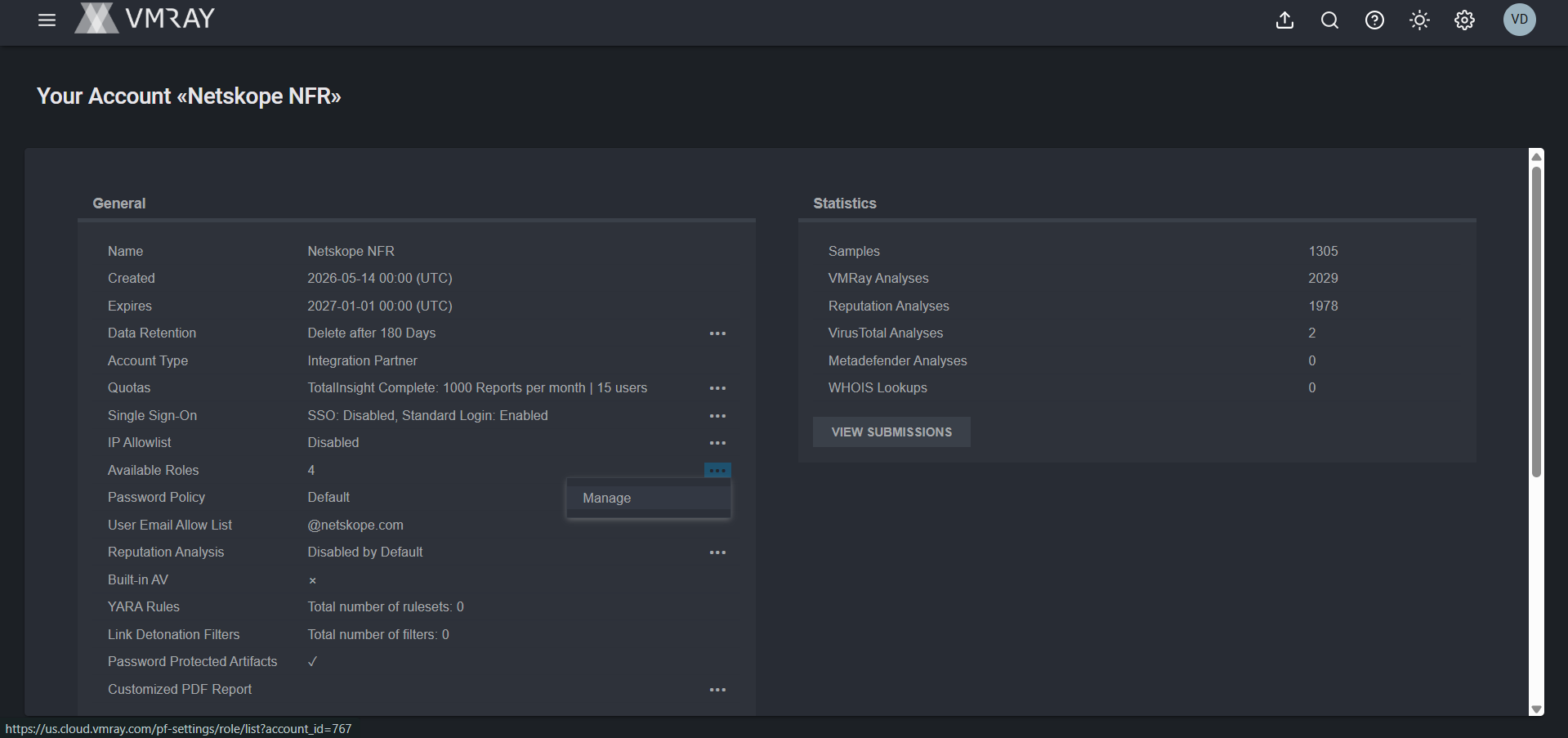
In VMRay, go to the Settings > Accounts > General > Available Roles > Manage.
-
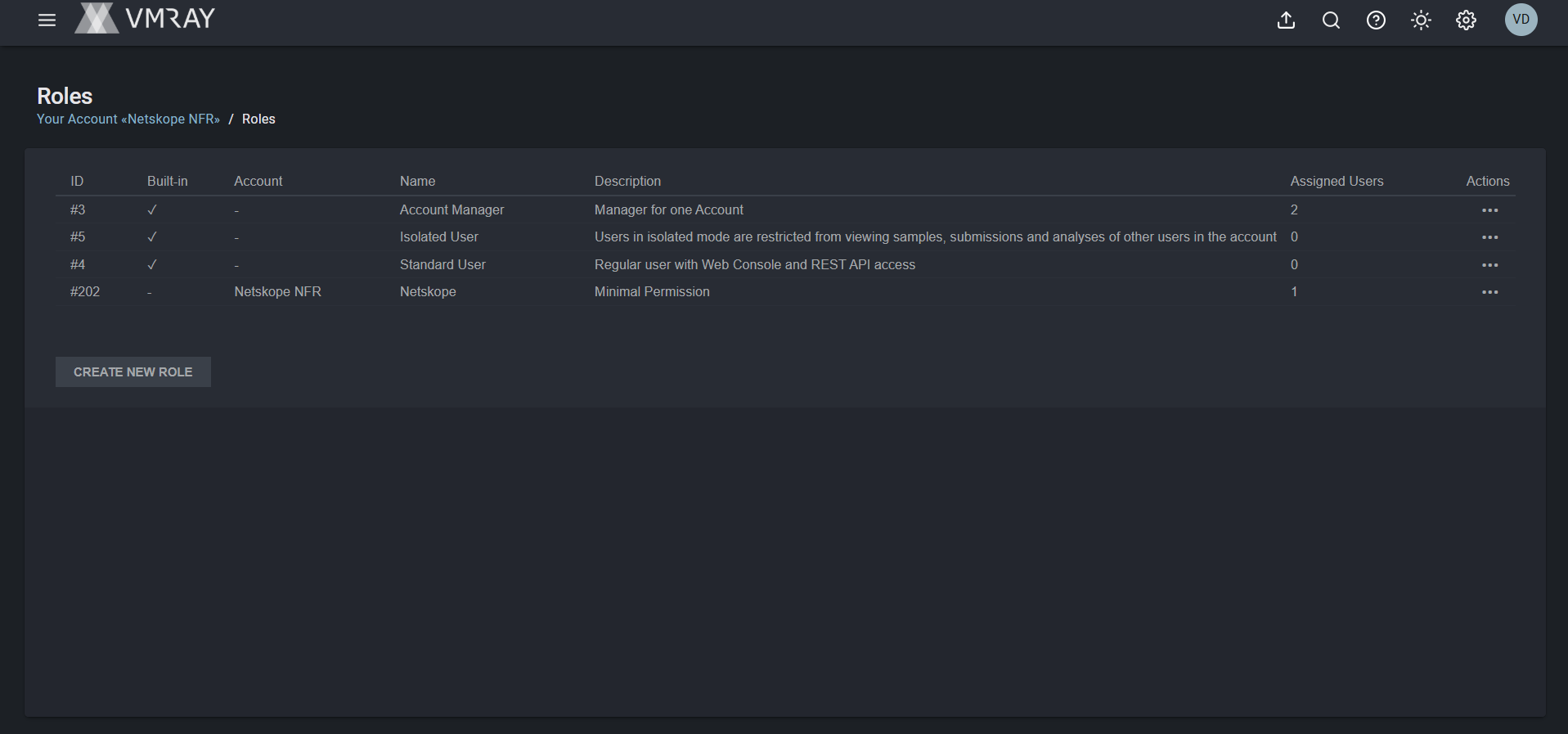
Click Create New Role.
-
Provide the name for the role and provide permissions.
-
Click Save.
The role is created, then assign this role to a user.
-
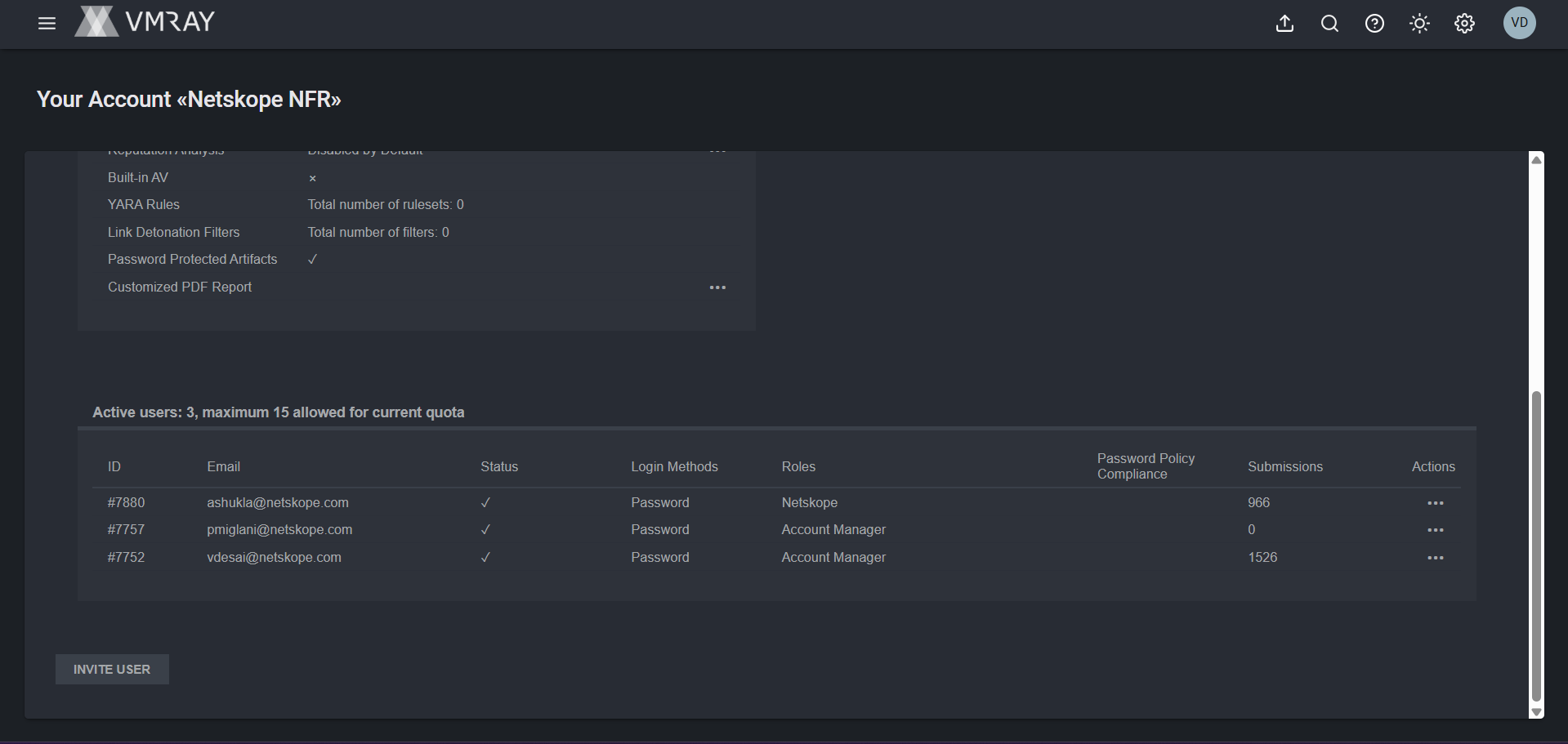
Go to the Settings > Accounts > Active users.
-
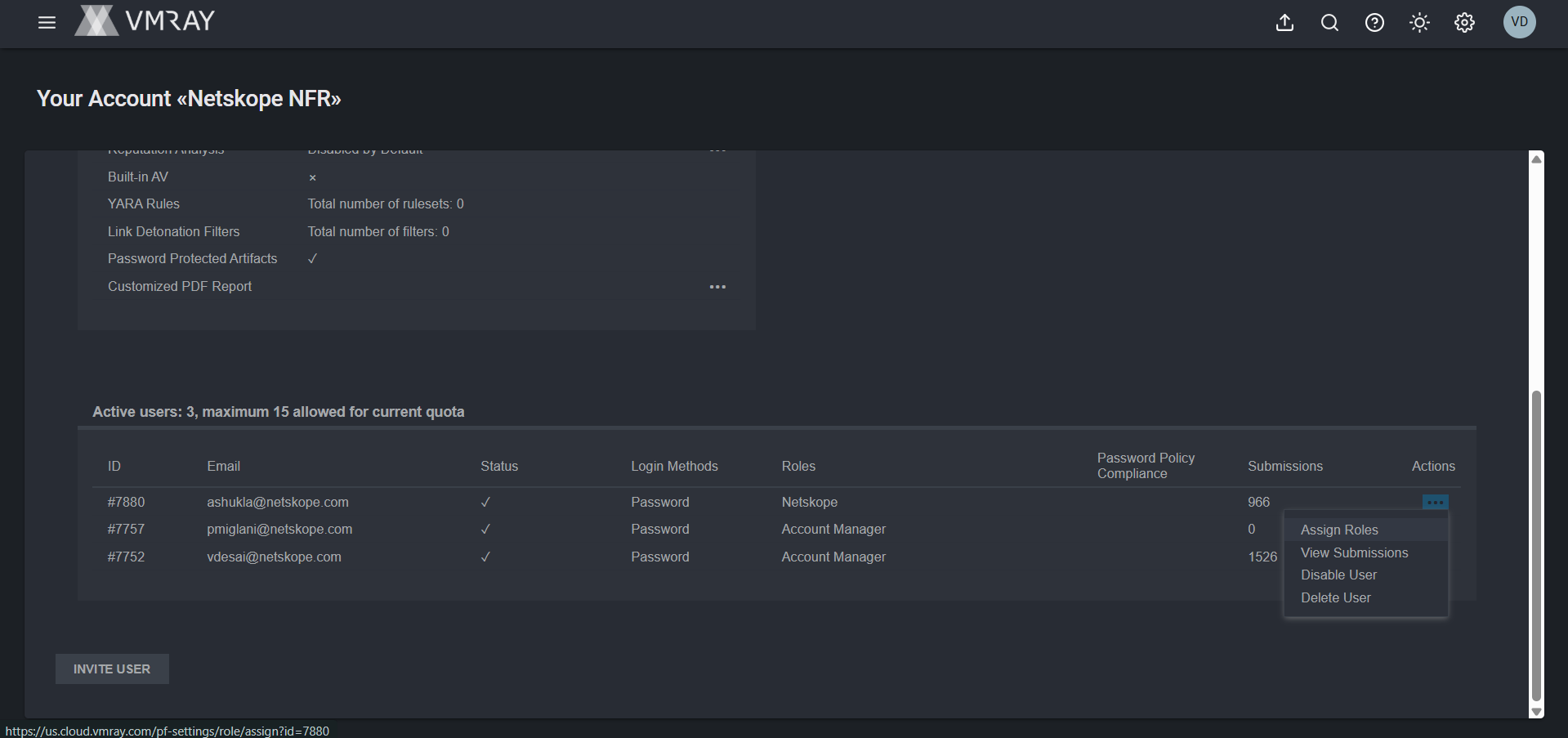
Click on three dots for the User you want to attach the role and click Assign Role.
-
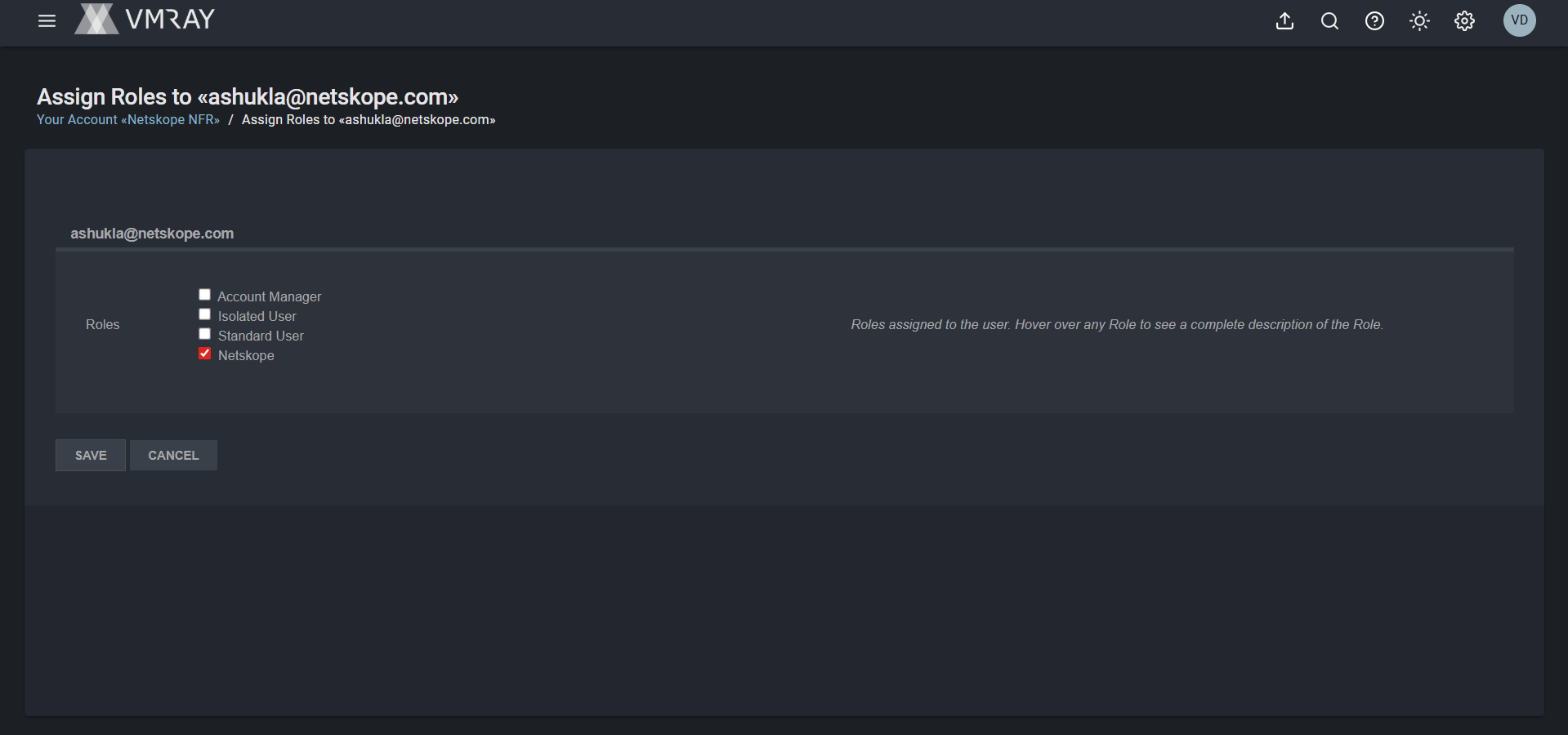
Select the created role and click Save.
Generate an API Token from VMRay
-
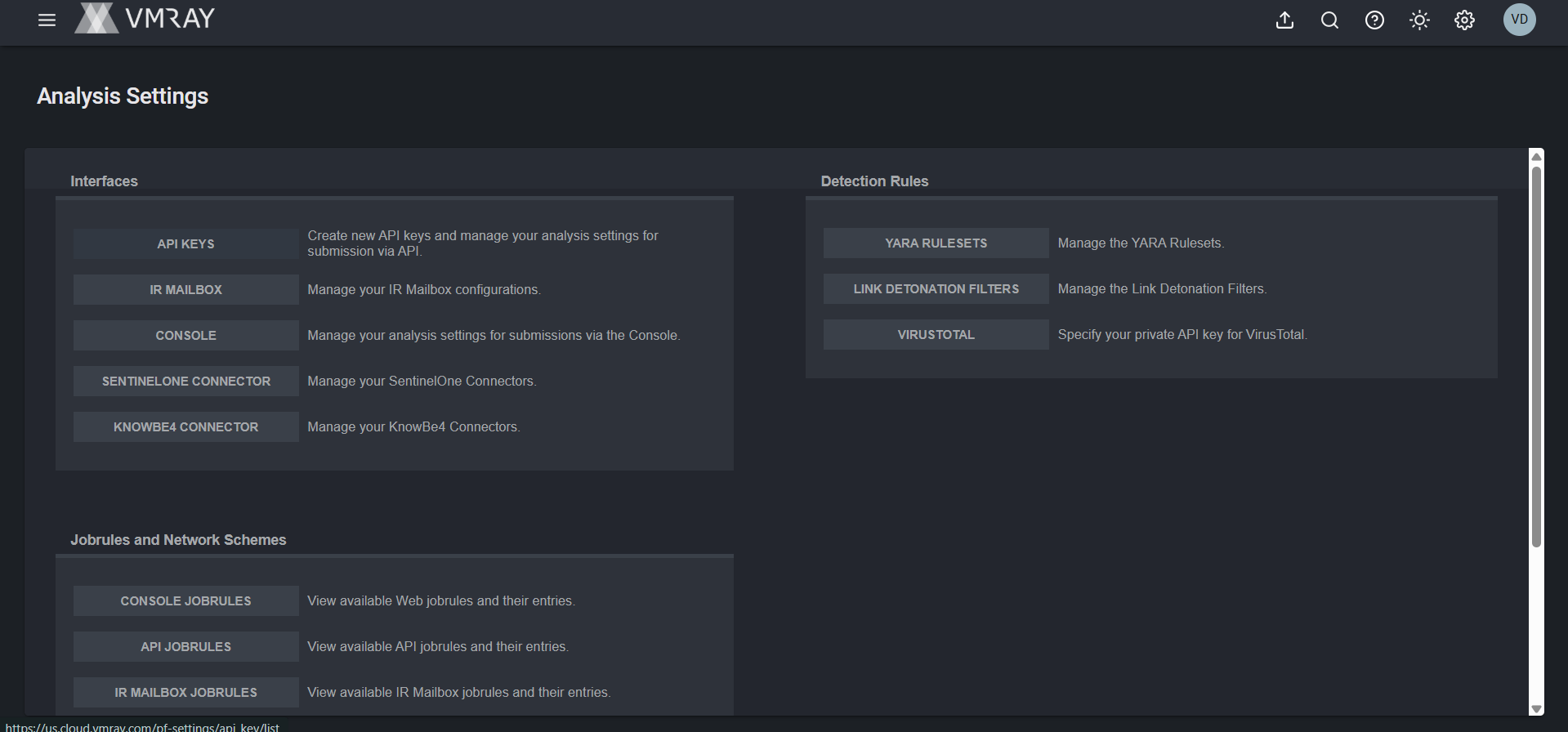
Go to Settings > Analysis > Interfaces > API Keys.
-
Click Create New API Key.
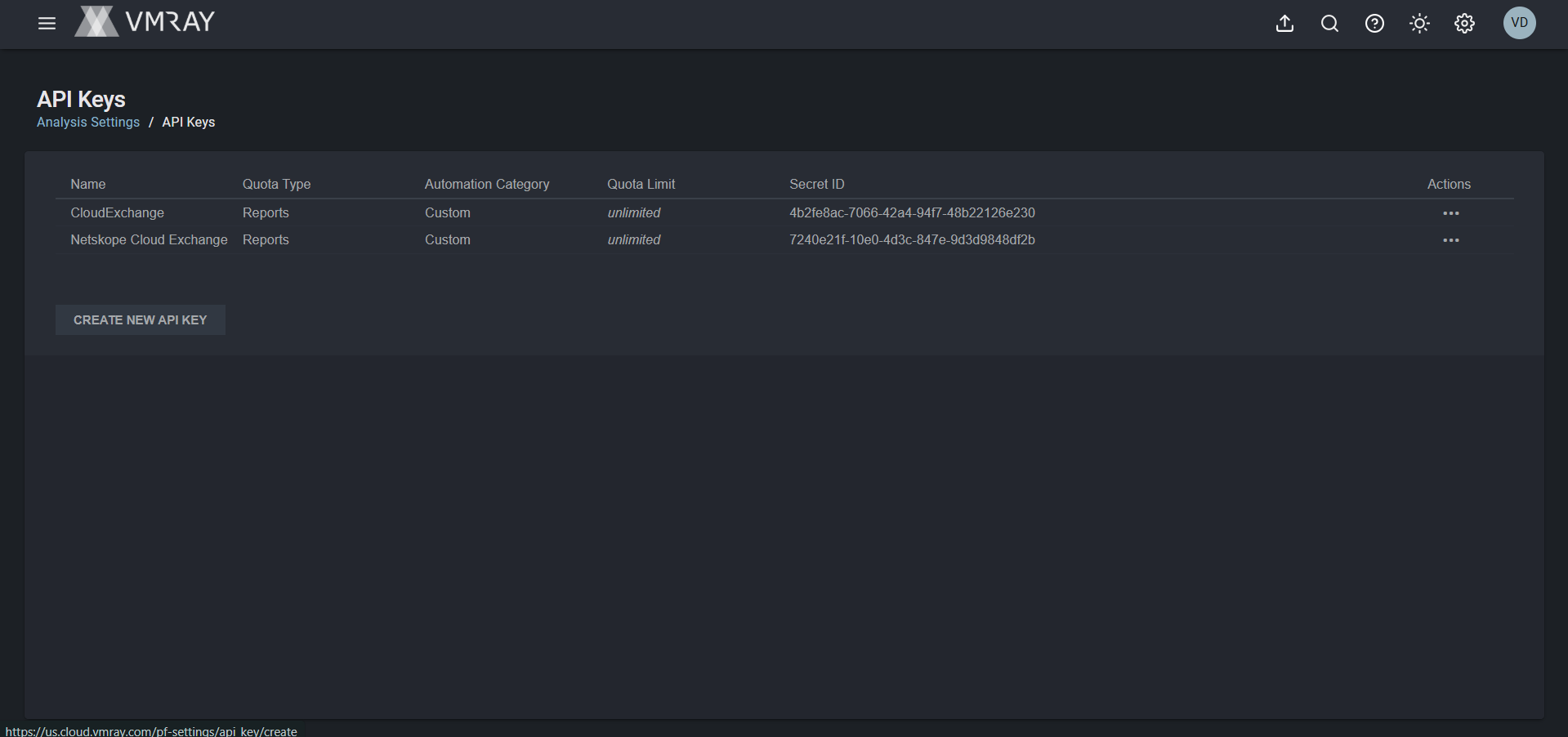
-
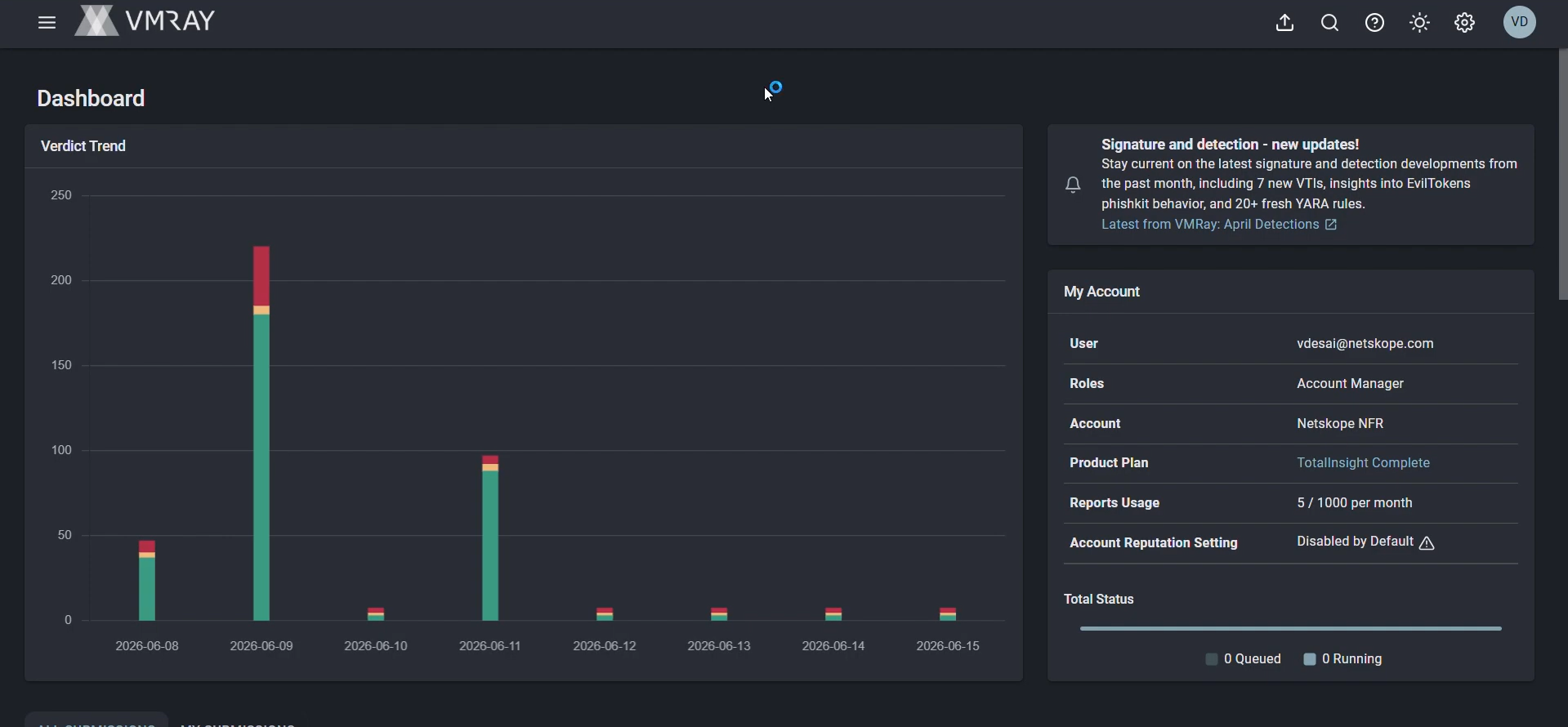
Provide the name for the API Token and click Save. Copy the API token to use to configure the plugin.
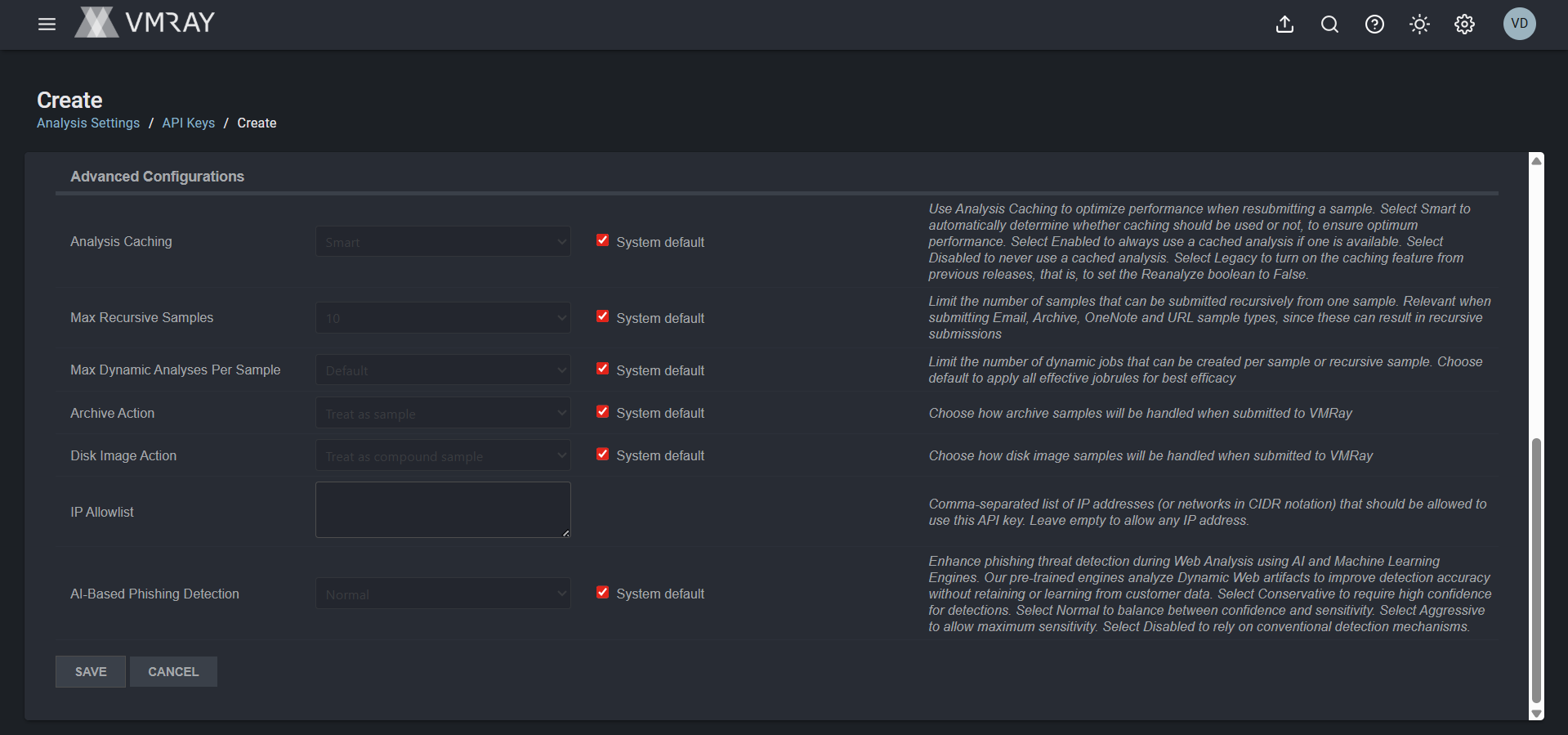 For the permissions, you should have the token created using the account with these permissions.
Configure the VMRay Plugin
-
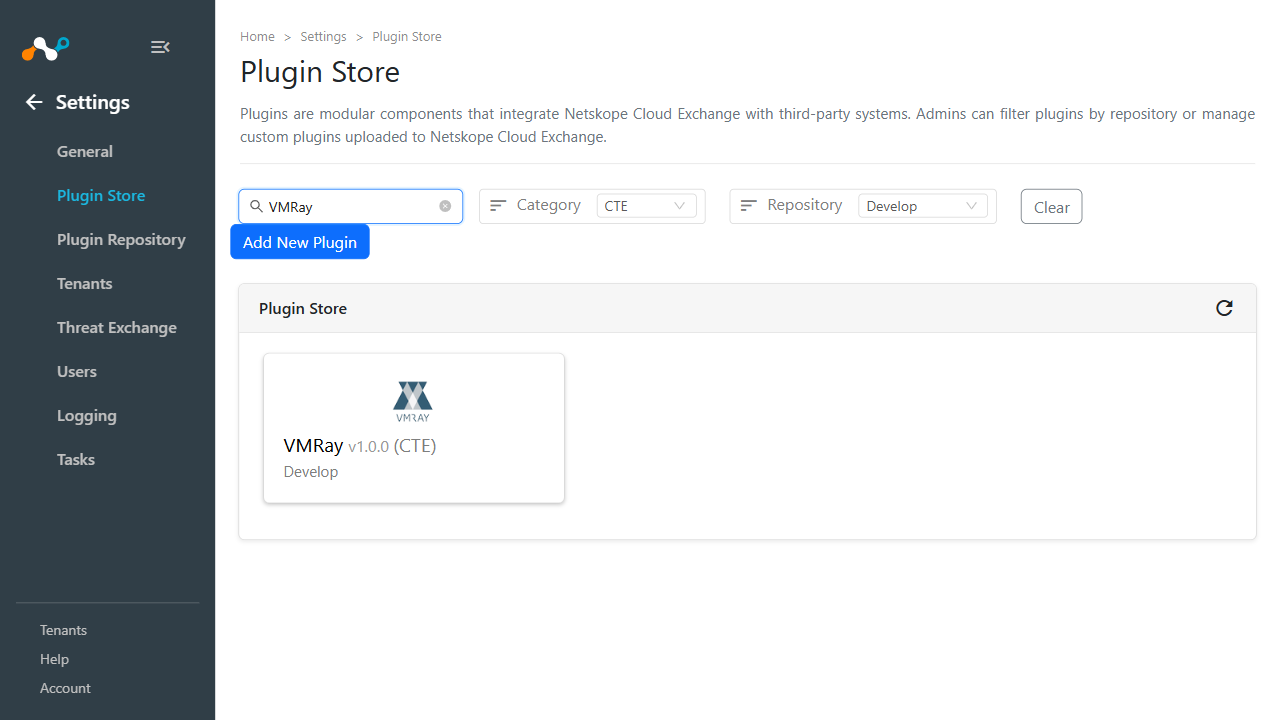
In Cloud Exchange, go to Settings > Plugin Store. Search for and select the VMRay v1.0.0 (CTE) plugin.
-
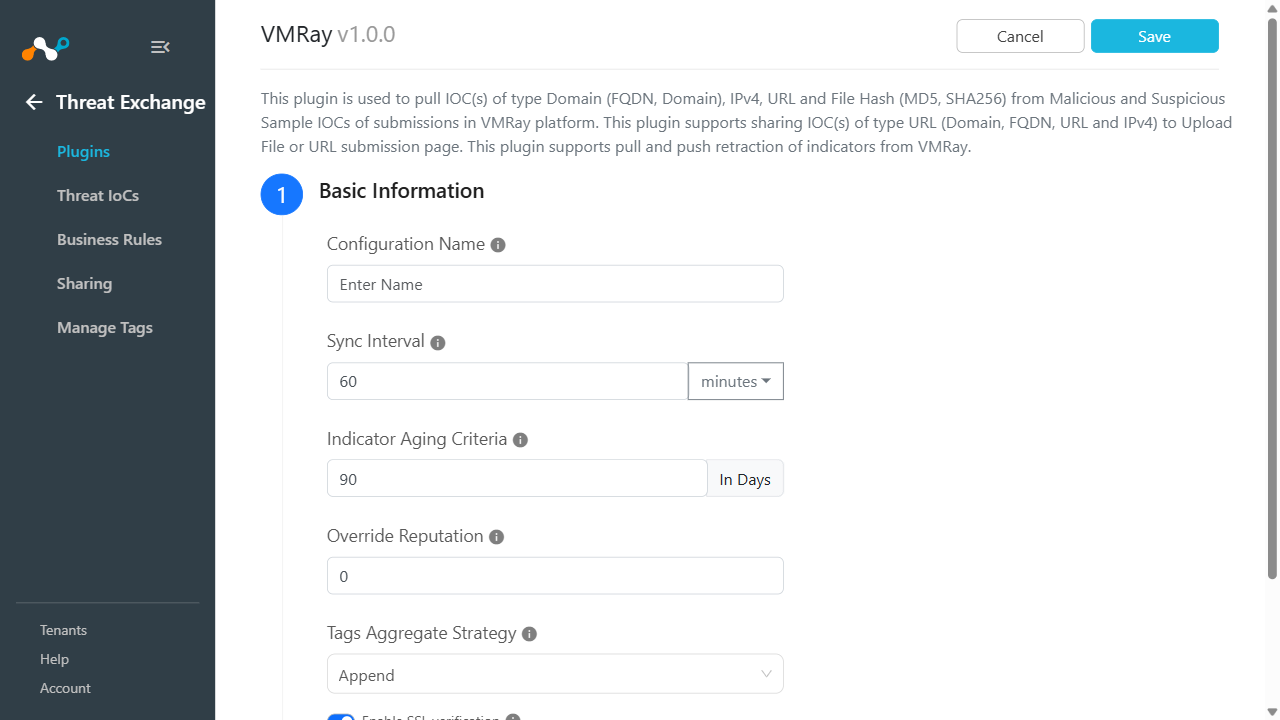
Enter the Basic Information:
- Configuration Name: The plugin configuration name.
- Sync Interval: The Interval to fetch data from this plugin and share data to this plugin from other sources.
- Aging Criteria: Expires indicators after specific time.
- Override Reputation: Set a value to override reputation of indicators received from this configuration. Leave empty to keep default.
- Tags Aggregate Strategy: Choose whether to append new tags to existing IoC(s) or overwrite them. This configuration parameter determines how tags are stored for indicators pulled for this configuration.
- Enable SSL Validation: Enable SSL certificate verification.
-
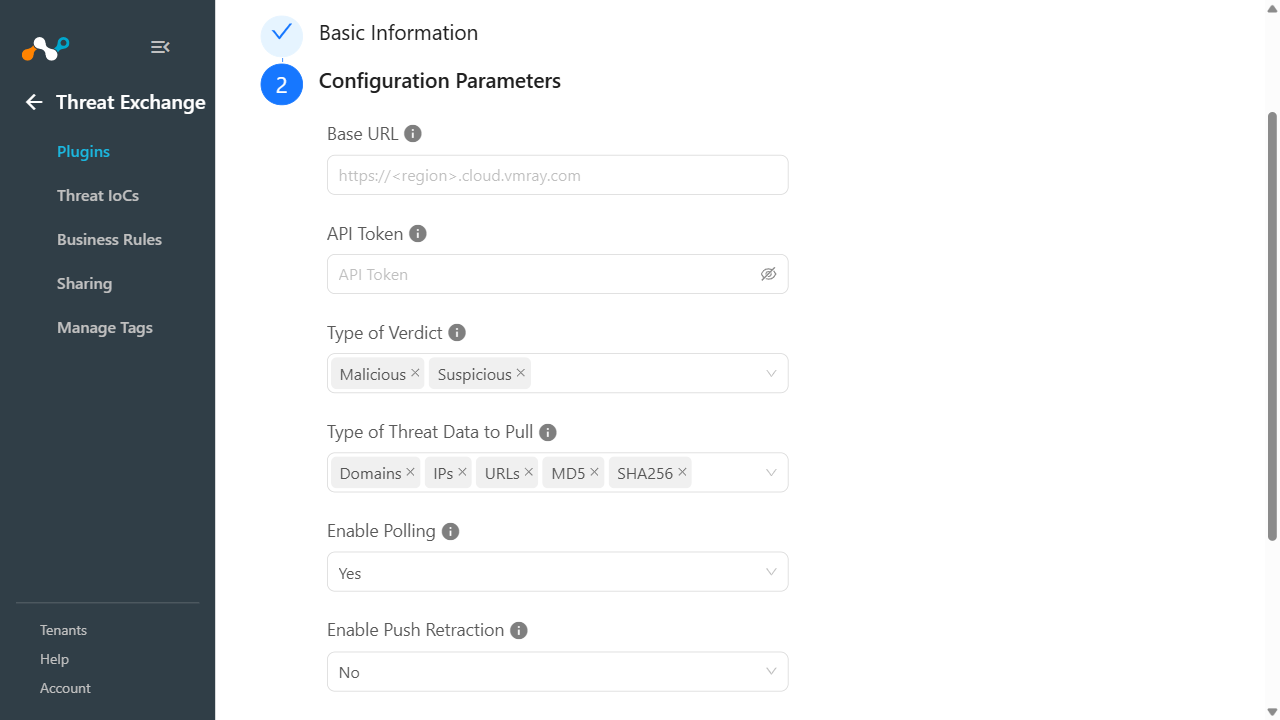
Click Next and enter the Configuration Parameters:
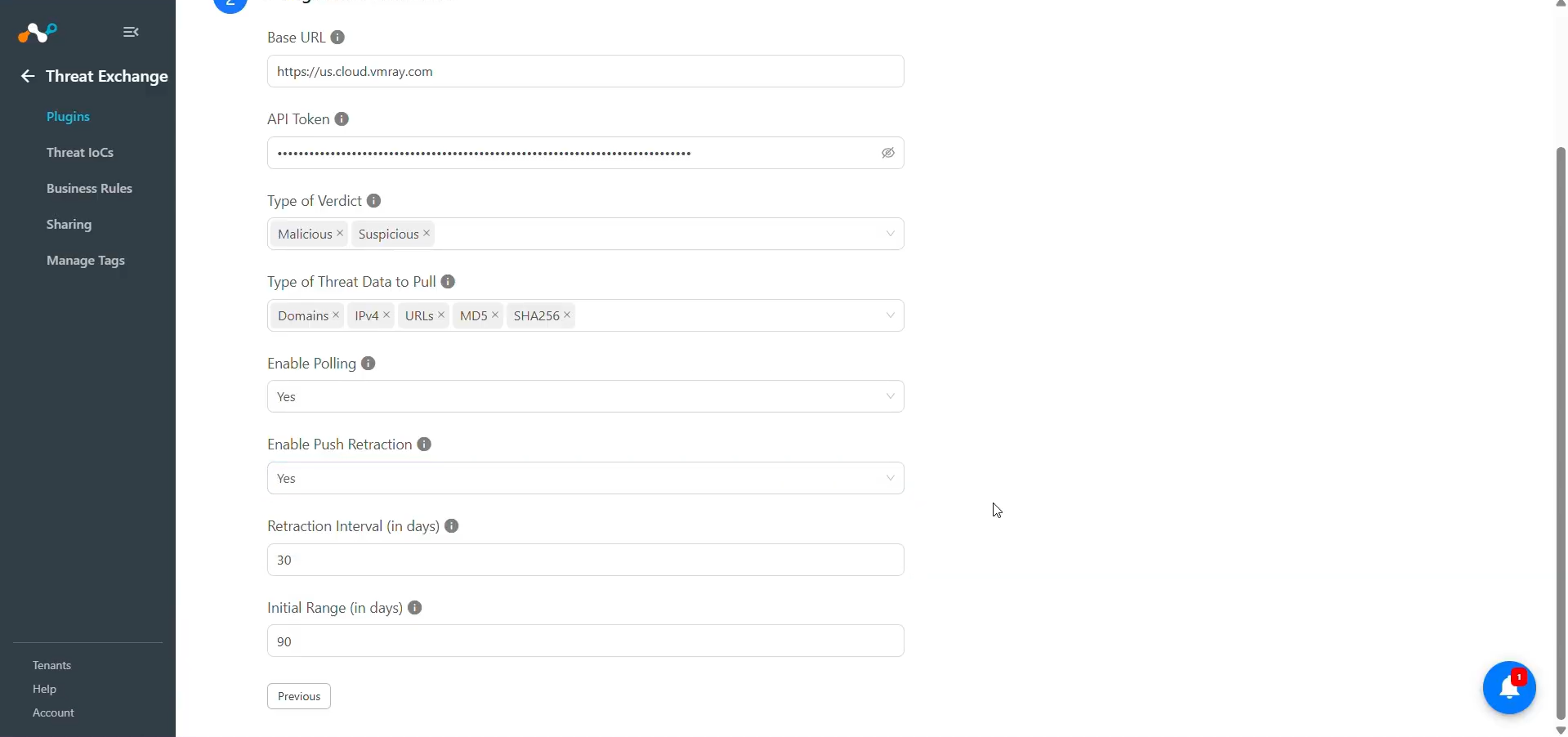
- Base URL: The Base URL of your VMRay instance. For example: https://<region>.cloud.vmray.com
- API Token: The API Token for authenticating with the VMRay platform that you created previously.
- Type of Verdict: Select the verdict types of IoC(s) to pull from VMRay submissions.
- Type of Threat Data to Pull: Select the types of IoC(s) to pull from VMRay. Leave empty to pull all supported IoC(s) types.
- Enable Polling: Enable/Disable polling Threat IoC(s) from VMRay. Disable if you only need to push Threat IOC(s) to VMRay.
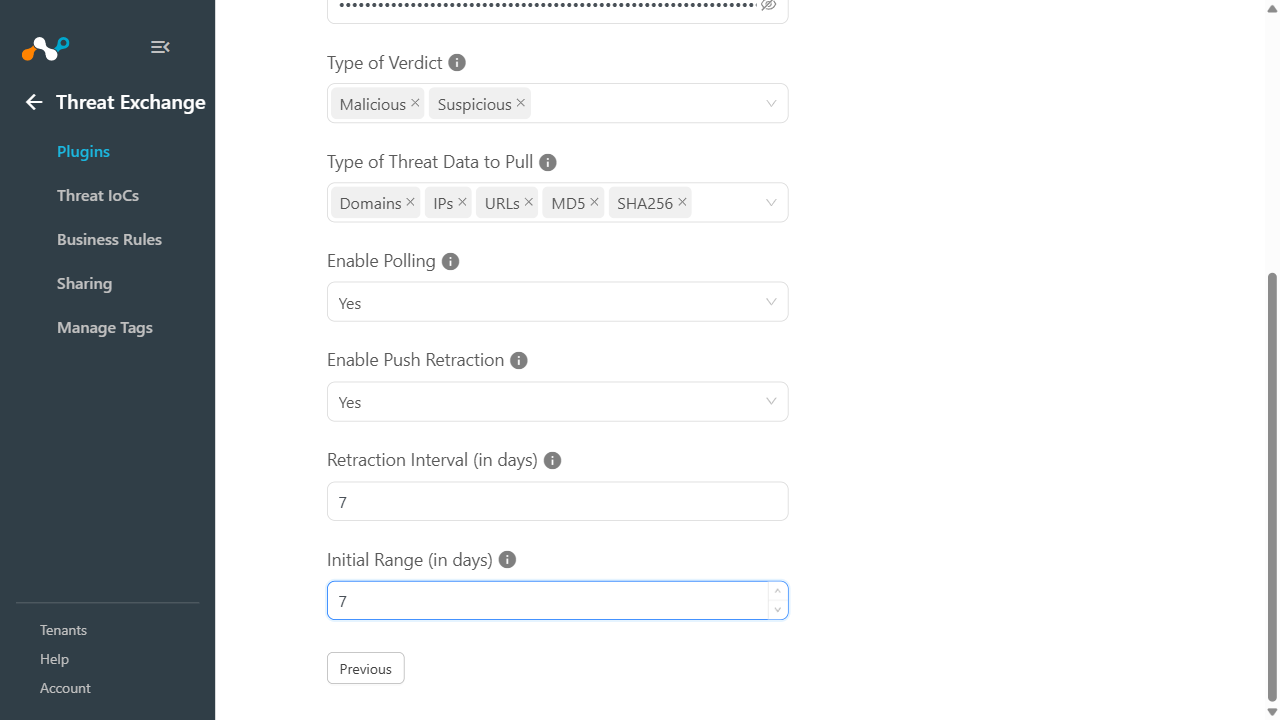
- Enable Push Retraction: Enable/Disable push retraction of IoC(s) from VMRay. When enabled, previously pushed IOC(s) to VMRay will be deleted when retracted in CE. Note: All related submission data and analyses will be deleted from your account as well.
- Retraction Interval (in days): The number of days to use as the retraction interval for VMRay submissions retraction. This parameter is applicable only if IoC Retraction is enabled in your Threat Exchange settings. Valid values are in range from 1 to 100000 days.
- Initial Range (in days): The number of days to pull indicators for the initial run. Valid values are in range from 1 to 100000 days.
-
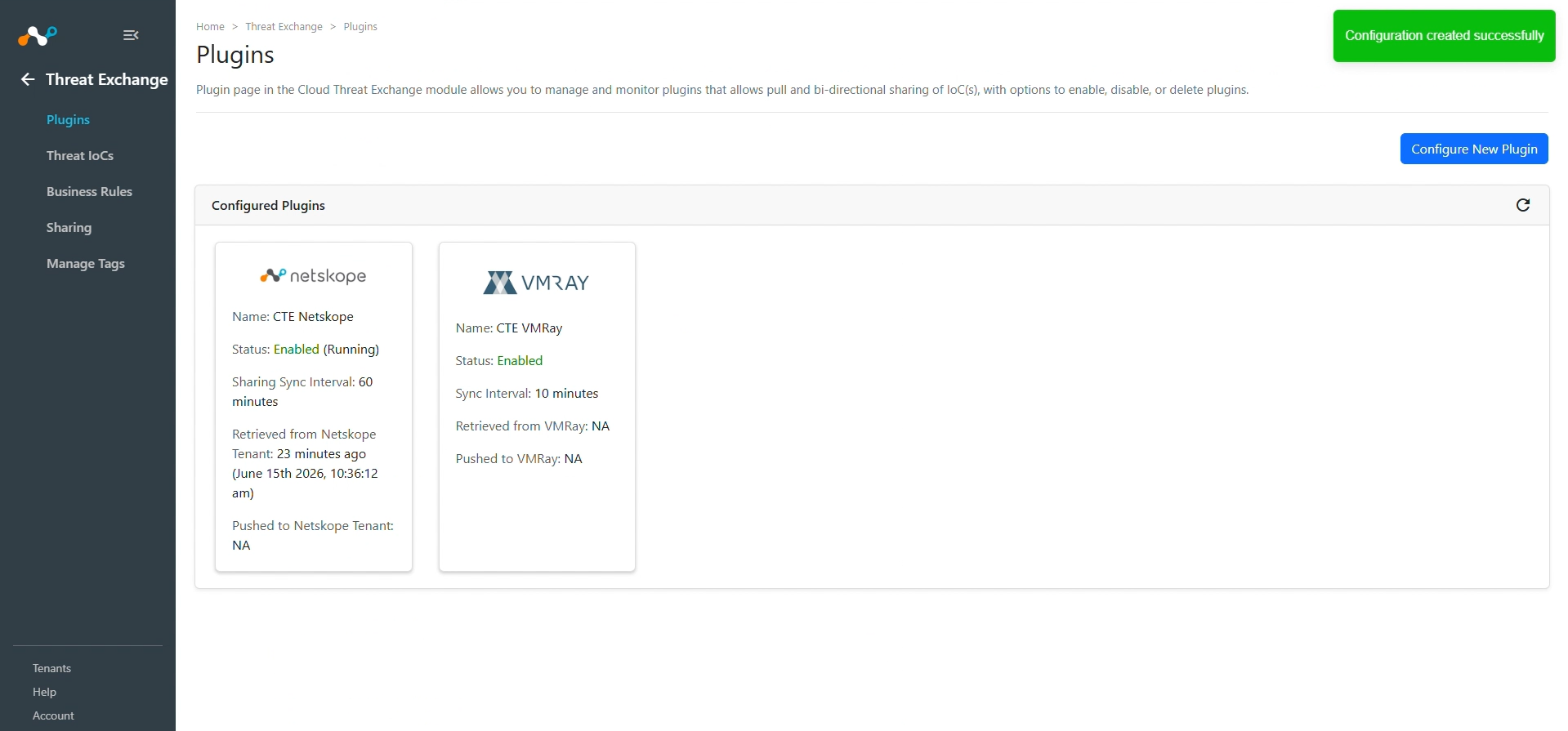
Click Save. The configuration appears on the Threat Exchange > Plugins page.
Configure a Threat Exchange Business Rule for VMRay
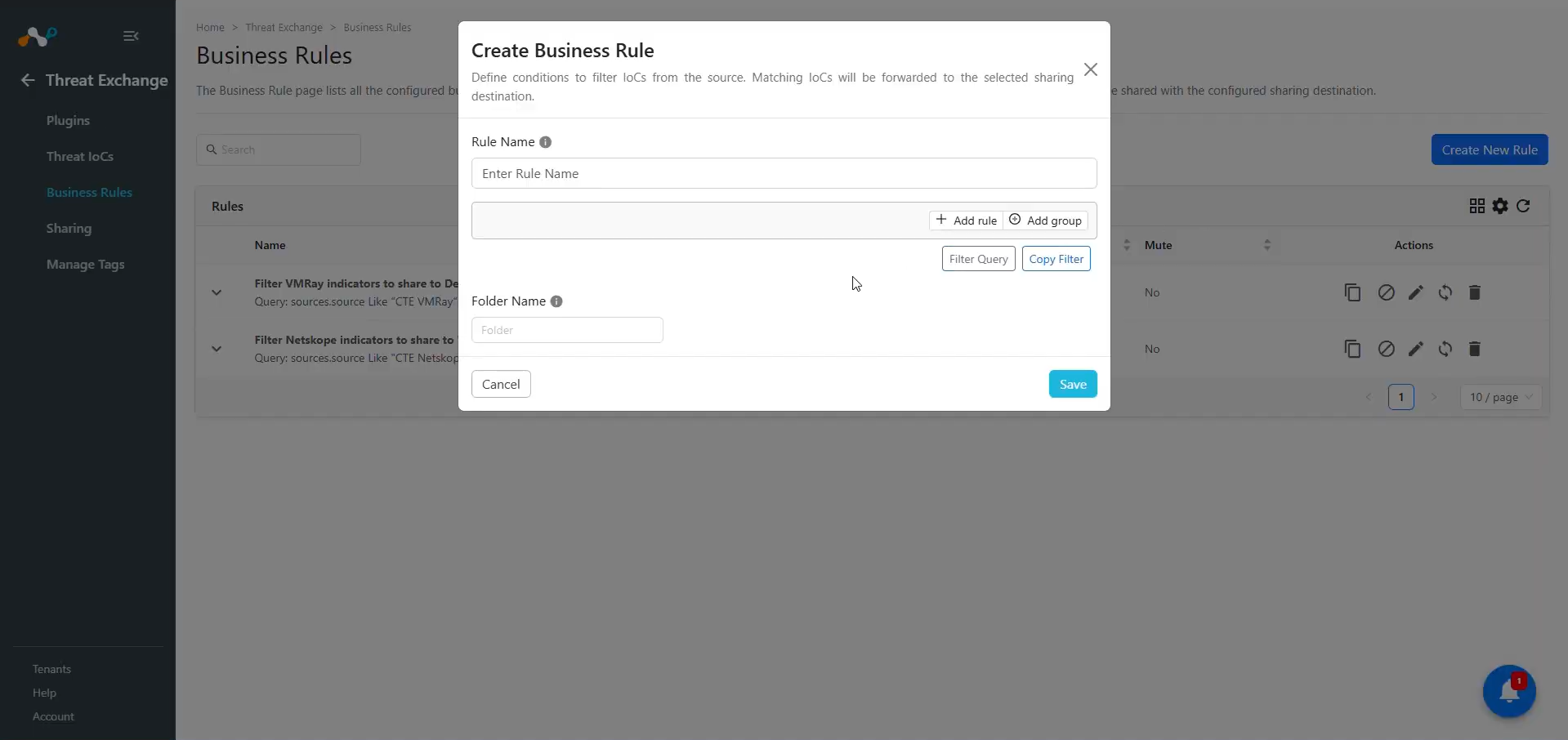
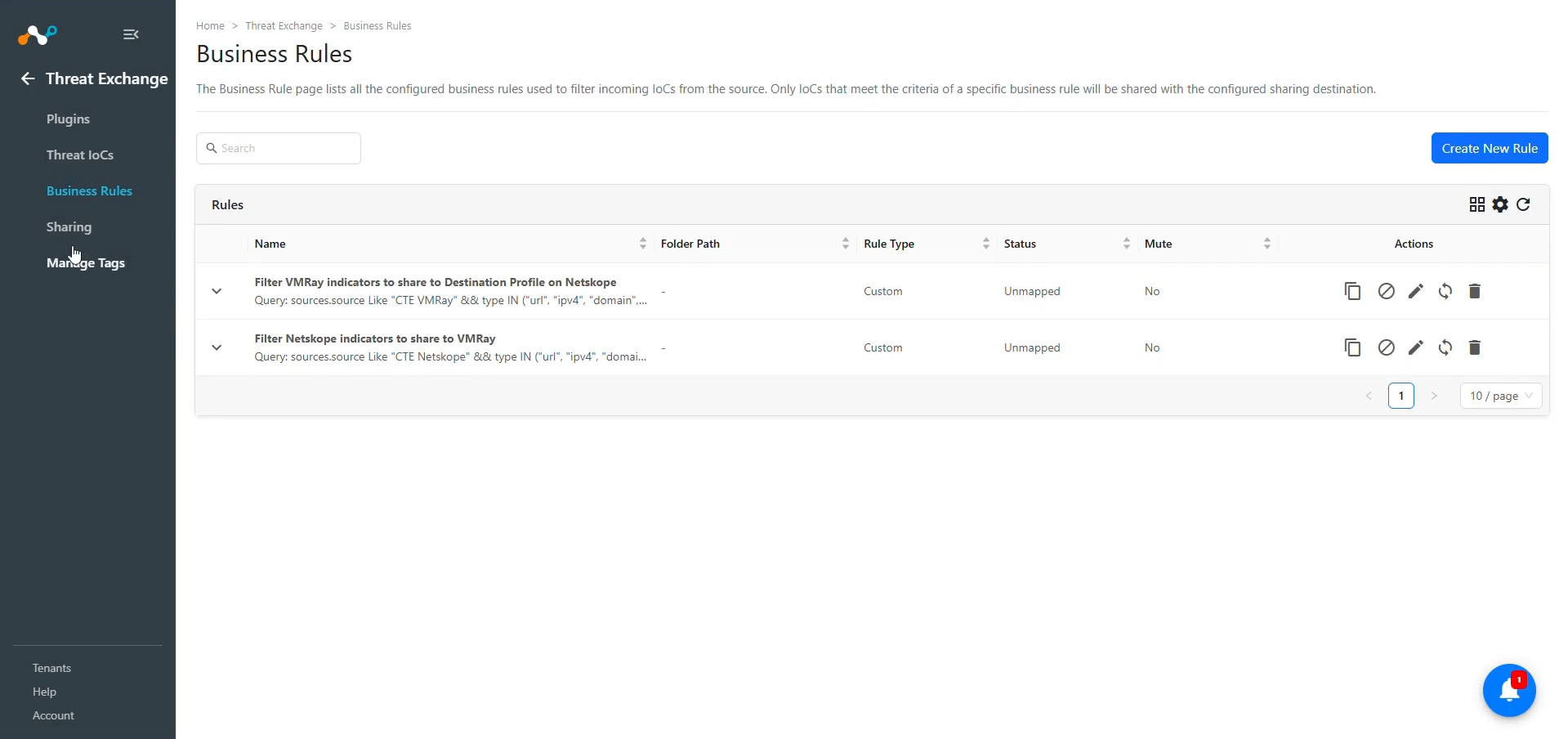
To share indicators fetched from the VMRay to Threate Exchange, you need to have a business rule that will filter out the indicators that you want to share. To configure a business rule:
-
In Threat Exchange, go to Business Rules and click Create New Rule.
-
Add the filter according to your requirements in the rule and then click Save.
Configure Sharing for Netskope and VMRay
In order to add Sharing configuration, a third-party Threat Exchange plugin, like CrowdStrike, has to be configured before proceeding. You need both a source and destination plugin (configurations) to add a Sharing configuration.
VMRay plugin supports the following sharing:
Add to URL Basic Analysis: This will add URLs, IPv4s, Domains and FQDNs to basic analysis and create a submission for the same.
To share IoCs from the VMRay to Cloud Exchange:
-
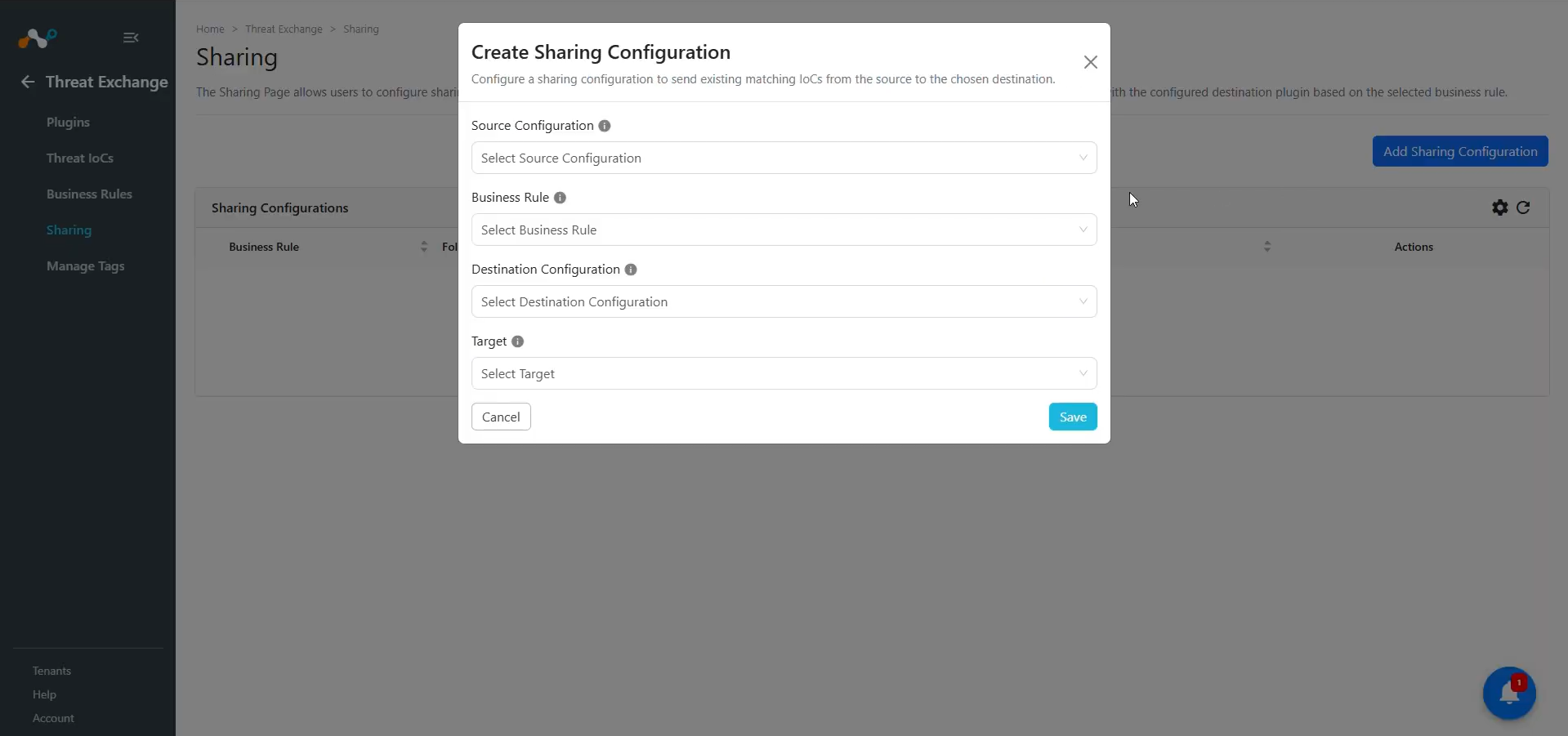
In Threat Exchange, go to Sharing and click Add Sharing Configuration.
-
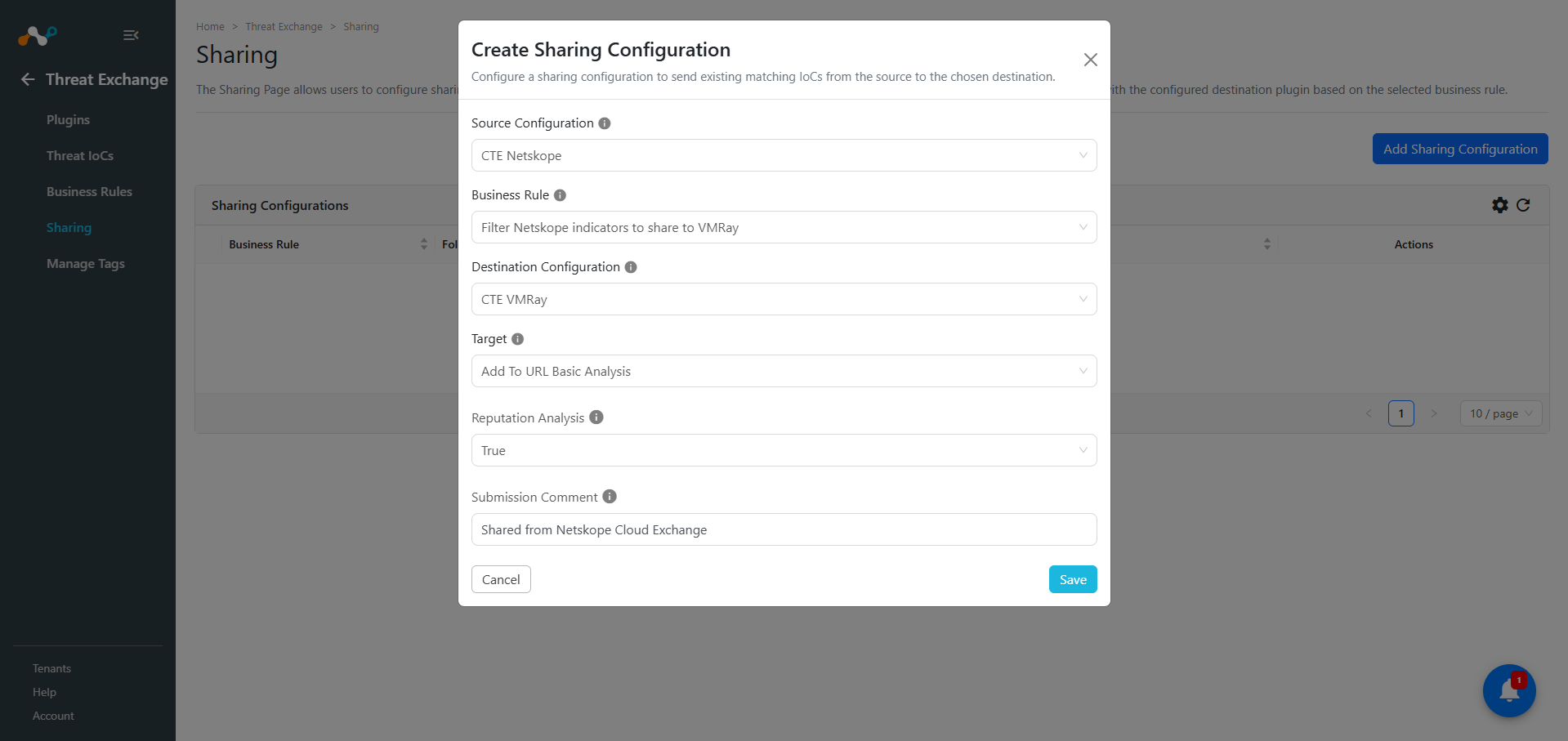
Select your Source Configuration (CTE Netskope), Business Rule, Destination Configuration (CTE VMRay), and Target.
-
Provide this information:
- Reputation Analysis: Select Reputation Analysis for URL basic analysis. Set to True to find out if this sample is known to be malicious or benign. Default value is True.
- Submission Comment: Optional comment for URL basic analysis. Allowed maximum 255 characters.
-
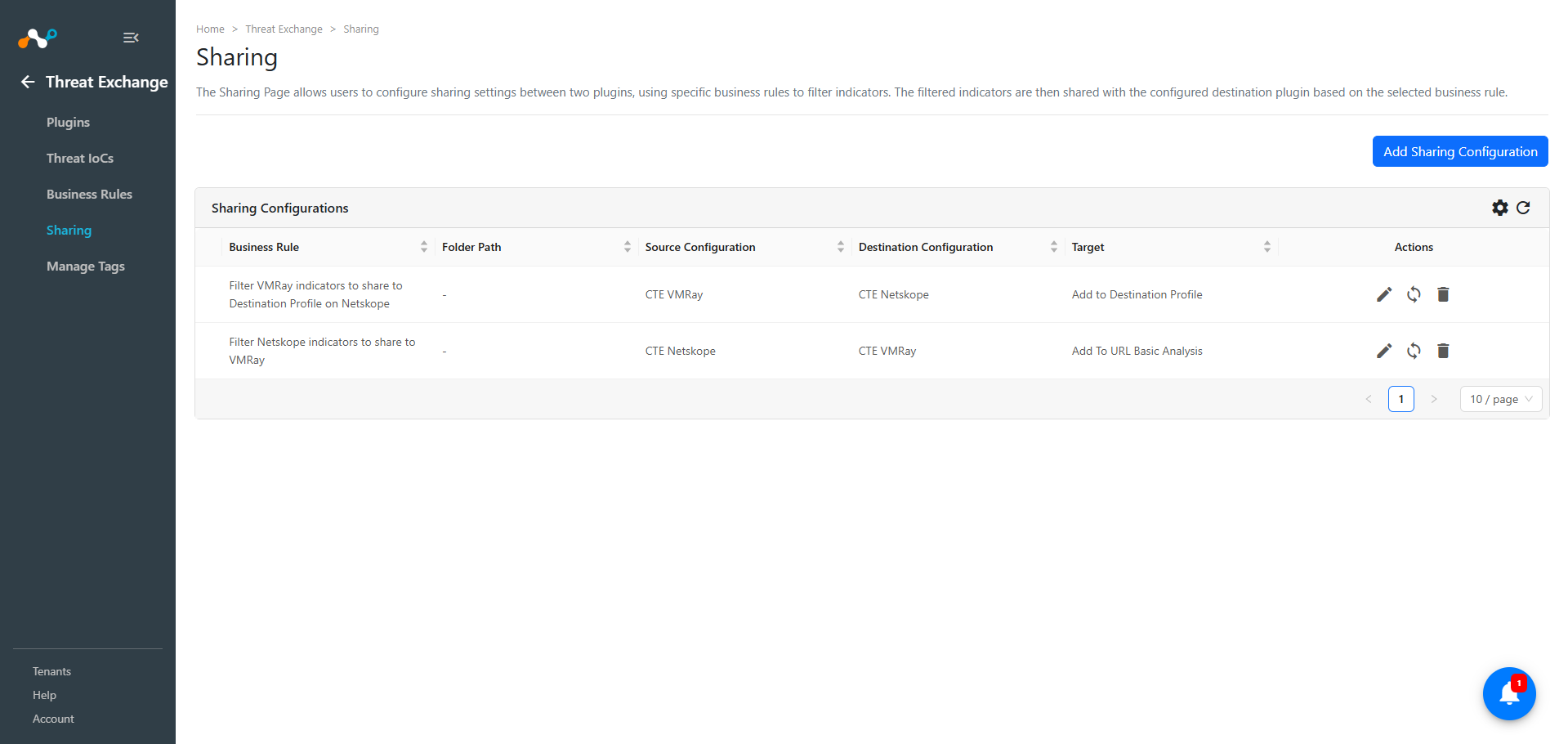
Click Save.
Note
As the VMRay plugin supports pulling URL, IPv4, Domain, FQDN, SHA256, and MD5, you can perform these actions on Netskope using these indicators:
- Add to URL List
- Add to File Hash List
- Add to Private App
- Add to Destination Profile
- Add to DNS Profile
Validate the VMRay Plugin
Validate the Pull
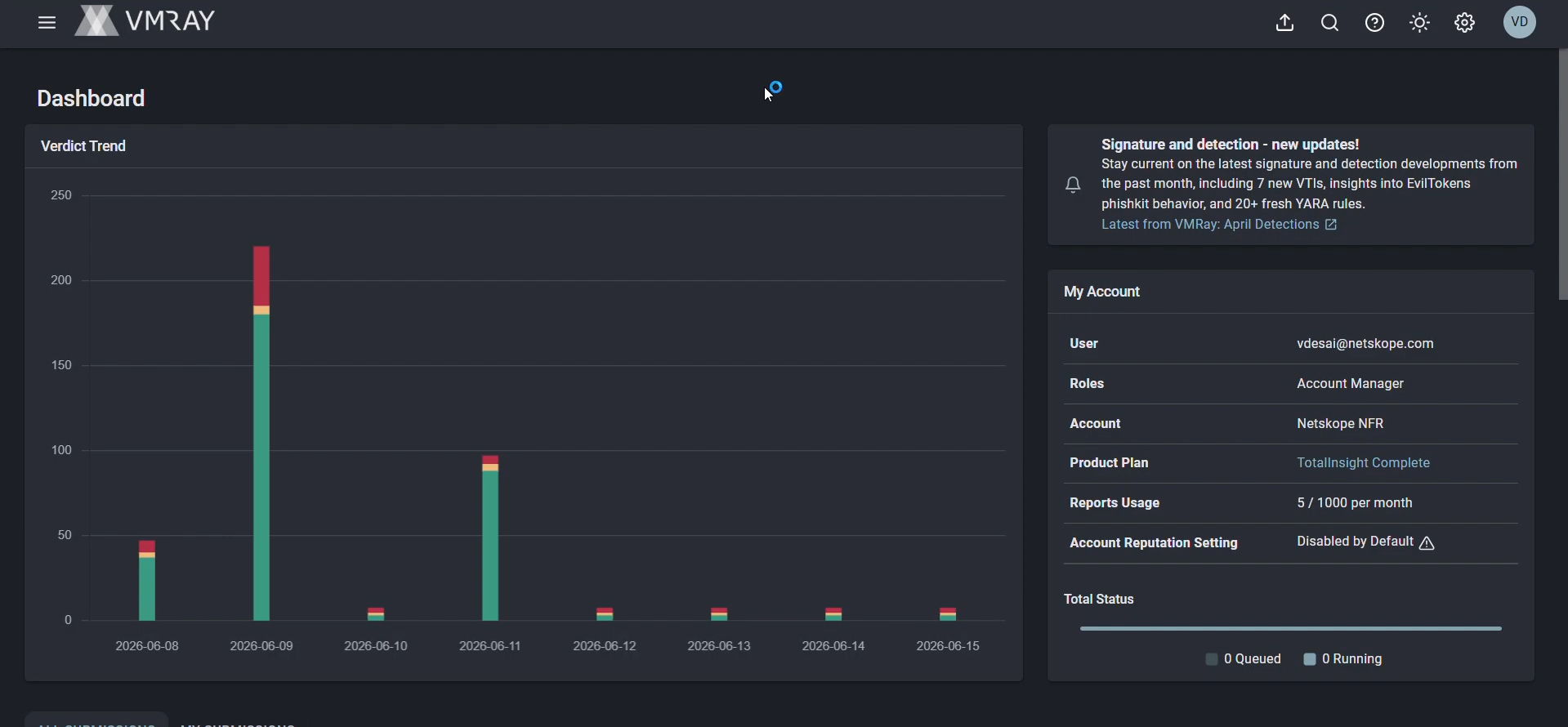
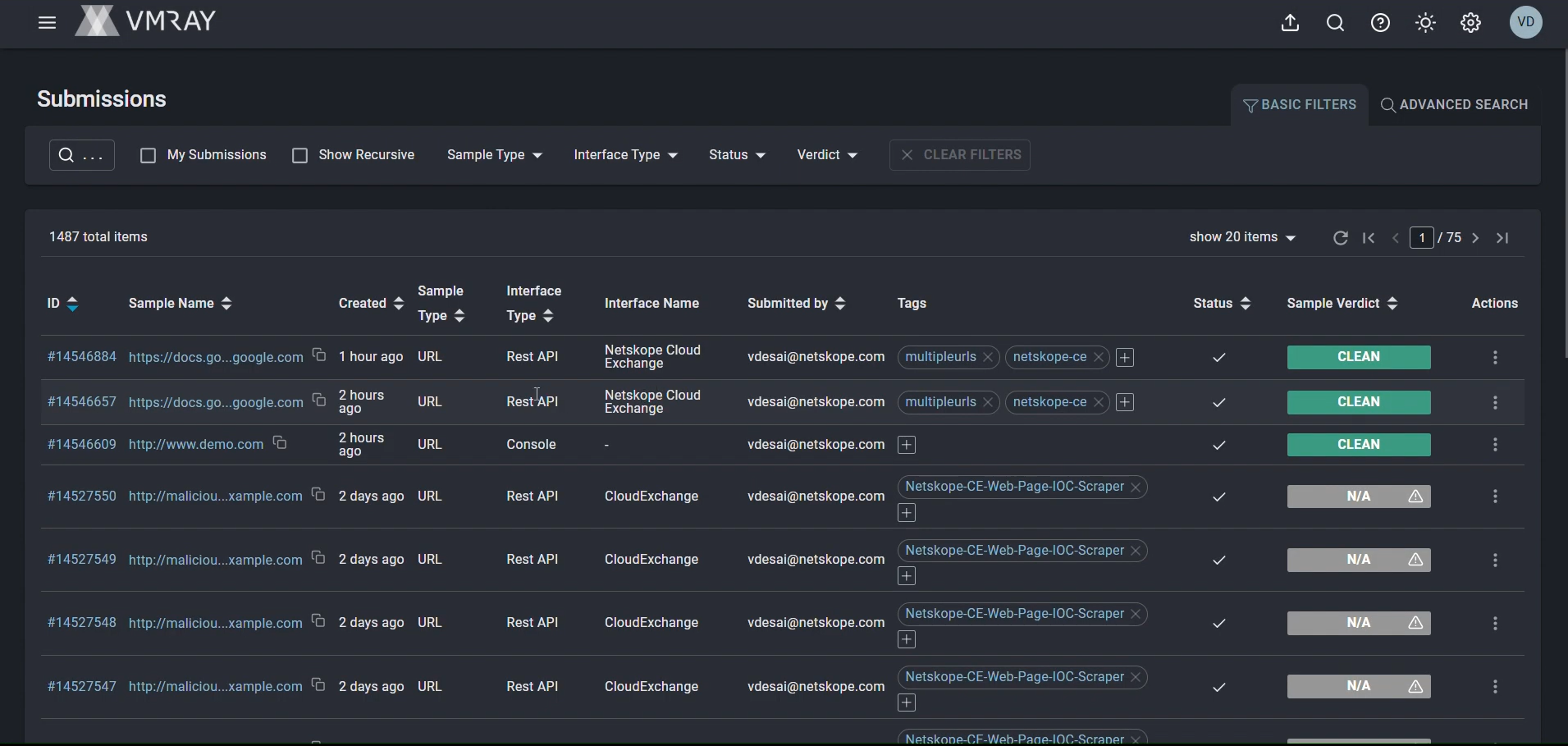
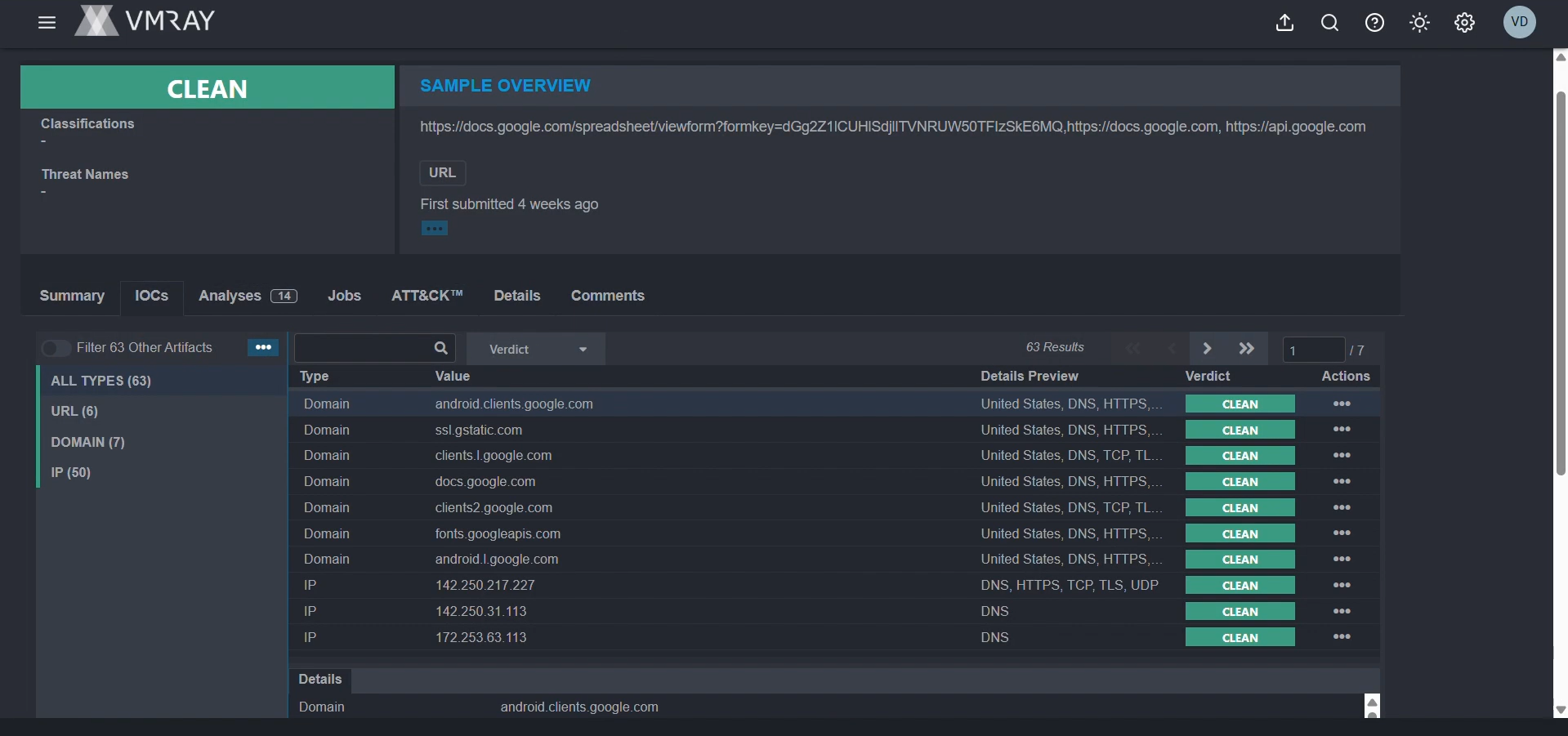
Validate in VMRay
To check available indicators on VMRay, you can follow the below steps
-
Log in to the VMRay instance.
-
From the left panel, go to the Submission page.
-
To check the IoCs under the submission, click on any of the submissions and go to the IoCs section.
Validate in Cloud Exchange
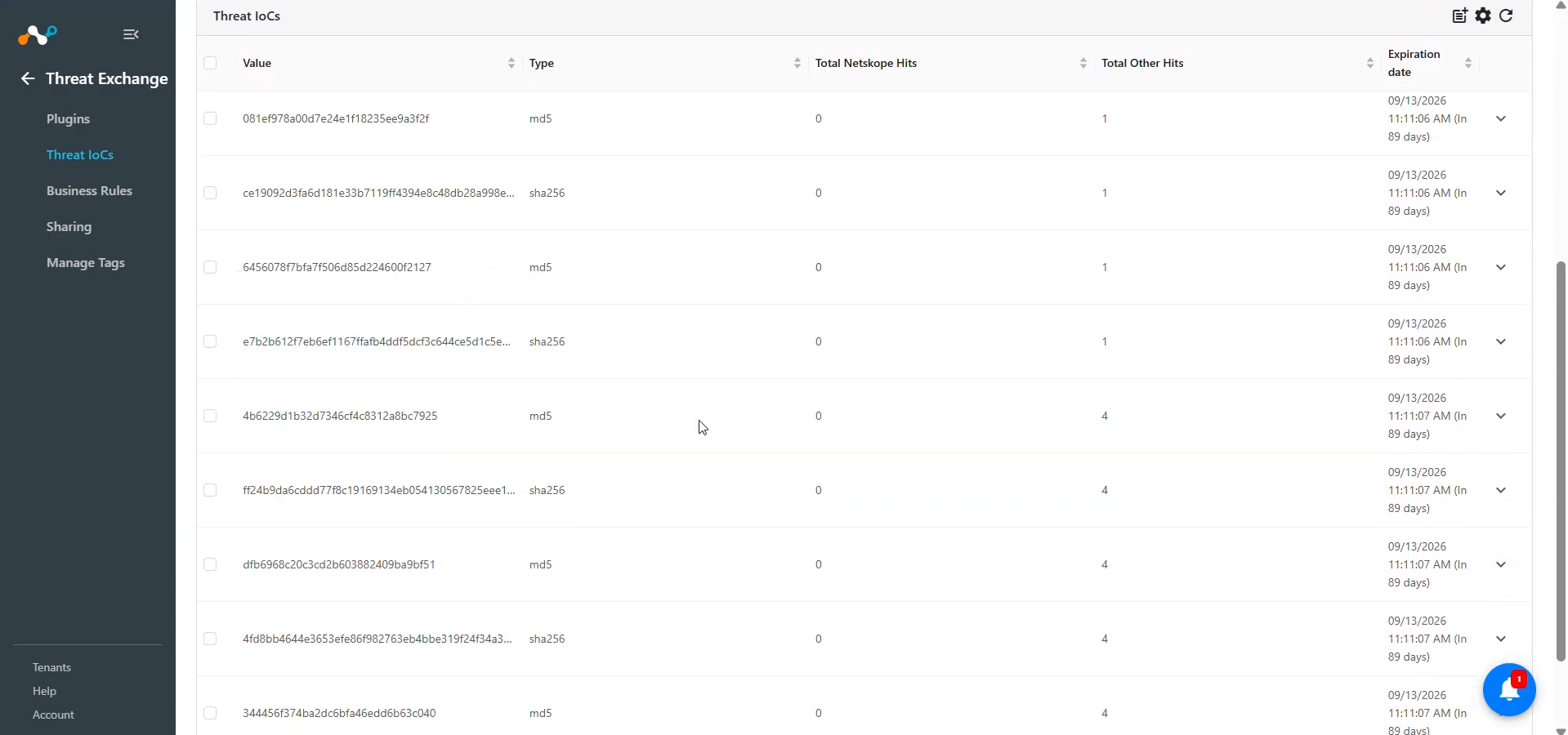
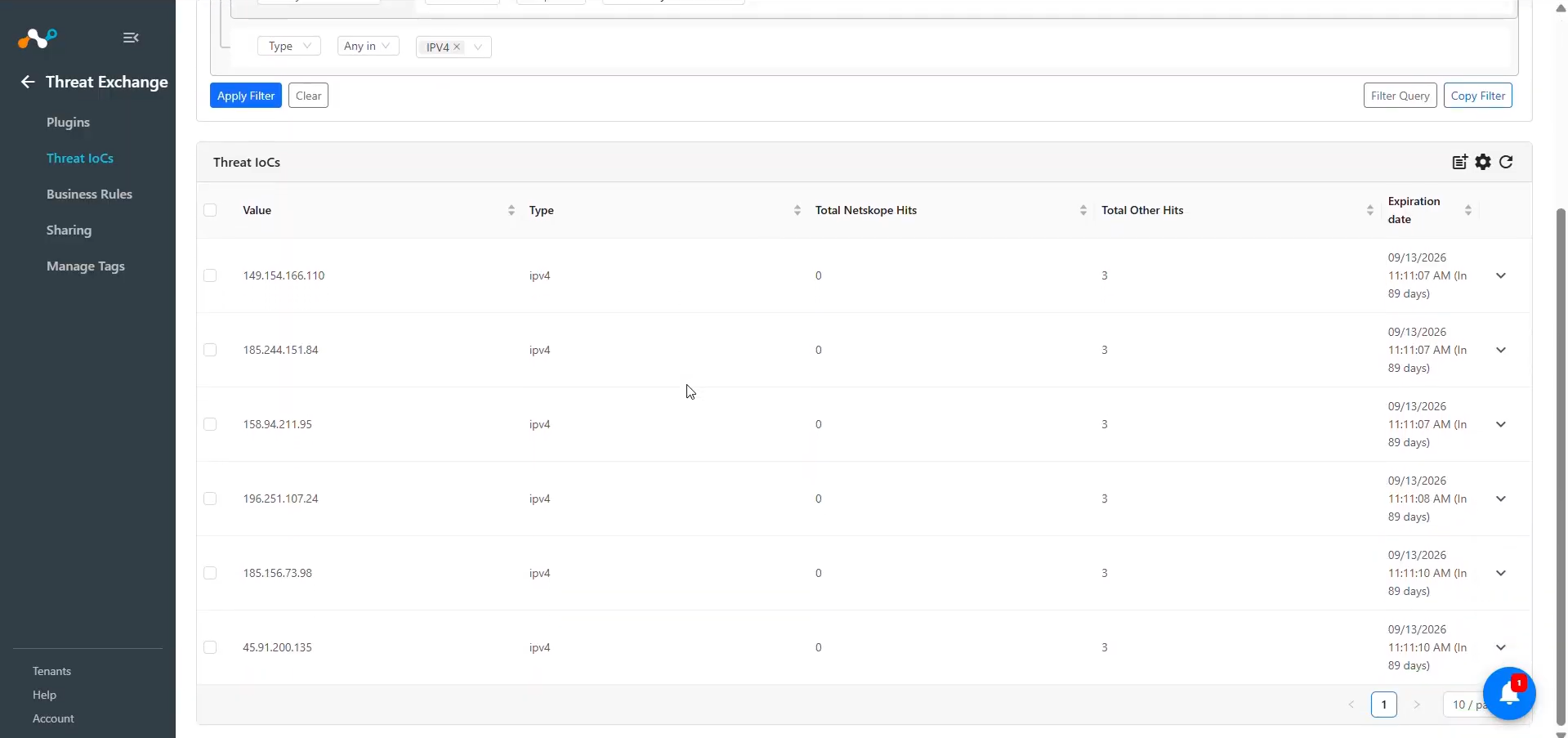
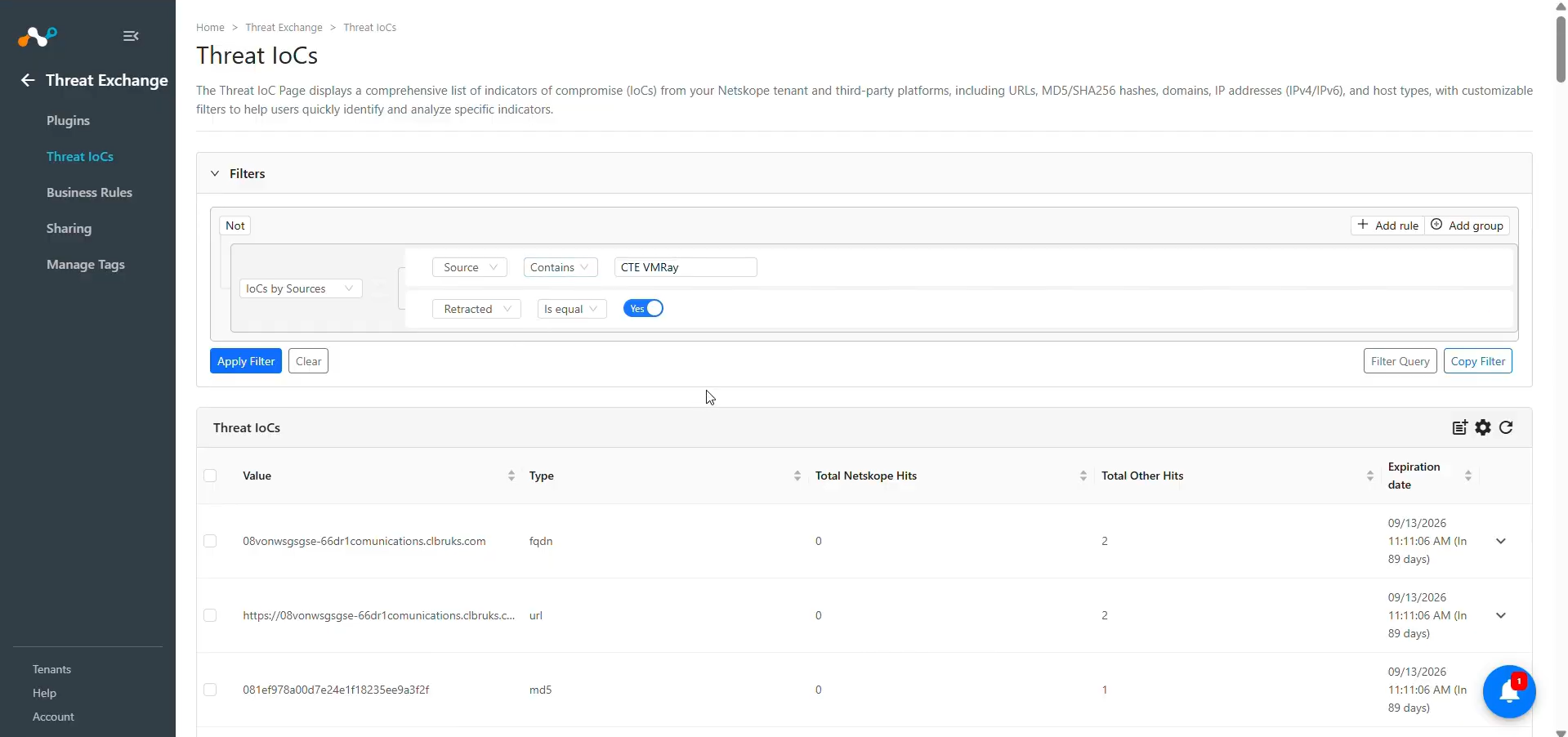
Pulled data will be listed on the Threat IoCs page. You can filter the IoCs pulled from the platform using the filter: sources.source Like “<plugin configuration name>”.
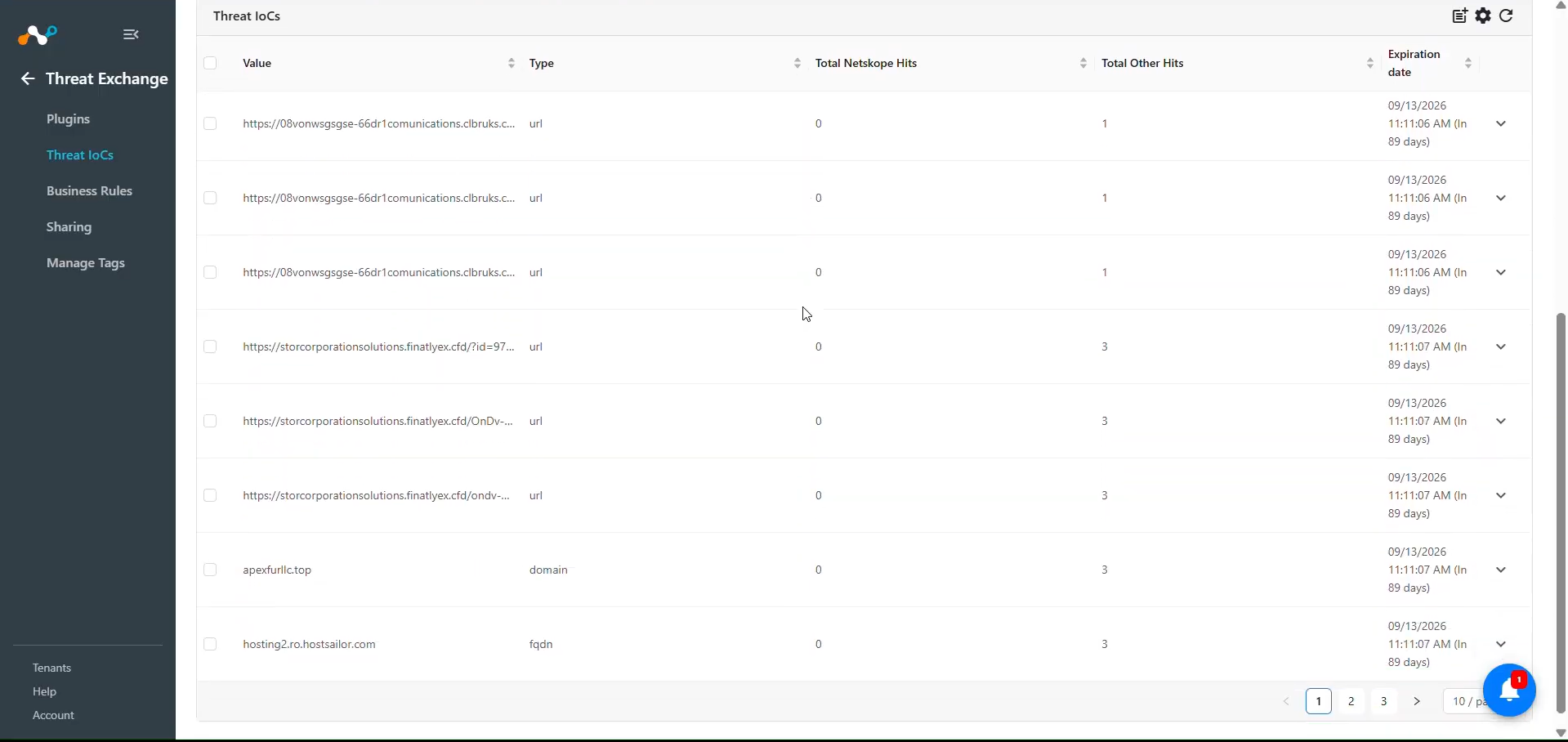
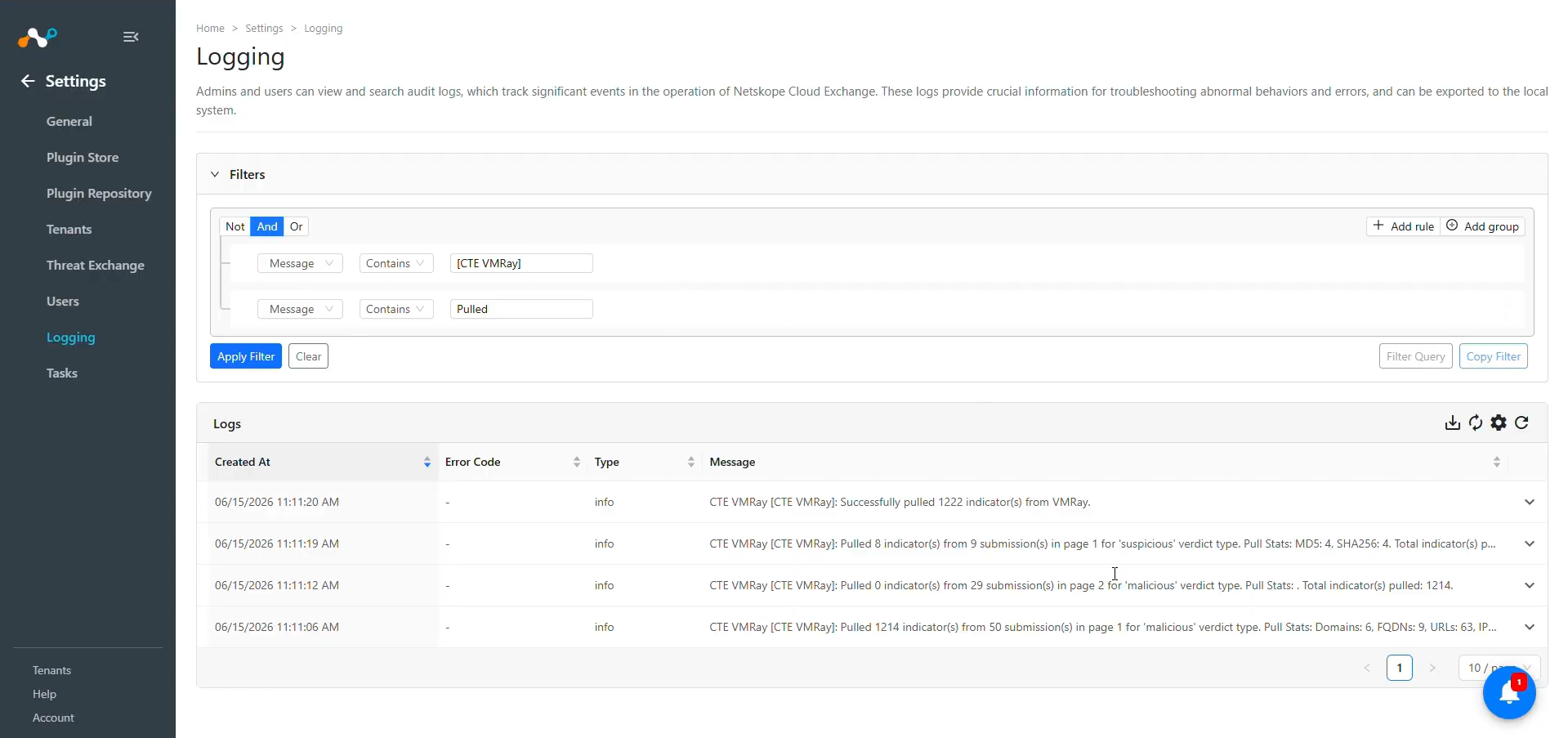
To verify pulled logs on Cloud Exchange, go to Logging and search logs from the VMRay plugin.
Validate the Pull Retraction
-
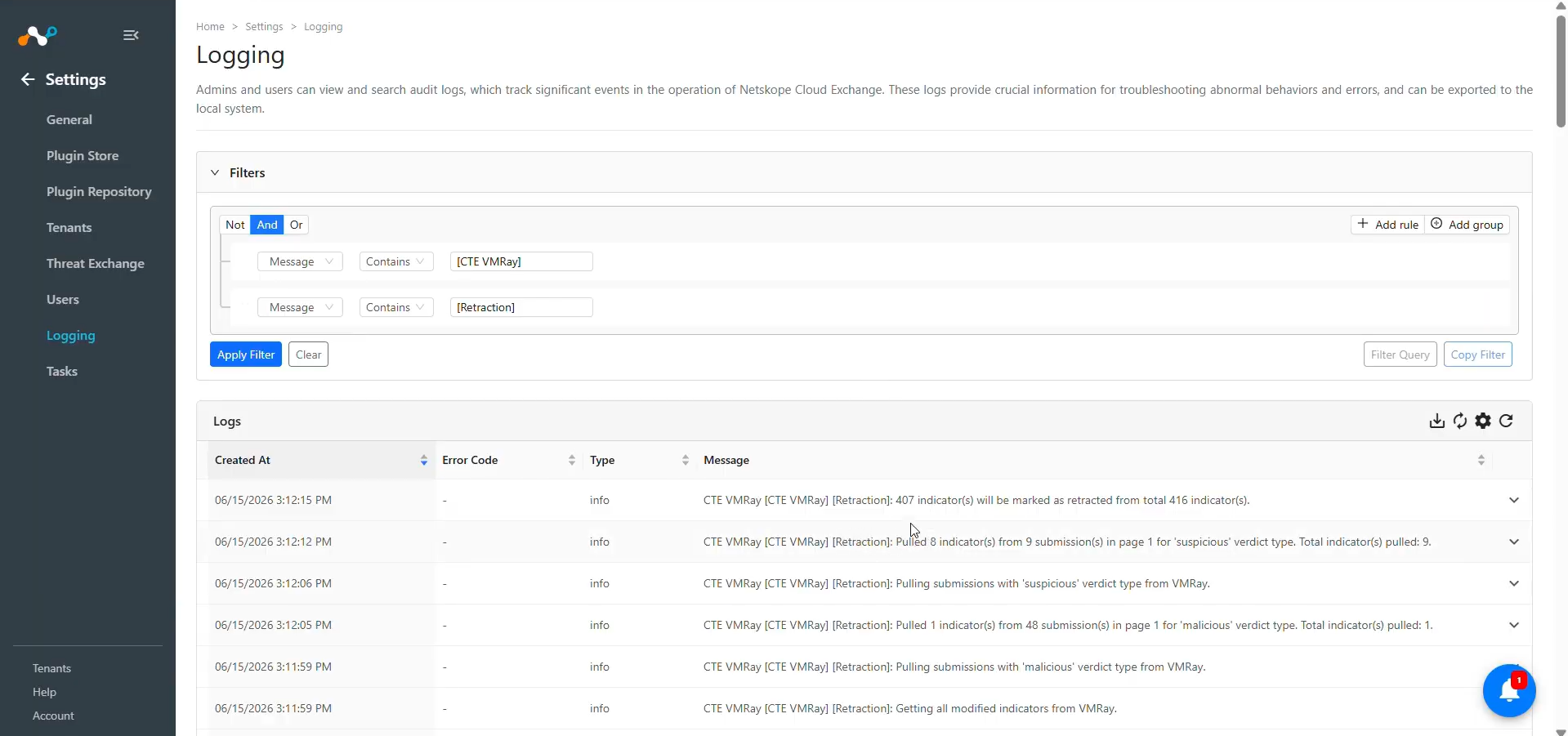
You can filter the logs related to retraction by using the filter: message Contains “[Retraction]”.
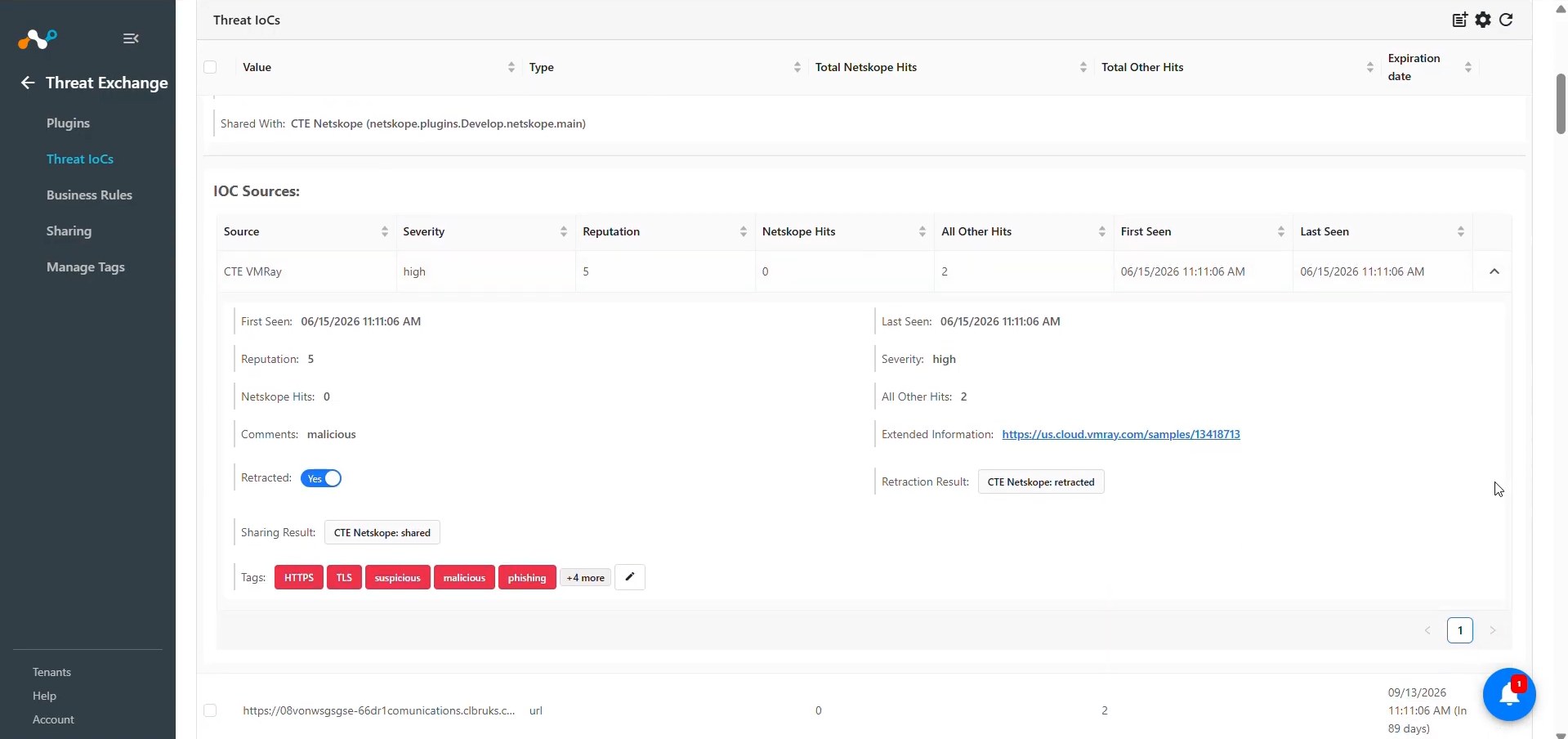
-
To validate the retracted IoCs on the Threat IoCs page, apply the filter: Retracted Is equal Yes, along with the source filter for the plugin configuration name.
Validate the Push
-
After the sharing configuration is complete, wait for the next sync cycle.
-
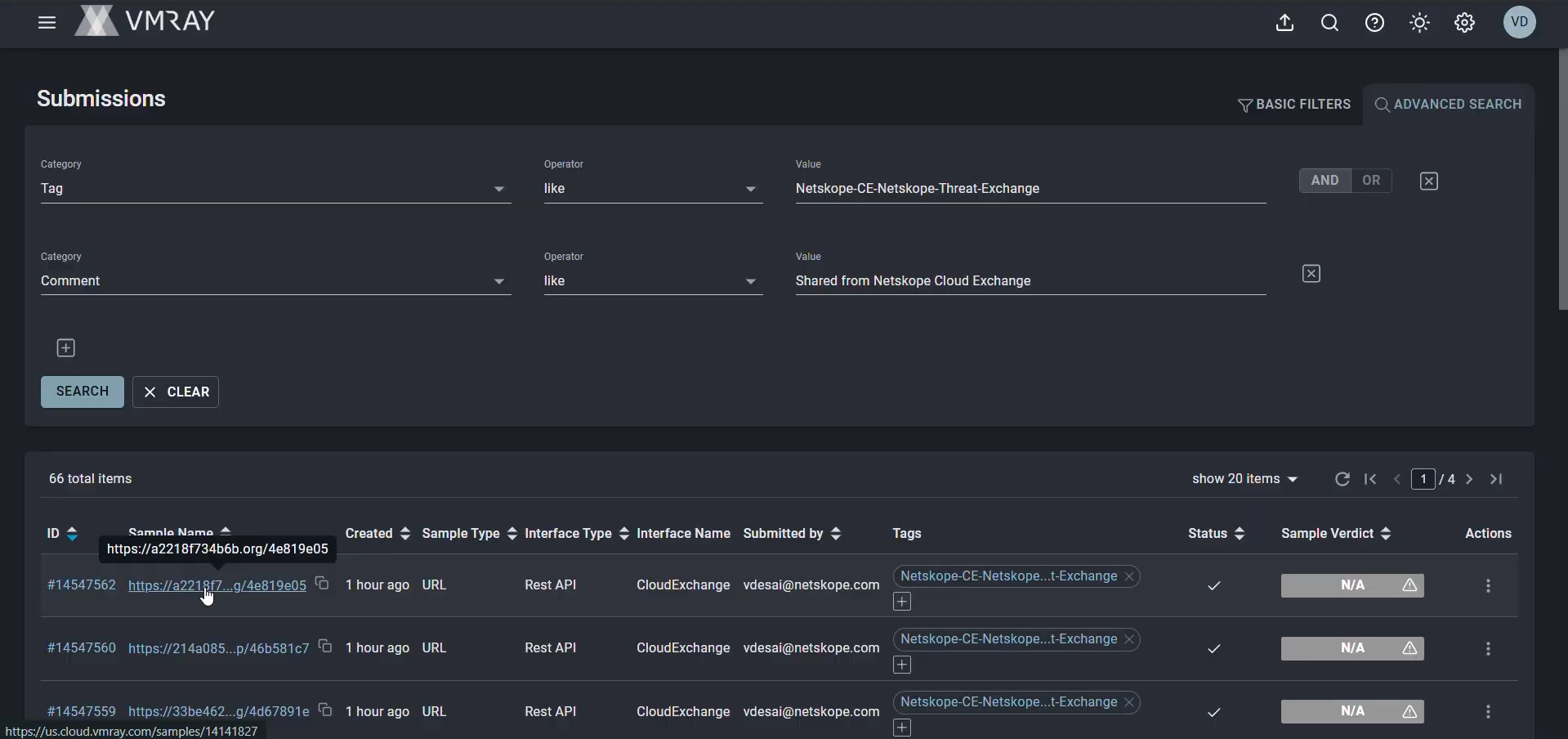
Log in to your VMRay instance and go to Submissions.
-
Search for the submitted indicator and confirm the submission appears with the Netskope-CE-{plugin_name} tag in the submission details.
Validate the Push Retraction
Ensure Enable Push Retraction is set to Yes in the VMRay plugin configuration.
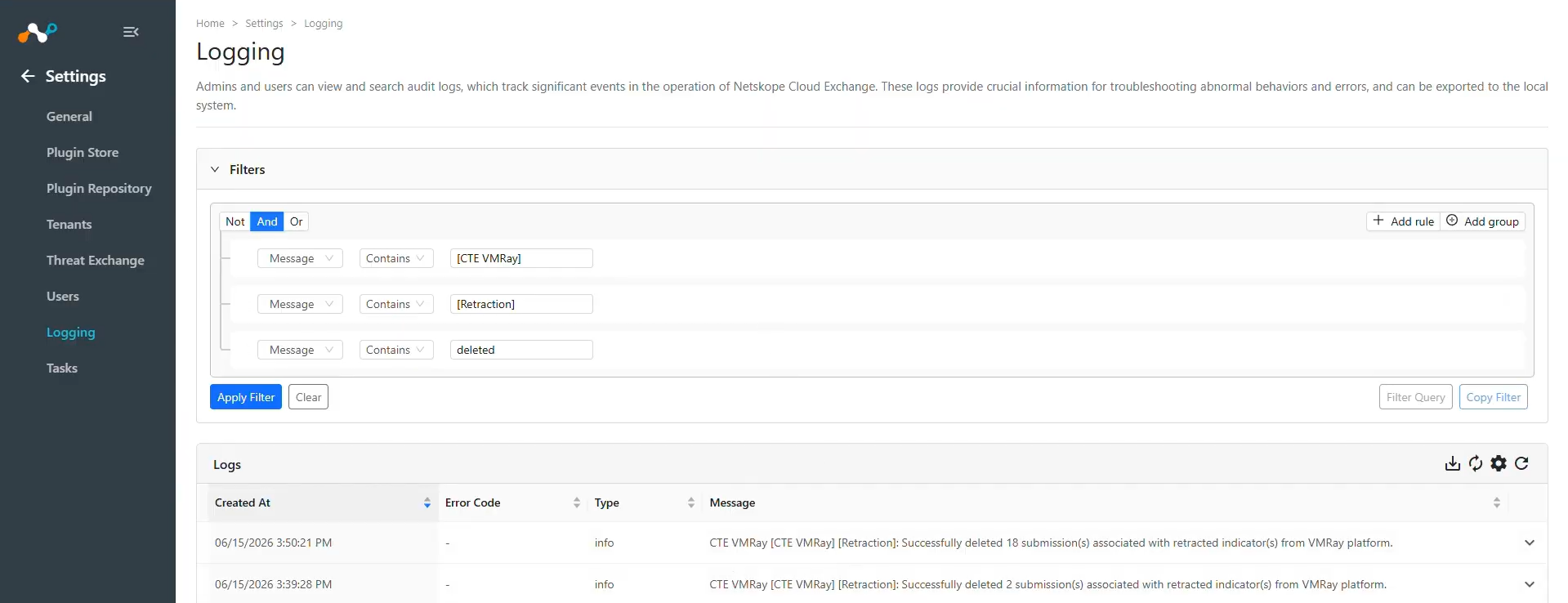
Verify the logs in logging page with filter like message Contains “[Retraction]”.
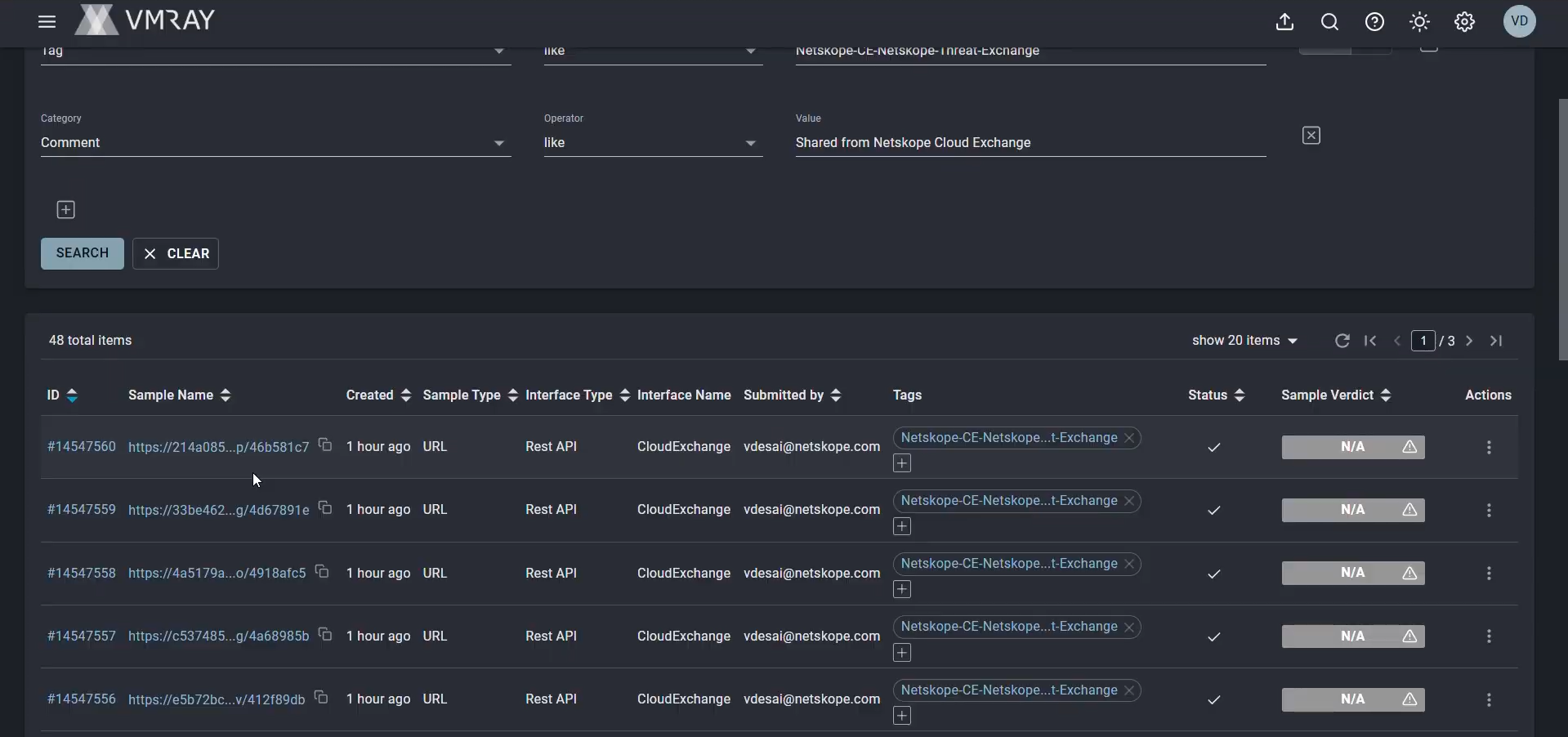
Log in to your VMRay instance and go to Submissions. Confirm the corresponding submissions have been deleted.
Troubleshooting the VMRay Plugin
Receiving error while configuring the plugin or pulling data
If you are receiving the error while configuring the plugin, this issue may be due to the Base URL and API Token being invalid or deleted.
What to do: Check the plugin credentials if the Base URL and API Token is valid. If it is valid, check if the credentials that you are using are still available on VMRay.
Unable to pull IoCs from the VMRay platform
After the plugin configuration, if the IoCs are not pulled from the platform, it might be due to one of these reasons:
- No IoCs are available on the platform to pull
- IoCs are not available for the given configuration parameters (like Types of Threat data to pull).
What to do: Identity your root cause from above and follow these steps to resolve the issue.
No IoCs are available on the platform to pull:
Check if the IoCs are available on the platform to pull. If available, check the resolution for the next point.
IoCs are not available for the given time range
If the IoCs are available on the platform to pull, but the plugin has not pulled the IoCs in Cloud Exchange, check the number of days mentioned in the initial range parameter of the plugin configuration. On the VMRay platform, check if you have data for the given time range.
If the data is still available for the given time range, it might be possible that the IoCs for the provided filter in the plugin configuration are not available, so check the values from the plugin configuration parameter and filter the same on the VMRay platform.
Unable to share IoCs to VMRay
If you are getting this error while sharing indicators to VMRay:
CTE VMRay [CTE VMRay]: An error occured while sharing indicator(s) to VMRay due to quota exceeded.
It is due to the quota limitation on the VMRay platform.
What to do: Verify the quota used on your VMRay instance from the Reports Usage dashboard.