

Netskope recommends creating a utility policy that sends users an alert for non-critical, low-use websites with an option to proceed. These websites are entries in a custom category you can create to tailor to your organization’s needs.

Recommended Utility Policy
When a Netskope administrator applies an Internet Access policy change in the Netskope UI, those changes are replicated across the NewEdge data plane. Replication is generally complete within five minutes, but there are times where replication can take a prolonged period of time.
To confirm which policy is active, a user notification can be configured to inform the administrator which version of the policy is currently being applied through the POP within the NewEdge data plane being used. To learn more: How to Test an Internet Access Policy Change Runbook.
-
Go to Policies > Internet Access.
-
Click New Policy.
-
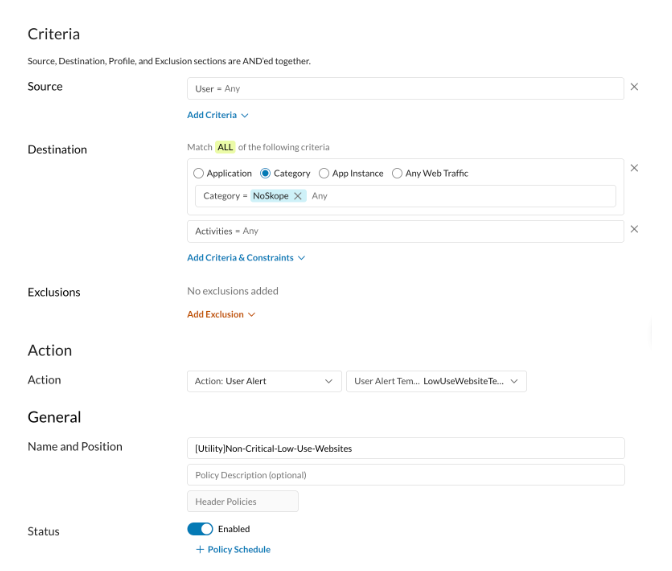
On the Policy creation page:
- Select Access policy goal
- Source: Any
- Destination: Choose Category, and select the custom category that contains the websites you want users to proceed with caution. Ensure the Activities is Any.
- Action: Choose the following.
- Action: Choose User Alert.
- Set Policy: Enter a name for the policy, select Policy Group name, and policy position.
-
Click Save and then Apply changes.