

Next Generation API Data Protection for Anthropic Claude Enterprise enables security teams to monitor and scan data within an organization’s Claude Enterprise environment. The integration uses the Claude compliance API to access organizational data, including conversations, files, projects, users, groups, and activity logs.
To configure Anthropic Claude Enterprise for the Next Generation API Data Protection, follow the instructions below.
Prerequisites
Before configuring Anthropic Claude Enterprise for Next Generation API Data Protection, review the prerequisites.
-
This integration requires the Claude compliance API which is available exclusively to Anthropic Claude Enterprise customers. Free, Pro, and Team plans do not have access to the compliance API.
-
A primary owner account is required to regenerate a compliance access key.
-
Ensure that the compliance API is enabled in your organization. To learn more: Access the Compliance API.
Generate a Compliance Access Key
This section describes the steps to create a compliance access key. Creating a compliance access key will allow Next Generation API Data Protection to start pulling activity logs, chat data, and file content programmatically.
– The key does not expire automatically and remains valid until the primary owner manually disables or deletes it.
– The compliance access key is different from admin key created in Claude console. Admin key provides access only to the activity feed. All other compliance API endpoints require a compliance access key. Ensure that you generate a compliance access key, not an admin key.
-
Log in to Claude Enterprise as the primary owner of the organization.
-
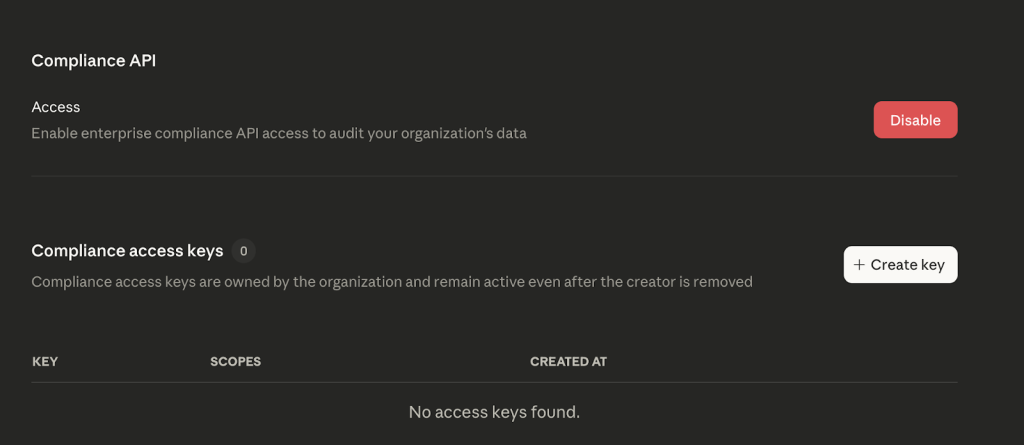
Navigate to Organization and access > Data and privacy > Compliance access keys.
-
Click + Create key.
-
Enter a name for the key (e.g., Netskope CASB API Integration).
-
Select the required scopes:
Scope Description Required for… read:compliance_activitiesRead organization and user activity data. Activity monitoring, audit events. read:compliance_user_dataRead user chats, files, projects, and org users. Inventory, DLP scanning. delete:compliance_user_dataDelete user chats, files, and projects. (not in use currently)
Delete remediation action.
Note: This will be delivered in a future release.read:compliance_org_dataRead organization metadata, roles, groups. Inventory (orgs, groups, roles). Scopes are immutable once assigned. If the scopes need to be modified, a new key must be created with all required scopes. -
Click Create and copy the key immediately.
The API key is only visible once, so be sure to copy it securely. The API key will be required when you set up the Anthropic Claude Enterprise instance on the Netskope tenant.

Configure Netskope to Access your Anthropic Claude Enterprise Account
To authorize Netskope to access your Anthropic Claude Enterprise account, follow the steps below:
-
Log in to the Netskope tenant UI and go to Settings > Configure App Access > Next Gen > CASB API.
-
Under Apps, select Anthropic Claude Enterprise and click Setup CASB API Instance.
The Setup Instance window opens.
-
Under Compliance Access Key, enter the API key that was previously created.
The format of the API key is
sk-ant-api01-....If the compliance key needs to be rotated, generate a new key in Claude Enterprise with all the required scopes. In the Netskope tenant, edit the Anthropic Claude Enterprise instance, enter the newly generated key and save the instance. The instance will re-grant and re-validate with the new key. -
Under Instance Name, enter a name of the SaaS app instance. This step is optional and if left blank, Netskope will determine the name of the app instance post grant.
-
Click Grant Access.
Refresh your browser, and you should see a green check icon next to the instance name.
Next, you can view the Next Generation API Data Protection Inventory page to get deep insights on various entities on your Anthropic Calude.ai instance. For more information on the Inventory page, see Next Generation API Data Protection Inventory.
After a successful grant, Next Generation API Data Protection automatically creates a default policy named Anthropic Claude Enterprise – Default Policy. This policy includes three DLP profiles: PCI (Payment Card Industry), PHI (Protected Health Information), and PII (Personally Identifiable Information). You can modify this policy or create a new one based on your requirements. To do so, see Next Generation API Data Protection Policy Wizard.