

Here are the latest features, issues fixed, and other updates published between the golden releases 126.0.0 and 129.0.0. This is a consolidated list of items published in the release notes for versions between 126.0.0 and 129.0.0.
Use Release Notes widget for release notes related to a specific version.
Here is the list of the new features and enhancements.
126.0.0
Support for Certificate Rotation
Netskope Client now supports certificate rotation to prevent any issues such as Netskope Client crashing due to API call failure whenever any certificate rotation occurs in the tenant.
Citrix VDI In Multi-User Environments
Netskope Client now supports Netskope Client deployment in Citrix VDI environment for multi-user scenarios.
To learn more, view Deploy Client on Citrix DaaS with Azure Virtual Desktop.
MacBook M4 Chipset
Added support for MacBook M4 Chipset devices with Netskope Client.
To learn more, view: Netskope Client Supported OS and Platforms.
Supported Minimum Client Version: 126.0.0
Support for Always-On VPN
Netskope now supports Always-On VPN for Chromebook devices managed by Google Workspace.
To learn more, view: Google Workspace.
Supported Minimum Client Version: 126.0.0
Enhanced Cloud Explicit Proxy HTTPS Performance
Enhanced Cloud Explicit Proxy HTTPS performance by optimizing mutual TLS (mTLS) session resumption, reducing handshake overhead wherever possible.
Periodic Device Classification Validation Interval Update
Updated the recommended validation interval for Periodic Device Classification to five minutes. An Info message is now displayed on the webUI when an interval of less than five minutes is selected, highlighting the potential performance impact.
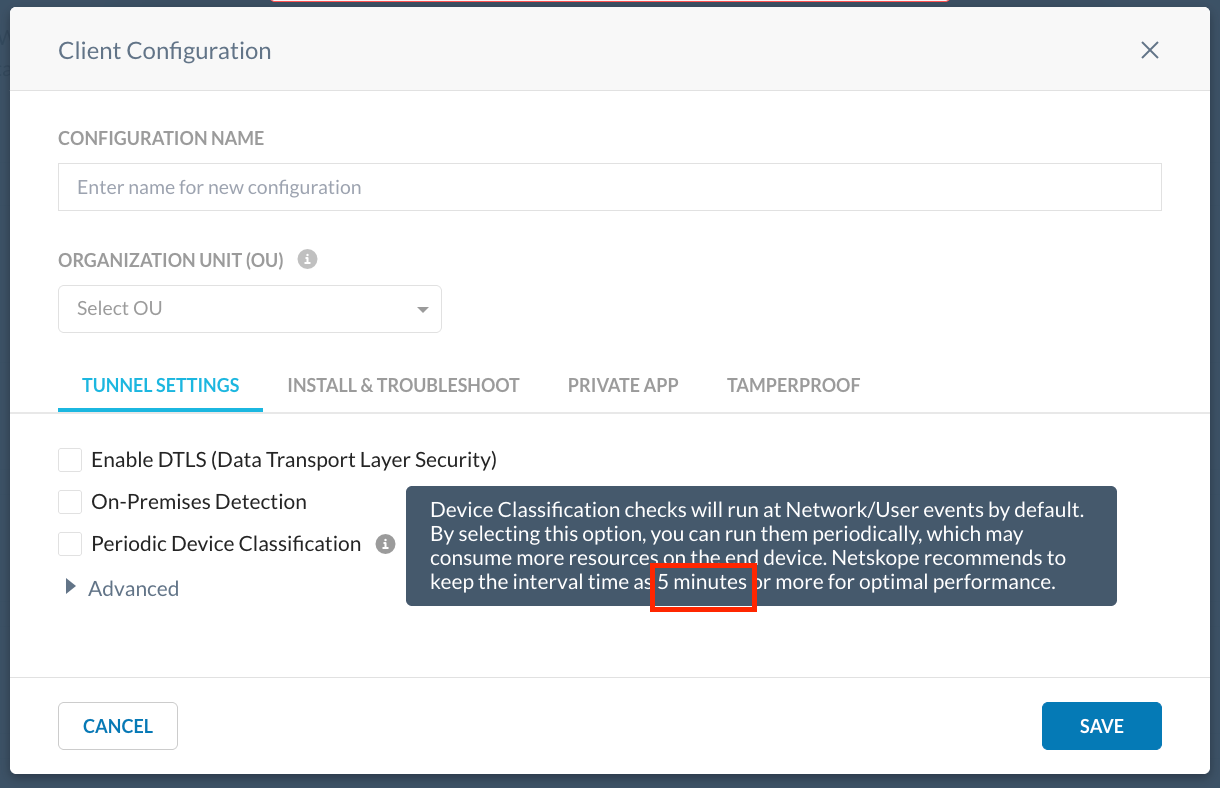
To learn more, view Client Configuration.
127.0.0
Device Classification Feature Improvements
Currently, the Device Classification Rules webUI provides only the Match Any or Match All operators to choose between criteria in a Device Classification rule. With this release, logical operators AND/OR can be used between criteria in a Device Classification rule.

To learn more, view Device Classification.
Device Classification Certificate Check
With this release, Netskope added a new capability to check Non-Exportable Private Key under Certificates in the Device Classification webUI that ensures the certificate and private key are securely bound to a specific machine and private key is non-exportable. This option can help prevent transfer or reuse of the certificate key to a different machine.
When the admin selects this option, the certificate check performs additional verification to ensure that the private key is present in the certificate store and that it is marked as non-exportable. If the certificate or key does not meet this compliance requirement, the Device Classification validation marks the device as Unmanaged.
Supported minimum Client version: 127.0.0
Supported OS: Windows and macOS.

To learn more, view Device Classification.
Support For Windows Server 2012 R2
With this release, Netskope renewed its support for Windows Server 2012 R2 with Netskope Client. The support was earlier discontinued as Microsoft announced End of Support (EOS) for Windows Server 2012 in October 2023.
As part of this enhancement, Windows Server 2012 R2 option is available in Device Classification > OS Check > Minimum OS Edition dropdown option.

To learn more, view Supported OS and Platform.
Supported minimum Client version: 127.0.0
REST APIv2 Support For Device Classification
REST API v2 Create, Read, Update, and Delete (CRUD) operation is now supported for Device Classification.
Go to Settings > Tools > Rest API V2 > API Documentation on the webUI to view the API documentation.
Supported minimum Client version: 127.0.0
IDP Enrollment for iOS
Added IDP enrollment support for Netskope Client for iOS.
Supported minimum Client version: 127.0.0
127.1.0
Data Center Selection or Pinning option
Introduced a feature that enables users to manually pin to a Point of Presence (POP) using the nsdiag command.
To learn more, view Data Center Pinning In Netskope Client.
Supported OS: Windows, MacOS, and Linux.
Supported minimum Client version: 127.1.0
128.0.0
Controlled General Availability (GA) of Multi Group/OU and OS Match Support
This was earlier available as a Beta feature in version 124.0.0. With this release, the webUI options are available in Controlled GA mode.
The enhancement brings multi-user group selection and OS selection as part of the steering match criteria.
To learn more: Steering Configuration.
This is a controlled General Availability feature. Contact your Sales Representative to enable this feature for your tenant.
Supported minimum Client version: 124.0.0
NS Client REST APIv2 support for Device Status Page
Rest APIv2 is now available for the Devices page. Various operations like fetching One Time Password (OTP) can be performed by using Rest APIv2.
Supported minimum Client version: 128.0.0
Netskope Client Debug Mode
The Netskope Client Debug Mode helps in consolidating information required for troubleshooting issues.
In the event of any issues, activate Debug Mode and reproduce the issue. Once the issue occurs, stop the Debug Mode and share the generated archive file with Netskope.
Supported minimum Client version: 128.0.0
To learn more, view: Netskope Client Debug Mode.
Enable Remote logging for Android and ChromeOS
Remote log collection is now supported for Android Netskope Client. To collect logs remotely, go to Settings > Secure Cloud Platform > Devices in your tenant webUI. Once the log collection is completed, the tenant receives an email notification about the log downloading link.
To learn more, view: Collect Logs.
Supported minimum Client version: 128.0.0
Outer Packet Capture in iOS
Netskope Client now supports Outer Packet Capture in iOS devices. Introduced Outer Packet Capture toggle button in the user interface.
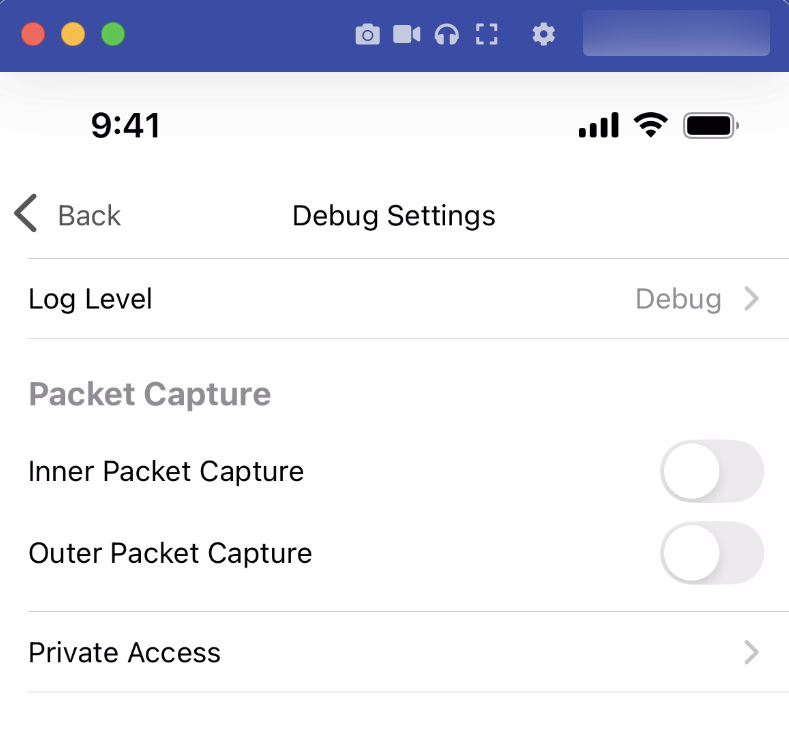
With the introduction of Outer Packet Capture feature in iOS, users can now capture both tunneled and LWIP bypassed traffic. Netskope Client excludes those network traffic not included in the Outer Packet Capture, through the excludeRoute or VPN Profile Settings. To capture the whole iOS system traffic, it still requires connecting to a Mac. To learn more, view Set up iOS Packet Tracing.
To learn more, view Advanced Debugging.
128.1.0
Secure Enrolment Risk Acknowledgement Notification
A Secure Enrolment Enablement Notification message is now displayed within the tenant webUI. This notification serves to document the administrator’s acknowledgment regarding the risks associated with failing to enable Secure Enrolment for their tenant. Administrators are presented with two options:
- Comprehend and acknowledge the inherent risk.
- Navigate to the Secure Enrolment webUI to enable the feature.
An identical notification is displayed again after a period of six months if the administrator selects I acknowledge and accept the risk.
129.0.0
Controlled General Availability of Device Classification Feature Improvements
This was earlier available as a Beta feature in version 127.0.0. With version 129.0.0, we are moving this feature as a Controlled Availability feature.
To learn more, view Device Classification.
Supported minimum Client version: 127.0.0
Support for Android 16
Netskope Client now supports Android 16 (Baklava).
To learn more: view Netskope Client OS and Platforms.
Secure Enrolment Services Toggle Option
With version 129.0.0, Secure Enrolment webUI under Settings > Security Cloud Platform > MDM Distribution now displays a separate toggle option for administrators to enable Secure Enrollment Services.
To learn more: Netskope Client Enrolment.
Secure Configuration Services Toggle Option
Administrators can now enable or disable the Secure Configuration Services option. It is mandatory to enable Secure Enrollment Services to enable the Secure Configuration Services option.
To learn more: Netskope Client Enrolment.
General Availability of Secure Enrolment Risk Acknowledgement Notification
The Secure Enrolment Enablement Notification message was displayed within the tenant webUI. This UI message was available as a Beta feature. With version 129.0.0, the message is displayed on the tenant UI for all tenants.

General Availability of Secure Configuration Services
Netskope Client Secure configuration is a new security enhancement that encrypts the configuration download APIs between Client and Netskope Cloud to mitigate any MITM compromises. This requires “Secure Enrollment to be enabled globally” as a prerequisite.
Netskope Client Secure Configuration download encrypts while downloading the configuration thereby further hardening the Netskope Client security.
To learn more: Netskope Client Enrolment.
Supported minimum Client version: 123.0.0
Device Classification Certificate Check – User Private Key Verification Improvement
This was earlier as a Beta feature in version 127.0.0. With version 129.0.0, Non-Exportable Private Key under Certificates in the Device Classification webUI is available for all tenants.
Supported OS: Windows and macOS.
Supported minimum Client version:127.0.0
To learn more, view Device Classification.
New nsdiag Option for Master Password
Introduced a new nsdiag option --password to be used along with nsdiag -t disable command. This allows the user to specify master password as an argument to nsdiag for disabling Netskope Client.
For example : nsdiag -t disable --password <master password in plain-text>
To learn more: Using Netskope Client.
General Availability of WSLv2 Support
This was earlier available as a Beta feature in version 113.0.0 and it is now available as a GA feature.
- Check WSL version and
systemdenable flag to warn users during the client install. Ifsystemdis disabled, need to turn on the flag and reboot the distro. - Netskope Private Access is not supported.
Supported minimum Client version: 113.0.0
To learn more: Netskope Client for Windows.
Here is the list of fixed issues between 126.0.0 and 129.0.0
| Issue Number | Description |
|---|---|
| 126.0.0 | |
| 645301 | Apple macOS 15.4 introduced a bug that breaks end user network access when running the Netskope Client with a Cloud Firewall steering configuration. Specifically, end users using a wired USB Ethernet Adapter may experience DHCP failures resulting in loss of network access after the USB adapter is physically removed and re-inserted into the USB port. This has only been encountered while the USB Ethernet Adapter is the primary network interface for the machine. This issue is now fixed. |
| 634854 | Long-poll connection is used by Netskope Client to pass user-attribution information to proxy when Netskope Client backs off in the presence of other traffic forwarding methods such as GRE, IPsec. Fixed an issue where the long-poll connection for Netskope Client set to one hour caused the user attribution to fail when GRE/IPsec tunnel failover takes place. This fix reduced the long poll keep alive timer from 60 minutes to 30 seconds. |
| 630024 | Netskope fixed a security gap involving the validation of secure enrollment token(s), in which the token(s) could potentially have been abused from one tenant to impersonate a user from another tenant. |
| 635063 | Fixed an issue where the Netskope Client for Linux crashed and couldn’t establish the tunnel again. |
| 622617 | Fixed an issue where devices were not enabled properly when the user performed bulk enablement of Netskope Client through the webUI. The issue occurred because the service cache was not cleared and this led to the Netskope Client not getting the latest support service commands, |
| 621381 | Fixed an issue where the Device Classification Rules webUI displayed an error after the user uploaded a certificate .pem file with longer name in the Certificate field. With this fix, the user can now upload a certificate .pem file with maximum of 255 characters as the file name to avoid any issues. |
| 635104 | Fixed an issue where Certificate Pinned Application with Action as Block did not block firewall traffic. |
| 618357 | The fix addresses the issue where Netskope Client did not perform the On-premises check when only “Private Access” was enabled. With this fix, the On-premises check is performed when Netskope Private Access is enabled and even when the other Netskope Client services remain disabled. |
| 614741 | Fixed a webUI issue where a few Certificate Pinned Apps steering exceptions with the Devices matching specific device classification field enabled displayed empty fields. This issue occurred when there are device classifications with null value accidentally added to the custom device classification fields in the exception. |
| 614375 | Improved Point of Presence (POP) reachability resilience by addressing scenarios where reachability checks were skipped.This issue resulted in Netskope Client connecting to sub-optimal POPs. |
| 127.0.0 | |
| 647666 | Fixed an issue when the Netskope Private Access tunnel remained in the disabled state for Netskope Client for Android. This happens after the device wakes up from sleep mode and when the Save Battery feature flag and the Allow One-Time Disable with password option is enabled. |
| 649593 | When a TCP connection is initiated, OS assigns an ephemeral port for each connection. Once this connection is complete, the port is closed. This port is assigned again for another TCP connection. However in certain cases, the port information was not removed by Netskope Client. This issue occurred when Certificate Pinned Applications are set to Bypass by Tunnel with local proxy configured in Windows system settings. |
| 634822 | When Netskope Client is installed in peruserconfig and IDP mode in an AD joined machine, the Client completes user enrolment using UPN instead of IDP enrollment. Fixed this issue by introducing a new MSI parameter: idpOnly, to enforce IDP only enrollment with Host and Token parameters in AD-joined devices. |
| 637576 | Fixed the PDEM empty user score issue that occurred during configuration update. The issue occurred due to invalid secure enrollment authentication token. |
| 639622 | Fixed an issue where the tunnel for Netskope Private Access remained in a disabled state after network switch. The issue occurred due to tunnel auto recovery mechanism and when the Allow disabling of Clients option is enabled in the Client Configuration webUI. |
| 637794 | Fixed an issue where the traffic from Netskope Private Access was not tunneling due to a feature flag that bypasses IP exceptions by Android OS instead of Netskope Client. |
| 644925 | Fixed an issue where the Netskope Client for iOS app did not work in certain T-Mobile IPv6 ONLY cellular network. |
| 627806 | The Netskope Client crashed when the LWIP (Lightweight IP) object mapped a port associated with a zombie session to an active session. This issue is now fixed. |
| 649419 | Fixed an issue where Device Classification encountered intermittent issue due to BitLocker. This issue was caused while retrieving the drive type for fixed or removable disks using Windows Management Instrumentation (WMI). Fixed this issue using the GetDriveTypeW API as a fallback. |
| 652754 | Fixed an issue where the Netskope Client app for Android was getting into “Netskope Client Connecting” state issue. The issue occurred under unreliable network environments such as weak mobile signal. |
| 458404 | If Tamperproof > Protect Client configuration and resources is enabled On a Windows system, the user cannot create crash dump file for any Netskope Client process (stagentsvc.exe or stagentui.exe) |
| 633830 | Fixed an issue where the Client Configuration UI screen enters an indefinite loading state. The issue occurred when a user tries to save a Client Configuration without enabling On-Premises Detection and the associated group contains Dynamic Steering enabled in its Steering Configuration profile. |
| 127.1.0 | |
| 538602 | Fixed an issue where Netskope Client crashed when the Netskope Client tunnel was getting disconnected. |
| 128.0.0 | |
| 659009 | In the event of any network change, the GSLB did not work as expected and Netskope Client connected to the wrong POP. Fixed this issue by forcefully updating the GSLB point of presence (POP) before attempting the tunnel reconnection as soon as internet connectivity is restored. |
| 624754 | Fixed an issue where the Netskope Client had uninstallation or upgrade issues if the user removed cached MSI package or the installer folder from C:\Windows\Installer. With this fix, even if the user removes the Installer folder, Netskope Client maintains a backup installer (stAgent_backup.msi) under C:\ProgramData\Netskope\stagent\data that can be used for the next Netskope Client upgrade. Also, prior to this fix, more than one MSI package was present under C:\ProgramData\Netskope\stagent\data after the Netskope Client upgrade. Fixed this issue and there will be only one MSI package stAgent_backup.msi in C:\ProgramData\Netskope\stagent\data. |
| 630626 | Fixed an issue where the user attempts to perform remote log collection when the Netskope Client installed in peruserconfig mode and the feature flag to encrypt the Netskope Client Configuration files is enabled after installing the Netskope Client. |
| 129.0.0 | |
| 679477 | Fixed an issue where the user experienced intermittent disconnection issues with the Netskope Client in Linux devices, affecting both NPA and Internet Security traffic. The issue caused connectivity loss for a few minutes at random times during the day. |
| 679420 | Fixed a P-DEM issue where the Netskope icon in Network Path Latency was getting displayed on the underlay Dashboard. The issue occurred due to the data from the Polaris Route Control was being sent to P-DEM inadvertently. With the fix, the Polaris Route Control data is not sent to P-DEM. |
| 671884 | Fixed an issue where the Device page displayed incorrect Client status after uninstalling the Netskope Client in macOS devices. The issue occurred when the feature flag to encrypt the branding file was enabled. With this fix, the uninstall status is displayed correctly even when the feature flag to encrypt the branding file is enabled. |
| 671659 | Fixed an issue with Netskope Client for iOS where the Client app did not work when the DNS resolver is IPv6 LinkLocal address. For example, when the device connects to internet through hotspot from another iPhone or iPad. |
| 693785 | Fixed an issue where wrong steering configurations were assigned when there are duplicate records for the same user. |
| 660522 | Windows AV check implementation depends on Windows security centre (WSC) APIs. Fixed an issue where the WSC service took time to get enabled when the system is rebooted. This led to Device Classification AV evaluation failure and the Client going to unmanaged state. With this fix, the Client uses the cached DC status from the previous evaluation until the WSC service comes up. Once the AV status change is detected the DC evaluation will happen again. |
| 701750 | Fixed an issue related to Secure Congifuration API response to prevent API response tampering. |
| 680392 | Fixed an issue that the Netskope Client app for iOS did not work in IPv6 only network. |
| 680385 | Fixed an issue on Netskope Client for macOS devices where users reported DHCP failures on macOS 15.5 with Client version 126.0.0 or later. Exclude DHCP traffic to eliminate the issue in the macOS versions. If the users encounter this issue, they must reboot to bring the device back to normal and then upgrade to the latest version of Netskope Client. |
| 670199 | Fixed an issue where the Last Event Time column displayed on the Devices webUI, randomly displayed “55 years ago”. |
Here is the list of known issues between versions 126.0.0 and 129.0.0
| Issue Number | Description |
|---|---|
| 126.0.0 | |
| 466448 | With Protect Client configuration and resources enabled, MSI re-run to update the secure enrollment tokens will not work. You can use nsdiag to update the secure enrollment tokens. |
| 127.0.0 | |
| 466448 | With Protect Client configuration and resources enabled, MSI re-run to update the secure enrollment tokens will not work. You can use nsdiag to update the secure enrollment tokens. |
| 636784 | While performing IDP login on Windows 2012 Server, users might receive HTTP 404 Page not found error from Okta. Refreshing the browser window and performing login again resolves the issue. |
| 127.1.0 | |
| 466448 | With Protect Client configuration and resources enabled, MSI re-run to update the secure enrollment tokens will not work. You can use nsdiag to update the secure enrollment tokens. |
| 128.0.0 | |
| 466448 | With Protect Client configuration and resources enabled, MSI re-run to update the secure enrollment tokens will not work. You can use nsdiag to update the secure enrollment tokens. |
| 670199 | When Devices page loads, Last Event Time column randomly displays “55 years ago”. |
| 128.1.0 | |
| 684014 | When an IDP user is disabled, Netskope Client did not get disabled promptly. |
| 466448 | With Protect Client configuration and resources enabled, MSI re-run to update the secure enrollment tokens will not work. You can use nsdiag to update the secure enrollment tokens. |
| 129.0.0 | |
| 684014 | When an IDP user is disabled, Netskope Client did not get disabled promptly. |
| 466448 | With Protect Client configuration and resources enabled, MSI re-run to update the secure enrollment tokens will not work. You can use nsdiag to update the secure enrollment tokens. |