

Enterprise Browser Endpoint Deprecation and Migration
Netskope announces the EOL/deprecation of several Enterprise Browser API /api/v2/nsbrowser/ endpoints and the migration to the new /api/v2/nsbrowser/extensions/policies endpoints.
Deprecated endpoints will reach End Of Support (EOS) on November 30, 2026, and End of Life (EOL) on March 31, 2027.
Deprecated Endpoints
| METHOD | ENDPOINT |
|---|---|
| GET | /api/v2/nsbrowser/extensionpolicies |
| GET | /api/v2/nsbrowser/extensionpolicies/{id} |
| POST | /api/v2/nsbrowser/extensionpolicies |
| PUT | /api/v2/nsbrowser/extensionpolicies/{id} |
| DELETE | /api/v2/nsbrowser/extensionpolicies/{id} |
| POST | /api/v2/nsbrowser/downloads |
Migrating from /extensionpolicies to /extensions/policies
Extension Governance policies introduced Apply/Revert workflow, Enable/Disable, and Bulk Operations to configure extension policies.
The /extensionpolicies endpoints are deprecated. Use the /extensions/policies endpoints instead. All paths below are relative to the ngweb base URL (e.g. /api/v2/nsbrowser).
Endpoint Mapping
| OPERATION | DEPRECATED | REPLACEMENT |
|---|---|---|
| List policies | GET /api/v2/nsbrowser/extensionpolicies | GET /api/v2/nsbrowser/extensions/policies |
| Get policy | GET /api/v2/nsbrowser/extensionpolicies/{id} | GET /api/v2/nsbrowser/extensions/policies/{id} |
| Create policy | POST /api/v2/nsbrowser/extensionpolicies | POST /api/v2/nsbrowser/extensions/policies |
| Update policy | PUT /api/v2/nsbrowser/extensionpolicies/{id} | PUT /api/v2/nsbrowser/extensions/policies/{id} |
| Delete policy | DELETE /api/v2/nsbrowser/extensionpolicies/{id} | DELETE /api/v2/nsbrowser/extensions/policies/{id} |
| Bulk update (new) | - | PUT /api/v2/nsbrowser/extensions/policies (max 100 policies per request) |
| Deploy pending changes (new) | - | POST /api/v2/nsbrowser/extensions/policies/deploy |
What Changed
1. Active / pending model
The new API splits every policy into two states:
- active — attributes currently applied to browsers.
- pending — staged changes that take effect only after a deploy.
Create and update bodies wrap the policy attributes in an active or pending object (send one, not both).
The previously flat fields (name, enabled, priority, userIds, userGroups, organizationalUnits, configs) move inside that wrapper.
Old create body:
{
  "name": "Dev Team",
  "enabled": true,
  "priority": 10,
  "userIds": ["user1"],
  "configs": { "ExtensionInstallAllowlist": ["ext1"] }
}
New create body (immediately active):
{
  "active": {
    "name": "Dev Team",
    "enabled": true,
    "priority": 10,
    "userIds": ["user1"],
    "configs": { "ExtensionInstallAllowlist": ["ext1"] }
  }
}
To stage a policy without applying it, send "pending": { ... } instead. Pending policies are promoted to active by POST /extensions/policies/deploy.
2. Response shape
Responses no longer return flat policy objects. Each policy is returned as:
{
  "id": 1,
  "active": { "name": "Dev Team", "enabled": true, "priority": 10 },
  "pending": null,
  "modifyBy": "admin",
  "modifyTime": "2025-09-09",
  "modifyType": "CREATED"
}
active is null for a policy created in pending state; pending is null when there are no staged changes.
3. Deploy workflow
Changes sent as pending (including deleteOnApply: true to schedule a deletion) are not applied until you call POST /extensions/policies/deploy.
To discard staged changes on a policy, send PUT /extensions/policies/{id} with an empty body (no active/pending) — this reverts the pending state.
4. List filtering
GET /extensions/policies accepts the same name (contains), offset, and limit query parameters as before, plus a new status parameter: ALL (default) or PENDING (only policies with staged changes).
Log in to your tenant to view Netskope REST API documentation. Navigate to Settings > Tools > REST APIv2
To learn more: Extension Governance, Netskope REST API
End-of-Life for Gainsight PX (Telemetry) Integration
Netskope announces the end-of-life of the Gainsight PX integration. After October 15, 2026, the Gainsight PX integration is no longer available in the Netskope tenant, and the Telemetry setting (Settings > Administration > Telemetry) is removed.
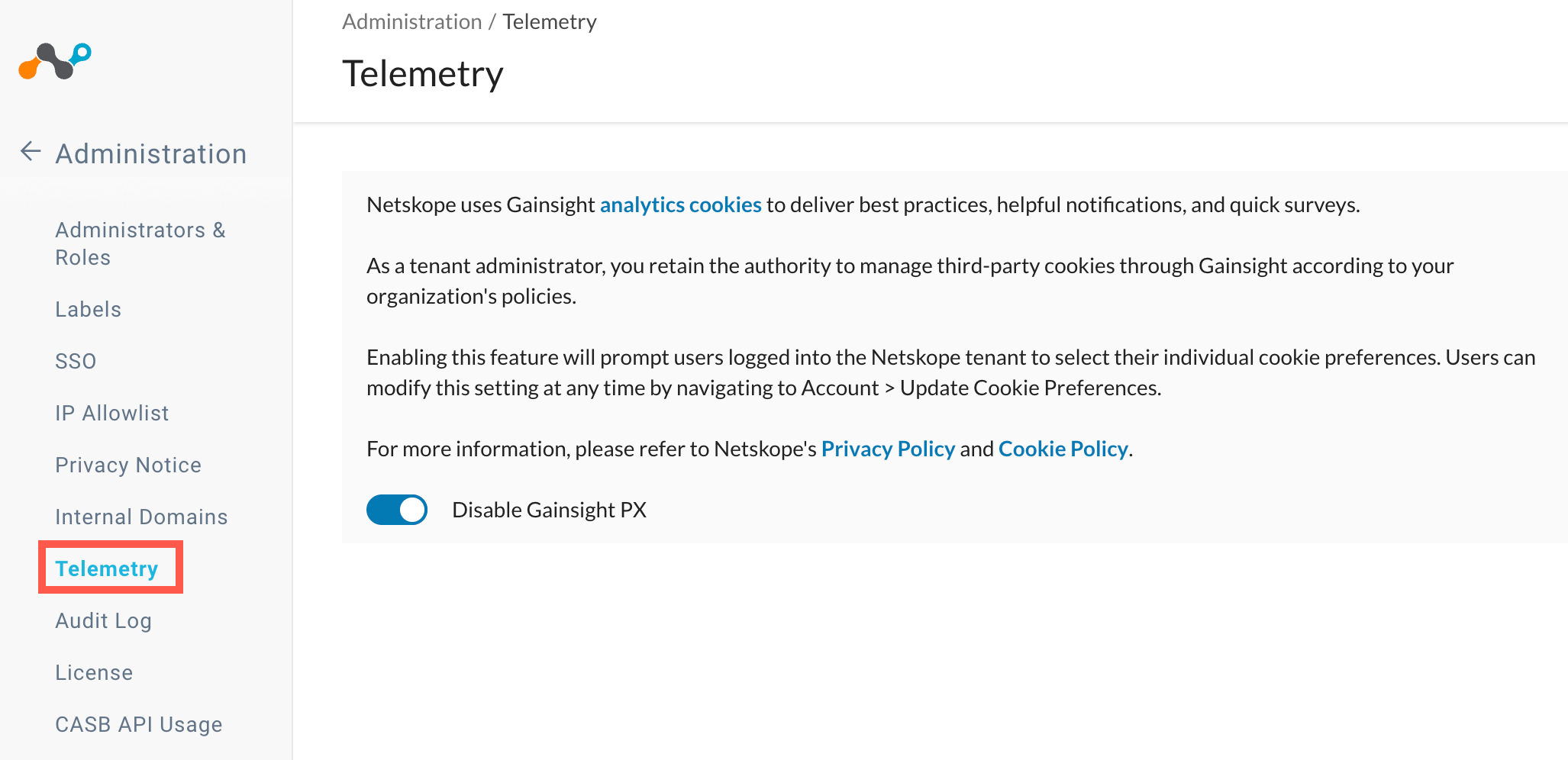
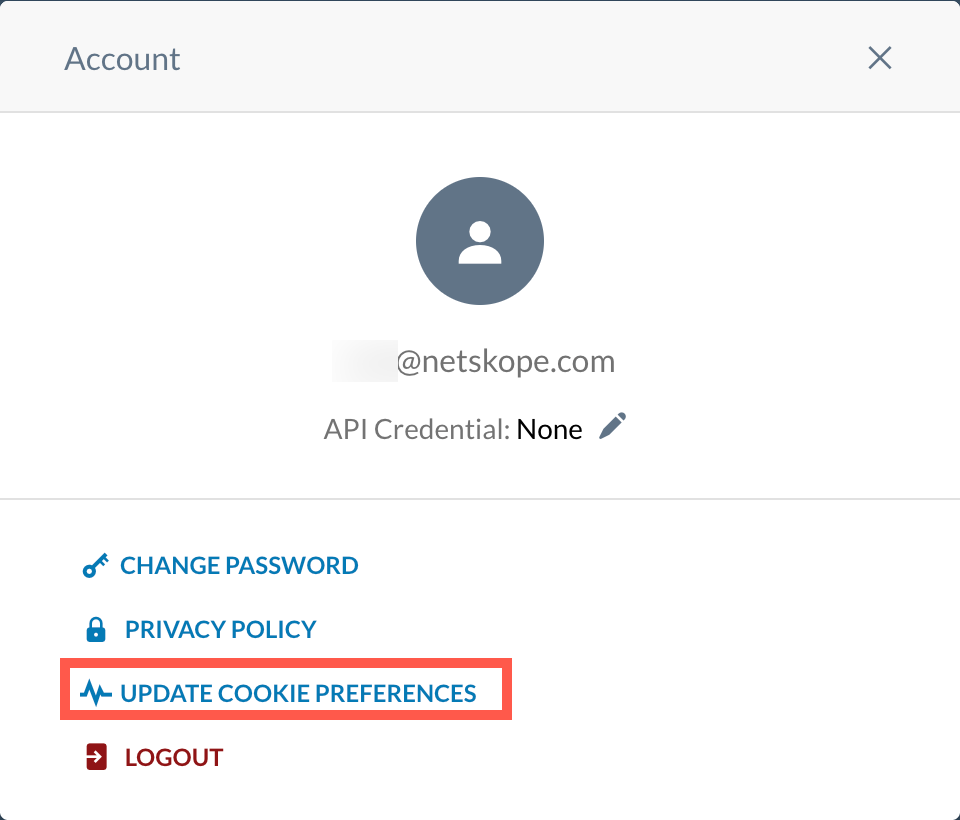
After this date, in-tenant notifications, best practices, and guides delivered through Gainsight PX analytics cookies are no longer available. The cookie preference banner and the Update Cookie Preferences option under Account are also removed. Gainsight PX no longer collects analytics data from your tenant.
Customer Impact: No action is required. Core Netskope platform functionality is not affected.
Classic API Forensic Storage Destinations – Deprecation Notice
Netskope has previously issued End-of-Life (EOL) notices and monthly email reminders to customers who have not migrated to the Next Gen Forensics to store DLP forensics incidents.
This announcement serves as a critical reminder that forensic storage using the classic forensic destination will cease to function starting Oct 31, 2026. If the older forensic instances are still in use after this date, forensics of incidents generated from Nov 1, 2026 will no longer be forwarded to their configured destinations, resulting in forensic data loss. Forensic incidents created prior to Oct 31, 2026, will be retained in older destinations in accordance with the incident retention policy.
To prevent unrecoverable loss of forensic data, customers are strongly advised to migrate to the Next Gen Forensics on or before Oct 31, 2026.
Migration Resources & Documentation
Legacy CASB-API Entity Endpoints Deprecation Notice
Netskope announces the deprecation of three public API endpoints that supports the file ID metadata, permission, and version in CASB API.
Deprecated Endpoints & ReplacedEndpoints
| Deprecated Endpoints | Replaced Endpoints |
|---|---|
POST /api/v2/casbapi/entities/getmetadata | GET /api/v2/casbapi/apps/{app}/instances/{instance}/files/{id} |
POST /api/v2/casbapi/entities/permissions | GET /api/v2/casbapi/apps/{app}/instances/{instance}/files/{id}/permissions |
POST /api/v2/casbapi/entities/getversions | GET /api/v2/casbapi/apps/{app}/instances/{instance}/files/{id}/versions |
Key Dates
| Milestone | Definition | Date |
|---|---|---|
| Effective Date | Deprecation of the CASB API REST API endpoints takes effect. | August 10, 2026 |
| End of Support | After this date, the deprecated endpoints will no longer be available. | February 1, 2027 |
Required Action
If your applications use these endpoints, migrate to the new versions before February 1, 2027, to avoid integration impact. For more information, go to Settings > Tools > REST API v2 > API Documentation to access the Swagger documentation.
End-Of-Support of Android 13 (Tiramisu)
Netskope Client will no longer support the following version of Android after August 31, 2026.
| Milestone | OS | Version | EOS Date |
|---|---|---|---|
| End-of-Support | Android | 13 (Tiramisu) | August 31, 2026 |
Contact your Netskope representative or Netskope Support for any further assistance.
AI Red Teaming API Deprecation Notice
Netskope announces the deprecation of two public API endpoints to support the new Custom Prompt Sets feature and improve request payload capacity.
Deprecated Endpoints
GET /api/v2/airt/prompt/categories
GET /api/v2/airt/rounds/estimate
Replacement Endpoints
GET /api/v2/airt/promptsets: Replaces /prompt/categories. This new endpoint returns both predefined and custom prompt-sets.
POST /api/v2/airt/rounds/estimate: Replaces the GET version of this endpoint to support longer request payloads.
Key Dates
| Milestone | Definition | Date |
|---|---|---|
| Effective Date | Deprecation of the AI Red Teaming API endpoints takes effect. | July 31, 2026 |
| End of Support | After this date, the deprecated endpoints will no longer be available. | January 31, 2027 |
Required Action
If your applications use these endpoints, migrate to the new versions before January 31, 2027, to avoid integration impact. For more information, go to Settings > Tools > REST API v2 > API Documentation to access the Swagger documentation.
Classic API Data Protection End of Life Announcement
The Classic API Data Protection platform has been the foundation of Netskope’s CASB API security offering for many customers. As Netskope continues to invest in its Next Generation API Data Protection platform, built for modern SaaS and AI app coverage — the classic platform will reach end of life on June 1, 2027. This guide outlines the key dates, impact, and steps to migrate without disruption to your security coverage.
Key Dates
| Date | Milestone |
|---|---|
| May 1, 2026 | End Of Life (EOL) announcement and transition window opens. |
| June 1, 2027 | End of Service – Classic API Data Protection platform is decommissioned. |
To learn more, see Classic API Data Protection: End of Life Announcement and Migration Guide.
Enterprise Browser API Deprecation Notice
Enterprise Browser Engineering has confirmed that the /configpolicies management suite is being phased out to align with the new consolidated policy architecture.
Deprecated Endpoints:
GET /api/v2/nsbrowser/configpolicies
POST /api/v2/nsbrowser/configpolicies
GET /api/v2/nsbrowser/configpolicies/{id}
PUT /api/v2/nsbrowser/configpolicies/{id}
DELETE /api/v2/nsbrowser/configpolicies/{id}
Effective Date: May 5, 2026
Sunset Period: 6 Months (Complete removal by November 5, 2026)
Kadiska End-of-Sale and End-of-Life
Netskope announces the End-of-Sale and End-of-Life dates of the Kadiska SKUs, globally. The last day to place an order for the affected service is 12/31/2025. Customers with active contracts will continue to receive support until the termination date of their contract. Table 1 describes the End-of-Sale milestones, definitions, and dates for the Kadiska product. Table 2 displays the End-of-life SKUs.
Table 1
End-of-life milestones, definitions and dates:
| Milestone | Definition | Date |
|---|---|---|
| Internal End-of-life announcement | End-of-life announcement is made internally to all Kadiska stakeholders | 10/31/2025 |
| End-of-life Announcement date | End-of-life announcement is made to the general public. The end-of-life banner is added to the Kadiska platform. | 12/31/2025 |
| End-of-sale date | This is the last date Kadiska purchase orders will be accepted and processed | 1/31/2026 |
| Last Date of Support | The last-possible date to receive support for Kadiska products. After this date, support is not available, and the service becomes obsolete and End of Life. | Expiration date ofexisting activecontract |
End of Sales SKU’s
The following SKU’s are going end-of-sale following the timeline in the table above.
Table 2
End-of-life SKUs
| SKU Code | SKU Description |
|---|---|
| NK-TS-K-E – Pack | Yearly subscription plan including, 10 applications (Watchers), 500k Tracer – tests |
| NK-TRACER-K-E | Add-on for 1Million additional Tracer Test |
| NK-USER-K-E | Add-On for Active User |
| NK-MAPPS-K-E | Add-on for 10 Additional Monitored Apps (Watchers) |
| NK-EDPNT-K-E | Add-on for 1000 additional agents |
| NK-STRTR-K-E | Yearly subscription plan including, 2 applications (Watchers), 50 active users extensions, 100k Watcher-sessions, 100k Tracer-tests |
| NK-U-PLTUSER-K-E | 10 additional Kadiska platform access for 10 users |
| NK-U-ACVUSER-K-E | 500 additional active users (using Watcher extension) |
For More Information
For more information about Netskope End-of-life policies, visit:
Netskope Product Life Cycle Policy
Advanced Analytics Widget Import/Export Dashboard and File Legacy Format End-of-Support: January 31, 2027
- The widget import/export feature will be deprecated on January 31, 2027. To avoid disruption, import widgets before this end-of-life (EOL) date.
- The current file format for dashboard export will be deprecated on January 31, 2027, any dashboard import attempts in the legacy format will fail after this date. To avoid disruption, import any dashboards that were exported using the previous file format before this date.
To learn more: Importing and Exporting Dashboards
Netskope Advanced Analytics and Reports API v1 End-of-Support: June 30, 2026
Netskope is updating Advanced Analytics and Reports API v1 with API v2. Support for API v1 will end in June.
API v2 reporting endpoints for Netskope Advanced Analytics (AA) and Reports will replace API v1. This updated version includes asynchronous endpoints for handling large datasets, increased data limits, and more intuitive, RESTful URL structures.
More information about this REST API is available in Swagger. In the UI, go to Settings > Tools > REST API v2 > API Documentation to access the Swagger API documentation.
To learn more about REST APIs:
- REST API v2 Overview
- REST API v2 Reporting Endpoints for Advanced Analytics
- REST API v2 Reporting Endpoints for Reports
SCIM Group Membership Lookup Behavior Change – EOL: Mar 31, 2026
Netskope is updating the method used to retrieve group membership information to improve performance and interoperability. Today, group membership is automatically returned whenever the SCIM group members API query is issued. Going forward, group membership details will only be returned when explicitly requested using the query parameter ?attributes=members. This change ensures group member data is provided only when needed, reduces unnecessary data processing, and helps address IdP interoperability issues.
| Milestone | Definition | Date |
|---|---|---|
| End-of-Life Announcement Date | The date the end-of-life of a product is announced to the general public. | Sep 30, 2025 |
| End-of-Support Date | After this date, the service will be unavailable. | Mar 31, 2026 |
Migration Steps
-
Update your automation scripts: Modify your existing API calls to include the new query parameter for retrieving group membership. This update does not change the response body format and prepares your integration for the new behavior.
-
Enable the new feature flag: Contact the Netskope Support team and request activation of the
SCIM Query Attributes Support for Group Membershipfeature flag on a designated test tenant. This allows you to validate the new functionality without affecting your production environment. -
Verify the updated API behavior: Once the feature flag is enabled, test your integration to confirm that group membership information is returned only when the query parameter is included.
Previous Behavior New Behavior GET /api/v2/scim/Groups/{id}
Does not return group membership details.GET /api/v2/scim/Groups/{id}?attributes=members
Returns group membership details when explicitly requested.
For more information, contact your Netskope representative or Netskope Support at support.netskope.com.
End-of-Support for Transaction Event Streaming on December 31, 2025
Netskope is retiring the Transaction Event Streaming solution (based on Google Pub/Sub Lite) by December 31, 2025, and transitioning to our next-generation log delivery platform: Netskope Log Streaming. This is based on Google’s plan to deprecate Pub/Sub Lite.
Customers currently using Transaction Event Streaming are requested to migrate to Netskope Log Streaming, which is Netskope’s new, unified log delivery solution that offers enhanced flexibility, broader event coverage, and a simpler path to integrate with their downstream systems.
Netskope Log Streaming is designed to support:
- Event forwarding to SIEMs via Cloud Bucket or Container based solutions
- Near real-time event delivery to cloud buckets
- Designed to accommodate large-volume event streaming
Key dates to note:
- Please refrain from setting up Transaction event streaming via Pub/Sub Lite for the customers who have purchased it recently and have not worked on the set up.
- For existing customers, Transaction event streaming will no longer be supported (End-of-Life) on 31st December 2025.
To learn more: Log Streaming Documentation
End-Of-Support of macOS 13 (Ventura)
Netskope Client will no longer support the following version of macOS after October 30, 2025.
| Milestone | OS | Version | EOS Date |
|---|---|---|---|
| End-of-support | macOS | 13 (Ventura) | October 30, 2025 |
Contact your Netskope representative or Netskope Support for any further assistance.
Migrating to Multiple IdP Support
This topic covers the general workflow for migrating to Multiple IdP support for your management console SSO.
At Netskope, we are continuously enhancing our platform to provide you with more flexibility and control. The Multiple IDP SSO feature has been available for admins. Netskope is beginning the process to migrate existing tenants.
As part of this transition, support for the current single IdP SSO configuration will be phased out.
| MILESTONE | DEFINITION | DATE |
|---|---|---|
| End of Life Announcement | Single IDP SSO feature will no longer be enhanced, and migration is required. | Sep 15, 2025 |
| End of Support | Single IdP SSO will be fully deprecated and no longer supported. | Mar 15, 2026 |
What’s Changing
- Today, Netskope provisions an administrator account using the NameID value from the SAML assertion response.
- Multiple IDP SSO requires an email-formatted user ID to enable domain-based IdP redirection.
- To support this, we have added a new SSO configuration field: Alternate User ID Attribute, which allows you to specify an alternate SAML attribute (in email format) for user identification.
Customer Impact
If your current SSO NameID does not use an email format, you must update your SSO configuration. This is a one-time migration step required after the feature is enabled to avoid disruption. Administrator account creation in SSO is based on the NameID field. To verify the username format, go to Settings > Administration > Administrators & Roles and review the Name column.
Migration Steps
- Work with your IdP administrator to identify a SAML attribute field containing a valid email address. For example, EmailAddress.
- Ensure you have at least one working local administrator account configured in your Netskope tenant.
- Contact your Netskope representative to enable the Multiple IdP SSO feature in your tenant.
- Once enabled, log in via https://<tenant>.goskope.com/locallogin using your local admin account.
- Update Netskope SSO configuration under Settings > Administration > SSO
- Edit the DefaultIDP account, enter the SAML attribute field that contains the email formatted value you identified in Step 1 (EmailAddress) in the Alternate User ID Attribute field.
- Save your changes.
- Confirm the admin domain is added under Settings > Administration > Internal Domains in the “Admin Account Domains” list.
- Test your SSO log in to validate the SSO administrators are able to log in to your account with the updated configuration.
End-of-Support of Android 12
Netskope Client will no longer support the following version of Android after August 31, 2025.
| Milestone | OS | Version | EOS Date |
|---|---|---|---|
| End-of-support | Android | 12 (Snow Cone) | August 31, 2025 |
Contact your Netskope representative or Netskope Support for any further assistance.
EOL for CSV-based Updates of User Directory Announcement
Effective January 31, 2026, Netskope no longer supports CSV-based uploads for importing user directory information . Netskope recommends transitioning to Directory Importer or SCIM app for seamless and automated synchronization of users and groups into the Netskope platform.
| Milestone | Definition | Date |
|---|---|---|
| End-of-Life Announcement Date | The date the end-of-life of a product is announced to the general public. | July 30, 2025 |
| End-of-Support Date | After this date, the service will be unavailable. | January 31, 2026 |
Contact your Netskope representative or Netskope Support for any further assistance.
End-of-Support of Windows 10
Netskope Client originally announced end-of-support for Windows 10 effective October 15, 2026. However, Netskope Client now extends its support until October 15, 2027.
During this extended support period:
-
Netskope will not block new Client installations on Windows 10.
-
Netskope support will accept Windows 10 issues.
-
Netskope engineering team will try to fix issues raised for Windows 10 in the best possible way. There will not be a fix available for issues that has a dependency on Microsoft.
-
Netskope Client upgrades to newer versions based on your configurations similar to the existing OS support.
| Milestone | OS | Version | EOS Date |
|---|---|---|---|
| End-of-support | Windows | Windows 10 | October 15, 2027 |
EOL for In-Tenant EDR Partner Integrations
Netskope will no longer support in-tenant Endpoint Detection and Response (EDR) integrations with partners after December 1, 2025. In-tenant Standard Threat Protection EDR integrations and related threat remediation profiles will be turned off. Netskope recommends customers using in-tenant partner EDR integrations (e.g., CrowdStrike or Carbon Black) migrate to Netskope Threat Exchange for EDR integrations.
Threat Exchange is a near real-time threat ingestion, curation, and sharing tool that enables Netskope customers and technology partners to bi-directionally exchange IOCs in their Netskope tenant. In addition to CrowdStrike EDR and Carbon Black, Threat Exchange integrates with dozens of different EDR, IR, SIEM, SOAR, or custom API-based tools and is extensible to additional partners. Threat Exchange is freely available to customers as a community tool.
| Milestone | Definition | Date |
|---|---|---|
| End-of-Life Announcement Date | The date the end-of-life of a product is announced to the general public. | May 22, 2025 |
| End-of-Support Date | After this date, the service will not be available. | December 1, 2025 |
End-of-Support Of Linux Versions
Netskope Client will no longer support the following Linux versions after May 31, 2025.
| Milestone | OS | Versions | EOS Date |
|---|---|---|---|
| End-of-support | Linux | May 31, 2025 |
End-Of-Support of Old MacOS Versions
Netskope Client will no longer support the following macOS versions after Dec 31, 2024:
| Milestone | Operating System | Versions | Definitions | EOS Date |
|---|---|---|---|---|
| End-of-support | macOS | 11 (Big Sur), 12 (Monterey), | After this date, Netskope Client no longer supports macOS versions 11 and 12. | Dec 31, 2024 |
| End-of-support | Android | 11 (Red Velvet Cake) | After this date, Netskope Client no longer supports Android version 11. | Dec 31, 2024 |
Netskope recommends using macOS version 13 or above to receive Netskope support for any Netskope Client related issues in the future.
EOL for a SSPM V2 Endpoint
Publication Date: 7/18/2024
Netskope announces the end-of-life and end-of-support for API v2 endpoints described in this section. SSPM supports rule categorisations based on Compliance Standard, Mitre Attack, Domain and Netskope Best Practice. Accordingly, APIs for listing and reading compliance standards are replaced by more generic APIs. Refer to the following table for more information:
| Deprecated API | Alternative API | Use |
|---|---|---|
| /api/v2/spm/rules/cs/{cs_id} | /api/v2/spm/rules/categories/cs/subcategories/{id} | To see information about specific compliance standard |
EOL for DNS Connector & DNS Mode on DPoP
Publication Date: 6/28/2024
Netskope announces the end-of-life and end-of-support dates for the DNS Connector function of the directory tools as well as Dataplane On-Premises (DPoP) with DNS mode deployment. Refer to the following table for the milestones, definitions, and dates for the affected products:
| Milestone | Definition | Date |
|---|---|---|
| End-of-Life Announcement Date | The date the end-of-life of a product is announced to the general public. | July 1, 2024 |
| End-of-Support Date | The last date to receive applicable service and support for the feature, as entitled by active service contracts or by warranty terms and conditions. After this date, all supported services for the product are unavailable and the product becomes obsolete. | September 30, 2024 |
DPoP supported two modes of deployment: DNS mode and explicit proxy mode. With DNS mode, DPoP transparently proxied SaaS applications by integrating with customer DNS servers using the DNS Connector.
On September 30, 2024, DPoP DNS mode steering and the DNS Connector functionalities for the Netskope directory tools will no long be supported. Customers using DPoP in DNS mode steering must switch to explicit proxy mode.
For more information on configuring DPoP in explicit proxy mode, go to: Configure the Appliance in Explicit Proxy Mode.
Contact your Customer Success Manager or Netskope representative if you have any questions.
EOL for Messenger Service for Appliance
Publication Date: 6/3/2024
Netskope plans to decommission the messenger service (messenger-) and consolidate the reporting and status updates via the callhome service (callhome-) when the appliance connects to the Netskope management console.
The decommissioning will impact only when the SNMP feature is enabled on Netskope appliances including OPLP, DPoP, CDPP, or DLP EDM/Fingerprint hashing VA deployment. Once decommissioned, the SNMP OID and SNMP trap for management plane status monitoring will no longer function, and will receive the “MP connection down” SNMP notification. Other SNMP configurations will continue to function. Appliance release version 113 and newer will not have this specific SNMP OID or SNMP trap. Customers must upgrade appliances to version 113 to avoid receiving these SNMP status messages.
This is an advance notification to enable customers to plan software upgrades as required.
Customer Impact: Any appliance version older than the Appliance R113 release with SNMP configured will receive a “MP connection down” SNMP notification after December 30, 2024.
The impacted SNMP Netskope OID is managementplaneStatus. The impacted SNMP trap is mpConnectionNotif.
Action Required:
- Customers who deploy an appliance with SNMP configured must upgrade the appliance to Appliance version R113 or newer.
- Remove the firewall rule for
messenger-<tenant-URL>if it was added, as it will not be used going forward.
For more information on SNMP MIBs, go to: Configure SNMP.
For more information on upgrading the virtual appliance, go to: Upgrade the Virtual Appliance.
Contact your Customer Success Manager or Netskope representative if you have any questions.
EOL for Netskope Adapters/Directory Tools
Publication Date: 4/26/2024
At Netskope, we ensure that our customers are protected with the latest and greatest version of the products that we offer. We will enhance the cipher strength on the Netskope platform, which is incompatible with older Windows operating systems. On December 1, 2024, The following OS’s will no longer be supported with Netskope Directory Tools, which include AD Importer, DNS Connector, and AD Connector.
- Windows 7 64-bit
- Windows 2008 R2 64-bit
- Windows 2012 64-bit
- Windows 2012 R2
Customer Impact: On December 1, 2024, The OS’s listed above will no longer be able to connect to Netskope platform with the Directory Tool applications.
Action Required: Customers using the Directory Tools must upgrade to one of these supported OS versions:
- Windows 10 64-bit
- Windows 11
- Windows 2016
- Windows Server 2019
- Windows Server 2022
For more information on the Directory tool, go to: Netskope Adapters.
Contact your Customer Success Manager or Netskope representative if you have any questions.
EOL for Specific REST API v1 Endpoints
Publication Date: 3/21/2024
Note
Update as of: May 6, 2025
In the last several months, Netskope has made a considerable effort to extend the timeline announced above to accommodate a number of customer requests. The final EOS date has now been set for May 31, 2025.
This is the advanced notification for the planned End of Life (EOL) for specific REST API v1 endpoints described in this article.Netskope currently offers a wide variety of REST API endpoints for automating operational workflows. The first generation of these APIs are referred to as REST API v1, and the second generation of these APIs are referred to as REST API v2. REST API v2 represents the modern, current version that utilizes the latest capabilities for authentication and authorization, which will continue to evolve in the future.In order to continue to provide the best in class capabilities, as well as robust technical support for REST API, it is imperative that we periodically assess and deprecate REST API endpoints that are no longer preferred. With this notice we are announcing the EOL of specific REST API endpoints (refer to the APIs listed below).
Note that there will be no impact for the existing User/Group info as they change the Base URL. When migrating to the new SCIM Base URL or Reverting the change back due to unforeseen issues.
Full sync is not required as part of this migration.
For more information about REST API v2, refer to the product documentation, or contact Netskope Support.
Important
If your Netskope tenant is hardened using IP Allowlist (Settings > Administration > IP Allowlist), then ensure that you add the respective source IP addresses of your integrated REST API V2 services to the Custom IP list.
Here’s the list of the EOL’ed REST API Endpoints, and the recommended replacement APIs to use instead.
| EOL’ed APIs | Replacement APIs | Reference Article |
|---|---|---|
| /api/v1/alerts | /api/v2/events/dataexport/alerts/uba /api/v2/events/dataexport/alerts/securityassessment /api/v2/events/dataexport/alerts/quarantine /api/v2/events/dataexport/alerts/remediation /api/v2/events/dataexport/alerts/policy /api/v2/events/dataexport/alerts/malware /api/v2/events/dataexport/alerts/malsite /api/v2/events/dataexport/alerts/compromisedcredential /api/v2/events/dataexport/alerts/ctep /api/v2/events/dataexport/alerts/dlp /api/v2/events/dataexport/alerts/watchlist | Get Alerts Data – Netskope Knowledge Portal |
| /api/v1/events | /api/v2/events/dataexport/events/application /api/v2/events/dataexport/events/audit /api/v2/events/dataexport/events/connection /api/v2/events/dataexport/events/incident /api/v2/events/dataexport/events/infrastructure /api/v2/events/dataexport/events/network /api/v2/events/dataexport/events/page | Get Events Data – Netskope Knowledge Portal |
| /api/v1/role | /api/v2/platform/roles | Manage User Roles – Netskope Knowledge Portal |
| /api/v1/updateUrlList | /api/v2/policy/urllist | Update a URL List – Netskope Knowledge Portal |
| /addon-*.goskope.com/SCIM/v2 | /api/v2/scim/Users /api/v2/scim/GroupsNew base URL: https://<tenant-name>.goskope.com/api/v2/scim |  SCIM Settings for User Provisioning SCIM Settings for User Provisioning |