

This document explains how to configure theNetskope Custom File Classification v1.1.0 plugin with the Custom File Classification (CFC) module of the Netskope Cloud Exchange platform. This plugin is used to push hashes of images to the Netskope Tenant.
Conditions préalables
Pour compléter la configuration, vous devez
- Un locataire Netskope (ou plusieurs, par exemple des instances de production et de développement/test).
- A Custom File Classifier on your Netskope tenant.
- A Netskope Cloud Exchange tenant with the Tenant plugin and Custom File Classification module enabled.
- A supported 3rd-party CFC plugin (like Microsoft File Share or Linux File Share) configured and available for integration.
Custom File Classification Plugin Support
This plugin is used to push hashes of images to the Netskope Tenant.
| Fonction | Support |
|---|---|
| Pull | Non |
| Push | Yes (.bmp, .dib, .jpeg, .jpg, .jpe, .jp2, .png, .webp, .avif, .pbm, .pgm, .ppm, .pxm, .pnm, .pfm, .sr, .ras, .tiff, .tif, .exr, .hdr, .pic, .zip, .tgz) |
Permissions
Veillez à ce qu'un jeton V2 avec les autorisations énumérées ci-dessous soit utilisé lors de la configuration du locataire Netskope, car il est nécessaire au bon fonctionnement du plugin CFC de Netskope.
| Point final de l'API | Méthode | Permissions | Usage |
|---|---|---|---|
| /api/v2/events/dataexport/events/alert | OBTENIR | Read | Validez le jeton v2 |
| /api/v2/services/dlp/classifiers/custom | GET | POST | Lecture + écriture | Pour obtenir la liste des classificateurs de fichiers personnalisés, valider les classificateurs et télécharger les hachages CFC vers le locataire |
Détails de l'API
Liste des API utilisées
| API endpoint | Méthode | Cas d'utilisation |
|---|---|---|
| api/v2/services/dlp/classifiers/custom | OBTENIR | Fetch all the custom classifiers from the netskope tenant. |
| api/v2/services/dlp/classifiers/custom/{classifier_id} | OBTENIR | Fetch specific custom classifier details from the netskope tenant. |
| api/v2/services/dlp/classifiers/custom/{classifier_id}/hashes | PUBLIER | Upload hashes to the custom classifier on the netskope tenant. |
Get All Custom Classifiers
API Endpoint: https://<tenant-url>/api/v2/services/dlp/classifiers/custom
Method: OBTENIR
Request Headers
| Clé | Value |
|---|---|
| Netskope-API-Token | <netskope_api_rbac3_token> |
| Accept | application/json |
| User-Agent | netskope-ce-6.1.0 |
Example API response
{
    "customClassifiers": [
        {
            "id": "7298383102162351187",
            "name": "Demo Classifier",
            "status": "ready",
            "type": "image",
            "description": "",
            "version": 479,
            "region": null,
            "modifyBy": "test.user@gmail.com",
            "isPredefined": false,
            "threshold": 0.6000000238418579,
            "negThreshold": 0.8999999761581421,
            "created": 1760364562718,
            "updated": 1776771825973,
            "lastTrained": 1776822980661,
            "overallStatus": {
                "invalid": 14408,
                "valid": 6387,
                "negative": 0,
                "errMsg": null
            },
            "modelEval": {
                "id": "7298383105162351187",
                "evaluationQuota": 0,
                "lastEvaluated": 1776768376145,
                "precision": 1,
                "recall": 1,
                "f1Score": 1,
                "f1Delta": 0,
                "precDelta": 0,
                "recallDelta": 0,
                "isEvalCurrent": false,
                "msg": "MAX_QUOTA_REACHED: Evaluation quota 10 is met",
                "status": "success",
                "warningKey": "OK"
            }
        }
    ],
    "llmClassifiers": []
}
Get Classifier by ID
API Endpoint: https://<tenant-url>/api/v2/services/DLP (Prévention des pertes de données)/classificators/custom/{class_id}
Method: OBTENIR
Request Headers
| Clé | Value |
|---|---|
| Netskope-API-Token | <netskope_api_rbac3_token> |
| Accept | application/json |
| User-Agent | netskope-ce-6.1.0 |
Example API response
{
    "id": "7298383102162351187",
    "name": "Demo Classifier",
    "status": "ready",
    "type": "image",
    "description": "",
    "version": 479,
    "region": null,
    "modifyBy": "test.user@gmail.com",
    "isPredefined": false,
    "threshold": 0.6000000238418579,
    "negThreshold": 0.8999999761581421,
    "created": 1760364561718,
    "updated": 1776771825973,
    "lastTrained": 1776822980661,
    "overallStatus": {
        "invalid": 14408,
        "valid": 6387,
        "negative": 0,
        "errMsg": null
    },
    "modelEval": {
        "id": "7298383105162351187",
        "evaluationQuota": 0,
        "lastEvaluated": 1776768376145,
        "precision": 1,
        "recall": 1,
        "f1Score": 1,
        "f1Delta": 0,
        "precDelta": 0,
        "recallDelta": 0,
        "isEvalCurrent": false,
        "msg": "MAX_QUOTA_REACHED: Evaluation quota 10 is met",
        "status": "success",
        "warningKey": "OK"
    }
}
Upload Hash to Classifier
API Endpoint: https://<tenant-url>/api/v2/services/DLP (Prévention des pertes de données)/classificateurs/custom/{class_id}/hashes
Method: PUBLIER
Request Headers
| Clé | Value |
|---|---|
| Netskope-API-Token | <netskope_api_rbac3_token> |
| Accept | application/json |
| User-Agent | netskope-ce-6.1.0 |
Body (form-data):
| Clé | Type | Value |
|---|---|---|
| Content-Type | Texte | multipart/form-data |
| upload | Fichier | file.json |
Matrice de performance
Here is the performance reading conducted for fetching and storing 10K Files metadata ( ~5.4 MB each file size and total file size is ~52.5 GB) on a Large Cloud Exchange instance with these specifications.
| Description | Spécifications |
|---|---|
| Taille de la pile | Grandes dimensions RAM : 32 GB Cœur : 16 |
| Hash generation and files metadata pushed from Netskope Custom File Classification plugin | ~ 6000 files/hour or ~32,000 MB/hour |
Workflow
- Configure the Custom File Classification plugin.
- Configure a Business Rule for Custom File Classification.
- Configure Sharing for Custom File Classification.
- Validate the Custom File Classification plugin.
Regardez une vidéo
Cliquez sur "play" pour regarder une vidéo :
Configure the Netskope Custom File Classification Plugin
-
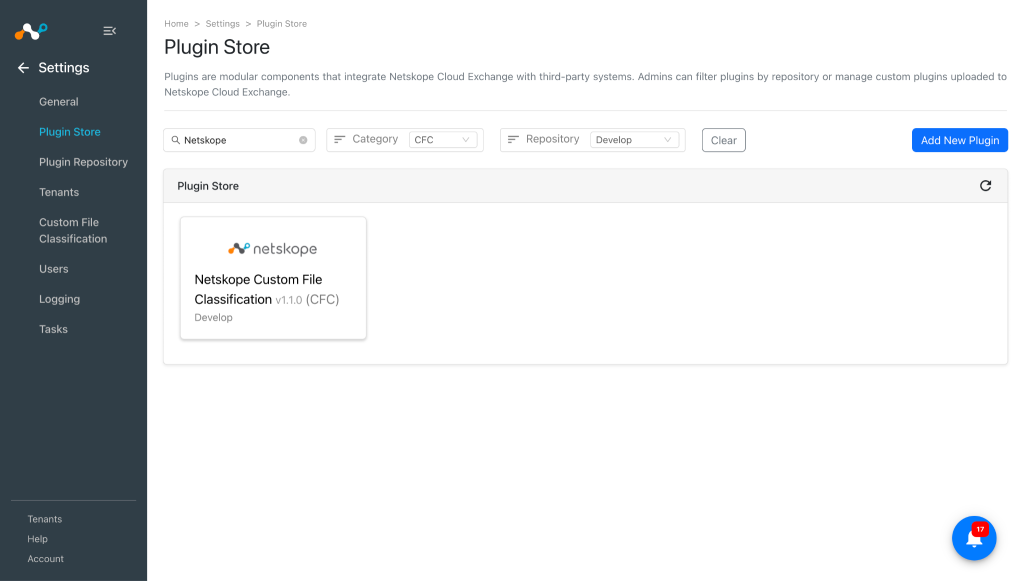
Dans Cloud Exchange, accédez à Settings > Plugin Store.
-
Recherchez et sélectionnez le plugin Netskope Custom File Classification v1.1.0 (CFC).
-
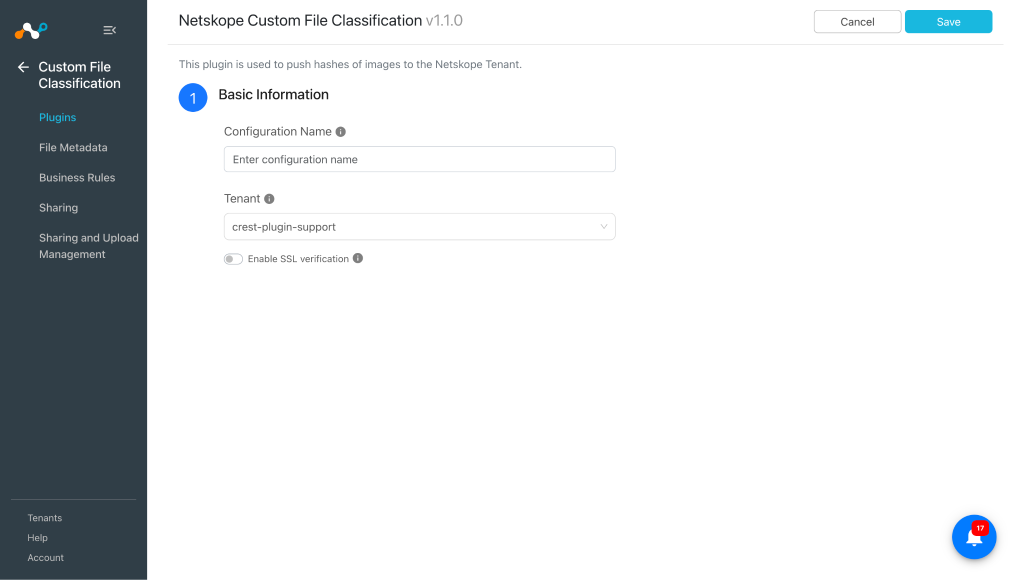
Saisissez les informations de base :
- Configuration Name: Plugin Configuration Name. Only Alphanumeric and space values are allowed.
- Tenant: Tenant plugin used to train the file classifiers with the image hashes.
- Enable SSL Verification: Enable/Disable SSL certificate verification.
-
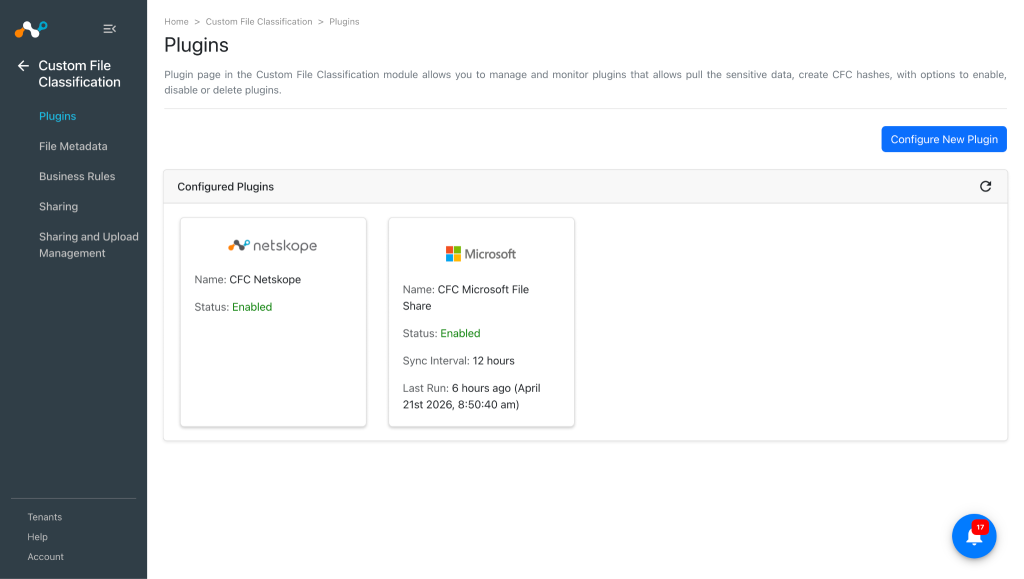
Cliquez sur Save.


Configure a CFC Business Rule for Netskope Custom File Classification
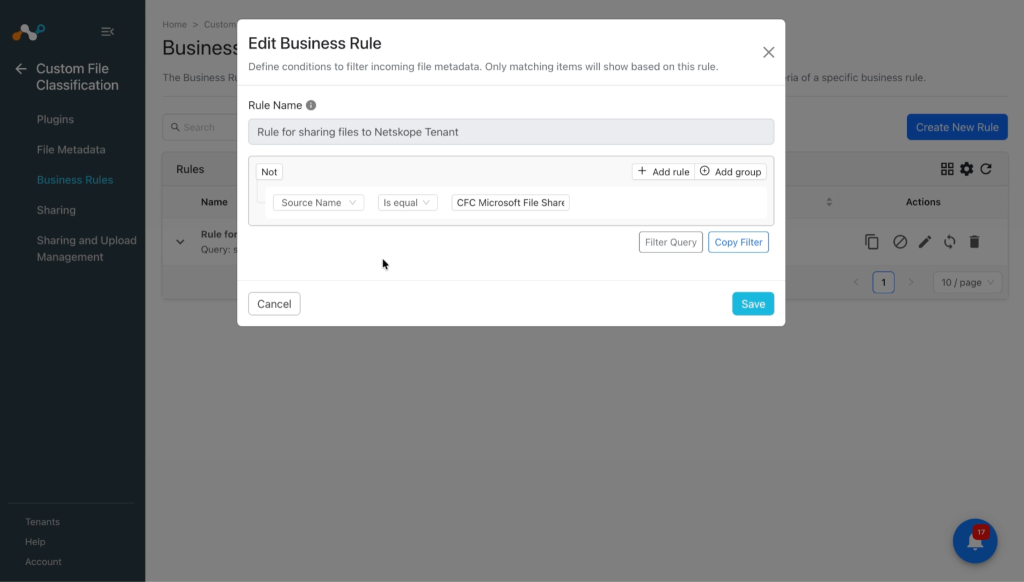
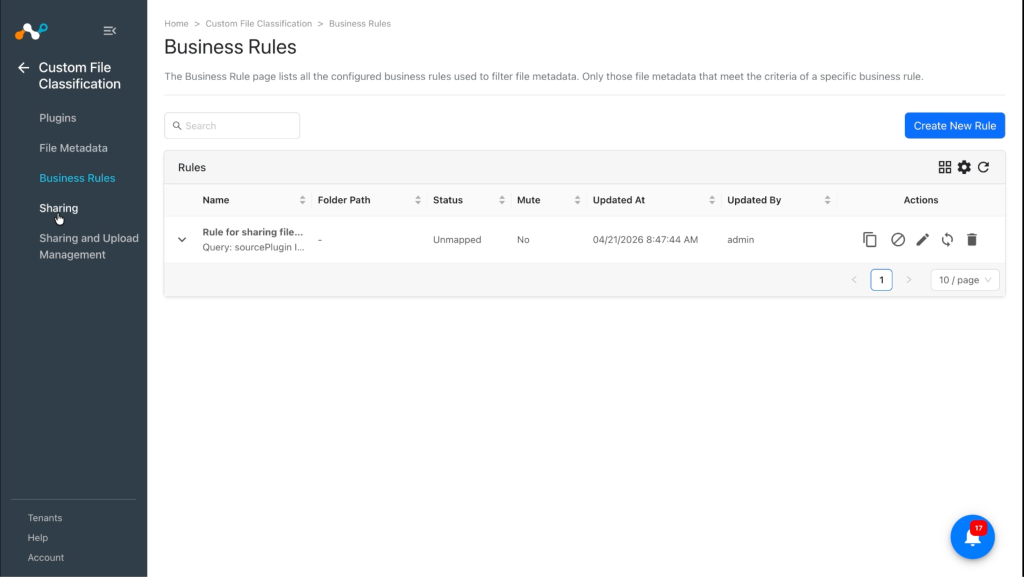
Le module Custom File Classification nécessite des règles commerciales pour partager des données de fichiers avec le locataire Netskope. Un utilisateur peut ajouter des règles pour filtrer les fichiers par nom, taille, extension, source, etc. Plusieurs règles peuvent être regroupées pour un filtrage avancé.
-
Allez sur Custom File Classification > Business Rules.
-
Cliquez sur Create New Rule et entrez ces paramètres :
- Rule Name: A unique name for the business rule.
- Rule: Set a filter based on conditions to make a group of files.
- Folder Name: Provide a folder or sub-folder name to group multiple business rules. It will help to see a structured list of business rules in the table.
-
Cliquez sur Save.


Configure Risk Exchange Sharing for Netskope Custom File Classification
-
Allez sur Custom File Classification > Sharing.
-
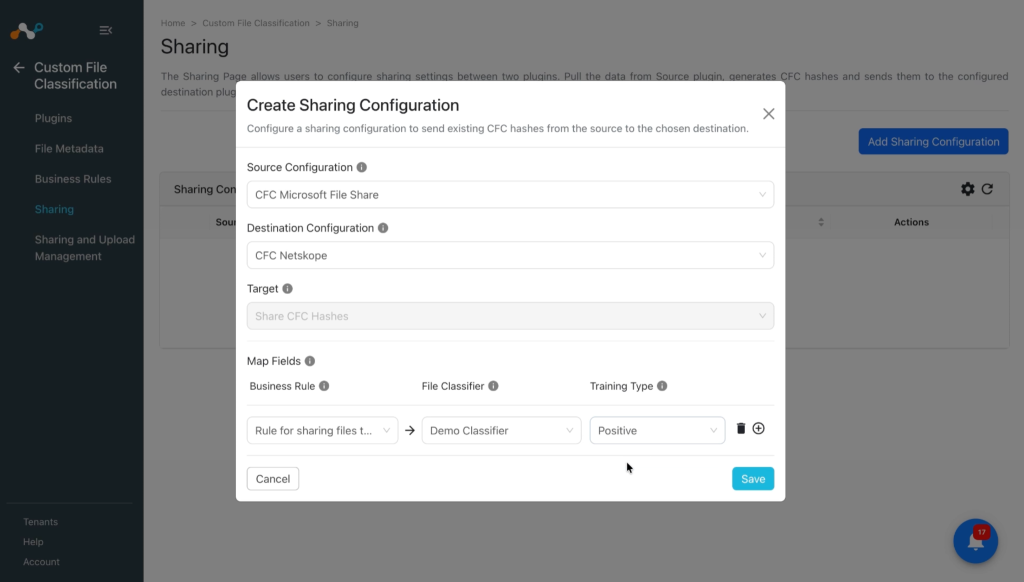
Click Add Sharing Configuration and select the Microsoft File Share CFC plugin as the Source Configuration.
-
Select le plugin Netskope CFC comme configuration de destination.
-
La cible est sélectionnée par défaut, en fonction de la configuration de la destination.
-
Select a Mapping for Business Rule, File Classifier, and Training Type. You can map multiple business rules in one sharing. The File Classifier lists only custom file classifiers created on the Netskope Tenant.
-
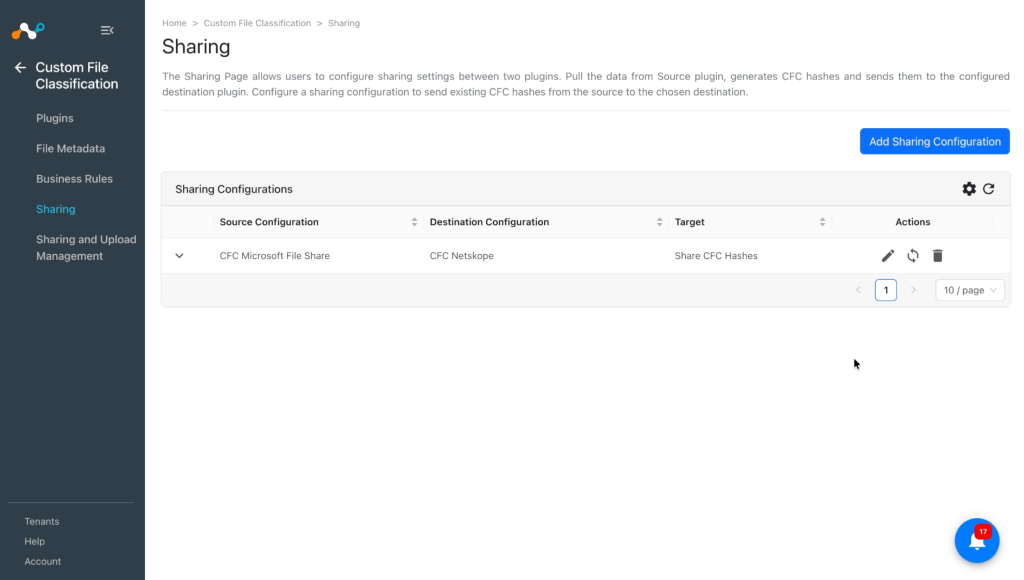
Cliquez sur Save.


Synchroniser ou supprimer les configurations de partage
- Sync: Cela lancera immédiatement le cycle de vie du plugin qui extraira les données des fichiers de la source, créera des hachages et les partagera avec la configuration de destination, indépendamment de l'intervalle de synchronisation de la configuration source.
- Delete: Supprime la configuration du partage.
Validate the Netskope Custom File Classification Plugin
Valider le retrait
After the Sharing is configured, you should wait until the next plugin lifecycle run of the configured Netskope Custom File Classification plugin gets executed successfully.
Validate the status on the Sharing and Upload Management page. Go to Custom File Classification > Sharing and Upload Management.

L'état de la configuration du partage peut être
- Scheduled: This represents that the sharing is configured, but it is still in the queue and waiting to run for the first time.
- Generating Hash: Cela signifie que le processus de génération d'un hachage est en cours.
- Uploading Hash: This represents that the hash is generated successfully, and the process of sharing it to the configured destination is in progress.
- Completed: This indicates that the generated hash is successfully shared with the destination configuration.
- Failed: Indicates that the process failed in either pulling data, hashing data, or uploading the hash.
Clicking View Metadata will redirect you to the Files Metadata page.


Validate Sharing on the Netskope Tenant
-
Connectez-vous à votre locataire Netskope.
-
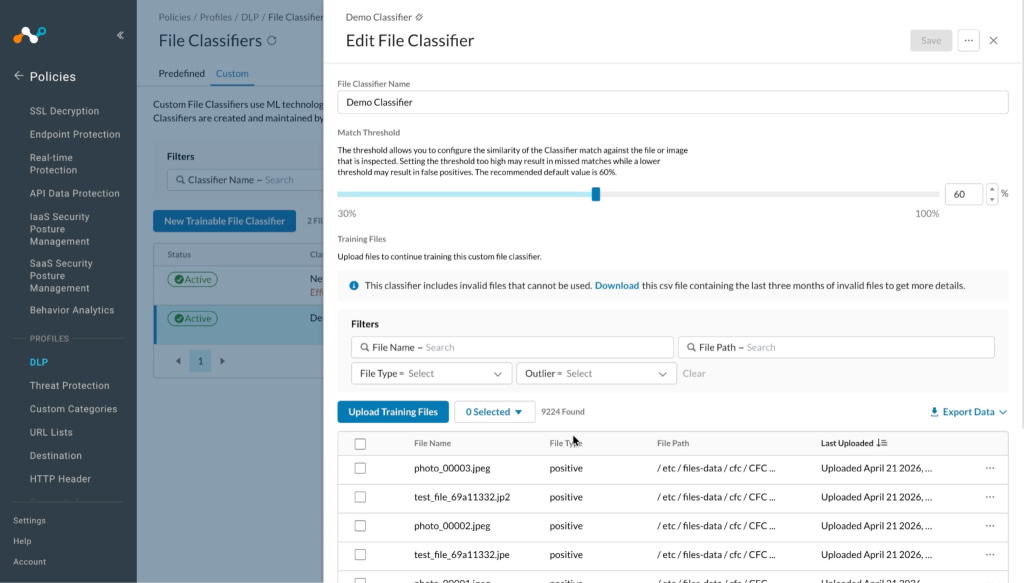
Allez sur Policies > DLP > File Classifiers.


-
Select le classificateur que vous avez sélectionné lors de la configuration du partage, vous verrez les hachages de fichiers reçus ici :


Troubleshooting the Netskope Custom File Classification Plugin
Unable to configure the Netskope Custom File Classification Plugin
If you are unable to configure the Netskope Custom File Classification plugin, it may be due to incorrect credentials provided while configuring the Netskope Tenant plugin.
What to do: Assurez-vous que le plugin locataire est configuré avec les autorisations requises.
Comportement connu
- Even though the classifier has been deleted from the tenant, it still shows a success status and the Last Shared At value is updated at every scheduled interval.
- We have observed that only 10,000 files were allowed to be shared on Netskope tenant for all Classifiers in total.
- We have validated sharing following types of files: .bmp, .dib, .jpeg, .jpe, .jp2, .png, .webp, .sr, .ras, .tiff, .tif, .exr, .hdr, .pic, .zip. Note that compressed files will be uncompressed on Netskope Tenant.
- For supported image formats such as .pbm, .pgm, .ppm, .pxm, .pnm, .pfm, and .avif, files are processed successfully within CE but will not be visible on the Netskope Tenant ad they will be stored as MD5 as per the Netskope Tenant team.