

Notes de mise à jour
1.4.0
Added
- Added support for indicator retraction.
- Added ‘Type of Threat data to pull’ and ‘Enable Polling’ configuration parameters.
- Added support to bifurcate the URL by types (Domain, IPv4, IPv6 & URL).
- Added resolution for error logs starting from CE v6.0.0.
- Added support for storing access token in the storage.
1.3.1
Added
- Added ‘Indicators with Generated Alert’ field in Configuration parameters.
- Added ‘Generate Alert’ field in the sharing configuration.
Removed
- Removed actions ‘Alert’ and ‘Alert and Block’ from configuration and sharing configuration.
1.3.0
Added
- Added support for different regions for Base URL.
- Added support for fetching indicators on the basis of actions provided.
- Added support for Tagging on the basis of indicator action.
1.2.0
Changed
- Replaced beta API’s with stable API endpoints.
1.1.0
Added
- Added push support.
Changed
- Changed deprecated apis.
1.0.0
Added
- Initial release.
This document explains how to configure the Microsoft Defender for Endpoint v1.4.0 plugin for the Threat Exchange module of the Netskope Cloud Exchange platform. This plugin is used to pull indicators of type URL, IPv4, IPv6, Domain, MD5 and SHA256 from the System > Settings > Endpoints > Indicators page of the Microsoft Defender for Endpoint platform. This plugin supports sharing indicators of type URL, IPv4, IPv6, Domain, MD5 and SHA256 to the System > Settings > Endpoints > Indicators page in the Microsoft Defender for Endpoint platform. This plugin also supports pull and push retraction of indicators from the Microsoft Defender for Endpoint platform.
Conditions préalables
Pour compléter cette configuration, vous avez besoin de :
- Un locataire Netskope (ou plusieurs, par exemple des instances de production et de développement/test).
- Un profil de fichier sur votre locataire Netskope.
- A URL List on your Netskope tenant.
- A Destination Profile on your Netskope tenant.
- A Private App on your Netskope tenant.
- A DNS Profile on your Netskope tenant.
- Un abonnement à Secure Web Gateway pour le partage d'URL.
- A Netskope Cloud Exchange tenant with the the Tenant plugin and Threat Exchange plugin already configured.
- Un compte Microsoft Defender for Endpoint.
- Votre identifiant de locataire Microsoft Azure, votre identifiant de client et votre secret de client.
- Une application Microsoft Azure disposant de l'autorisation Ti.ReadWrite.All. Pour plus d'informations, consultez cet article.
- Connectivité avec ces hôtes :
- https://api.securitycenter.microsoft.com/api/indicators
- https://securitycenter.windows.com
- https://login.microsoftonline.com
- https://portal.azure.com
Prise en charge de Microsoft Defender for Endpoint Plugin
This plugin is used to pull indicators of type URL, IPv4, IPv6, Domain, MD5 and SHA256 from the System > Settings > Endpoints > Indicators page of the Microsoft Defender for Endpoint platform. This plugin supports sharing indicators of type URL, IPv4, IPv6, Domain, MD5 and SHA256 to the System > Settings > Endpoints > Indicators page in the Microsoft Defender for Endpoint platform. This plugin also supports pull and push retraction of indicators from the Microsoft Defender for Endpoint platform.
| Types d'indicateurs prédéfinis | Types d'indicateurs partagés |
|---|---|
| URL, IPv4, IPv6, Domain, MD5 and SHA256 | URL, IPv4, IPv6, Domain, MD5 and SHA256 |
Retrait de l'IoC
IoC Retraction (Pull): Indicators will be fetched from Microsoft Defender for Endpoint and in the subsequent pull cycles if some indicators are deleted on Microsoft Defender for Endpoint or not within the retraction interval range then they will be marked as Retraced in Cloud Exchange.
IoC Retraction (Push): Retracted indicators present on Cloud Exchange will be deleted from Microsoft Defender for Endpoint during sharing.
| Type de rétraction | Type de rétraction supportée |
|---|---|
| Retrait de l'IoC (Pull) | Oui |
| Retrait de l'IoC (Push) | Oui |
Mises en correspondance
Mappages de traction
Voici les mappings pour les IoCs tirés.
| Netskope CTE Field | Defender API Field | Description |
|---|---|---|
| Indicator.value | indicatorValue | |
| Indicator.type | indicatorType | Url → URL; DomainName→ Domain; FileMd5 → MD5; FileSha256 → SHA256; IpAddress→IPv4/IPv6 |
| Indicator.firstSeen | creationTimeDateTimeUtc | |
| Indicator.lastSeen | lastUpdateTime | |
| Indicator.comments | titre + description | Concatenated as “<title> | <description>“ |
| Indicator.severity | sévérité | |
| Indicator.tags | action | creates Defender_<action> tag; one tag per indicator. |
Correspondances de gravité pour la traction
| Sévérité de Netskope | Defender Severity |
|---|---|
| LOW | Faible |
| MEDIUM | Moyen |
| HIGH | Haut |
| UNKNOWN | Autre chose |
Mappages de poussée
Voici les mappings pour les IoCs partagés.
| Netskope CTE Field | Defender API field | Description |
|---|---|---|
| Indicator.value | indicatorValue | |
| Indicator.type | indicatorType | URL → Url Domaine → DomainName Nom de domaine complet → DomainName Adresse IPv4/IPv6 → IpAddress MD5 → FileMd5 SHA256 → FileSha256 |
| Indicator.comments | description | Formaté sous le nom « Netskope-CTE | <source> | <comments> » |
| Indicator.severity | sévérité | |
| action_dict.action (configuré) | action | Mapped via action_conversion: unknown/alert/Alert → Audit; allow → Allowed; block → Block; AlertAndBlock → Block (and forces generateAlert=True). |
| action_dict.generate_alert | generateAlert | Si l'action est un audit : True forcé ; sinon, utilise Yes/No configuré (booléen). |
| Indicator.type/value | type | “Indicator <value> of type <indicatorType>” (uses resolved type). |
Severity Mapping for push
| Sévérité de Netskope | Defender Severity |
|---|---|
| LOW | Faible |
| MEDIUM | Moyen |
| HIGH | Haut |
| CRITICAL | Haut |
Permissions
Application Microsoft Azure avec l'autorisation Ti.ReadWrite.All . Pour plus d'informations, cliquez ici.
Détails de l'API
Liste des API utilisées
| Netskope CTE Field | Proofpoint API field | Type |
|---|---|---|
| threatStatus | threatStatus | String |
| interval | interval | Datetime |
| sinceSeconds | sinceSeconds | Integer |
| eventTypes | eventTypes | String |
Authentification
Ce plugin utilise la bibliothèque Python pour générer des jetons d'authentification pour .
- Bibliothèque : Bibliothèque d'authentification Microsoft pour Python (msal)
- Utilisation : Microsoft Authentication Library for Python (msal) pour obtenir un jeton d'authentification pour les API de Microsoft Defender.
Create a new session with credentials
scope = ["https://api.securitycenter.microsoft.com/.default"]
authority = "https://login.microsoftonline.com/{tenantID}

app = msal.ConfidentialClientApplication(
           client_id={clientID}, authority=authority, client_credential={clientSecret}, proxies=proxy
)
auth_json = app.acquire_token_for_client(scopes=scope)
auth_token = auth_json.get("access_token", "")
Indicateurs de traction
API Endpoint: <Base URL>/api/indicators
Method: OBTENIR
Headers
| Clé | Value |
|---|---|
| Authorization | Bearer <auth_token> |
| Content-Type | application/json |
| Accept | application/json |
| User-Agent | netskope-ce-6.1.0-cte-microsoft-defender-for-endpoint-v1.4.0 |
Parameters
| Clé | Value |
|---|---|
| $filtre | Combinaison de creationTimeDateTimeUtc+ge+<UTC timestamp> et d'actions optionnelles : action+eq+'<Action>' avec ou. ex. : creationTimeDateTimeUtc+ge+2025-02-05T00:00:00Z et (action+eq+'Alerte' ou action+eq+'Audit') |
Sample API Response
{
  "@odata.context": "https://api.securitycenter.microsoft.com/api/$metadata#Indicators",
  "value": [
    {
      "id": "66407",
      "indicatorValue": "a40da157d2e56d26c01d8d57947779e1b403999ed32a1ac3553b46f501542e0d",
      "indicatorType": "FileSha256",
      "action": "Audit",
      "createdBy": "d45ccecf-7406-47f6-90e5-05f0b3f76094",
      "severity": "Informational",
      "category": 1,
      "application": null,
      "educateUrl": null,
      "bypassDurationHours": null,
      "title": "Indicator a40da157d2e56d26c01d8d57947779e1b403497e999a1ac3553b46f501542e0d of type FileSha256",
      "description": "Pull Test",
      "recommendedActions": null,
      "creationTimeDateTimeUtc": "2026-01-21T09:08:36.9319034Z",
      "expirationTime": null,
      "lastUpdateTime": "2026-01-21T09:08:36.9319034Z",
      "lastUpdatedBy": null,
      "rbacGroupNames": [],
      "rbacGroupIds": [],
      "notificationId": null,
      "notificationBody": null,
      "version": null,
      "mitreTechniques": [],
      "historicalDetection": false,
      "lookBackPeriod": null,
      "generateAlert": true,
      "additionalInfo": null,
      "createdByDisplayName": "Demo app",
      "externalId": null,
      "createdBySource": "PublicApi",
      "certificateInfo": null
    },
    {
      "id": "66408",
      "indicatorValue": "521e25b2d1bb9f8059dc7b0e86d05454bd599941e2a59620521ba1510be110e6",
      "indicatorType": "FileSha256",
      "action": "Audit",
      "createdBy": "d45ccecf-7406-47f6-90e5-05f999f76094",
      "severity": "Informational",
      "category": 1,
      "application": null,
      "educateUrl": null,
      "bypassDurationHours": null,
      "title": "Indicator 521e25b2d1bb9f8059dc7b0e86d05454bd565441e9999620521ba1510be110e6 of type FileSha256",
      "description": "Pull Test",
      "recommendedActions": null,
      "creationTimeDateTimeUtc": "2026-01-21T09:08:37.7747306Z",
      "expirationTime": null,
      "lastUpdateTime": "2026-01-21T09:08:37.7747306Z",
      "lastUpdatedBy": null,
      "rbacGroupNames": [],
      "rbacGroupIds": [],
      "notificationId": null,
      "notificationBody": null,
      "version": null,
      "mitreTechniques": [],
      "historicalDetection": false,
      "lookBackPeriod": null,
      "generateAlert": true,
      "additionalInfo": null,
      "createdByDisplayName": "Demo app",
      "externalId": null,
      "createdBySource": "PublicApi",
      "certificateInfo": null
    }
]
}
Indicateurs de poussée
API endpoint: <Base URL>/api/indicators
Method: PUBLIER
Headers
| Clé | Value |
|---|---|
| Authorization | Bearer <auth_token> |
| Content-Type | application/json |
| Accept | application/json |
| User-Agent | netskope-ce-6.1.0-cte-microsoft-defender-for-endpoint-v1.4.0 |
Body
{
        "indicatorValue": "malicious.example.com",
        "indicatorType": "DomainName",
        "action": "Block",
        "title": "Indicator malicious.example.com of type DomainName",
        "description": " Netskope-CTE | demo | Example domain IOC",
        "severity": "High",
        "generateAlert": true,
}
Sample API Response (Status Code: 201)
{
  "@odata.context": "https://api.securitycenter.microsoft.com/api/$metadata#Indicators/$entity",
  "id": "67908",
  "indicatorValue": "malicious.example.com",
  "indicatorType": "DomainName",
  "action": "Block",
  "createdBy": "d45ccecf-7406-47f6-90e5-05f0b3f76094",
  "severity": "High",
  "category": null,
  "application": null,
  "educateUrl": null,
  "bypassDurationHours": null,
  "title": "Indicator malicious.example.com of type DomainName",
  "description": " Netskope-CTE | demo | Example domain IOC",
  "recommendedActions": null,
  "creationTimeDateTimeUtc": "2026-02-09T07:01:36.6399107Z",
  "expirationTime": null,
  "lastUpdateTime": "2026-02-09T07:01:36.6399107Z",
  "lastUpdatedBy": null,
  "rbacGroupNames": [],
  "rbacGroupIds": [],
  "notificationId": null,
  "notificationBody": null,
  "version": null,
  "mitreTechniques": [],
  "historicalDetection": false,
  "lookBackPeriod": null,
  "generateAlert": true,
  "additionalInfo": null,
  "createdByDisplayName": "Demo app",
  "externalId": null,
  "createdBySource": "PublicApi",
  "certificateInfo": null
}
Supprimer les indicateurs
API endpoint: <Base URL>/api/indicators/{id}
Method: DELETE
Headers
| Clé | Value |
|---|---|
| Authorization | Bearer <auth_token> |
| Content-Type | application/json |
| Accept | application/json |
| User-Agent | netskope-ce-6.1.0-cte-microsoft-defender-for-endpoint-v1.4.0 |
Parameters
| Clé | Value |
|---|---|
| id | ID of the Indicator to delete on Defender platform |
Delete Indicators for retraction
API endpoint: <Base URL>/api/indicators/BatchDelete
Method: PUBLIER
Headers
| Clé | Value |
|---|---|
| Authorization | Bearer <auth_token> |
| Content-Type | application/json |
| Accept | application/json |
| User-Agent | netskope-ce-6.1.0-cte-microsoft-defender-for-endpoint-v1.4.0 |
Body
{
    "IndicatorIds": [
        "<Indicator ID>"
    ]
}
Sample API Response
Status Code: 204 No Content
Matrice de performance
Here is the performance reading conducted by pulling and sharing 15K indicators from/to Microsoft Defender for Endpoint on a Large CE Stack with these specifications.
| Description | Spécifications |
|---|---|
| Détails de la pile | Taille : Grande RAM : 32 GB CPU : 16 cœurs |
| Indicator fetched from Microsoft Defender for Endpoint | ~15K IOCs per minute |
| Indicateurs partagés avec CrowdStrike | ~100 per minute |
Agent utilisateur
netskope-ce-6.1.0-cte-microsoft-defender-for-endpoint-v1.4.0
Workflow
- Get your Tenant ID, Application (Client) ID, and Client Secret from Microsoft Defender.
- Add API Permissions for Microsoft Defender.
- Configurez le plugin Microsoft Defender for Endpoint.
- Configure a Business Rule for Microsoft Defender for Endpoint.
- Configure Sharing for Netskope and Microsoft Defender for Endpoint.
- Validate the Microsoft Defender for Endpoint Plugin.
Regardez une vidéo
Cliquer sur « play » pour regarder une vidéo.
Get your Tenant ID, Application (Client) ID and Client Secret from Microsoft Defender
-
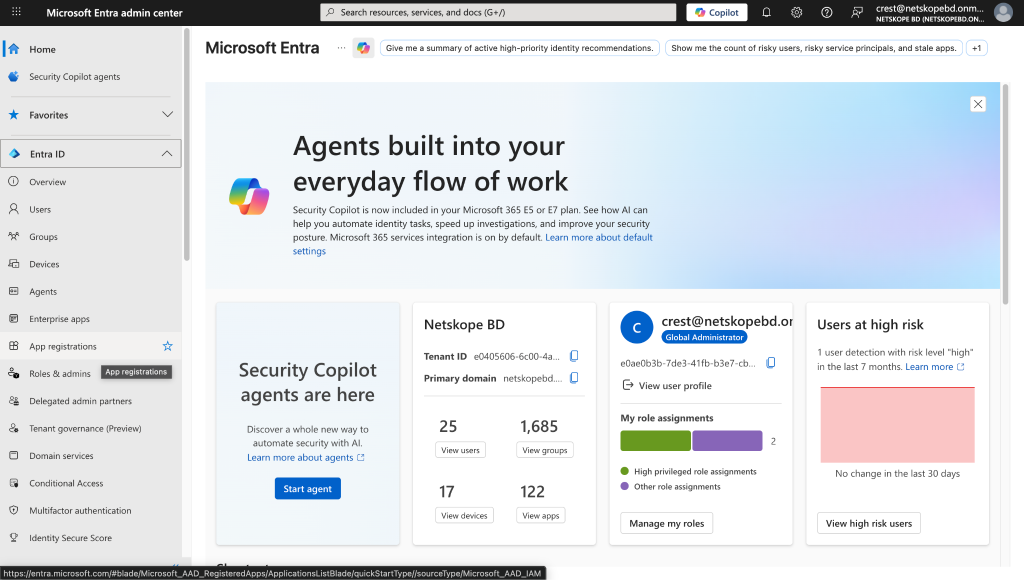
Go to https://entra.microsoft.com/ and log in with your credentials
-
Cliquez sur App registrations.
-
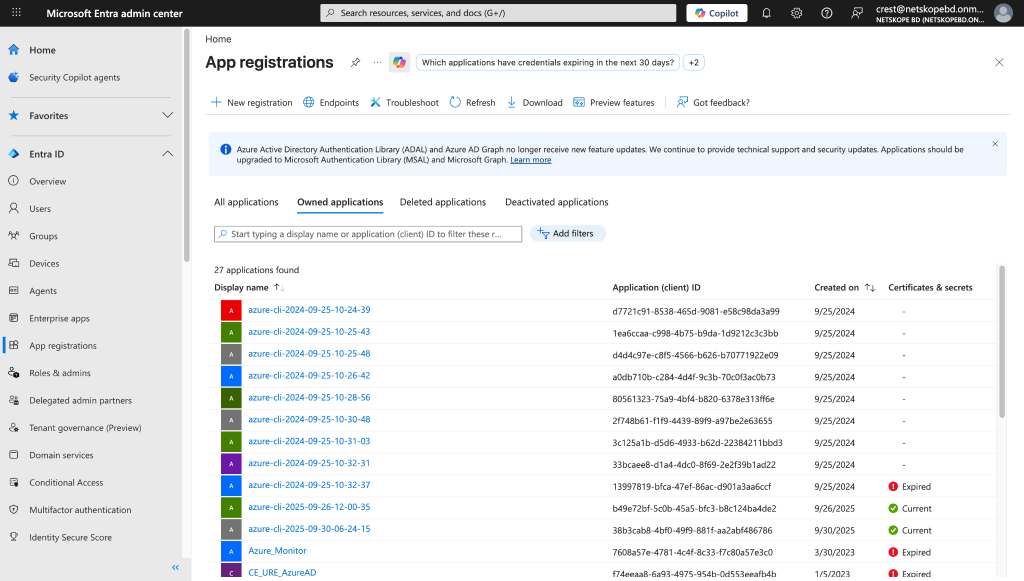
Cliquez sur New Registration.
-
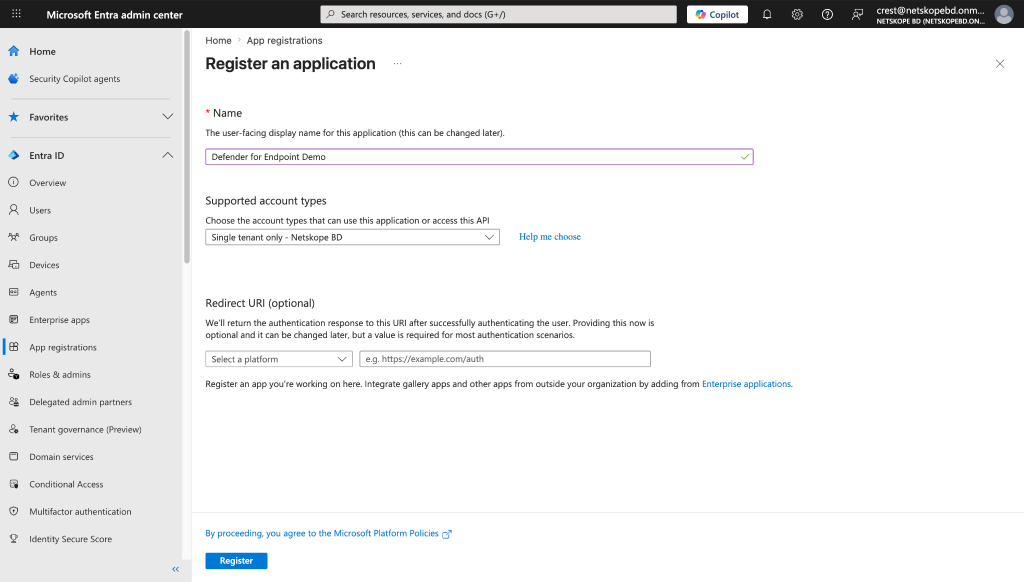
Indiquez le nom de la candidature et cliquez Register.
-
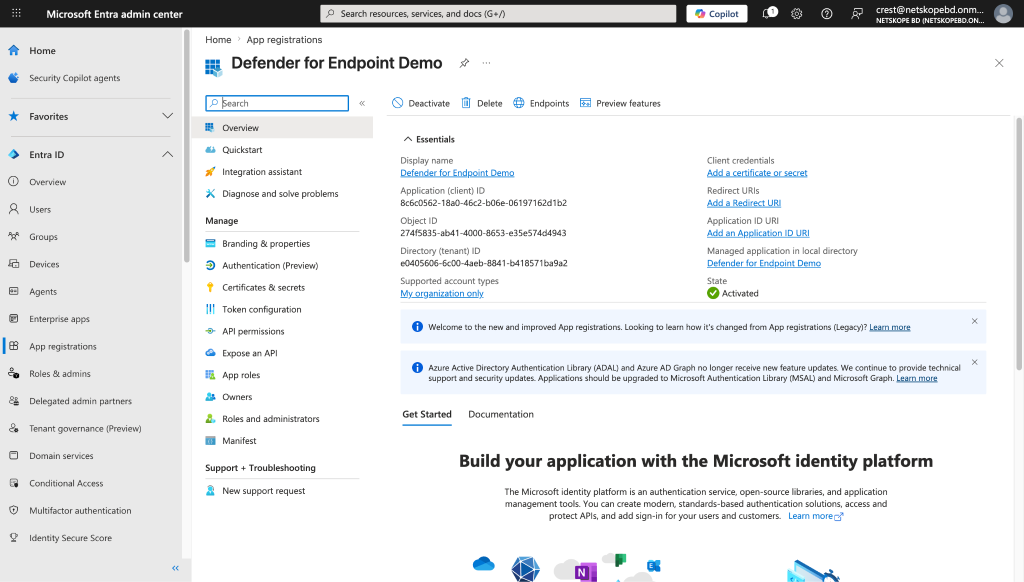
Copy the Application (Client ID), which is the Client (Application) ID in Netskope. Also copy the Directory (tenant) ID, which is tenant ID in Netskope. Click Certificates & Secrets.
-
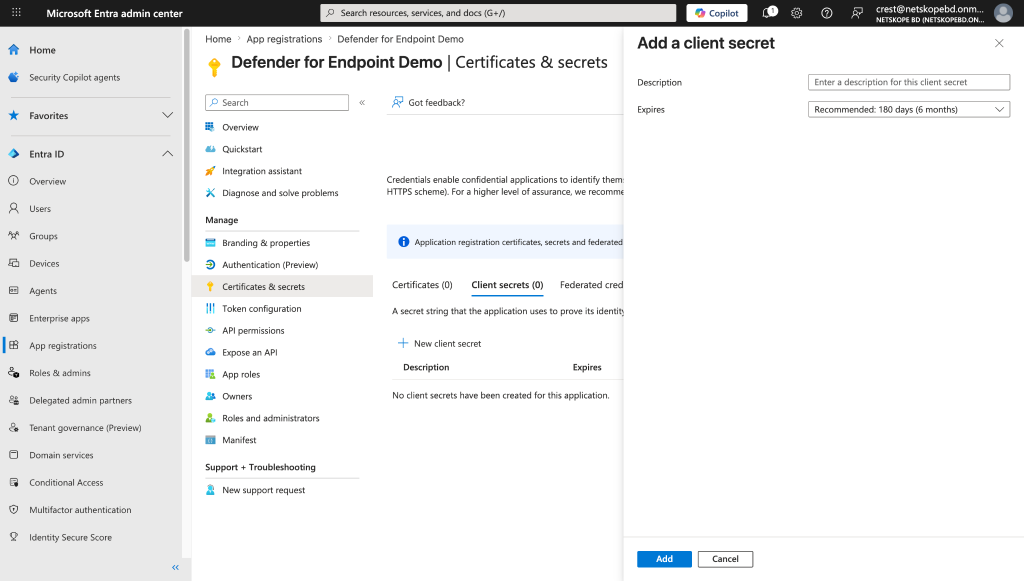
Cliquez New client secret. Ajoutez une description et cliquez Save.
-
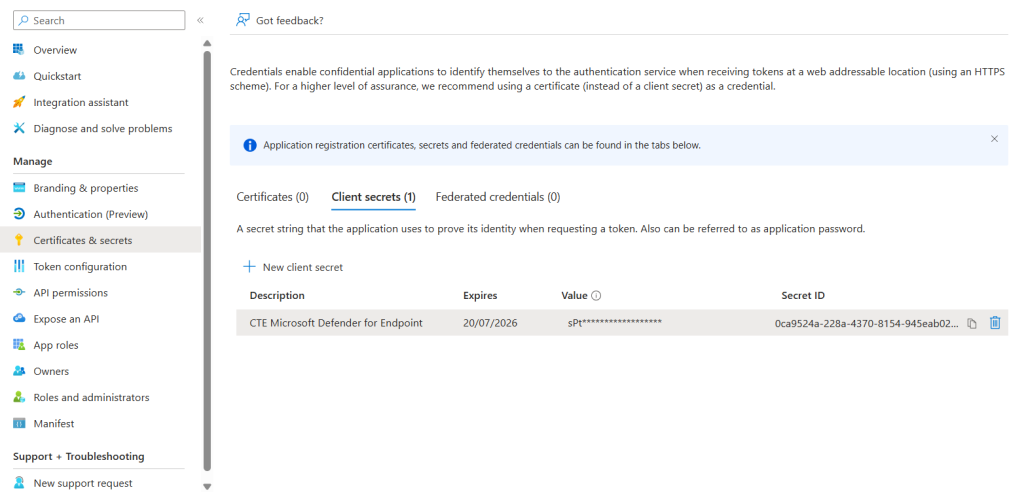
Copy the value; it is the Client Secret needed for the plugin configuration.


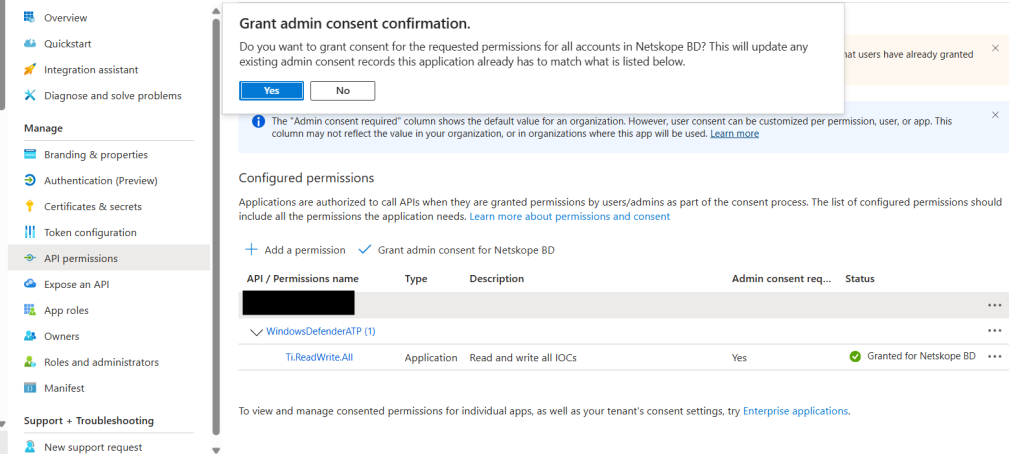
Add API Permissions
-
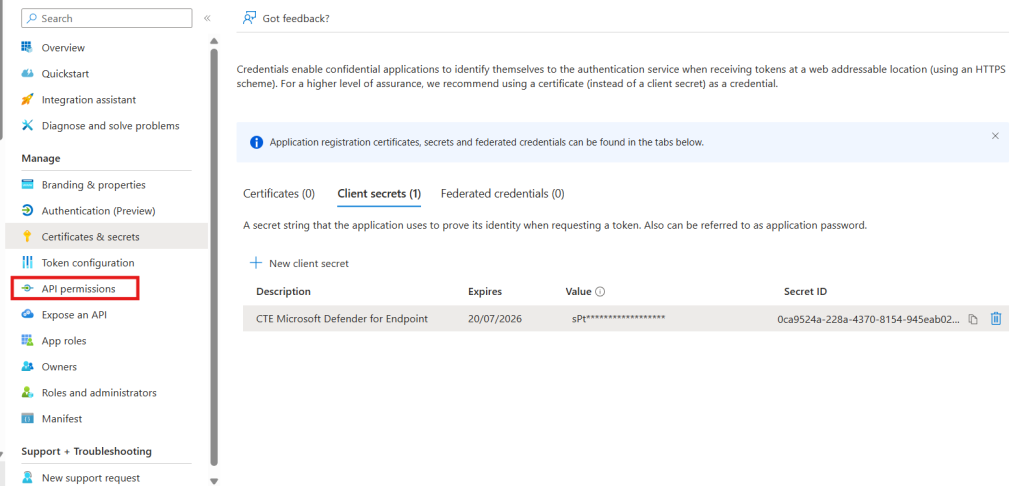
Dans le panneau de gauche, cliquez sur API permissions.
-
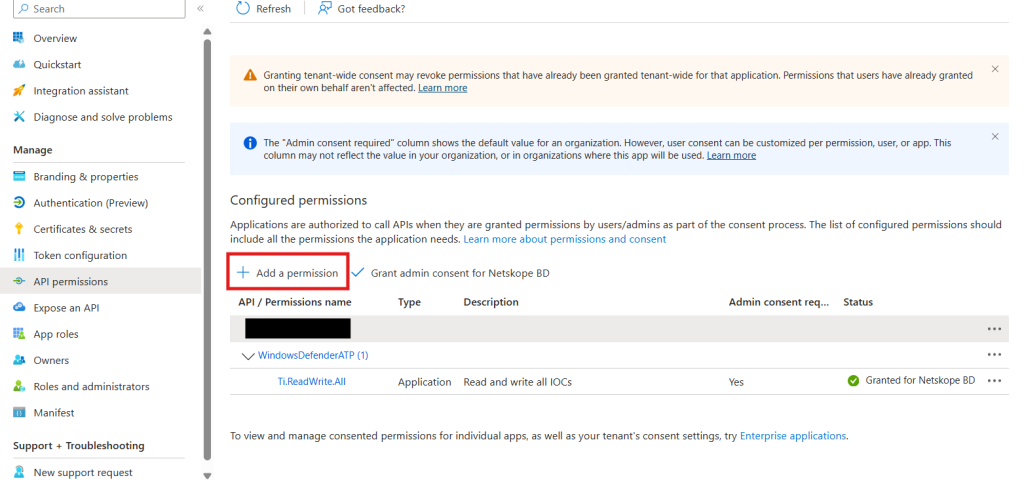
Cliquez sur Add a permission.
-
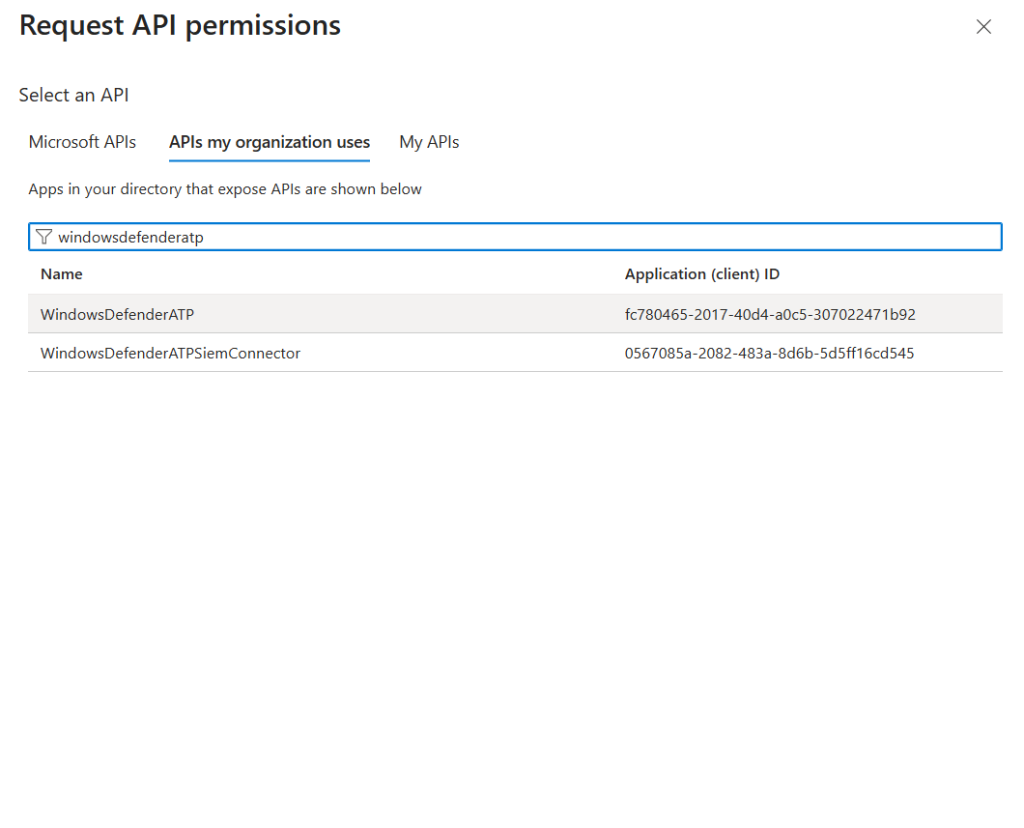
Cliquez sur APIs my organization uses puis sur WindowsDefenderATP.
-
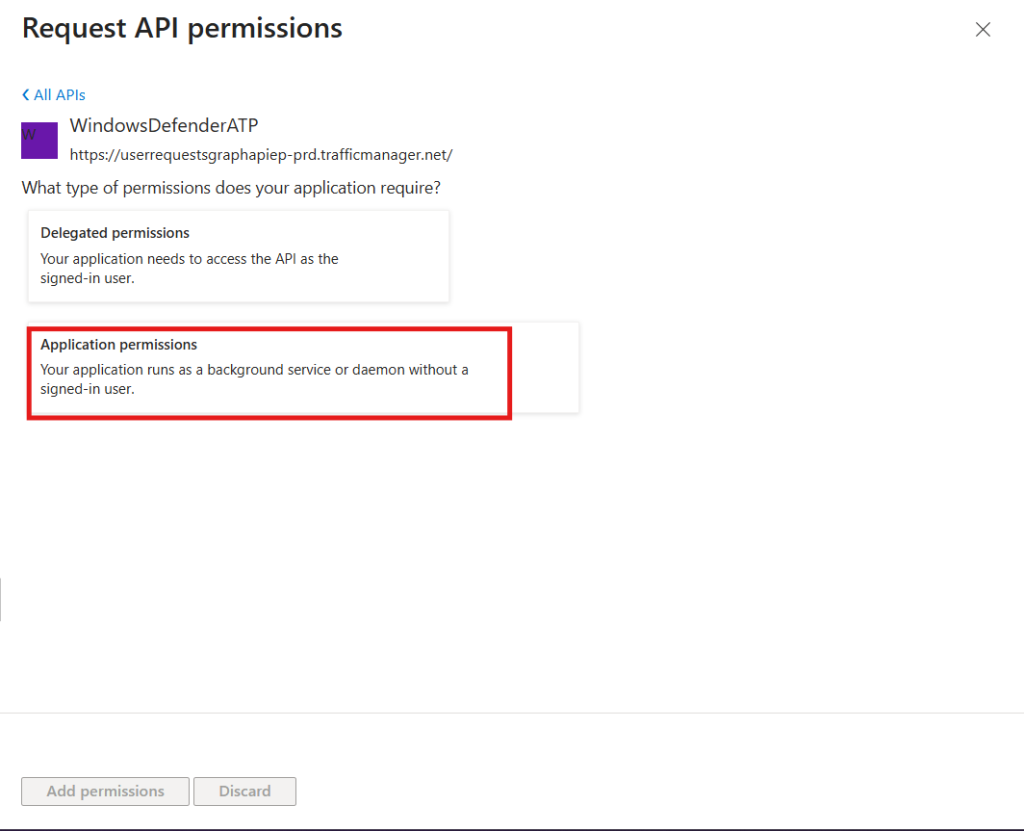
Cliquez sur Application permissions.
-
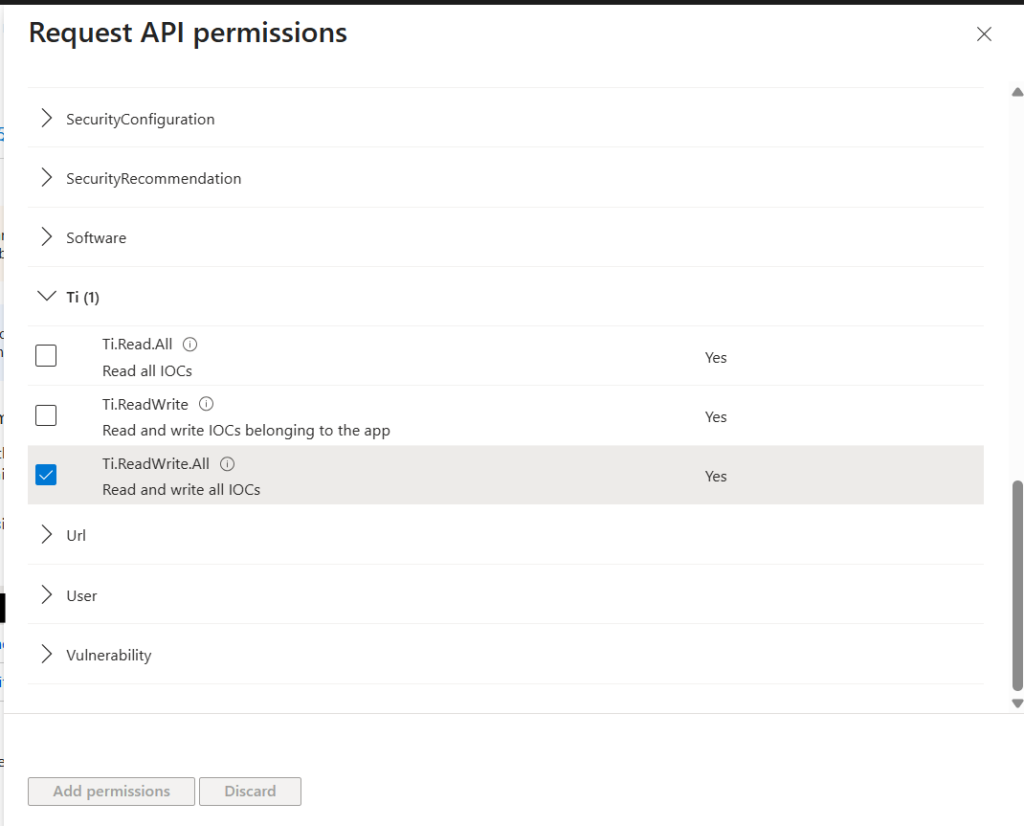
Select the Ti.ReadWrite.All permissions and click Add permission.
Cliquez sur Grant admin consent for Contoso.
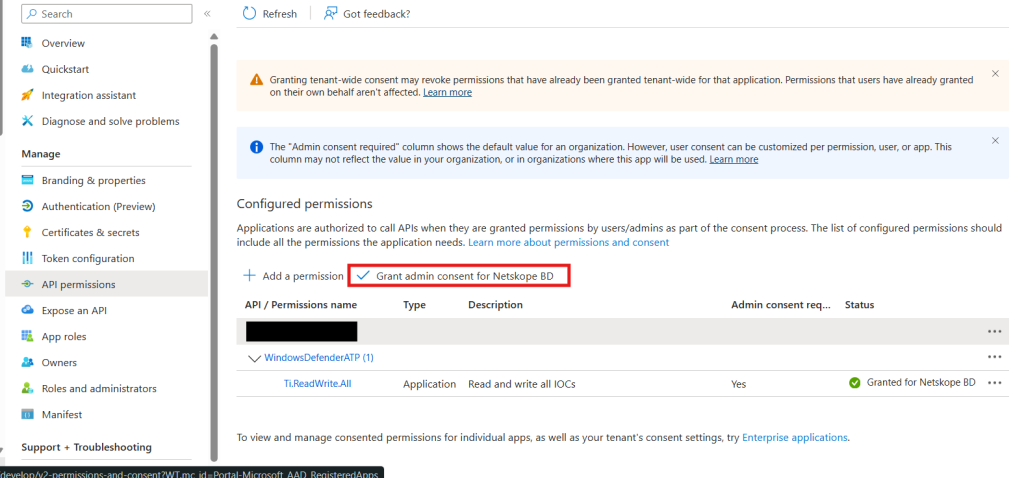
Cliquez sur Yes.


Configurer le plugin Microsoft Defender for Endpoint
-
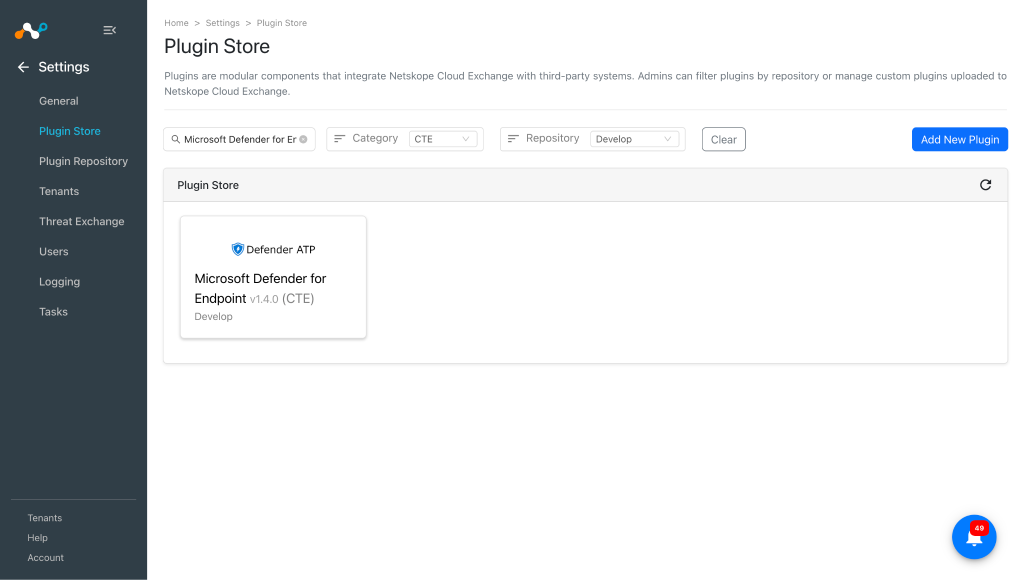
Dans Cloud Exchange, accédez à Settings > Plugin Store.
-
Recherchez et sélectionnez le plugin Microsoft Defender for Endpoint v1.4.0 (CTE).
-
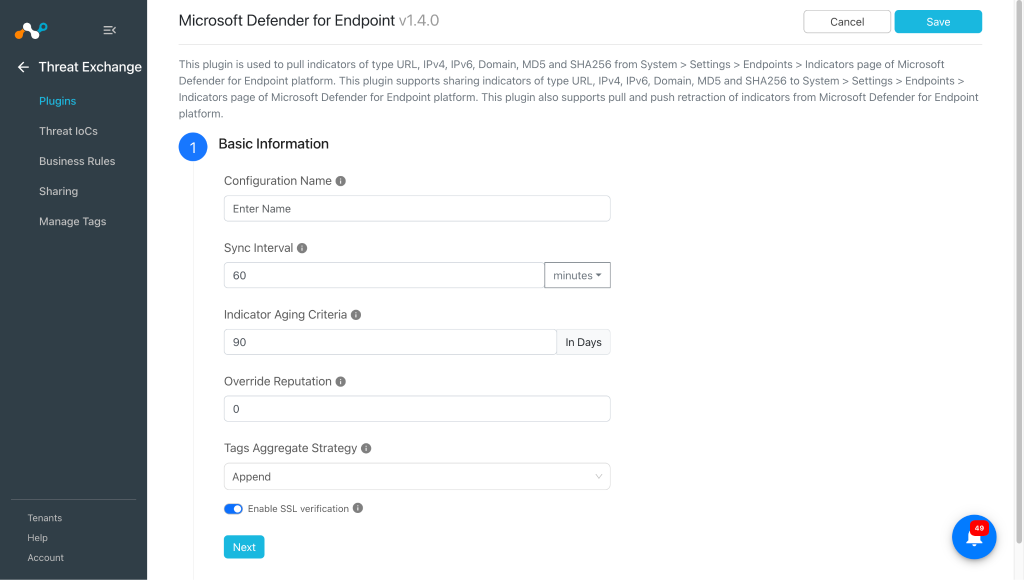
Saisissez les informations de base :
- Configuration Name: Nom unique pour la configuration.
- Sync Interval: Leave the default.
- Aging Criteria: Durée d'expiration du plugin en jours. (Valeur par défaut : 90)
- Override Reputation: Set a value to override the reputation of indicators received from this configuration.
- Tags Aggregate Strategy: Choisissez d'ajouter les balises New aux IoC existants ou de les écraser. Ces paramètres de configuration déterminent la manière dont les étiquettes sont stockées pour les indicateurs tirés dans le cadre de cette configuration.
- Enable SSL Validation: Enable SSL Certificate validation.
-
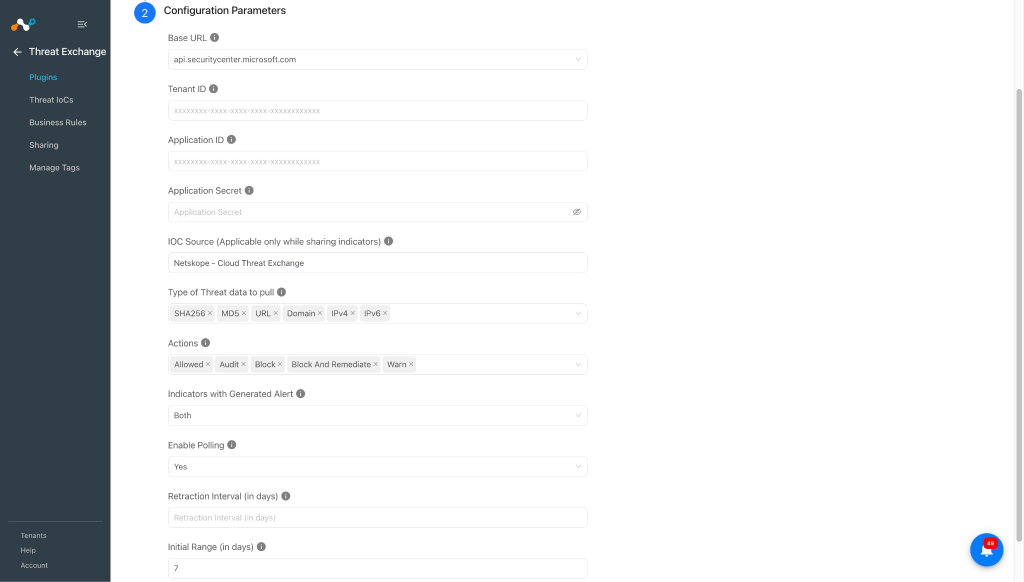
Cliquez sur Next et entrez les paramètres de configuration :
- Base URL: Base URL of the Microsoft Defender for Endpoint platform.
- Tenant ID: Directory (Tenant) ID of the Microsoft Entra ID application.
- Application ID: Application (Client) ID of the Microsoft Entra ID application.
- Application Secret: Client Secret of the Microsoft Entra ID application.
- IOC Source (Applicable only while sharing IoCs): The source where this indicator originated. This can be used for tracking where this indicator was defined. Limit 200 characters.
- Type of Threat data to pull: Type of Threat data to pull. If no threat type is selected, all threat type indicators will be pulled.
- Actions: Select the action(s) to filter the pulled indicators. If no action is selected, all indicators will be pulled regardless of their action.
- Indicators with Generated Alert: Select whether to pull indicators based on their Generate Alert flag. Both pulls all indicators regardless of this flag.
- Enable Polling: Enable/Disable polling data from Microsoft Defender for Endpoint. Disable if you only need to push indicators to Microsoft Defender for Endpoint.
- Retraction Interval (in days): Spécifiez le nombre de jours pendant lesquels la rétractation IoC doit être effectuée pour les indicateurs Microsoft Defender for Endpoint. Ce paramètre ne s’applique que si la rétractation IoC(s ) est activée dans les paramètres d’échange de menaces. La valeur doit être comprise entre 1 et 365.
- Initial Range (in days): Nombre de jours pour extraire les données pour l'exécution initiale.
-
Cliquez sur Save.
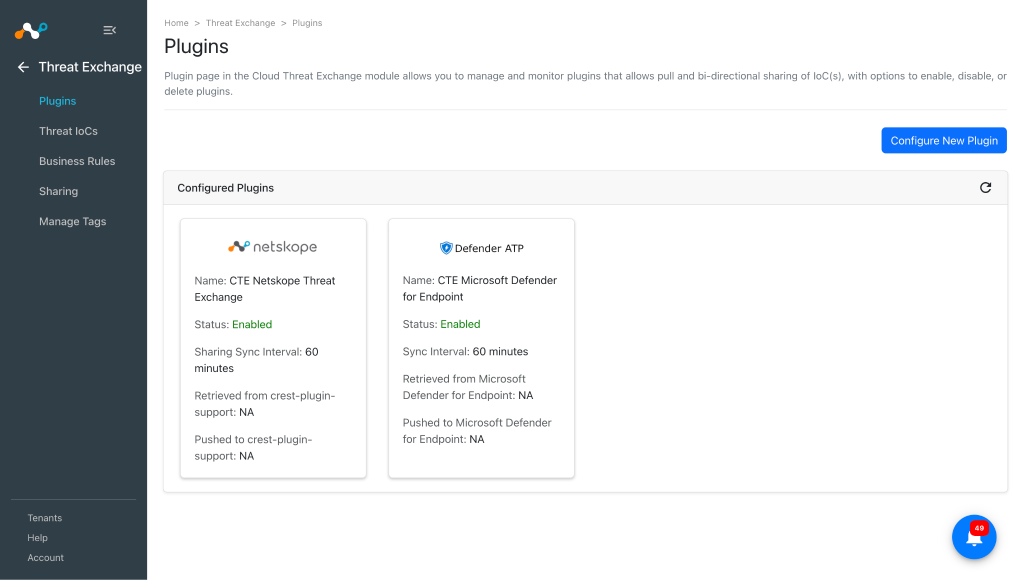


Configure a Threat Exchange Business Rule for Microsoft Defender for Endpoint
Pour partager les indicateurs extraits de Microsoft Defender for Endpoint avec Netskope, et vice-versa, vous devez disposer d'une règle de gestion qui filtrera les indicateurs que vous souhaitez partager. Pour configurer une règle de gestion :
-
Dans Threat Exchange, allez à Business Rules et cliquez sur Create New Rule.
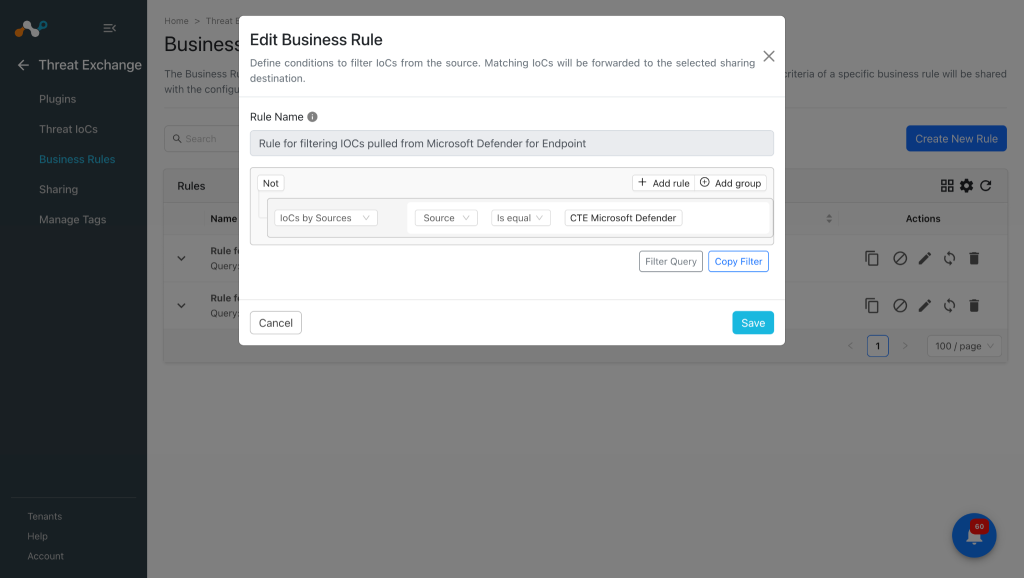
-
Ajoutez le filtre selon vos exigences dans la règle, puis cliquez sur Save.
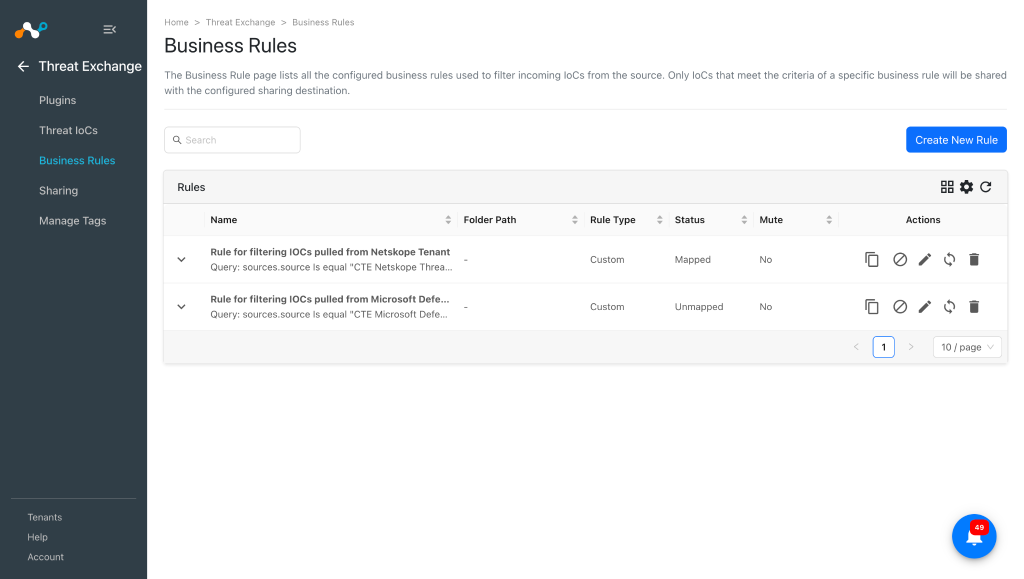 FQDN present in Cloud Exchange will be shared as URL/Domain in Microsoft Defender.


Configurer le partage pour Netskope et Microsoft Defender for Endpoint
Pour partager des IoC de Netskope Cloud Exchange vers la plateforme Microsoft Defender for Endpoint, et vice versa, suivez les étapes suivantes :
-
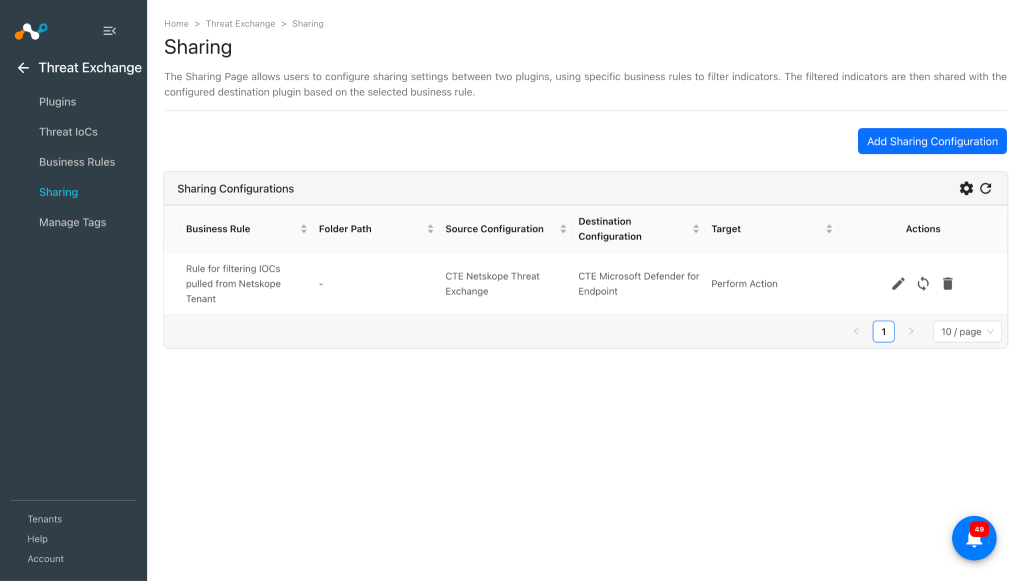
Dans Threat Exchange, allez à Sharing et cliquez sur Add Sharing Configuration.
-
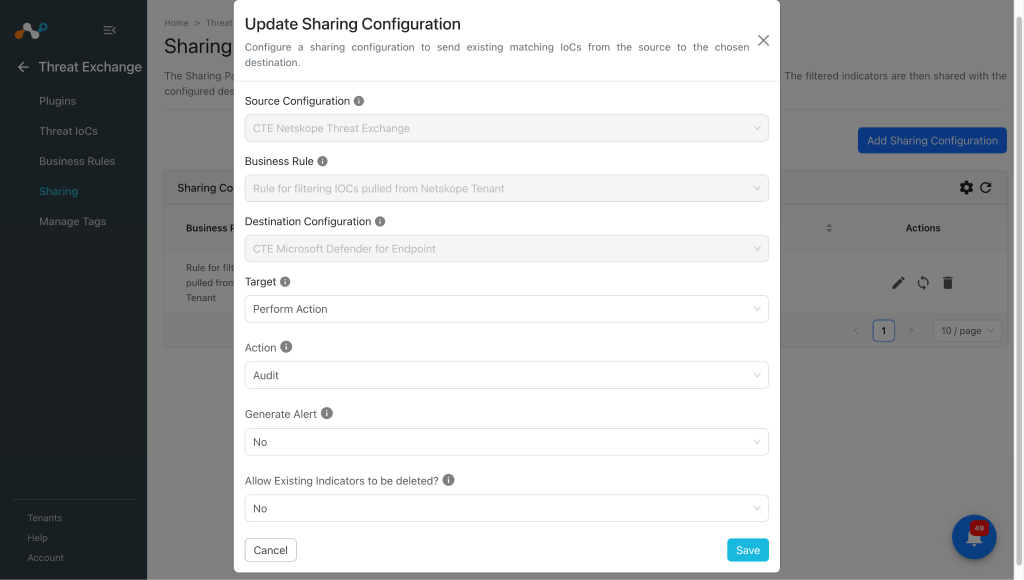
Select la configuration de la source (Netskope CTE), la règle de gestion, la configuration de la destination (Microsoft Defender for Endpoint) et la (les) cible(s). Entrez ces valeurs :
- Action: The action that is taken if the indicator is discovered in the organization.
- Generate Alert: Generate alerts for the indicators. Note that for the action type Audit, the Generate Alert will be Yes by default, so even if you keep it as No with the action type Audit you will see the shared IoCs on Defender will have Generate alert as Yes.
- Allow Existing Indicators to be deleted?: Whether or not to delete the existing indicator(s) from the Microsoft Defender for Endpoint platform to insert new indicator(s). If Yes is selected, the oldest indicator will be deleted when max capacity of 15000 active indicators per tenant is exceeded.
-
Cliquez sur Save.
-
Follow these steps again, but vice-versa for sharing Microsoft Defender for Endpoint IoCs to Netskope. Select your Source Configuration as Microsoft Defender for Endpoint, a Business Rule, Destination Configuration (CTE Netskope Threat Exchange), and Target.
-
Lorsque vous avez terminé, cliquez sur Save.


Valider le plugin Microsoft Defender for Endpoint
Valider le retrait
Les données extraites seront répertoriées dans Threat Exchange à l'adresse Threat IoCs. Vous pouvez filtrer les IoCs extraits de la plateforme en utilisant le filtre : sources.source,contains <plugin name>.


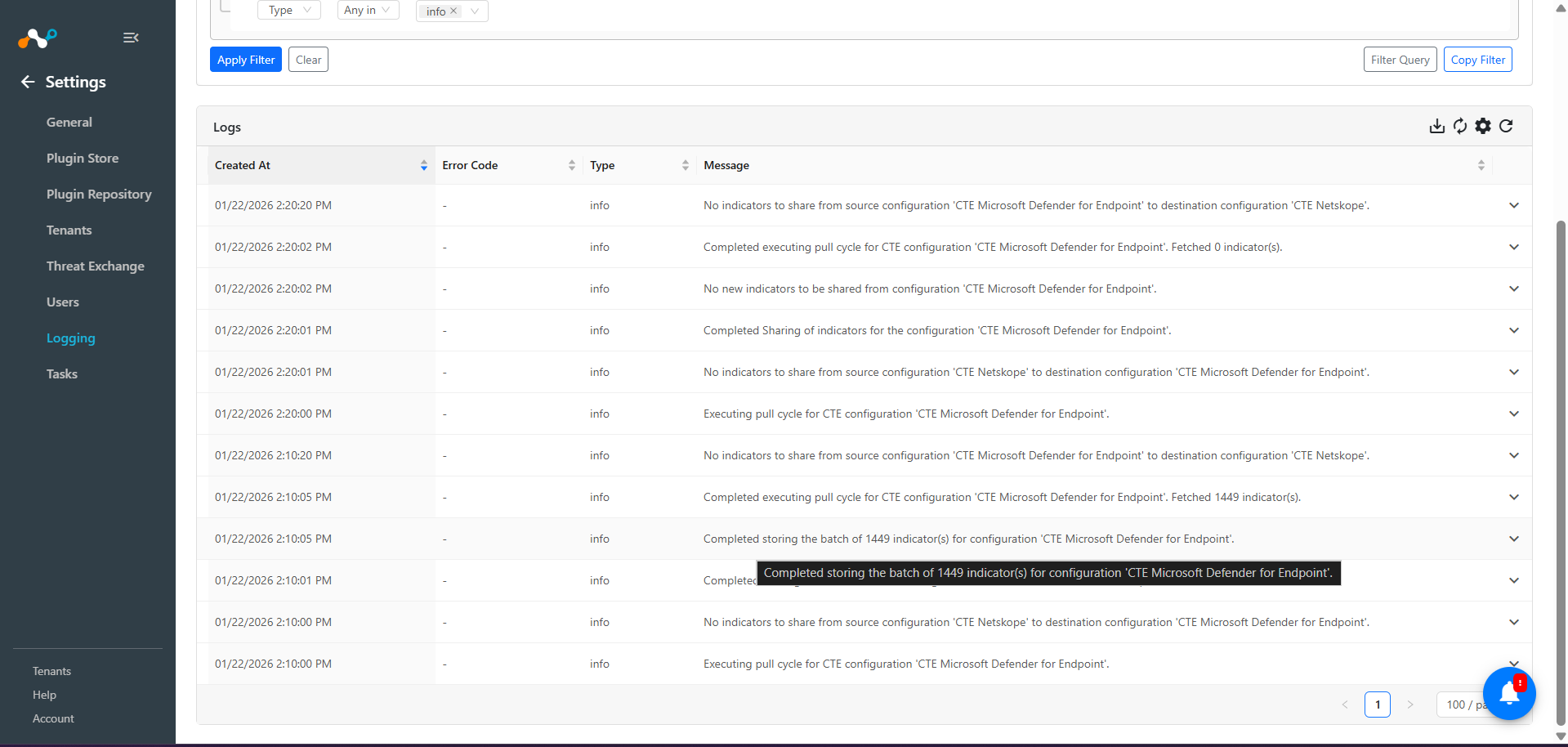
Pour vérifier les journaux tirés dans Cloud Exchange, allez sur Logging et recherchez les journaux pour le plugin Microsoft Defender for Endpoint.
To verify the data available for pulling on Microsoft Defender for Endpoint, log in to Microsoft Defender and go to Settings > Endpoints > Indicators. You can verify URL indicators from IP Addresses and URLs/Domains page, and MD5 and SHA256 from the File Hashes page.


Valider le push
Shared IoCs to Microsoft Defender for Endpoint can be verified at Logging in Cloud Exchange.

Note
- Pour le partage d’IoC, Microsoft Defender a une limite de débit de 100 IoC par minute. Consultez la documentation.
- If the IoCs are not shared within expected time and you do not see any logs in CE related to sharing after the initial log for sharing start then it may be due to the rate limit of Microsoft Defender. You can manually check via the Microsoft Defender’s API, whether the rate limit is exhausted or not for sharing IOCs.
Pour vérifier les indicateurs partagés sur Microsoft Defender. Connectez-vous à Microsoft Defender et allez sur Settings > Endpoints > Indicators.
Vous pouvez filtrer les indicateurs partagés en appliquant un filtre du type "Created by : <app_name>".


Validez la rétractation
Pour vérifier les IoC rétractés de Microsoft Defender, consultez les journaux pour l'exemple de rétractation d'IoC : message Like “CTE Microsoft Defender for Endpoint” && message Like “retraction”.

Pour vérifier les IoCs rétractés dans Cloud Exchange, allez sur Threat IoCs et cherchez "sources.source Like "CTE CrowdStrike" && sources.retracted Is equal true".

Here’s the Destination Profile on the Netskope tenant before push retraction for CTE Netskope Threat Exchange executes:

You can verify the deletion of IoC from Netskope tenant from the Retraction result filed under particular IoC. In the below image you can see the Retraction result is marked as CTE Netskope Threat Exchange: retracted that means it was deleted from the Netskope tenant.

Here’s the URL List on the Netskope tenant after push retraction for CTE Netskope Threat Exchange executes:

This plugin also supports push retraction, which means IoCs pulled from 3rd-party platforms that were shared to Microsoft Defender platforms, and were marked as retracted in Cloud Exchange, will also get deleted from the Microsoft Defender platform. You can verify the same through the Retraction result field.
This is an MD file present on Defender:


Here the retraction result is CTE Microsoft Defender for Endpoint: retracted this means that particular IoC was deleted from Microsoft Defender platform as it was marked as retracted yes in Cloud Exchange.
MD5 was deleted from the Defender platform:

Dépannage du plugin Microsoft Defender for Endpoint
Impossible de configurer le plugin
This may be due to one of these reasons:
- Invalid configuration parameters.
- Insufficient permissions.
- License Error: During configuration of plugin if you receive error message “Plugin: Microsoft Defender for Endpoint, Validation error occurred. Received status code: 403, Unauthorized request – No active license found”, it may indicate that you have selected an incorrect Base URL for the credentials used.
What to do:
- Vérifiez que tous les identifiants locataires, identifiants d’application et secrets d’application sont corrects et disposent des autorisations appropriées. Suivez la section Configuration sur Microsoft Defender .
- Verify proper permissions are provided.
Unable to share IOCs to Microsoft Defender for Endpoint.
This may be due to the max capacity of 15000 active indicators per tenant on Microsoft Defender for Endpoint.
What to do:
Check the total number of IoCs on your Microsoft Defender for Endpoint. If it is 15k then you can edit the sharing configuration with Allow Existing Indicators to be deleted? fieldas Yes. If Yes is selected, the oldest indicator will be deleted when max capacity of 15000 active indicators per tenant is exceeded.
Error while upgrading the plugin
While updating the plugin from version v1.3.0 to version v1.3.1 user will get an validation error while saving the plugin as follows:

What to do:
In this case the follow the steps to successfully enable the plugin:
- Select the skip option.
- Go to the configured Threat exchange plugin, click on the edit icon for the Microsoft Defender for Endpoint plugin, and remove the actions Alert and Alert And Block if selected previously.
- Select the value for Indicators with Generated Alert field as per your requirement whether you want to pull all the indicators or the one with generated alerts yes or no.
- Enregistrez le plugin.
- Cliquez sur l’icône d’activer et sélectionnez Enable.
