

Notes de mise à jour
2.0.0
Added
- Added support for IoC(s) Retraction.
- Added resolution for error logs starting from CE v6.0.0.
- Added support to bifurcate the URL by types (Domain, FQDN and URL).
- Added handling of API rate limit.
Changed
- Improved error handling.
1.0.0
Added
- Initial Release
This document explains how to configure the Proofpoint v2.0.0 plugin in the Cloud Exchange platform. This plugin is used to pull IoCs of type URL, SHA256, Domain, and FQDN from the Proofpoint TAP (Targeted Attack Protection) Dashboard under Threats. The plugin supports pull retraction of indicators from Proofpoint. This plugin does not support sharing of indicators to Proofpoint platform.
Conditions préalables
Pour compléter cette configuration, vous avez besoin de :
- Un locataire Netskope (ou plusieurs, par exemple des instances de production et de développement/test).
- Un profil de fichier sur votre locataire Netskope.
- A URL List on your Netskope tenant.
- A Destination Profile on your Netskope tenant.
- A DNS Profile on your Netskope Tenant
- Un locataire Netskope Cloud Exchange avec le plugin Tenant et le plugin Threat Exchange déjà configurés.
- Connectivity to the Proofpoint platform.
- Connectivity to the following host: https://tap-api-v2.proofpoint.com.
Support du plugin Proofpoint
This plugin is used to pull IOCs of type URL, SHA256, Domain, and FQDN from the Proofpoint TAP (Targeted Attack Protection) Dashboard under Threats. The plugin supports pull retraction of indicators from Proofpoint. This plugin does not support sharing of indicators to Proofpoint platform.
| Types d'indicateurs prédéfinis | Types d'indicateurs partagés |
|---|---|
| URL, SHA256, Domain, FQDN | Non pris en charge |
IOC Retraction
IoC Retraction (Pull): Indicators will be fetched from Proofpoint and in the subsequent pull cycles. If some indicators are deleted from Proofpoint, they will be marked as Retracted in Cloud Exchange.
IoC Retraction (Push): Retracted indicators present on Cloud Exchange will be deleted from Proofpoint during sharing.
| Type | Description |
|---|---|
| Retrait de l'IoC (Pull) | Oui |
| Retrait de l'IoC (Push) | Non |
Mises en correspondance
Mappages de traction
| Netskope CTE Field | Proofpoint API field | Type |
|---|---|---|
| threatStatus | threatStatus | String |
| interval | interval | Datetime |
| sinceSeconds | sinceSeconds | Integer |
| eventTypes | eventTypes | String |
Détails de l'API
Liste des API utilisées
| Point final de l'API | Méthode | Use case |
|---|---|---|
| /v2/siem/all | OBTENIR | Validate Credentials and Pull indicators |
Validate Credentials or Pull Indicators
API Endpoint: https://tap-api-v2.proofpoint.com/v2/siem/all
Method: OBTENIR
Request Parameters:
| Paramètres | Value |
|---|---|
| format | “JSON” (default) |
| interval | “2024-01-01T00:00:00Z/2024-01-01T01:00:00Z” |
| sinceSeconds | 3600 |
| threatStatus | “active” |
| User-Agent | netskope-ce-5.1.2-cte-proofpoint-v2.0.0 |
Sample API Response:
{
  "clicksPermitted": [
    {
      "url": "https://example.com/malicious",
      "threatTime": "2024-01-01T12:00:00Z",
      "threatURL": "https://threatinfo.proofpoint.com/...",
      "classification": "malware"
    }
  ],
  "clicksBlocked": [
    {
      "url": "https://blocked-site.com",
      "threatTime": "2024-01-01T12:30:00Z",
      "threatURL": "https://threatinfo.proofpoint.com/...",
      "classification": "phish"
    }
  ],
  "messagesDelivered": [
    {
      "threatsInfoMap": [
        {
          "threat": "abc123def456...",
          "threatType": "attachment",
          "threatTime": "2024-01-01T13:00:00Z",
          "threatUrl": "https://threatinfo.proofpoint.com/...",
          "classification": "malware"
        },
        {
          "threat": "https://malicious-url.com",
          "threatType": "url",
          "threatTime": "2024-01-01T13:15:00Z",
          "threatUrl": "https://threatinfo.proofpoint.com/...",
          "classification": "phish"
        }
      ]
    }
  ],
  "messagesBlocked": [
    {
      "threatsInfoMap": [
        {
          "threat": "def789ghi012...",
          "threatType": "attachment",
          "threatTime": "2024-01-01T14:00:00Z",
          "threatUrl": "https://threatinfo.proofpoint.com/...",
          "classification": "spam"
        }
      ]
    }
  ]
}
Matrice de performance
This reading is conducted on a Large CE Stack with below-mentioned specs by pulling 100k IOCs from each page and pushing 100k IOCs to Proofpoint.
| Description | Spécifications |
|---|---|
| Taille de la pile | Grandes dimensions RAM : 32 GB Cœur : 16 |
| Indicators fetched from Proofpoint | ~34.5k per min |
Agent utilisateur
netskope-ce-6.1.0-cte-proofpoint-v2.0.0
Workflow
- Get your credentials from Proofpoint.
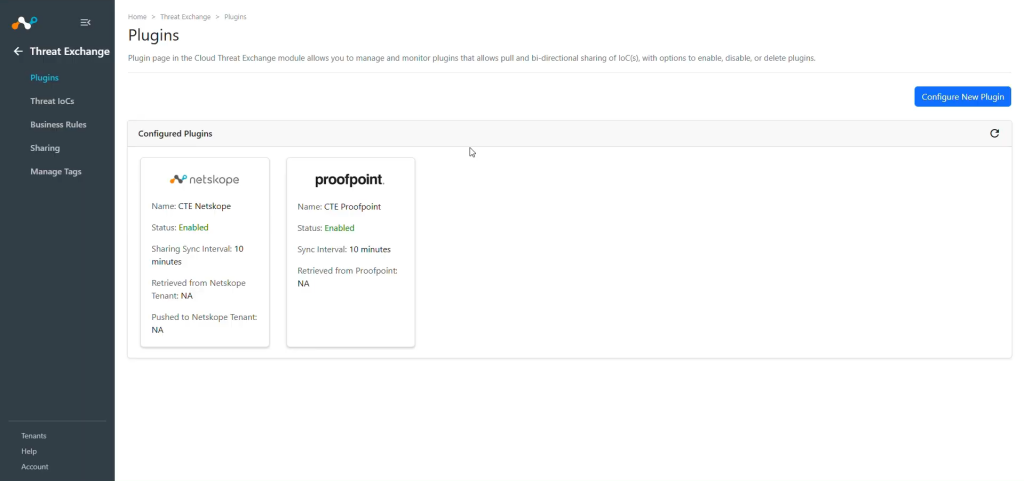
- Configurez le plugin Proofpoint.
- Configure a Business Rule for Proofpoint Plugin.
- Configurez le partage pour le plugin Proofpoint.
- Validez le plugin Proofpoint.
Regardez une vidéo
Cliquer sur « play » pour regarder une vidéo.
Get your Credentials from Proofpoint
-
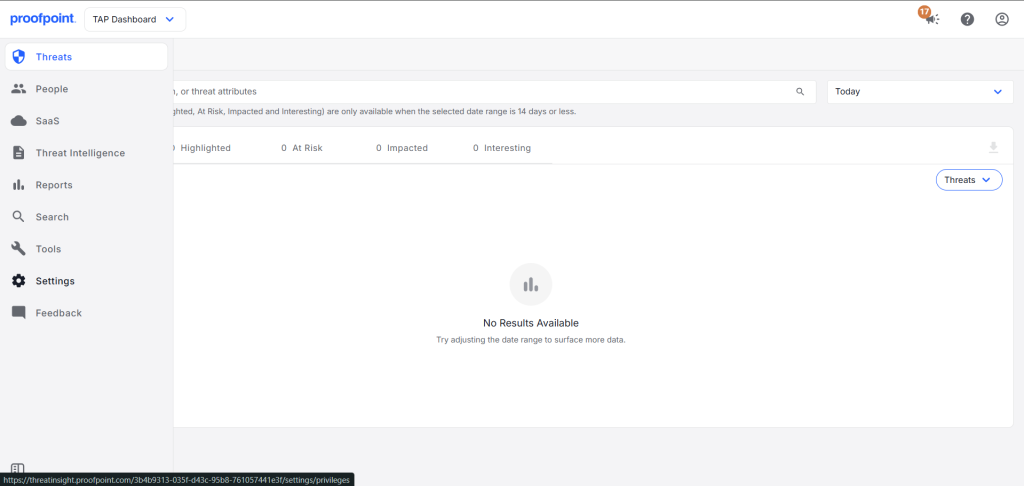
Connectez-vous au tableau de bord TAP de Proofpoint et allez sur Settings.
-
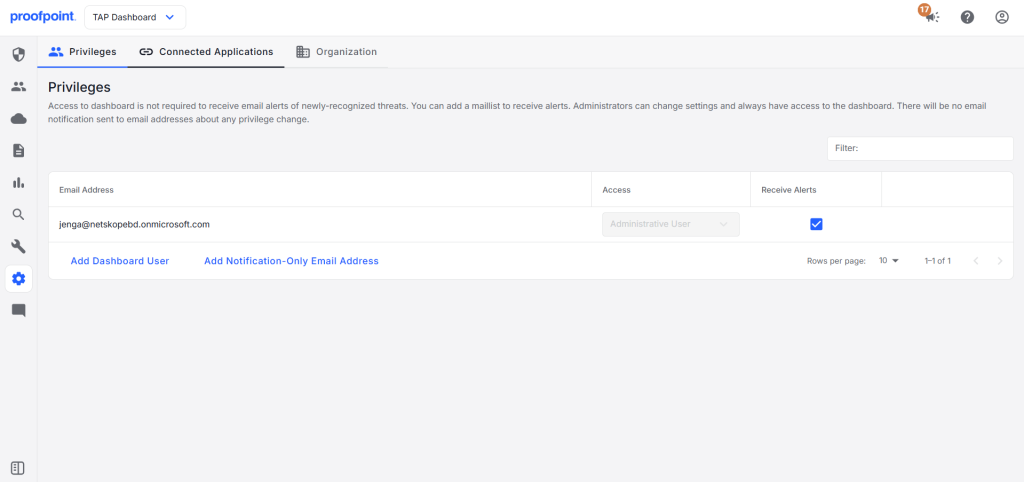
Dans les paramètres, allez à Connected Applications.
-
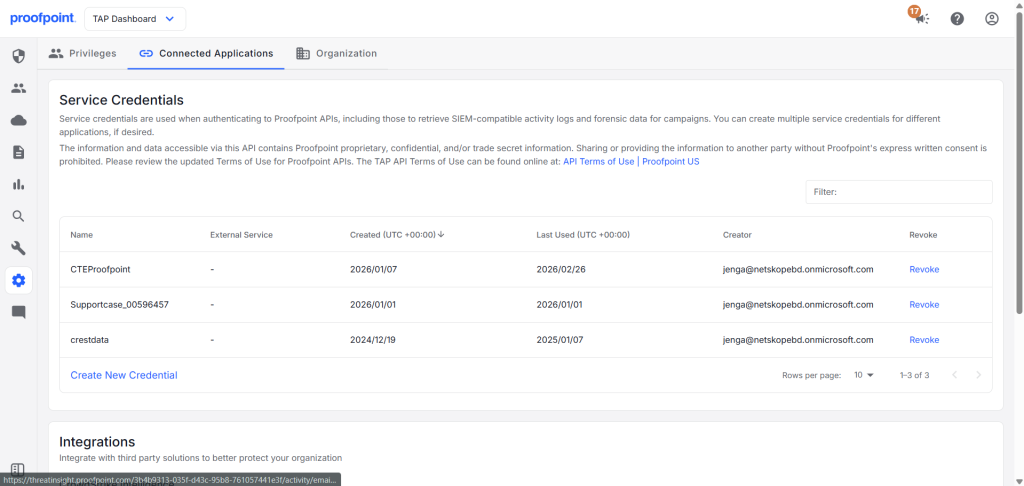
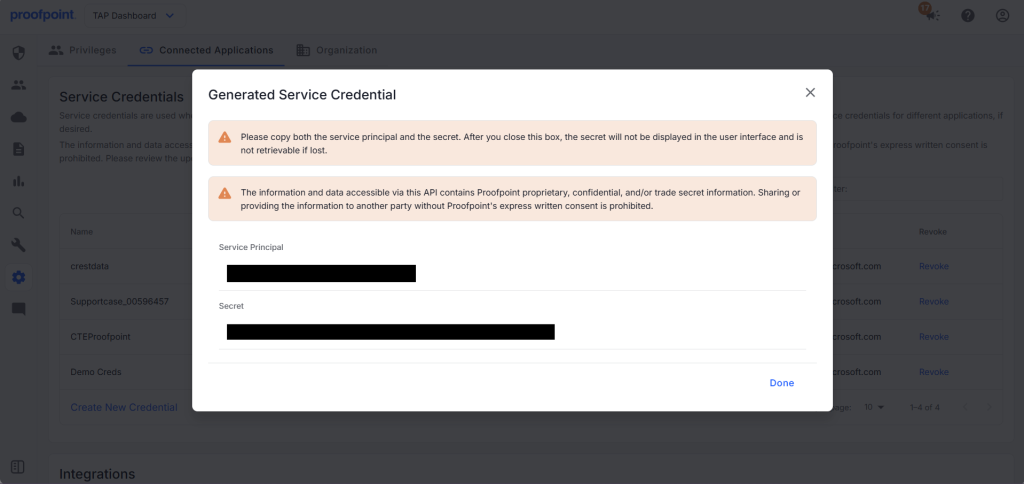
Cliquez sur Create New Credential.
-
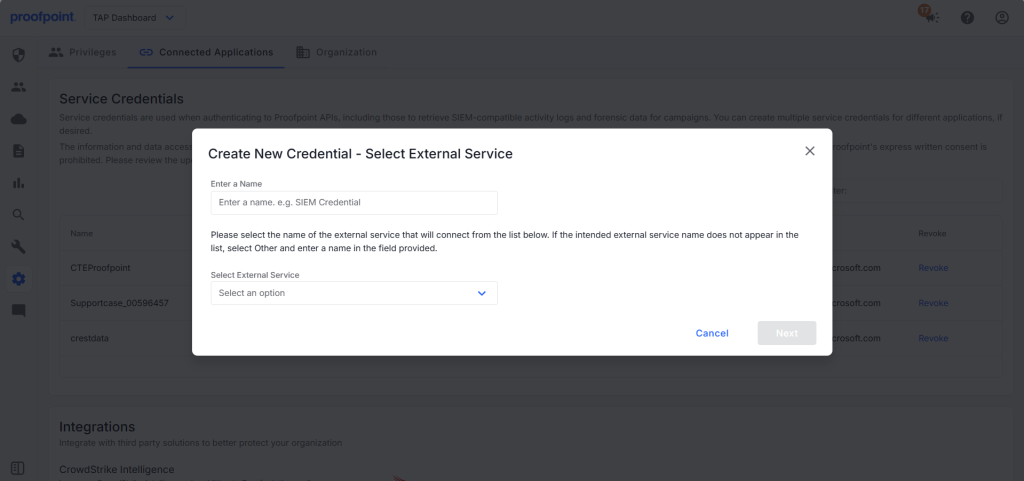
Enter a Name and select an External Service for the credential.
-
Copiez le principal de service et le secret générés car ils seront utilisés pour configurer le plugin dans Cloud Exchange. Une fois terminé, cliquez sur Done.


Configurer le plugin Proofpoint
-
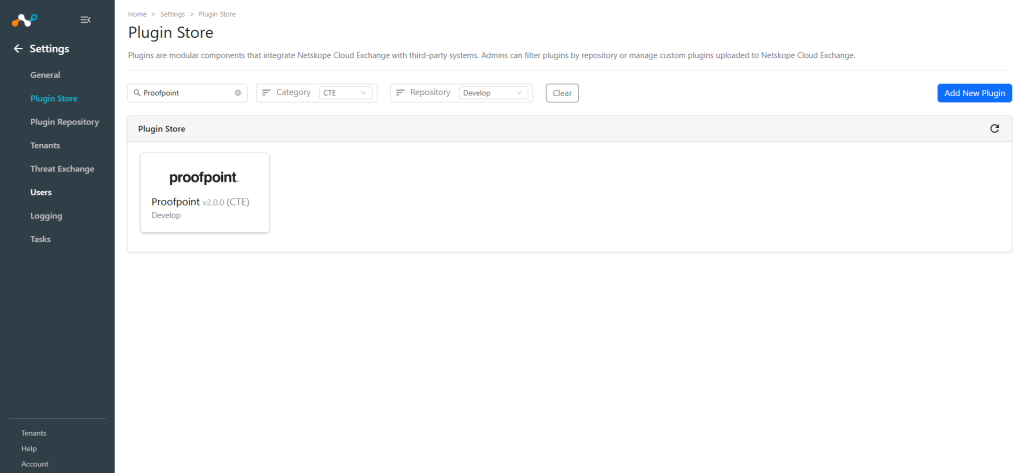
Dans Cloud Exchange, accédez à Settings > Plugin Store.
-
Recherchez et sélectionnez le plugin Proofpoint v2.0.0 (CTE).
-
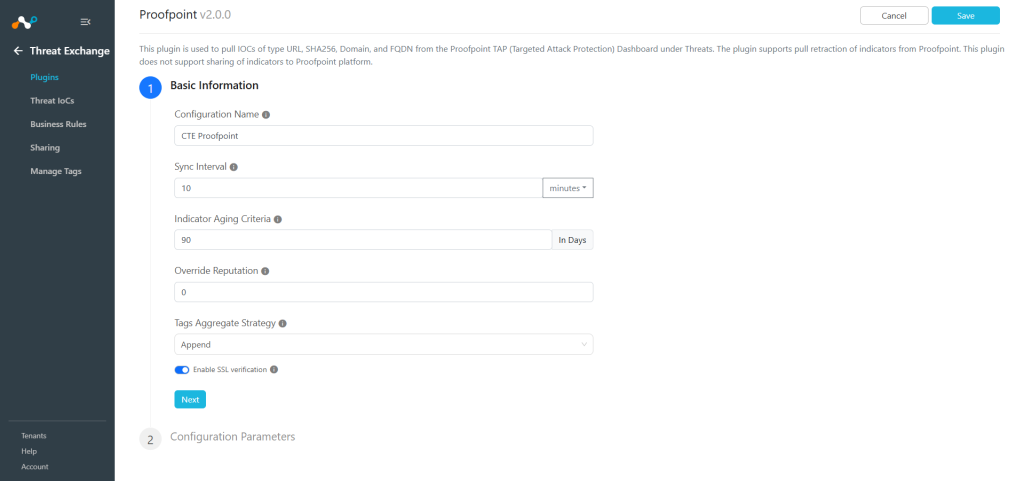
Saisissez les informations de base :
- Configuration Name: Nom unique pour la configuration.
- Sync Interval: Intervalle pour récupérer les données de ce plugin et partager des données vers ce plugin depuis d’autres sources.
Notez qu’il est préférable d’avoir une valeur plus élevée pour l’intervalle de synchronisation si vous voulez obtenir des IoC en grand nombre. - Aging Criteria: Expiry time of the plugin in days (Default: 90)
- Override Reputation: Définissez une valeur pour remplacer la réputation des indicateurs reçus de cette configuration.
- Enable SSL Validation: Activer la validation du certificat SSL.
-
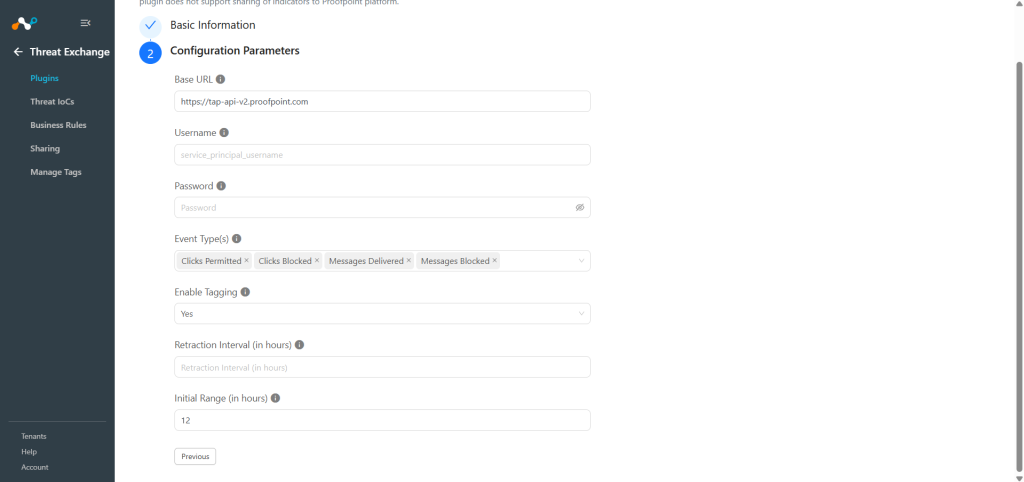
Cliquez sur Next et entrez les paramètres de configuration :
- Base URL: Proofpoint TAP API Base URL, like https://tap-api-v2.proofpoint.com.
- Username: Proofpoint Service Principal.
- Password: Proofpoint Secret.
- Event Types: Select event types to pull threat indicators (URL, SHA256, Domain, and FQDN) from Proofpoint. If no event types are selected, all event types will be included by default.
- Enable Tagging: Activer/désactiver la fonctionnalité de marquage.
- Retraction Interval: Nombre d’heures à utiliser comme intervalle de rétraction pour la rétraction IoC(s) Proofpoint. Les valeurs valides sont dans la plage de 1 à 168 heures. Ce paramètre ne sera pris en compte que si la rétractation de l’IoC est activée dans les paramètres de l’échange de menaces.
- Initial Range: Number of hours Threat IoCs to pull in the initial run. Valid values are in range from 1 to 168 hours.
-
Cliquez sur Save.


Configure a Threat Exchange Business Rule for Proofpoint
Pour partager les indicateurs extraits de Proofpoint vers Cloud Exchange, vous devez disposer d'une règle de gestion qui filtrera les indicateurs que vous souhaitez partager.
-
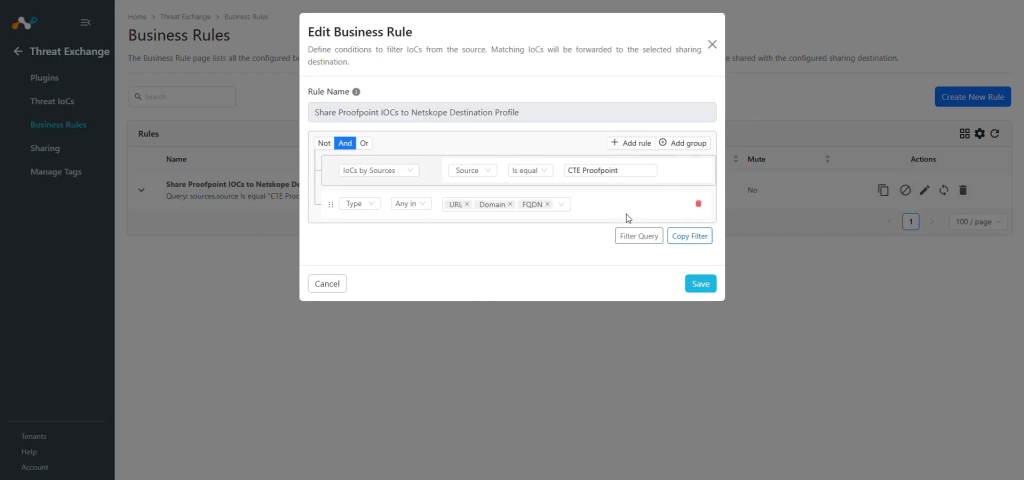
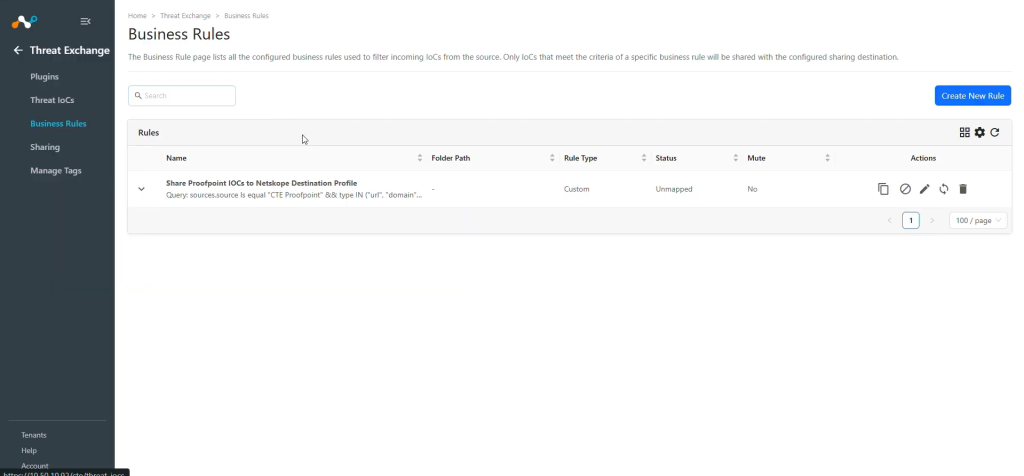
Dans Threat Exchange, allez à Business Rules et cliquez sur Create New Rule.
-
Ajoutez le filtre selon vos besoins dans la règle.
-
Cliquez sur Save.


Configurer le partage de Threat Exchange pour le plugin Proofpoint
Pour partager les IoCs de Proofpoint vers Netskope Cloud Exchange :
- Dans Threat Exchange, allez à Sharing et cliquez sur Add Sharing Configuration.
- Select your Source Configuration (CTE Proofpoint), Business Rule, Destination Configuration (CTE Netskope), and Target.
- Cliquez sur Save.

Note
- The Proofpoint plugin does not support sharing of IoCs, but the IoCs pulled from this plugin can be shared to other 3rd-party platforms.
- Pour plus de détails sur la configuration du partage pour Threat Exchange, consultez le guide du plugin Netskope Threat Exchange.
Valider le plugin Proofpoint
Valider le retrait
To verify pulled logs in Cloud Exchange, go to Logging and search logs from the CTE Proofpoint plugin. You can filter the logs using the filter: message Like “[<plugin configuration name>]”.

Les données extraites seront répertoriées sur la page IoCs de la menace. Vous pouvez filtrer les IoCs extraits de la plateforme en utilisant le filtre : sources.source Like "<plugin configuration name>".

Validez la rétractation de la traction
To verify the Retracted IoCs, check the logs for IoC Retraction example: message Like CTE Proofpoint [CTE Proofpoint] [Retraction].

You can filter the retracted IoCs from the platform using the filter: sources.source Is equal “<plugin configuration name>” && sources.retracted Is equal true.


Note
- The IoCs that fall outside the Retraction Interval will be marked as Retracted: Yes in Cloud Exchange.
- Also, the plugin only pulls Active indicators, so the indicators that were first pulled with Active status, and then updated to False Positive or Cleared will be marked as retracted.
- Le résultat du partage ne sera marqué que si les IoC sont extraits du plugin source après la création de la configuration de partage.
Valider le push
Here you can see IoCs were added to the Destination Profile on Netskope Tenant.


Then some of the shared IoCs got marked as retracted so it was deleted from the list.

Dépannage du plugin Proofpoint
Unable to pull IoCs from the Proofpoint platform
Après la configuration du plugin, si les IoC ne sont pas extraits de la plateforme, cela peut être dû à l'une des raisons suivantes :
- Aucun IoC n'est disponible sur la plateforme pour tirer
- Les IoC ne sont pas disponibles pour les paramètres de configuration donnés (comme Initial Range).
What to do: Identity your root cause from above and follow one of these steps to resolve the issue.
No IoCs are available on the platform to pull:
Vérifier si les IoC sont disponibles sur la plateforme à tirer. Si elle est disponible, vérifiez la résolution pour le point suivant.
IoCs are not available for the given time range
If the IoCs are available on the platform to pull, but the plugin has not pulled the IoCs in CE, check the number of days mentioned in the initial range parameter of the plugin configuration. On the Proofpoint platform, check if you have data for the given time range.