

This article explains how to enable synthetic application monitoring across your users while keeping your applications healthy, and is written for Netskope administrators and application owners planning to use DEM application probes. No deep networking background is required. This guide focuses on what to decide, and in what order.
What Application Probes Do
Netskope Digital Experience Management (DEM) shows you how well your important applications are working for real users. One of its handiest features is the application probe: a small, automatic test that the Netskope Client on each device sends to the web addresses you pick. It checks that the app is reachable and measures how fast it responds.
You choose up to three web addresses per application and how often each device tests them, from every 5 minutes to once an hour. You can turn probes on for everyone, or just for certain groups or organizational units (OUs). It’s a simple way to catch problems before your users report them.
Why Some Planning Matters
Each probe is tiny. But probes run from every device you turn them on for. Ten thousand laptops each sending a small test every few minutes adds up to a steady stream hitting the app you’re watching. Aim that at an app that isn’t built for it, and you can overload it by accident. Fortunately, probes spread out on their own.
Each device starts its own probe timer when the Netskope Client starts up. They don’t all test at the same clock time. Because devices start at different moments, their probes naturally spread out, which keeps the load gentle. The main thing to watch for is events that start many devices at once, like a company-wide reboot or a big client update; those can briefly line the probes up.
The image below shows the same 10,000 users at the same 5-minute setting. Normally the tests are spread out and the load is barely noticeable (the low line). If a lot of devices start together, the same setting can produce big, repeating spikes.
Note: Charts are illustrative planning aids based on a conservative load model; your applications’ real capacity should be confirmed with their owners. Prepared with your Netskope team.
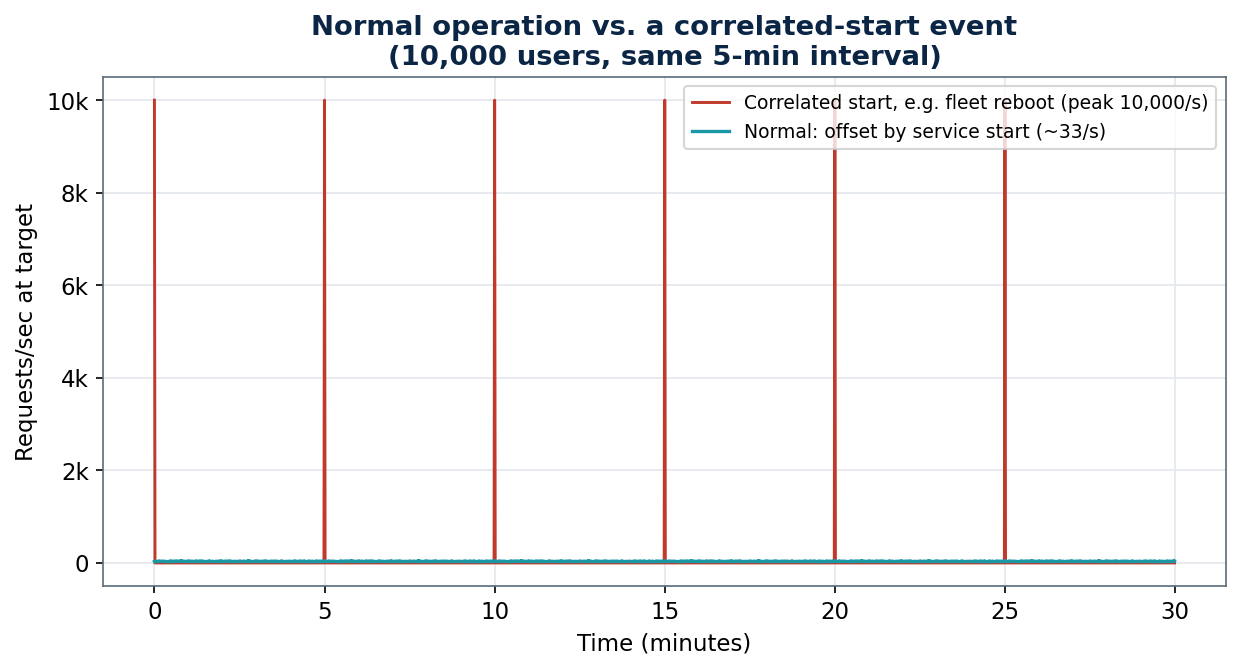
Normally, probes are spread out and gentle (low line). If many devices start at the same time, they line up into spikes, even with identical settings.
A Simple Rule: More Devices or Shorter Intervals Equals More Load
Two things drive how much traffic reaches your app: how many devices are probing, and how often. Longer intervals and smaller groups keep you well within what an app can handle. The chart below shows roughly how many users one app can support at each interval, for a smaller and a sturdier target.
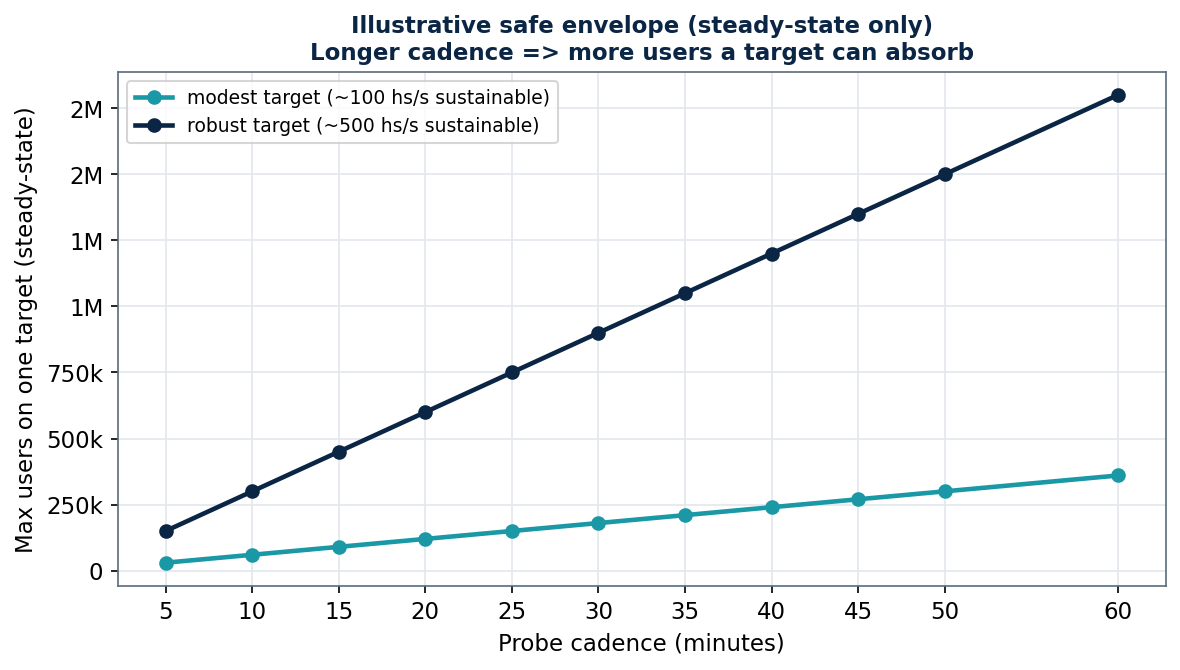
This is a rough guide only. Longer intervals let far more users safely share one target. Your app’s real capacity may differ; check with its owner.
Shared Responsibility
Netskope sends the probes; you choose the targets, the audience, and how often. The safest rollouts are planned together with the owners of the apps you want to watch.
Five Steps to a Safe Rollout
1. Start small. Turn probes on for one group or OU first, a few dozen to a few hundred users, before going wider.
2. Pick a comfortable interval. Start at 15–30 minutes instead of the 5-minute default. You can shorten it later.
3. Choose targets that can take the traffic. Big SaaS services handle it easily. Smaller internal apps, admin pages, or single-server sites need more care — check with their owners first.
4. Grow in stages. Move from your pilot to bigger groups step by step, checking that the app and your network stay healthy.
5. Keep an easy way to dial back. Because probes are set by group/OU, you can pause or reduce them in one step if anything looks stressed.
A Quick Planning Guide
Use this as a starting point when deciding where to begin. It’s deliberately conservative — the goal is a smooth rollout, not the maximum number of probes.
| Situation | Suggested Starting Point |
|---|---|
| Large, well-known SaaS app (major productivity or CRM suite) | Any interval is fine; still roll out by group in stages. |
| Medium internal web app behind a load balancer | Start at 15–30 min; pilot one OU, then expand. |
| Small or single-server internal app / admin console | Start at 30–60 min; keep the audience small; confirm with the app owner. |
| Not sure how much the target can handle | Treat it as small: 30–60 min, pilot group only, ask the owner. |
What to Watch For
- Big start-up events. A company-wide reboot, a patch day, or a large client update can start many devices at once and line up their probes. Spread these out across groups when you can.
- Three addresses, one destination. If your three domains actually lead to the same service, that service gets three times the traffic. Check with your app owner if you’re unsure.
- Smaller targets feel it first. Internal tools and appliances usually handle less than big cloud services — give them longer intervals and smaller groups.
- Your own network. Firewalls, proxies, and internet links also carry the probe traffic. Size very large rollouts with your network team.
Getting Help
Your Netskope sales engineer or technical account team can help you size probes for your own apps and users, and can review your rollout plan before you go wider. When in doubt, start smaller and grow — probes are easy to scale up once you’ve confirmed everything stays healthy.