

Here are the latest features, issues fixed, and other updates published between the golden releases 123.0.0 and 126.0.0. This is a consolidated list of items published in the release notes for versions between 123.0.0 and 126.0.0.
Use Release Notes widget for release notes related to a specific version.
Here is the list of the new features and enhancements.
123.0.0
General Availability Of Block IPv6 Traffic
This was available as a Controlled GA feature in 122.0.0. With version 123.0.0, this is available for all tenants.
You can block IPv6 non-web traffic in your devices to avoid any undesired IPv6 access. When Netskope Client is enabled in a dual stack computer, applications fall back to IPv4 and the traffic is tunnelled to Cloud Firewall.
Supported OS: Windows and macOS
To learn more: IPv6 Traffic Steering.
General Availability Of Master Password Support For Netskope Client Disablement
This was available as a Beta feature and with version 123.0.0, this is available for all tenants.
- Supported OS: Windows and macOS
- Supported minimum Client version: 118.0.0
This is an option for administrators that enables them to set a Master Password while configuring “Allow disabling of all Client Services together” under Settings > Security Cloud Platform > Client Configuration > Tamperproof on the webUI. This is optional and if enabled by the administrators, makes it mandatory for the end-users to enter the password while disabling Netskope Client.
To learn more: Client Configuration.
General Availability Of One-Time Password-Based Client Disable
This was earlier available as a Beta feature for Windows in 118.0.0. With release 123.0.0, this feature is available for all tenants.
- Supported OS: Windows
- Supported Minimum Client Version: 118.0.0

To learn more: Netskope Client Configuration.
Improvements In nsdiag -e Option
With this release, you can now understand if the command nsdiag -e is successful or not. After you run the command, if the return value is 0, it means successful. Else, it failed.
The command prompt user interface also displays an error message “Failed to save Enrollment Tokens” if the command fails.

Supported minimum Client version: 123.0.0
To learn more: Secure Enrollment.
Device Status Page Read Operation
With this release, you can use APIv2 for read operations on the Devices page. Check the following instructions to view the API documentation:
- Log into your tenant.
- Go to Settings > Tools > Rest API V2 > API Documentation.
IDP Enrollments
Introduced a feature flag which when enabled makes Netskope Client perform IDP based enrollment. When the feature flag is enabled, and if the Netskope Client is installed in IDP mode, the Client will not try UPN enrollment. The default value is set to false, which means there is no behavioral change.
– Netskope recommends not to enable this feature flag if Fail Close is enabled in a multi-user environment. Otherwise, the second user IDP will fail since Fail Close drops the IDP traffic.
To learn more: Netskope Client via IDP.
Removal Of Certificate Option In Device Classification for iOS
From version 123.0.0, Netskope is removing the Certificates webUI option for Device Classification: iOS. This option available was for iOS devices installed with iOS Profile which was deprecated in March 2024.

Support For Non-Chrome Browsers
Earlier, Netskope allowed IDP enrollments for Android devices only through Chrome web browser. With this release, Netskope Client for Android now supports IDP-based enrollment using Microsoft Edge browser.
Default Enforcement of Secure Enrollment for New Tenants
With version 123.0.0, Secure Enrollment is enforced by default for all new tenants.
This feature was available from version 118.0.0. You need to enforce this security feature on existing tenants.
To learn more: Secure Enrollment.
General Availability (GA) of Multiple Token Support
This feature was earlier available as Beta in version 122.0.0. From version 123.0.0, this feature is available for all tenants. There is no change in the functionality or working of this feature.
Supported minimum Client version: 123.0.0
To learn more: Secure Enrollment.
General Availability of GSLB Fallback Option In China
This was available as a Beta feature in version 121.0.7. From version 123.0.0, this feature is available for all tenants.
Supported minimum Client version: 121.0.7
To learn more: Netskope Client Network Configuration.
Retention For Device Event Data
Device Events are now retained for a maximum of one year.
124.0.0
General Availability of CRL Validations, Smart Card, and UPN in Device Classification
Check CRL, Check UPN, and Check Smart Card options in Device Classification was earlier available as a Beta feature in version 122.1.0. With version 124.0.0, this is available for all tenants.
- Check UPN
- Supported OS: Windows and macOS
- Check Smart Card:
- Supported OS: Windows
- Check CRL
- Supported OS: Windows
Minimum Netskope Client Version: 122.1.0 or later
To learn more: Device Classification.
Updated Enrollment and Encryption Tokens in Mac
You can now use nsdiag -e command to update the enrollment and encryption tokens on MacOS platforms. This was earlier supported only on Windows.
Minimum Netskope Client Version: 124.0.0
To learn more: Secure Enrollment.
Device Classification(DC) Profile Names in Exported Devices List
With this enhancement, you can now view custom Device Classification profile names in the exported file from the Devices page.
Steering Configuration WebUI Enhancements
With version 124.0.0, Netskope introduces two new capabilities under Match Criteria in the Steering Configuration on the WebUI:
- OS Family: Differentiate steering profiles based on different operating systems (Windows, MacOS, Linux, Android, and iOS). This option provides flexibility in configuring steering profiles by choosing the OS type as match criteria.
- User Group/ OU: With 124.0.0, Netskope added ability to select multiple User Groups/OUs while configuring Steering profiles.

To learn more: Steering Configuration.
Minimum Netskope Client Version: 124.0.0
125.0.0
Support for IPs/Subnets/IP Ranges Bypass for Android OS
Netskope Android App now supports a new bypassing mechanism for IPs/Subnets/IP Ranges using exclude routes supported in the Android VPN service.
Anti-tampering Enhancements
With version 125.0.0, Netskope restricts admins with higher system privileges to disable Netskope Client services.
To restrict disabling Client services, enable the following options under Settings > Security Cloud Platform > Netskope Client > Client Configuration in the tenant webUI:
- Password protect client uninstallation
- Protect client configuration and resources
Master Password Availability
With version 125.0.0, Master Password for disabling all Client services is available for all tenants.
To learn more: Client Configuration.
126.0.0
Support for Certificate Rotation
Netskope Client now supports certificate rotation to prevent any issues such as Netskope Client crashing due to API call failure whenever any certificate rotation occurs in the tenant.
Citrix VDI In Multi-User Environments
Netskope Client now supports Netskope Client deployment in Citrix VDI environment for multi-user scenarios.
To learn more, view Deply Client on Citrix DaaS with Azure Virtual Desktop.
MacBook M4 Chipset
Added support for MacBook M4 Chipset devices with Netskope Client.
To learn more, view: Netskope Client Supported OS and Platforms.
Supported Minimum Client Version: 126.0.0
Support for Always-On VPN
Netskope now supports Always-On VPN for Chromebook devices managed by Google Workspace.
To learn more, view: Google Workspace.
Supported Minimum Client Version: 126.0.0
Support for Bypass At OS Level
With this feature, Netskope provides the ability to bypass traffic at the OS level for MacOS platforms by pushing config from MDM in the VPN profile.
Improved Cloud Explicit Proxy HTTPS Performance
Improved Cloud Explicit Proxy HTTPS performance by increasing mTLS session resumption where possible.
Periodic Device Classification Validation Interval Update
Updated the recommended validation interval for Periodic Device Classification to five minutes. An Info message is now displayed on the webUI when an internal of less than five minutes is selected, highlighting the potential performance impact.
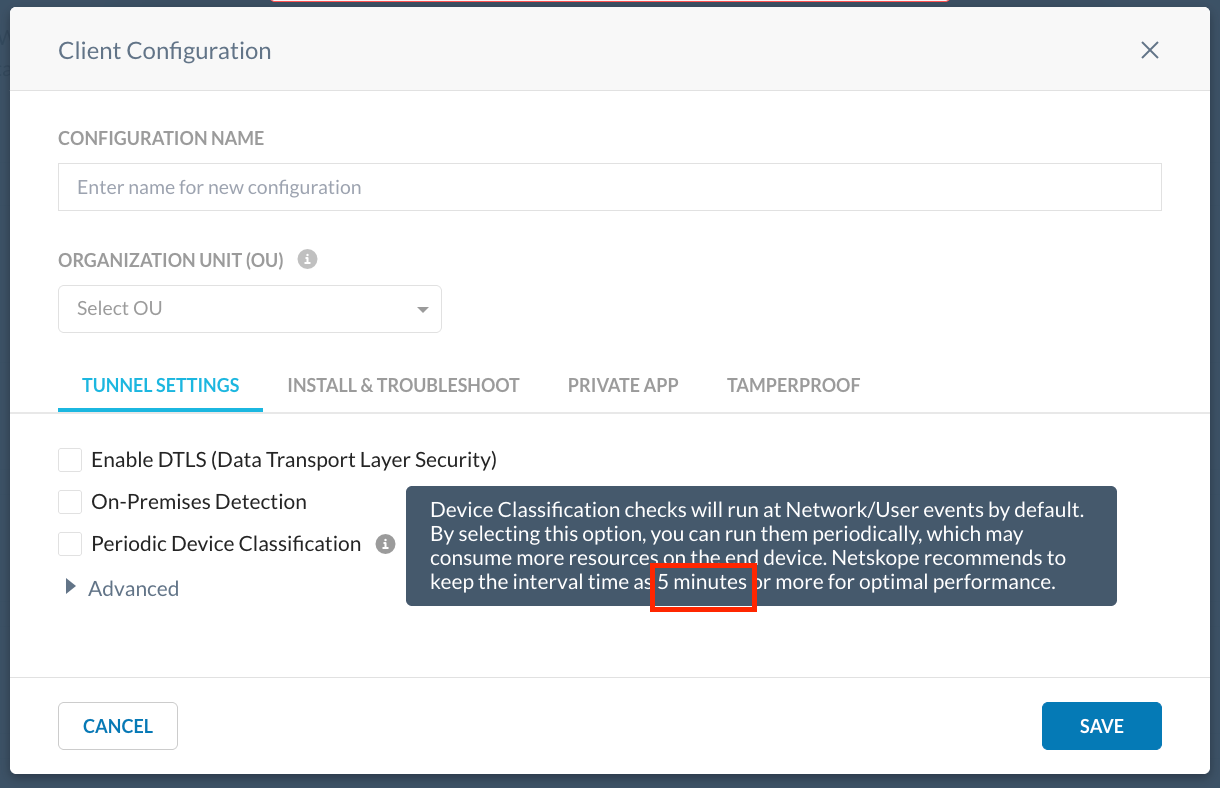
To learn more, view Client Configuration.
Here is the list of fixed issues between 123.0.0 and 126.0.0
| Issue Number | Description |
|---|---|
| 123 | |
| 549061 | An intermittent issue that was displaying wrong on-prem status is fixed. Now when user switches networks, correct on-prem status will be shown. |
| 561500 | Earlier, when the Web Traffic mode, Steer DNS, and FailClose steering options are configured; DNS traffic is not steered after the device recovers from network disconnection. This issue is now fixed and the DNS traffic is now steered properly after network disconnection. |
| 559121 | Fixed an Android battery drain issue related to a feature flag that breaks when the configuration file encryption is enabled. |
| 557778 | Fixed a remote log collecting issue when secure config and encryptClientConfig were both enabled. |
| 552725 | Fixed an issue where the weekly scheduled client upgrade and the time of the day configured to trigger upgrade, was less than time of the day from the upload timestamp. |
| 546710 | If the Netskope Client is installed in a per-user mode and Fail Close is enabled and it switches to a non-provisioned user; Fail Close will not work as expected if Captive portal detection is enabled (Grace Period Timeout being greater than zero). The Captive Portal detection does not work for the non-provisioned user. Fixed this issue and now the non-provisioned user (per-user mode) with Captive Portal DetectionTimeout greater than zero and Fail Close enabled works as expected. |
| 549966 | Fixed a potential race condition in P-DEM that caused Netskope Client for macOS to crash. |
| 543228 | Fixed an issue with the position and keyword for IDP and UPN mode in the Netskope Client installation script. It will use IDP mode only if 4th parameter is “idp” and UPN mode only if 6th parameter is “upn”. For example, in IDP single-mode deployments: jamfnsclientconfig.sh |
| 561138 | Fixed an issue where the Netskope Client UI shows the tunnel is disconnected but actually the tunnel is up after waking up from the modern standby on Windows. |
| 551274 | Fixed an issue where if the Logs were not present under C:\Users\XXXX\AppData\Roaming\Netskope\stagent, auto upgrade failed. This fix ensures Logs folder is always present before an upgrade is triggered. |
| 538734 | Fixed screen mirroring issue in the Cloud Firewall mode. |
| 535028 | When multiple user sessions are active, Custom Device Classification is shown empty for the last logged in user. This occurs because the correct sessionID is not fetched by config lib. This fix helps to fetch the right sessionID corresponding to the logged in User and display the correct device classification status. |
| 540849 | Fixed an issue with Steering Config created before enabling Netskope for Web license, where domain exceptions did not show correctly after cloning a steering profile. |
| 555839 | Fixed an issue with missing Certificate Pinned Applications in tenants created between versions 99.0.0 and 116.0.0. |
| 123.0.5 | |
| 595031 | When “Secure Config Validation” and “Dynamic Steering” is enabled, Netskope Client failed to get the correct Certificate Pinned Application list. This caused Netskope Client to not bypass Certificate Pinned Application traffic. This issue is now fixed. Note: The fix is released as part of mainstream release version 124.0.0 and is back ported to versions 120.1.9 and 123.0.5. |
| 593503 | Fixed an issue where Netskope Client crashed after enabling DEM feature. Note: The fix is released as part of mainstream release version 124.0.0 and is back ported to versions 120.1.9 and 123.0.5. |
| 124.0.0 | |
| 538194 | This fix resolved issues with Perform Server Name Indication (SNI) Check and Explicit Proxy over Client (EPoC) functionalities. When “Perform Server Name Indication check” is enabled, the destination server IP is cached by Netskope Client for traffic steering. Later when Perform Server Name Indication Check is disabled, it does not clear cache until system/Client service restart resulting in tunnelling issues to the destination IP Similarly, in case of Explicit Proxy over Client (EPoC) setup, when there is a change in the proxy configuration, the stale proxy IPs are not cleared from cache by the Netskope Client until system/Client service restart. With this fix, tunnel reconnection clears the cache and resumes the functionality. |
| 577918 | Fixed an issue where Netskope Client did not restart NPA services automatically on Android and ChromeOS devices. This usually occurs during network switches or under unreliable networking environments. |
| 505168 | Fixed an issue where the OTP Disablement was not working after enabling Netskope Client from the Devices page. |
| 577990 | The screen casting for Chromebook devices failed when Netskope Client is enabled. The Chrome casting service involves real-time TCP, and UDP protocols. The current bypassing mechanism has a limitation to support this application. To address this issue, Netskope implemented a new bypassing mechanism based on the exclude routes supported in the Android VPN service. Note: The new bypassing mechanism is supported only for Android OS version 13 or later. This is enabled by feature flag. Contact Netskope Support to enable this feature flag for your tenant. |
| 565711 | Fixed an IdP enrollment issue on Windows. While performing IdP-based enrollment with Netskope Client if the username information or failed enrollment gets cached by SSO, the user can click the reset button on the enrollment window to temporarily disable SSO to restart the enrollment. |
| 577598 | Fixed an issue where the customized Email Invitation Expired template did not render properly after saving it. Instead, it displayed a static page. |
| 555622 | Fixed an issue where enabling DNS security feature in a multi-user environment caused BSOD. |
| 527991 | Fixed an issue where the interoperability between BWAN, Kaspersky anti-virus, and Netskope Client did not function properly. The fix is available through a feature flag. Contact Netskope Support to enable the feature flag for your tenant. |
| 591721 | Fixed a deadlock issue that caused Netskope Client to go unresponsive to UI or nsdiag command. |
| 593977 | Fixed a potential crash issue on Windows that can occur when the end user updates configuration on the Netskope Client UI. |
| 593503 | Fixed an issue where Netskope Client crashed after enabling DEM feature. |
| 595031 | When “Secure Config Validation” and “Dynamic Steering” is enabled, Netskope Client failed to get the correct Certificate Pinned Application list. This caused Netskope Client to not bypass Certificate Pinned Application traffic. This issue is now fixed. Note: The fix is released as part of mainstream release version 124.0.0 and is back ported to versions 120.1.9 and 123.0.5. |
| 553715 | Netskope Client depends on IWscProduct interface (Windows API) to detect AV status on the machine. ERROR_SERVICE_NOT_ACTIVE can occur if Windows Security Center service or other COM related services are not running. The possible reasons for these services not being active are: system restart/service crash (not Client service) and Netskope Client checking before its up and running. To fix this issue, Netskope Client registers with WscRegisterForChanges API (Windows API) to register for Windows Security changes. |
| 592680 | Fixed an issue by adding support for bypassing Certificate-pinned applications by Android systems directly for exceptions configured using a negative regular expression (regex). Refer to the following negative regex examples on how to:
|
| 578769 | Fixed an issue where an error message due to duplicate Domain exception did not appear properly on the WebUI. |
| 124.1.0 | |
| 577983 | Fixed an issue where the Netskope Client for macOS crashed due to the configured custom ports. |
| 125.0.0 | |
| 578337 | Fixed an issue where configurations with Fail close and Netskope Client installed with IDP and peruserconfig mode in a multi-user setup on Windows devices; the IDP enrollment for the second user failed. With this fix, in a multi-user setup, if the Netskope Client is installed in peruserconfig mode, with fail-close and a feature flag enabled; the Netskope Client gets three minutes of grace period of time to bypass non-provisioned user’s traffic. This allows end-user to get ample time to do IDP enrollment. |
| 525169 | Previously, Netskope Client only checked the first certificate (Root CA) in the certificate chain and with this version Netskope Client validates the entire certificate chain. Earlier, if the end user had valid root CA certificate but expired intermediate CA certificates from the chain of certificates in the uploaded PEM file in the Netskope webUI, the device was labeled as Managed but now it will be labelled Unmanaged. |
| 601667 | Whenever an upgrade failure occurs, the Client installer attempts to roll back to the previously installed Netskope Client version. However, if the roll back fails, an event is generated with incorrect version details. This issue is now fixed. |
| 593977 | Fixed an issue wherein the Netskope Client for Windows experienced a crash upon end-user update of the Client Configuration through the Netskope Client UI. |
| 593481 | Fixed an issue where the apt-get update command failed to connect with the domain on Linux devices. With this fix, the session ID used in the user’s apt-get-update command is added to the exception list. |
| 592681, 611939 | Fixed an issue where the Internet Service, Private Access tunnels or both remained in an indefinite disconnected state after it encountered a network switch or any other network interruptions. |
| 591721 | Fixed a Netskope Client deadlock issue that caused Client to have no response for the user interface (UI) or nsdiag commands. |
| 579345 | Fixed a BSOD issue when the feature flag to bypass traffic at the driver level is enabled, or when the Steering is set to “All Traffic” mode with explicit proxy configured. |
| 528750 | Fixed an issue where the the Tunnel Disconnect event is not posted when a user logs off from a device where the Netskope Client is enabled. |
| 584242 | Fixed an issue where previous Dynamic Steering Configurations (created prior to version 119.0.0) incorrectly bypassed traffic due to the missing empty Category exceptions. This was previously fixed for newly created configurations in version 119.0.0, but it did not apply to the existing configurations. With version 125.0.0, the fix applies to existing configuration also. |
| 126.0.0 | |
| 645301 | Apple macOS 15.4 introduced a bug that breaks end user network access when running the Netskope Client with a Cloud Firewall steering configuration. Specifically, end users using a wired USB Ethernet Adapter may experience DHCP failures resulting in loss of network access after the USB adapter is physically removed and re-inserted into the USB port. This has only been encountered while the USB Ethernet Adapter is the primary network interface for the machine. This issue is now fixed. |
| 634854 | Long-poll connection is used by Netskope Client to pass user-attribution information to proxy when Netskope Client backs off in the presence of other traffic forwarding methods such as GRE, IPsec. Fixed an issue where the long-poll connection for Netskope Client set to one hour caused the user attribution to fail when GRE/IPsec tunnel failover takes place. This fix reduced the long poll keep alive timer from 60 minutes to 30 seconds. |
| 635063 | Fixed an issue where the Netskope Client for Linux crashed and couldn't establish the tunnel again. |
| 630024 | Netskope fixed a security gap involving the validation of secure enrollment token(s), in which the token(s) could potentially have been abused from one tenant to impersonate a user from another tenant. |
| 622617 | Fixed an issue where devices were not enabled properly when the user performed bulk enablement of Netskope Client through the webUI. The issue occurred because the service cache was not cleared and this led to the Netskope Client not getting the latest support service commands |
| 621381 | Fixed an issue where the Device Classification Rules webUI displayed an error after the user uploaded a certificate .pem file with longer name in the Certificate field. With this fix, the user can now upload a certificate .pem file with maximum of 255 characters as the file name to avoid any issues. |
| 635104 | Fixed an issue where Certificate Pinned Application with Action as Block did not block firewall traffic. |
| 618357 | The fix addresses the issue where Netskope Client did not perform the On-premises check when only "Private Access" was enabled. With this fix, the On-premises check is performed when Netskope Private Access is enabled and even when the other Netskope Client services remain disabled. |
| 614741 | Fixed a webUI issue where a few Certificate Pinned Apps steering exceptions with the Devices matching specific device classification field enabled displayed empty fields. This issue occurred when there are device classifications with null value accidentally added to the custom device classification fields in the exception. |
Here is the list of known issues between versions 123.0.0 and 126.0.0
| Issue Number | Description |
|---|---|
| 123.0.0 | |
| 528750 | If the user logs off while the Netskope Client is enabled, the Tunnel Disconnect event is not posted. |
| 555622 | BSOD issue is observed when the DNS Security feature is enabled in a multi-user environment. |
| 466448 | It is a known issue that when self protection is enabled, MSI re-run to update the secure enrollment tokens does not work. Instead, you can use nsdiag to update the secure enrollment tokens. |
| 124.0.0 | |
| 579345 | Its a known issue that a crash occurs when the feature flag to bypass traffic at the driver level, is enabled, or when the Steering is set to “All Traffic” mode with a proxy configured. |
| 574118, 587497 | Whenever Netskope Client tunnel disconnects or reconnects, an asynchronous Input/Output request to the OS caused the Netskope Client services to crash. |
| 528750 | If a user logs off from a device where the Netskope Client is enabled, the Tunnel Disconnect event is not posted. |
| 466448 | With self protection enabled, MSI rerun to update the secure enrollment tokens will not work. You can use nsdiag to update the secure enrollment tokens. |
| 124.1.0 | |
| 592681 | The Internet Security tunnel, Private Access tunnel or both can remain in an indefinite disconnected state after it encounters a network switch or any other network interruptions. As a workaround, enable Netskope Client app or restart Netskope Client application. |
| 125.0.0 | |
| 570306 | Users lose connectivity to VDI when a provisioned and a non-provisioned user goes into Fail Close. The workaround is to restart the VDI server. |
| 466448 | With Protect Client configuration and resources enabled, MSI re-run to update the secure enrollment tokens will not work. You can use nsdiag to update the secure enrollment tokens. |
| 126.0.0 | |
| 466448 | With Protect Client configuration and resources enabled, MSI re-run to update the secure enrollment tokens will not work. You can use nsdiag to update the secure enrollment tokens. |